0nt-one/dsh-voice-input
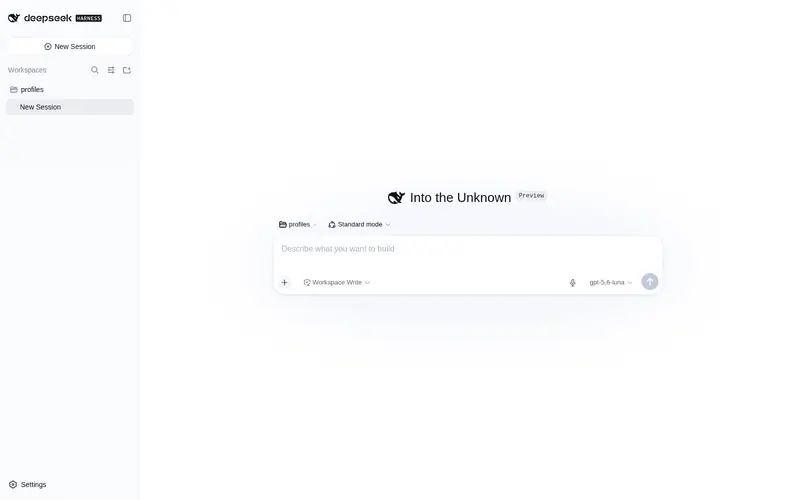
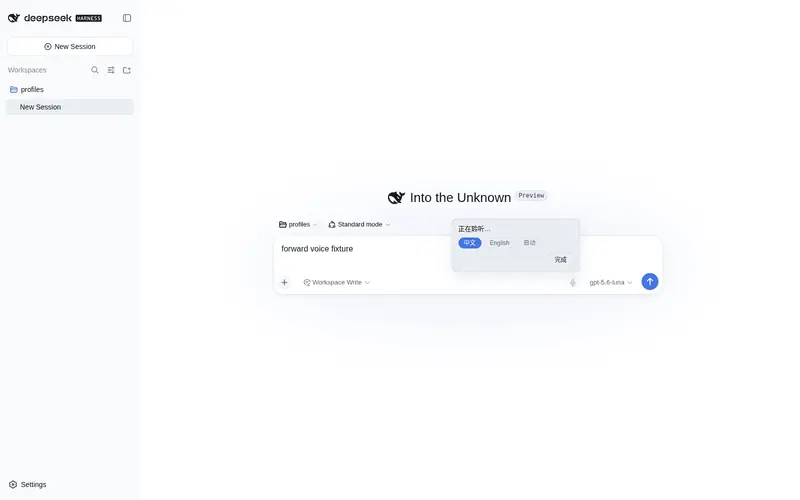
Voice input plugin — a mic button in the composer tool row that turns speech into text live via the browser's Web Speech API (Chrome/Edge), with language switching and optional auto-send. Zero dependencies.
Listed
1
Voice
Bundle verified
Preview
What it does
Mic button in the composer tool row: Web Speech API speech-to-text (Chrome/Edge), language switching, and optional auto-send, zero dependencies.
Best for
- Chrome or Edge users who want live speech-to-text directly in the composer without an API key or server-side integration.
- Bilingual dictation workflows that benefit from Chinese, English, or automatic language selection, editable transcripts, and optional auto-send.
Not ideal for
- Firefox or other browsers without `webkitSpeechRecognition`.
- Offline use or pages served outside HTTPS, `localhost`, or `127.0.0.1`; recognition requires network access and an eligible secure context.
README
dsh-voice-input-web



语音输入客户端插件(client plugin)——给 DeepSeek Harness Web GUI 的聊天输入框工具行加一个麦克风按钮:点击开始说话,浏览器 Web Speech API(Chrome / Edge 内置,免费、无需 API 密钥)把语音实时转成文字填入输入框。

功能
- 麦克风按钮位于输入框工具行右侧(发送按钮左侧,
conversation.input.right插槽) - 点击开始/停止聆听;聆听时按钮红色脉冲,上方浮层实时显示转写中间结果
- 每段识别完成的最终文本自动追加到输入框草稿,可继续编辑后发送
- 浮层内可一键切换识别语言:中文 / English / 自动
- 可选自动发送:
localStorage设置dsh-voice-input-web.autoSend = "1"后,一段语音识别完成即自动发送 - 零依赖、零密钥、无服务端改动;识别完全在浏览器本地进行
与其他方案对比
| 方案 | 转写方式 | 依赖 | 成本 |
|---|---|---|---|
| 本插件(Web Speech API) | 浏览器系统语音服务 | 无 | 免费 |
| dsh-voice | agent 工具(OpenAI 兼容 ASR) | 需 ASR API key | STT 收费 |
| dsh-voice-input(SenseVoice) | 本地离线转写 | 需模型/服务 | 免费、离线 |
安装
方式一:npm 包(推荐)
dsh plugin --profile web add dsh-voice-input-web
方式二:离线安装(GitHub 源码)
-
将本包放入 web profile 的 node_modules:
~/.dsh/profiles/web/node_modules/dsh-voice-input-web/ -
在
~/.dsh/profiles/web/cordis.patch.yml追加:- insert: - id: dsh-voice-input-web name: 'dsh-voice-input-web' -
重启
dsh --profile web,浏览器刷新页面。按钮出现在输入框工具行。
安装后插件 id / 包目录名 / localStorage key 统一使用
dsh-voice-input-web(dsh-voice-input在 npm 上已被同名 SenseVoice 方案占用)。
配置(localStorage)
| key | 值 | 默认 | 说明 |
|---|---|---|---|
dsh-voice-input-web.lang |
zh-CN / en-US / auto
|
zh-CN |
识别语言 |
dsh-voice-input-web.autoSend |
"1" / "0"
|
"0" |
识别完成后自动发送 |
兼容性
- 需要 Chrome / Edge(或任何支持
webkitSpeechRecognition的浏览器);Firefox 不支持 Web Speech API,会显示提示 - 页面需在
localhost/127.0.0.1或 HTTPS 下访问(浏览器安全限制) - 语音识别需要联网(由浏览器调用系统语音服务)
License
MIT
Frequently Asked QuestionsFAQ
Use the verified command dsh plugin --profile default add github:0nt-one/dsh-voice-input in a DSH-enabled shell. The command resolves the public package metadata and keeps the plugin attached to the catalog identity shown on this page.
Compatibility follows the bundle and profile status shown above. If a profile is not detected, keep the plugin disabled there and check the repository documentation before enabling it in production.
The GitHub link and activity metadata are the source of truth for releases and maintenance. Revisit this page after a new release to confirm the catalog has observed the latest version.