1123762794/dsh-web-restart
One-click restart button for the DeepSeek Harness Web UI: sidebar footer button, single click restarts the dsh web process. / DSH Web 界面一键重启按钮。
Listed
4
Dev
Bundle verified
Preview
What it does
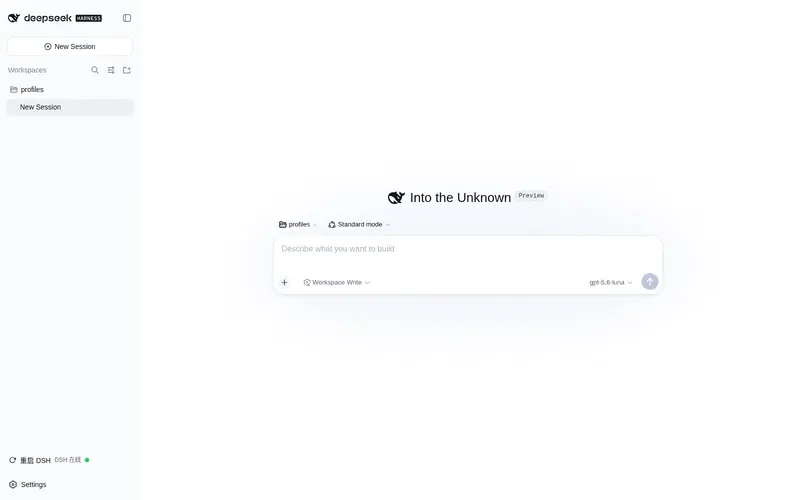
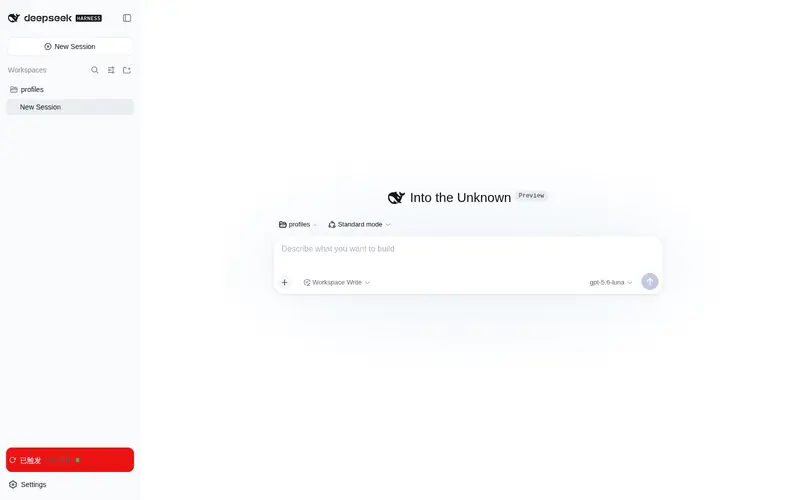
One-click restart button for the DSH Web UI: a sidebar footer button that restarts the dsh web process with a single click and persists across the restart it triggers.
Best for
- Operators of a compatible DSH Web installation who frequently need an immediately available sidebar restart control.
- Windows users willing to adapt the bundled restart command and script path to their own host setup.
Not ideal for
- Installations that cannot use the author's hard-coded Windows PowerShell script path without forking or editing the plugin.
- Environments requiring confirmation, graceful workload draining, or a portable cross-platform restart mechanism; one click triggers the restart immediately.
README
dsh-web-restart
One-click restart button for the DeepSeek Harness Web UI.
Adds a small circular restart button (↻) to the sidebar footer, next to Settings. A single click immediately restarts the dsh web process — the page disconnects for ~15–20 seconds, then you refresh and everything is back (sessions are persisted on disk and recover automatically). The button is persistent: it survives the restart it triggers.
Windows-specific: the restart launches
dsh webthrough an independent hidden PowerShell process, so the script keeps running after the harness process is killed.
Features
- Single-click restart — no confirmation step, no double-click dance.
- Persistent: survives the DSH restart it triggers (installed as a bundle-layer plugin, not a dynamic session plugin).
- Small footprint: sits beside the Settings trigger in the sidebar footer; icon-only in the 56px rail, icon + label in the wide sidebar.
- In-flight feedback: the button turns red and shows “重启中…” → “已触发” while the request is being processed.
- Re-entry guard: a second click while a restart is already in flight is rejected.
- Online status dot: the button also shows DSH liveness — a green dot polls
GET /dsh-healthevery 5s (red when the harness is unreachable/restarting).
Install
From GitHub (this repo)
dsh plugin --profile web add github:YOUR_OWNER/dsh-web-restart
Then restart dsh web once so the bundle layer loads.
Manual (edit profile files)
- Add the dependency:
// ~/.dsh/profiles/web/package.json
{
  "dependencies": {
    "dsh-web-restart": "github:YOUR_OWNER/dsh-web-restart"
  }
}
- Add the plugin row (this repo ships its own
cordis.patch.yml— either merge its row into your profile’scordis.patch.yml, or install via thedsh plugincommand above which does it for you):
# ~/.dsh/profiles/web/cordis.patch.yml
- insert:
    - id: dsh-web-restart
      name: dsh-web-restart
-
pnpm installin the profile directory, then restartdsh web.
How it works
| Layer | File | What it does |
|---|---|---|
| Host | lib/index.js |
Registers an exact POST /restart-dsh route on the webServer; launches the restart script as an independent hidden PowerShell under danger-full-access sandbox policy |
| Client | lib/client.js |
Registers the sidebar footer button (slot sidebar.footer.action); single click fetches POST /restart-dsh; polls GET /dsh-health every 5s for the status dot |
| Bundle | cordis.patch.yml |
The loader row that mounts both halves |
The host routes return before the restart happens (~1s host timer + 3s inner sleep), giving the browser time to render the “restarting” state before the page drops.
Why not ctx.timeout in the route handler
ctx.timeout is a Cordis mixin backed by ctx.effect(), which is scoped to the Cordis fiber lifecycle. A webServer route handler runs as a plain Node HTTP callback — outside any fiber — so ctx.effect-registered timers are silently dropped and the restart never fires. This plugin uses Node’s native setTimeout in the handler instead.
Compatibility
- DeepSeek Harness
0.1.0-rc.6(web profile). - The restart script path (
D:\1\dsh-web-host.ps1) is hard-coded for this author’s machine — fork and adjust it (or replace the command inlib/index.js) for your own environment. Contributions to make this configurable are welcome.
Development
The client bundle is hand-written in the exact wire format (window.__ModuleLoader__.load({ id, factory })), so no build step is required:
node --check lib/index.js
node --check lib/client.js
License
MIT
Frequently Asked QuestionsFAQ
Use the verified command dsh plugin --profile default add github:1123762794/dsh-web-restart in a DSH-enabled shell. The command resolves the public package metadata and keeps the plugin attached to the catalog identity shown on this page.
Compatibility follows the bundle and profile status shown above. If a profile is not detected, keep the plugin disabled there and check the repository documentation before enabling it in production.
The GitHub link and activity metadata are the source of truth for releases and maintenance. Revisit this page after a new release to confirm the catalog has observed the latest version.