13071301808/dsh-composer-expand
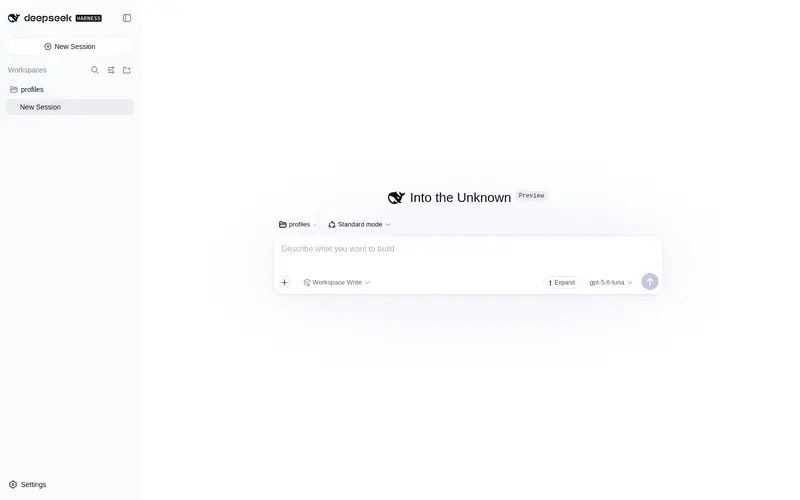
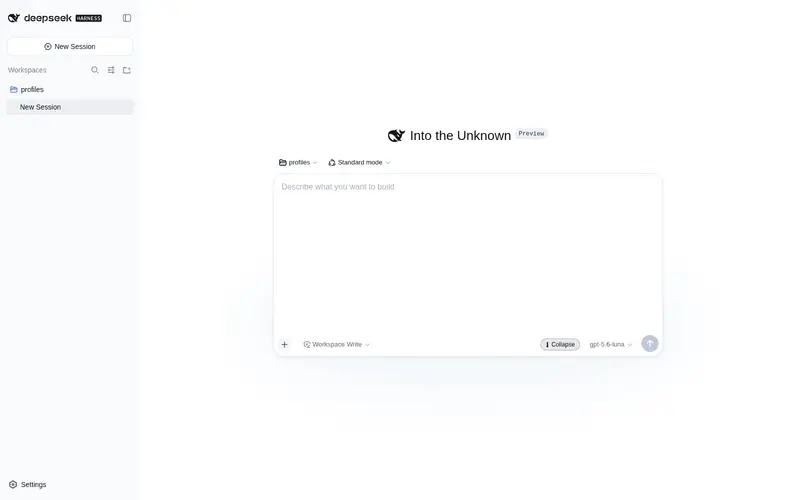
Composer expand/collapse toggle for DeepSeek Harness (dsh): a ⬆/⬇ button in the composer tool row grows the input to a tall 70vh writing view for long drafts.
Listed
4
Ui
Bundle verified
Preview
What it does
Composer expand/collapse toggle for the Web UI: a ⬆/⬇ button in the composer tool row grows the input to a tall 70vh writing view for long drafts.
Best for
- DSH Web users writing long prompts or drafts who need a one-click 70vh composer view with a useful minimum height.
- Users who want expanded-mode Enter to insert newlines while retaining modified-key sending shortcuts, with the expanded state remembered in the browser.
Not ideal for
- Short-message workflows where the default composer already provides enough space.
- Users needing per-session state or an adjustable expansion height; the state is browser-wide and the expanded height is fixed at 70vh.
README
dsh-composer-expand
为 DeepSeek Harness(dsh)打造的 composer 展开/收起插件。在 composer 工具行放一个 ⬆/⬇ 按钮,点击在「默认封顶高度」与「70vh 高书写视图」之间切换,长草稿不再挤在一个小窗口里滚动。
为什么需要
DSH 默认把 composer 文本框封顶在一个较小高度(seat 上定义了 --dsh-composer-text-max-height: 336px,限制文本框滚动容器)。草稿变长后,只能在小窗口里滚动几行。本插件对短草稿保持默认行为,写长 prompt 时一键切换到大视图。
功能
-
⬆ 按钮在 composer 工具行 — 位于
conversation.input.right(发送按钮旁官方预留的可点击控件位)。 -
展开到 70vh — 在会话滚动容器上切换 CSS class;composer 卡片与 textarea 同步放宽
max-height。再点一次恢复默认封顶高度。 -
展开最小高度 300px — 输入内容较少时也保持足够的书写空间;内容变多后最高仍受
70vh限制。 -
展开状态回车换行 — 展开时普通回车只插入换行,不触发发送;
Ctrl/Cmd + Enter等带修饰键快捷键仍可用于发送。 -
浏览器内持久化 — 状态写入
localStorage[dsh-composer-expand:expanded],刷新页面、切换工作区都保留。 -
中英文双语 — 按钮文案与提示跟随 DSH 的
locale服务。 - 纯前端 — 无自定义协议、无 host 命令、无 LLM 调用、不进会话日志。
-
不依赖构建哈希 — CSS 锚定 DSH 稳定的
data-conversation-scroll/data-composer-seat/data-input-mirror属性,而不是每次构建都会变的哈希类名。
安装
通过 npm 安装(推荐)
dsh plugin --profile web add dsh-composer-expand
已发布到 npm,包含预构建产物,无需本地构建。
源码本地开发
dsh CLI 必须在 PATH 上。若你只用 npx 跑过 harness,dsh 尚未全局安装,会报 zsh: command not found: dsh——先全局安装:
npm install -g @deepseek-ai/dsh
从本仓库安装:
# 1. 构建产物(tsdown 生成 lib/index.js + lib/client.js)
pnpm install
pnpm build

# 2. 加入 web profile
dsh plugin --profile web add ./

# 3. 以该 profile 重启 harness
dsh --profile web
重启后 ⬆ 按钮出现在 composer 工具行(发送按钮旁)。可在 设置 → 插件 中确认 dsh-composer-expand 已列出。
工作原理
| 环节 | 机制 |
|---|---|
| 按钮位 |
conversation.input.right 列表槽位(会话作用域);ctx.slots.inject 注册单个 React 组件 |
| 切换状态 | React useState,初始值读 localStorage[dsh-composer-expand:expanded];变更时写回 localStorage |
| DOM 挂钩 |
document.querySelector('[data-conversation-scroll]').classList.toggle('dsh-composer-expand-on', on) — 会话滚动容器上的官方稳定属性 |
| CSS 契约 |
.dsh-composer-expand-on 在 [data-composer-seat] 上覆盖 --dsh-composer-text-max-height(真正的 336px 上限)为 var(--dsh-composer-expand-height)(默认 70vh),并给 [data-input-mirror] 设 min-height: 300px,即使内容很少输入框也会明显变高 |
| 硬依赖 |
export const inject = ['slots', 'locale'] — 均为官方 harness 客户端服务 |
| 无 host 命令 |
lib/index.js 是空 apply(),整个插件纯客户端 |
构建
pnpm install
pnpm build   # tsdown: lib/index.js(ESM host)+ lib/client.js(ModuleLoader 客户端 bundle)
已知限制
- 状态按浏览器记忆,不按会话。DSH 同一时刻只渲染一个 composer,目前无感知差异;若未来同时渲染多个,需要收窄 DOM 选择器。
- 展开高度固定为
70vh。未来版本可在设置卡片里提供高度滑块。 -
--dsh-composer-text-max-height(336px)是 DSH 的设计选择。本插件只放宽 composer 文本框容器,不影响其他 disclosure 行。
License
MIT
Frequently Asked QuestionsFAQ
Use the verified command dsh plugin --profile default add github:13071301808/dsh-composer-expand in a DSH-enabled shell. The command resolves the public package metadata and keeps the plugin attached to the catalog identity shown on this page.
Compatibility follows the bundle and profile status shown above. If a profile is not detected, keep the plugin disabled there and check the repository documentation before enabling it in production.
The GitHub link and activity metadata are the source of truth for releases and maintenance. Revisit this page after a new release to confirm the catalog has observed the latest version.