1624318455/dsh-plugin-tts
Edge TTS voice plugin for DeepSeek Harness: read assistant replies aloud, auto-read toggle, voice settings panel (free, no API key)
Listed
5
Voice
Bundle verified
Preview
What it does
Reads assistant replies aloud via free Edge TTS or your own RVC voice models: read-aloud buttons + auto-read, adaptive chunked progressive playback (gapless long reads), one-click voice-pack installs from a registry, and a portable RVC runtime.
Best for
- Users who want manual or automatic read-aloud controls for assistant replies, selected text, and downloaded speech audio in DSH Web.
- Long-form listening workflows that benefit from progressive chunked playback, or users who want custom locally computed RVC voices and installable voice packs.
Not ideal for
- Text-only or silent workflows where speech playback, message controls, and audio downloads add little value.
- Offline Edge TTS use, or custom-voice users unwilling to provide a local RVC inference environment; Edge TTS is online and RVC requires its own local runtime.
README

dsh-plugin-tts






Links
- 中文 README(简体中文)
- RVC Custom Voice Guide — custom voices · chunked progressive playback · compact index · voice packs · portable runtime
- User Guide (执行手册) — step-by-step, for first-time users
- Adaptive chunked playback design — how gapless long reads work
dsh-plugin-tts — Edge TTS + RVC voice for DeepSeek Harness
A dual-sided (Host + Web UI) DeepSeek Harness plugin that reads assistant replies aloud — Microsoft Edge’s free online TTS out of the box, or your own RVC voice models for custom voices. Long replies stream with gapless adaptive chunked playback; voices install one-click from a voice-pack registry; a portable RVC runtime means no RVC WebUI install is needed.
📖 First time? See the user guide (执行手册) — every step covers “what / how / how to tell it worked”: read-aloud, RVC voices and voice-pack downloads.
Features
- Read-aloud button on every finalized assistant message (in the copy / feedback / branch action row): click to speak that message (the button shows an animated equalizer), click again to stop.
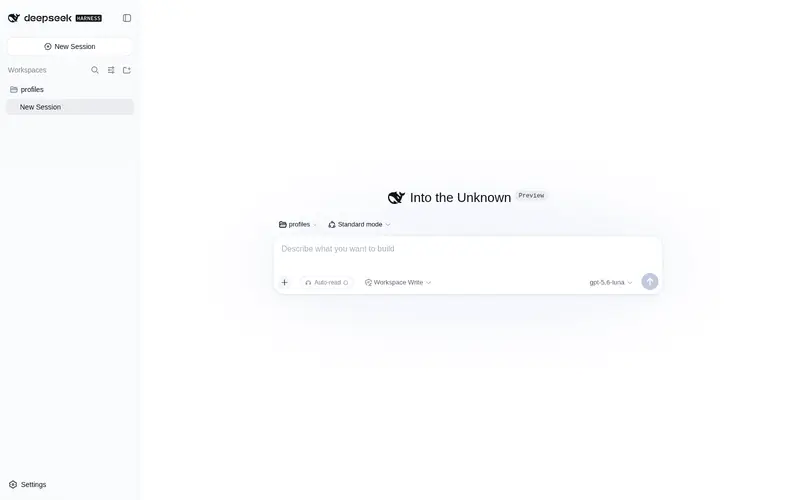
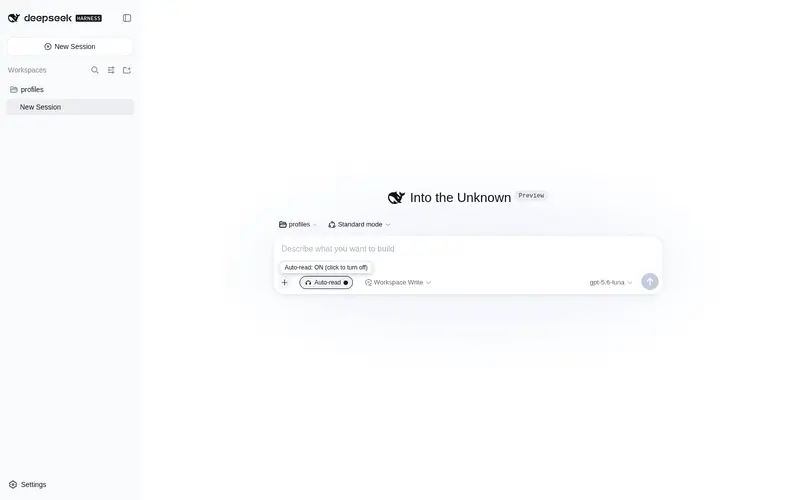
- Auto-read toggle in the composer tool row (between the command and the access-mode buttons): when on, every newly completed assistant reply is read aloud automatically (the toggle gets a circular highlight); when off, nothing is auto-read.
-
Voice settings panel under 设置 → 插件 → 语音:
- TTS provider: Edge TTS (free, no API key) / custom RVC voice
- Voice: 22 live-verified Edge TTS voices (default 晓萱 zh-CN-XiaoxuanNeural)
- Sound tuning: rate / pitch / volume (0 = default)
- Voice packs: one-click install of voices from a registry
- Preview: type text and press the play (triangle) button — a spinning loader shows while it is synthesizing/playing (click again to stop), failures show an inline message.
- RVC custom voices: read with your own trained RVC models, computed locally (upload base audio, index-free mode, advanced params — see the RVC guide).
- Gapless long reads: adaptive chunked progressive playback — probe-calibrated chunk size, play-while-converting, Web Audio sample-accurate joins, no gaps between chunks (see the design doc).
- Mini player while reading: pause / resume + playback speed (1x / 1.25x / 1.5x) on the message’s action row; chunked long reads surface a visible “chunk x/y” counter.
-
Themed tooltips & RVC onboarding: hover tooltips use the app’s theme
tokens (
--dsw-*); the RVC panel opens with a first-time 3-step guide (per-OS startup commands + one-click diagnostics). - Download audio: a download button on each message saves the synthesized audio (Edge base or RVC-converted) as an MP3 — reuses the in-session cache so a just-read message downloads instantly.
- Read selected text: selecting text in a message shows a floating “朗读选中” chip — click it to read just that selection.
- Streaming long reads (Edge too): long plain-Edge reads also stream progressively (first chunk plays while the rest synthesize), reusing the gapless chunked pipeline — no more waiting for full synthesis.
Requirements
- DeepSeek Harness
webprofile (dsh web) - Node.js >= 22 (the worker uses the native
WebSocket) - For RVC custom voices only: a local RVC inference environment (an RVC WebUI
or the portable runtime) and a running
rvc-server.py. macOS users: see the RVC Guide → “启动本地 RVC 服务” and the User Guide §4.2.
Install
# published form:
dsh plugin --profile web add "github:1624318455/dsh-plugin-tts#main"
# or local development:
dsh plugin --profile web add "file:/path/to/dsh-plugin-tts"
Restart dsh web; the plugin then loads automatically as a profile bundle.
Voices (live-verified, Edge TTS)
| Region | Voices |
|---|---|
| Simplified Chinese | Xiaoxuan 晓萱 · Xiaoyi 晓伊 · Yunxi 云希 · Yunyang 云扬 · Xiaoxiao 晓晓 · Yunjian 云健 · Yunxia 云夏 · liaoning-Xiaobei 晓北 · shaanxi-Xiaoni 晓妮 |
| Taiwan | HsiaoChen 曉臻 · HsiaoYu 曉雨 · YunJhe 雲哲 |
| Hong Kong | HiuGaai 曉佳 · HiuMaan 曉曼 · WanLung 雲龍 |
| English | Aria · Jenny · Guy · Sonia (UK) |
| Other | Nanami 七海 (ja-JP) · SunHi (ko-KR) · Denise (fr-FR) |
Note: legacy voices such as Xiaohan / Xiaomeng / Xiaorui / Xiaoshuang were removed by the Edge endpoint (
1007 Unsupported voice) and are not listed.
Architecture
| Layer | Location | Role |
|---|---|---|
| Host | lib/index.mjs |
Registers /dsh-tts-api/speak (synthesis / chunk queue), /dsh-tts-audio/<id> (audio), /dsh-tts-api/rvc-* (RVC inference / files / compact index / voice packs) webServer routes; runs a zero-dependency worker via node -e
|
| Client | lib/client.js |
Hidden <audio> host in shell.overlay + the UI entries (read-aloud button / auto-read toggle / settings panel); talks to the Host through fetch
|
The TTS worker mirrors node-edge-tts@1.2.10:
Sec-MS-GEC query params (ticks rounded to the 5-minute boundary),
Sec-MS-GEC-Version=1-143.0.3650.75, Path:audio binary framing, xml:lang
derived from the voice locale, one retry on abnormal (1006) closures. Audio is
audio-24khz-48kbitrate-mono-mp3.
Edge cases handled
- Clicking the read button of the message being auto-read stops it; another message’s button switches to manual reading.
- Disabling auto-read never interrupts a manual read; it stops auto reads.
- A newly completed message (auto on) interrupts the current read; text-less messages are skipped; session switches only stop auto reads.
- Stopping / switching messages eagerly cancels the active RVC chunked job on the Host, so the local conversion service stops scheduling new chunks and releases GPU/memory promptly (no waiting for the lazy GC).
- Repeatedly reading the same text + voice reuses the in-session audio cache (no re-synthesis); if the cached backing file was cleaned by the OS, it transparently re-synthesizes instead of serving a stale 404 URL.
- If an Edge voice was removed by the endpoint (
1007 Unsupported voice), the voice is pruned from the picker and the plugin auto-falls back to the default. - Audio is autoplay-unlocked on the first user gesture (Web Audio context resumed + silent clip) so reads aren’t silently blocked by browser policy.
-
Esc/S(outside an input) stops the current read-aloud. - Synthesis / playback failures silently reset the icon state (the preview panel shows an inline error message).
Settings persistence
Voice, auto-read toggle, provider and RVC settings are persisted to
localStorage (dsh-tts-settings) and restored on load, surviving refresh /
reopen. A “Reset to defaults” button in the settings panel restores defaults and
clears the stored settings.
Custom voice (RVC)
Use your locally trained RVC model for voice conversion: switch the TTS
provider to “自定义音色(RVC)” in the settings panel. First-time RVC users
need two things: a model file (.pth) and a running local RVC service — see
the RVC Guide or User Guide §4.2 for
macOS/Windows/Linux startup commands. The full story — service startup, panel
config, gapless chunked playback, compact index, voice-pack registry install,
portable runtime, settings reference and troubleshooting — lives in the
RVC Custom Voice Guide.
Public pack registry example: rvc-for-tts (设置 → 语音 → 音色包 → registry URL:
https://raw.githubusercontent.com/1624318455/rvc-for-tts/main).
Troubleshooting (Edge TTS)
-
403 /
Sec-MS-GECrejected: the Edge endpoint protocol or version check changed; updateCHROMIUM_FULL_VERSION/TRUSTED_CLIENT_TOKENinside the worker inlib/index.mjs. -
1007 Unsupported voice: the selected voice was removed from the endpoint; pick one from the table above. -
No sound: check system volume, the browser autoplay policy (interact
with the page once), or the synthesis logs (
[tts]errors in thedsh webconsole).
RVC-specific troubleshooting: RVC Guide → Troubleshooting.
UI language (i18n)
The settings panel has an Interface language selector at the top: Auto (follow browser) / 中文 / English.
- Default “Auto” follows the browser/system language (Simplified Chinese and others → Chinese, everything else → English).
- Switching applies immediately and is persisted to localStorage
(
dsh-tts-lang), surviving page reloads. - Covers the whole settings panel, bubble/read-aloud buttons, diagnostics, voice-pack panel, plus RVC service errors/progress hints.
Development
node tests/smoke.mjs   # fake-ctx route registration + real Edge TTS synthesis + audio serve assertions
npm run test:all       # full: smoke + live + patch + i18n + client-load
Hot-reload after editing lib/ (on Windows a file: install is a COPY, not a
symlink, so the running dsh reads the profile copy):
Copy-Item lib/* $env:USERPROFILE\.dsh\profiles\web\node_modules\@dsh-external\dsh-plugin-tts\lib\ -Recurse -Force
# then refresh the browser (bundles are re-read from disk per request; never use pnpm install --force)
Known limits
- Voice / auto-read toggle / provider / RVC settings are persisted to localStorage and survive refresh (see “Settings persistence” above); the audio cache itself is in-session only (files live in the OS temp dir, cleaned by the OS), so a full restart re-synthesizes the first read of each text.
- Synthesized audio is written to the OS temp dir and cleaned by the OS.
- zh/en layout/visual fitting (English text is longer; may wrap/overflow; theme
vars
--dsw-*) must be eyeballed in the real dsh UI with the plugin loaded — this plugin ships no standalone HTML (its UI is slot-injected by the dsh web host), so it cannot be headless-screenshotted here (tests/client-load.mjsasserts the in-memory render only, not real DOM/CSS).
License
MIT
Frequently Asked QuestionsFAQ
Use the verified command dsh plugin --profile default add github:1624318455/dsh-plugin-tts in a DSH-enabled shell. The command resolves the public package metadata and keeps the plugin attached to the catalog identity shown on this page.
Compatibility follows the bundle and profile status shown above. If a profile is not detected, keep the plugin disabled there and check the repository documentation before enabling it in production.
The GitHub link and activity metadata are the source of truth for releases and maintenance. Revisit this page after a new release to confirm the catalog has observed the latest version.