534119219/chicheng-cron
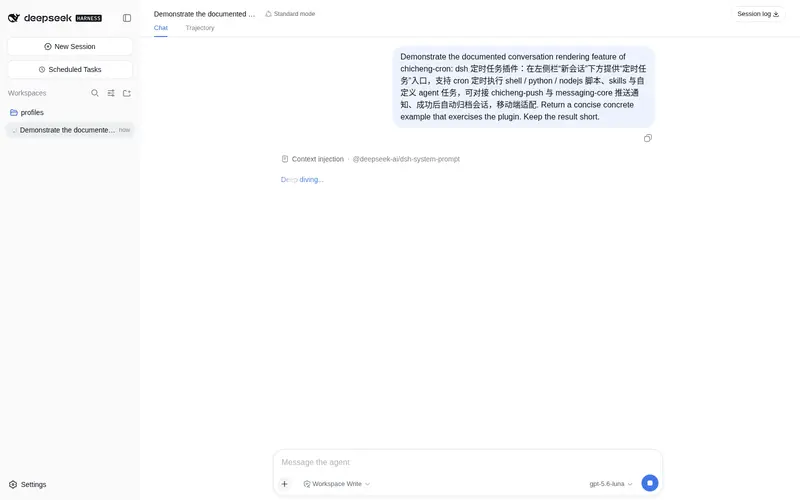
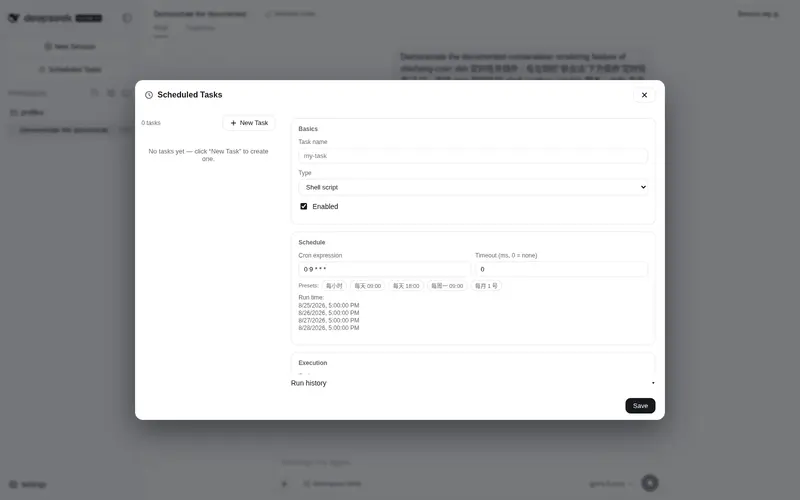
DSH 定时任务插件:侧栏「定时任务」入口,cron 定时执行 shell / python / node 脚本、Skill 与 Agent 任务;支持 chicheng-push 与 messaging-core 推送通知、会话归档、移动端适配。
Listed
2
Workflow
Bundle verified
Preview
What it does
Cron scheduler with a sidebar UI: run shell, Python or Node scripts, skills, or agent tasks on a schedule, with push notifications and session archiving.
Best for
- Users who need recurring Shell, Python, Node.js, skill, or agent jobs managed from the DSH Web sidebar.
- Automation workflows that benefit from execution history, captured output, timeouts, and optional session archiving.
- Scheduled tasks that should notify configured chicheng-push channels or messaging-core conversations when runs finish.
Not ideal for
- Jobs that must catch up every missed schedule after DSH Web downtime; missed times are not rerun.
- Systems where DSH Web is not kept running to drive the scheduler.
- Simple one-off commands that do not need scheduling, history, notifications, or agent execution.
README
chicheng-cron
DeepSeek Harness(dsh web)的定时任务插件:在左侧栏 「新会话」下方提供 「定时任务」 入口,用 cron 表达式定时执行 Shell / Python / Node 脚本、Skill 或任意 Agent 任务,并支持推送通知、会话整理与移动端适配。
功能
- 侧栏入口:位于「新会话」按钮正下方,展开/收缩态与原生控件一致(rail 18px 图标)
-
任务类型
- Shell 脚本(Windows
cmd.exe/ 其他平台/bin/sh) - Python 脚本(自动探测
python/py/python3) - Node.js 脚本(当前 Node 运行时)
- Skill(自动注入已安装 skill 的完整说明给 Agent 执行)
- 交给 Agent(自由提示词,由 headless dsh Agent 完成任意任务)
- Shell 脚本(Windows
-
调度:标准 5/6 字段 cron(
*/n、a-b、列表、月份/星期缩写)、@hourly–@yearly、@every <n>s|m|h|d;本地时间计算,重启后自动恢复 -
推送通知:对接 chicheng-push(Server酱/PushPlus/Bark/钉钉/企微/Telegram/飞书/Webhook 等渠道)与 messaging-core 消息平台(任意已连接机器人的会话);标题/内容模板支持
{name} {type} {status} {exitCode} {duration} {time} {output}占位符,内容留空自动附带运行输出 - 会话整理:Agent/Skill 运行会话可自动归入侧栏「定时任务」工作区;可开启「成功后自动归档会话」,完成后对话从侧栏隐藏(日志保留)
- 执行历史:状态、退出码、耗时、推送结果、归档标记;输出弹窗查看
- 移动端适配:窄屏单页导航(列表 ↔ 编辑)、执行历史默认收起、16px 输入防 iOS 缩放、安全区适配
截图
 |
 |
 |
 |
||
安装
dsh plugin --profile web add github:534119219/chicheng-cron
安装后重启 dsh web,左侧栏「新会话」下方出现「定时任务」按钮。
从源码开发时提示:
dsh plugin add会把file:依赖物化成目录快照,改源码后可用仓库内scripts/relink-dev.ps1恢复 junction 指向源码。
使用
- 点击侧栏「定时任务」→ 新建任务
- 选择类型并填写:名称、cron 表达式(实时预览下次执行时间)、脚本/提示词、工作目录、超时
- 可选:
- 完成后推送通知:选择渠道(chicheng-push 或 messaging-core 会话)、推送标题/内容(留空用默认,自动附输出)
- Agent/Skill 会话归入「定时任务」分组
- 成功后自动归档会话(对话从侧栏隐藏,日志保留)
- 保存后到点自动执行;「立即执行」可随时手动触发,执行历史查看结果与输出
推送模板占位符
| 占位符 | 含义 |
|---|---|
{name} |
任务名称 |
{type} |
任务类型 |
{status} |
完成/失败/超时/运行中 |
{exitCode} |
退出码 |
{duration} |
耗时 |
{time} |
完成时间 |
{output} |
运行输出(Agent 任务的最终回答,前 800 字) |
API(同源 fenced)
list save remove toggle runNow preview runs runOutput skills pushChannels status —— 全部 POST /cron/api/<method>。
数据与限制
- 任务与历史:
$DSH_HOME/cron/store.json;运行输出:$DSH_HOME/cron/runs/ - Agent/Skill 任务通过
dsh --profile headless执行,复用$DSH_HOME/settings.yaml的模型配置 - Web 未运行时错过的时间点不补跑
License
MIT
Frequently Asked QuestionsFAQ
Use the verified command dsh plugin --profile default add github:534119219/chicheng-cron in a DSH-enabled shell. The command resolves the public package metadata and keeps the plugin attached to the catalog identity shown on this page.
Compatibility follows the bundle and profile status shown above. If a profile is not detected, keep the plugin disabled there and check the repository documentation before enabling it in production.
The GitHub link and activity metadata are the source of truth for releases and maintenance. Revisit this page after a new release to confirm the catalog has observed the latest version.