534119219/chicheng-gate
DSH Web 插件:局域网/远程访问控制、frpc 内网穿透、面板密码门禁与手机端 UI 适配。
Listed
3
Remote
Bundle verified
Preview

What it does
LAN / remote-access control, frpc NAT tunneling, a panel password gate, and mobile UI adaptation for the DSH Web GUI.
Best for
- Users who need to access the DSH Web GUI from trusted LAN devices.
- Self-hosters with an frps server who want frpc-based public tunneling through a password gateway.
- Mobile users who want DSH Web interface adaptations alongside remote-access controls.
Not ideal for
- Environments that cannot accept the security exposure of binding DSH to all network interfaces or publishing it through a tunnel.
- Public or untrusted-network access where a strong panel password will not be configured.
- Deployments that cannot restart DSH Web after changing remote-access or frpc configuration.
README
chicheng-gate
DSH Web GUI 插件:远程访问控制 + frpc 内网穿透 + 面板密码门禁 + 手机端 UI 适配。
在设置面板里统一管理:
- 远程访问:一键切换 Web GUI 绑定 0.0.0.0 / 127.0.0.1,让局域网设备可访问;关闭时自动还原所有修改。
- frpc 内网穿透:自动下载并拉起 frpc,把面板映射到公网 frps 服务器,可随时开/停。
- 面板密码门禁:非本机访问必须先通过密码验证(scrypt 加盐哈希 + 会话 cookie + 登录限速)。
- 手机端 UI:注入移动端适配 CSS。
⚠️ 安全警告(务必先读)
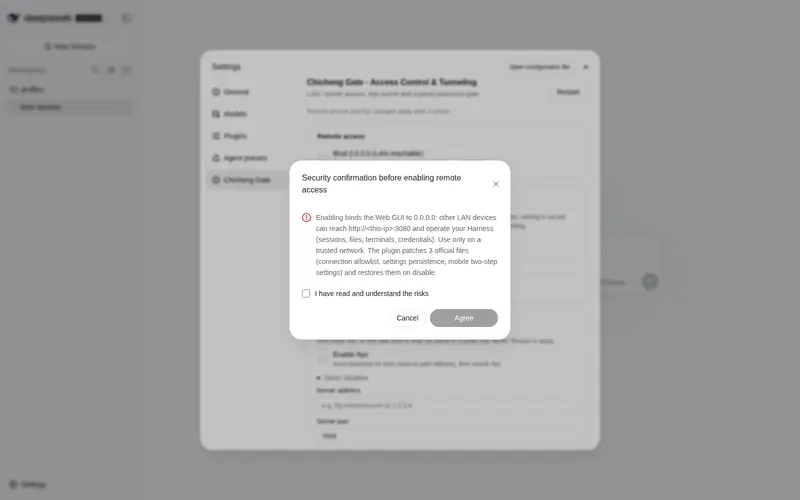
开启「远程访问」会把 Web GUI 绑定到 0.0.0.0(所有网卡),局域网内任何设备都能访问并操作你的 Harness(会话、文件、终端、凭据、代码执行等)。
开启「frpc 内网穿透」会把面板暴露到公网。强烈建议同时设置「面板密码」——本插件的密码门禁会对所有非本机访问(包括走 frp 隧道的访问)要求先登录。
- 仅在你信任的网络使用。
- 公网 / 不可信网络开启,等同于把完整控制权暴露给他人,请务必设置强密码。
功能特性
- 远程访问开关(默认关):切换 0.0.0.0 与 127.0.0.1 绑定;关闭时还原全部修改。
- frpc 内网穿透(默认关,实时开关):启动时自动从 GitHub Releases 下载 frpc(带 SHA256 校验,失败回退手动路径),生成 frpc.toml 并拉起;取消勾选立即停止。配置项:服务器地址/端口、token 验证、本机端口、远程端口。
- 面板密码门禁:非 127.0.0.1 来源必须先通过密码验证;密码只存加盐哈希,带登录限速(5 次/分/IP)与 7 天会话。
- 独立密码网关:frpc 隧道不直连 DSH,而是先经过一个本地密码网关(127.0.0.1 的「本机端口」,默认 3081),验证通过后才转发到 DSH 主端口 3080——这样公网隧道也需要密码,而本机 127.0.0.1 免密访问不受影响。
- 手机端 UI 调整(默认开):注入移动端适配 CSS。
- 首次使用安全确认:阅读并确认风险后才解锁开关。
- crypto.randomUUID 补丁:修复局域网 HTTP 下 randomUUID 缺失。
截图
 设置页 |
 密码登录页 |
 手机端 1 |
 手机端 2 |
 手机端 3 |
安装
GitHub 安装:
dsh plugin --profile web add github:534119219/chicheng-gate
安装后在 profile 的 package.json 里会得到:
"dependencies": {
  "chicheng-gate": "github:534119219/chicheng-gate"
}
使用
- 打开 Web GUI → 设置 → 侧栏选「赤橙网关」。
- 首次进入弹出安全确认,勾选「我已阅读并了解上述安全风险」→ 点「同意」。
- 设置面板密码(推荐):在「面板密码」卡片输入至少 8 位密码并保存。
- 配置 frpc(如需公网访问):在「内网穿透 (frpc)」卡片填服务器地址、端口、token、本机端口(默认 3081,不可用 3080)、远程端口。
- 打开「远程访问」开关(局域网访问)和/或「启用 frpc」(公网访问)。
- 重启 dsh web(远程访问和 frpc 配置改动需重启生效;frpc 的启用/停用开关本身是实时的)。
- 访问:
- 局域网:http://<本机IP>:3080本机IP>
- 公网(frpc 隧道):http://
工作原理
- 主机侧(lib/index.js):
- 启动早期读取设置,提供 remoteAccess 服务(决定 webserver.host 与 connection.trustedHosts),并给 web-runtime 注入同一 trust 列表(供 /api 与 dsh-better-sidebar 等 fence 使用)。
- 按开关应用/还原 4 处官方源码补丁(打补丁前自动备份 .chicheng-gate.bak,关闭时还原)。
- 面板密码门禁:包住 HTTP server 的 request/upgrade,非本机访问要求会话 cookie;提供 /chicheng-gate/login、/chicheng-gate/logout、/chicheng-gate/password、/chicheng-gate/status、/chicheng-gate/restart 路由。
- frpc 管理:自动下载/启动/停止 frpc(存放于 $DSH_HOME/frpc/,PID 记在 frpc.pid),按设置实时开关。
- 独立密码网关:监听 127.0.0.1 的「本机端口」,反向代理(HTTP + WebSocket + SSE)到 DSH 主端口,复用同一套密码/会话。
- 客户端(lib/client.js):在设置侧栏注册「赤橙网关」分区,卡片式渲染远程访问 / 面板密码 / frpc / 手机端 UI,通过 settingsScope 读写设置。
设置命名空间:chicheng-gate(写入 settings.yaml):
chicheng-gate:
  consented: false
  remoteEnabled: false
  mobileUi: true
  frpcEnabled: false
  frpcServerAddr: ""
  frpcServerPort: 7000
  frpcAuthMethod: token
  frpcToken: ""
  frpcLocalPort: 3081
  frpcRemotePort: 3080
  frpcPath: ""
  panelPasswordHash: ""
(panelPasswordHash 为 secret,settings 里只存哈希,不存明文。)
常见问题
- 改了远程访问 / frpc 配置没生效:需要重启 dsh web(frpc 的「启用」开关本身是实时的,无需重启)。
- frps 上不显示端口 / 公网打不开:检查 frpc 状态(设置页有实时状态),常见原因是「远程端口」在 frps 上被占用,或 frps 的 vhostHTTPPort 占用了同一个端口。换一个空闲端口即可。
- 公网能打开但弹登录页:正常,走隧道必须输入面板密码;本机 127.0.0.1 不需要。
- 资源管理器 / 设置 403:确认远程访问已开、trustedHosts 已包含访问来源,并已重启。
License
MIT
Frequently Asked QuestionsFAQ
Use the verified command dsh plugin --profile default add github:534119219/chicheng-gate in a DSH-enabled shell. The command resolves the public package metadata and keeps the plugin attached to the catalog identity shown on this page.
Compatibility follows the bundle and profile status shown above. If a profile is not detected, keep the plugin disabled there and check the repository documentation before enabling it in production.
The GitHub link and activity metadata are the source of truth for releases and maintenance. Revisit this page after a new release to confirm the catalog has observed the latest version.