534119219/chicheng-push
DSH(DeepSeek Harness) Web 消息推送插件:多渠道推送(Server酱/PushPlus/Bark/钉钉/企微/Telegram/飞书/Webhook等),设置界面提供「推送插件」入口,可被其他插件调用(pushNotifier 服务 / /push/api 接口)
Listed
2
Notify
Bundle verified
Preview
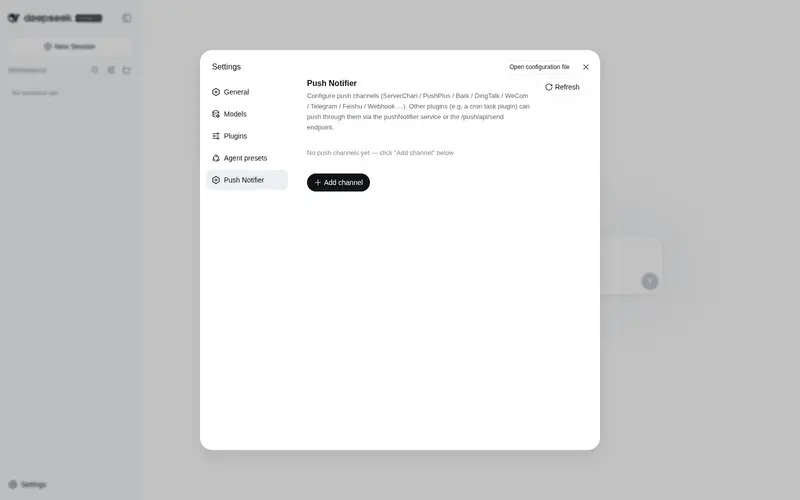
What it does
Multi-channel push for DeepSeek Harness: Server酱, PushPlus, Bark, DingTalk, WeCom, Telegram, Feishu, ntfy, custom webhooks and more, configurable from the settings panel and callable by other plugins via the pushNotifier service.
Best for
- DSH users who want several notification providers managed from one settings panel.
- Plugin authors who need in-process push delivery through the pushNotifier service.
- Scripts or trusted-host integrations that need to send through configured channels using an HTTP endpoint.
Not ideal for
- Environments that cannot securely protect the local channel store, because tokens and credentials are stored in plaintext.
- Email workflows where nodemailer cannot be dynamically loaded.
- Users who only need in-app DSH messages and have no external notification channel to configure.
README
chicheng-push


dsh 消息推送插件:在 Web 设置界面左侧栏新增 「推送插件」 入口,可配置管理多个推送渠道;同时把推送能力以 pushNotifier 服务(host 侧)和 /push/api/send HTTP 接口暴露给其他插件,例如定时执行插件在任务完成后调用推送。
界面语言:中文 / English UI 均支持(locale 字典随浏览器语言切换)。
截图
 |
 |
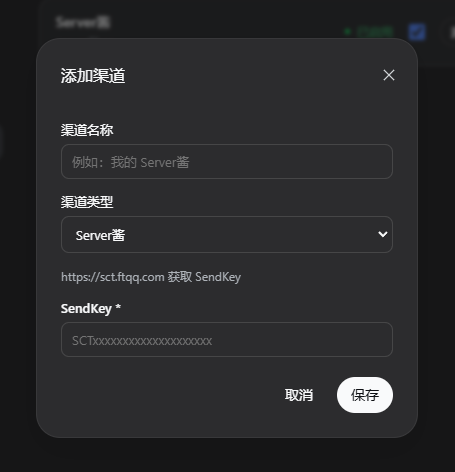 |
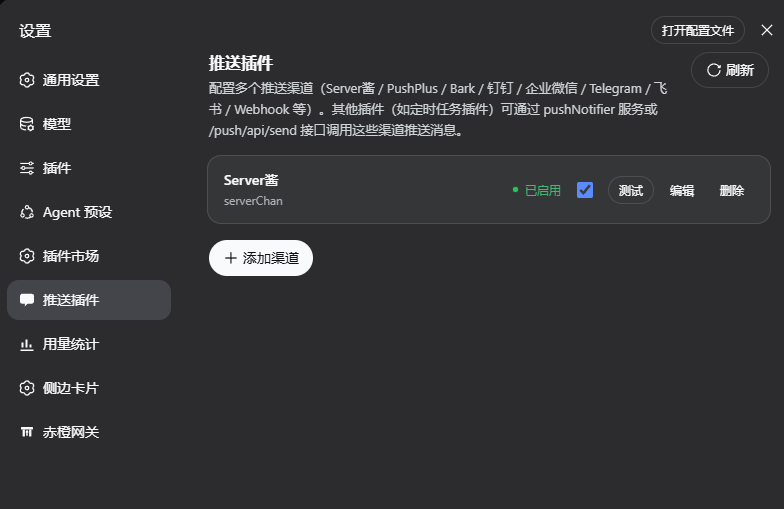
| 设置入口 — 设置界面左侧栏的「推送插件」入口 | 渠道列表 — 启用/停用、测试、编辑、删除 |
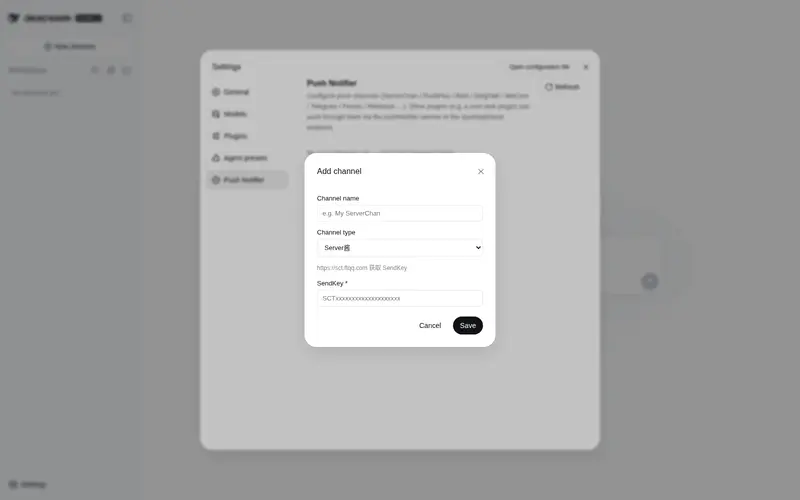
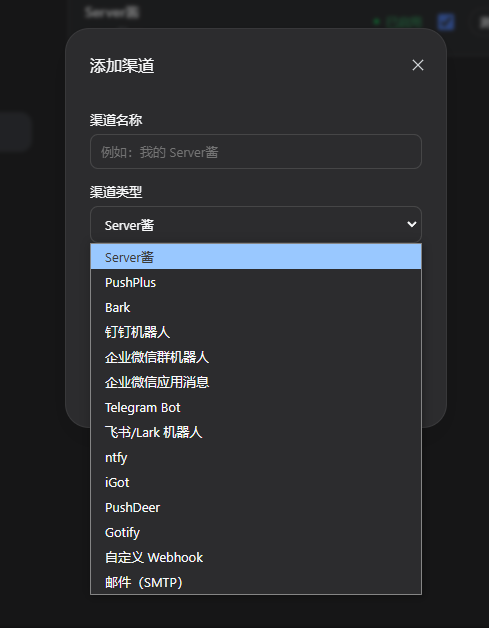
添加 / 编辑渠道 — 按类型动态表单,必填项标 *
|
目录
渠道实现参考 whyour/qinglong 的 notify 目录,默认支持:
| 渠道 | 类型 id | 说明 |
|---|---|---|
| Server酱 | serverChan |
sctapi / sctp 多通道 |
| PushPlus | pushPlus |
支持群组与渠道 |
| Bark | bark |
iOS 推送 |
| 钉钉机器人 | dingtalkBot |
支持加签 |
| 企业微信群机器人 | weWorkBot |
群 Webhook |
| 企业微信应用消息 | weWorkApp |
corpid,corpsecret,touser,agentid |
| Telegram Bot | telegramBot |
支持自建 API 域名 |
| 飞书 / Lark 机器人 | lark |
支持加签 |
| ntfy | ntfy |
支持自建实例与鉴权 |
| iGot | iGot |
聚合推送 |
| PushDeer | pushDeer |
支持自建 |
| Gotify | gotify |
自部署 |
| 自定义 Webhook | webhook |
$title / $content 变量 |
| 邮件(SMTP) | email |
需要环境可动态加载 nodemailer
|
结构
chicheng-push/
├── package.json          # dsh.bundle / dsh.client 声明
├── cordis.patch.yml      # 插入 profile 层
├── lib/
│   ├── index.js          # host 半:渠道存储 + 推送实现 + /push/api/* + pushNotifier 服务
│   └── client.js         # client 半:设置界面「推送插件」页
├── assets/               # 界面截图
├── docs/                 # 补充文档(面板图标补丁等)
├── examples/             # 集成示例(定时任务插件)
├── smoke.mjs             # 集成测试
└── README.md
安装
方式 A:npm 发布包(推荐,预构建免 allowBuilds)
插件发布到 npm 后:
dsh plugin --profile web add chicheng-push
npm 安装的预构建产物会跳过 pnpm 的 allowBuilds 构建授权,一条命令装好。
方式 B:本地打包 / 本地路径
在插件目录内打包安装:
cd D:\Harness\chicheng-push
npm pack
dsh plugin --profile web add chicheng-push-0.1.0.tgz
或者直接以本地路径安装:
dsh plugin --profile web add D:\Harness\chicheng-push
确认 profile 清单
无论哪种方式,确认 profile 清单已包含本插件:编辑
C:\Users\TJ\.dsh\profiles\web\package.json,在 dsh.profile.bundles 数组中
加入 "chicheng-push"(dsh plugin add 会同步 dependencies;若未自动加入
bundles,手动补一行):
   "dsh": {
     "profile": {
       "bundles": [
         "@deepseek-ai/dsh-base",
         "@deepseek-ai/dsh-web-app",
         "dsh-better-sidebar",
         "chicheng-gate",
         "dshmarket",
         "dsh-cron-scheduler",
         "chicheng-push"
       ]
     }
   }
- 手动重启 dsh web 服务,插件生效。
使用
重启后打开 设置 → 推送插件:
-
添加渠道:选择类型 → 填写字段(必填项标
*)→ 保存;可添加任意多个渠道。 - 测试:对单个渠道发送一条测试消息(真实推送,可验证配置)。
- 启用/停用:停用的渠道不会出现在「发送到全部渠道」中。
- 编辑 / 删除:管理已有渠道。
渠道数据持久化在 $DSH_HOME/push/channels.json(默认 C:\Users\TJ\.dsh\push\channels.json)。
其他插件如何调用
方式一:host 侧 pushNotifier 服务(进程内,推荐)
chicheng-push 在 host 侧注册了名为 pushNotifier 的 cordis 服务。其他 host 插件(如
定时执行插件)在 apply(ctx) 中直接读取即可:
// 定时任务插件 lib/index.js —— 任务执行完成后推送结果
const push = ctx.get("pushNotifier");
if (push) {
  const result = await push.send({
    title: `任务「${task.name}」执行完成`,
    content: `状态:${record.status}(exit ${record.exitCode})\n耗时:${record.durationMs}ms  `,
    channels: "all",           // 省略或 "all" = 全部启用渠道;也可传渠道 id/name 数组
  });
  console.log(`[cron] 推送结果 ok=${result.ok} sent=${result.sent}/${result.total}`);
}
服务 API:
push.list()                                   // -> channels
push.types()                                  // -> 渠道类型定义(字段 schema)
push.send({ title, content, channels })       // -> { ok, total, sent, results[] }
push.sendText(title, content, channels)       // 便捷重载
push.test(id)                                 // 发送测试消息到指定渠道
send 返回 { ok, total, sent, results },results 是每个渠道的
{ id, name, type, ok, message | error }。
方式二:HTTP 接口 /push/api/send(进程外 / 脚本 / agent)
任意位置(同源或受信 host)POST JSON:
curl -X POST http://127.0.0.1:3080/push/api/send \
  -H "content-type: application/json" \
  -d '{"title":"定时任务完成","content":"exit 0","channels":"all"}'
响应:{ "ok": true, "total": 2, "sent": 2, "results": [...] }
接口列表(全部 POST,fenced:仅同源 / loopback / 受信 host):
| 方法 | 请求体 | 说明 |
|---|---|---|
list |
{} |
渠道列表 |
types |
{} |
渠道类型定义(表单 schema) |
save |
{ channel } |
新增或更新(带 id 为更新) |
remove |
{ id } |
删除 |
toggle |
{ id, enabled } |
启用/停用 |
test |
{ id } |
测试消息 |
send |
{ title, content, channels? } |
发送(channels 省略 = 全部启用) |
在定时执行插件中的集成示例
以 dsh-cron-scheduler 为例:任务 run 落定后通过
pushNotifier 服务推送结果。完整示例与参数说明见
examples/cron-integration.md,核心片段:
// executeRun 的 finalize 之后
const push = ctx.get("pushNotifier");
if (push) {
  await push.send({
    title: `定时任务「${task.name}」完成`,
    content: [
      `状态:${record.status}(exit ${record.exitCode ?? "-"})`,
      `耗时:${record.durationMs ?? "-"} ms`,
      `开始:${record.startedAt}`,
    ].join("\n"),
  }).catch((error) => console.warn("[cron] push failed:", error));
}
设置面板图标补丁(官方 shell)
设置面板左侧栏的「推送插件」图标默认回退为设置齿轮——要让它与主侧栏
「消息平台」的聊天气泡图标一致,需要给官方 shell 的 navIcon() 打一个补丁
(settings.section slot 契约不支持自定义图标)。补丁内容、目标文件、升级后
恢复步骤见 docs/panel-icon-patch.md。
开发说明
- host 半为零第三方运行时依赖(HTTP 渠道使用 Node 内置
fetch);email 渠道仅在配置且 可动态加载nodemailer时使用。 - 修改
lib/index.js后需重启生效;修改lib/client.js后刷新页面即可(bundle 由/plugins/chicheng-push/client.js?rev=<hash>提供)。 - 集成测试:
node smoke.mjs(19 项断言,含真实 HTTP 发送链路)。
安全
- 渠道配置(含 SendKey / Token / 授权码)明文存储在
$DSH_HOME/push/channels.json, 请确保该目录仅当前用户可读写;详见 SECURITY.md。 -
/push/api/*接口有 fence 保护(仅同源 / loopback / 受信 host)。
License
Frequently Asked QuestionsFAQ
Use the verified command dsh plugin --profile default add github:534119219/chicheng-push in a DSH-enabled shell. The command resolves the public package metadata and keeps the plugin attached to the catalog identity shown on this page.
Compatibility follows the bundle and profile status shown above. If a profile is not detected, keep the plugin disabled there and check the repository documentation before enabling it in production.
The GitHub link and activity metadata are the source of truth for releases and maintenance. Revisit this page after a new release to confirm the catalog has observed the latest version.