534119219/chicheng-stats
DSH 全局用量统计插件:高度可配置侧边栏组件(文字/卡片)+ 统计面板(模型分布/趋势/首字节/耗时明细)
Listed
3
Usage
Bundle verified
Preview
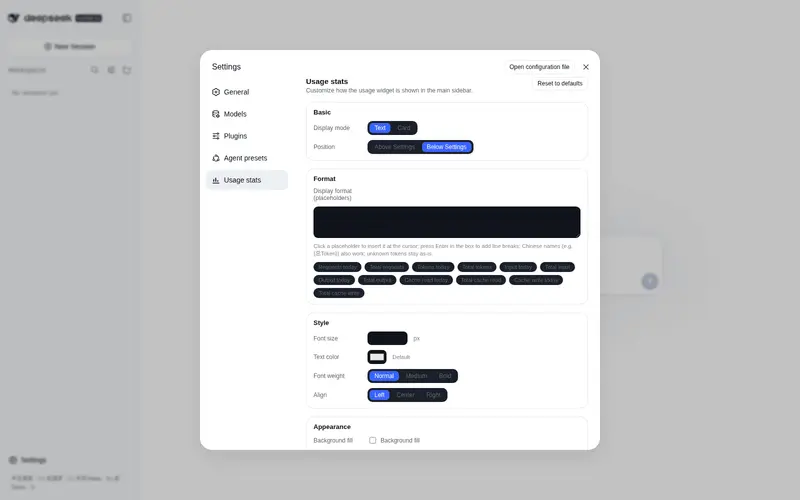
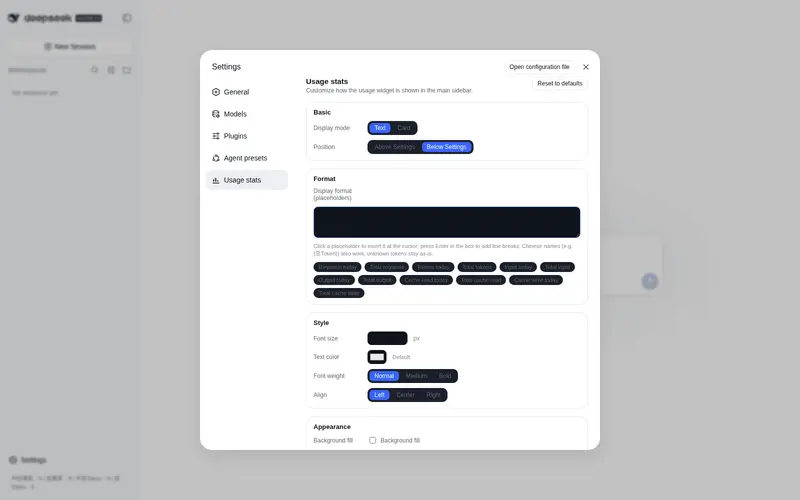
What it does
Configurable DSH usage statistics: a sidebar text/card widget plus a detail dialog with per-provider and per-model breakdowns, cache-hit rates, token trends, and latency details (TTFT and duration).
Best for
- Users who want request and token usage summarized across interactive and headless DSH sessions.
- Teams comparing usage by provider or model, including cache-hit rates and token trends.
- Operators investigating per-request TTFT and total latency while keeping session data unchanged.
Not ideal for
- Environments below Node.js 22, because historical log scanning requires built-in Zstandard support.
- Users who need billing or cost calculations rather than request, token, cache, and latency statistics.
- Workflows that do not generate DSH provider usage samples.
README
chicheng-stats
dsh Web 全局用量统计插件:在左侧栏”设置”按钮旁显示用量组件(一行小字或卡片,可在 设置 → 用量统计 中自由配置),点击打开完整的用量统计面板(Sub2API 风格的使用记录)。跨所有会话统计,包括 headless 定时任务等其他进程产生的会话。
功能特性
-
实时累计:订阅
session/event,按(turn, step)去重计数每次 provider 请求的用量样本,并记录逐请求明细(时间 / 模型 / 会话 / 输入 / 缓存读 / 缓存写 / 输出); -
模型归属:从
request/header快照追踪每个请求使用的模型,支撑模型分布统计; -
可配置侧边栏组件:设置 → 用量统计 中可调整——
- 通用:显示模式(文字 / 卡片)、位置(设置按钮上方 / 下方);
- 文字模式:自定义模板 + 12 个占位符、字号、文字颜色、粗细、对齐、背景填充(含背景颜色)、圆角、内边距;
-
卡片模式:卡片大小、每行列数(1/2/4)、显示项目(勾选)、标题字号与颜色、数值字号与颜色、间隔、圆角、边框粗细与颜色、背景颜色(默认
#43454A); - 修改实时生效(约 5 秒内),无需重启;
- 统计面板:点击组件弹出面板——时间范围选择(今日 / 近7天 / 近30天 / 本月 / 全部)、提供方筛选(全部 / 各提供方,可查看单一提供方用量)、概览、模型分布、Token 使用趋势图(SVG)、用量明细表(含首字节 / 总耗时);
-
历史回填 + 增量扫描:启动后扫描
$DSH_HOME/sessions下全部会话日志(zstd 多帧拼接,按帧切分后逐帧解压),只处理越过持久化 seq 水位的事件,与实时计数天然去重;此后每 5 分钟轻扫一次,覆盖其他进程写入的会话; -
持久化:聚合写入
$DSH_HOME/stats/store.json,明细写入$DSH_HOME/stats/requests.json,组件设置写入$DSH_HOME/stats/settings.json(均防抖原子写入),重启不丢; - 只读安全:不修改任何会话数据,对模型体验 / KV Cache 零影响。
界面预览
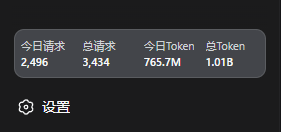 侧边栏 · 卡片模式(4 列) |
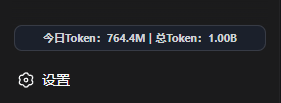 侧边栏 · 文字模式 |
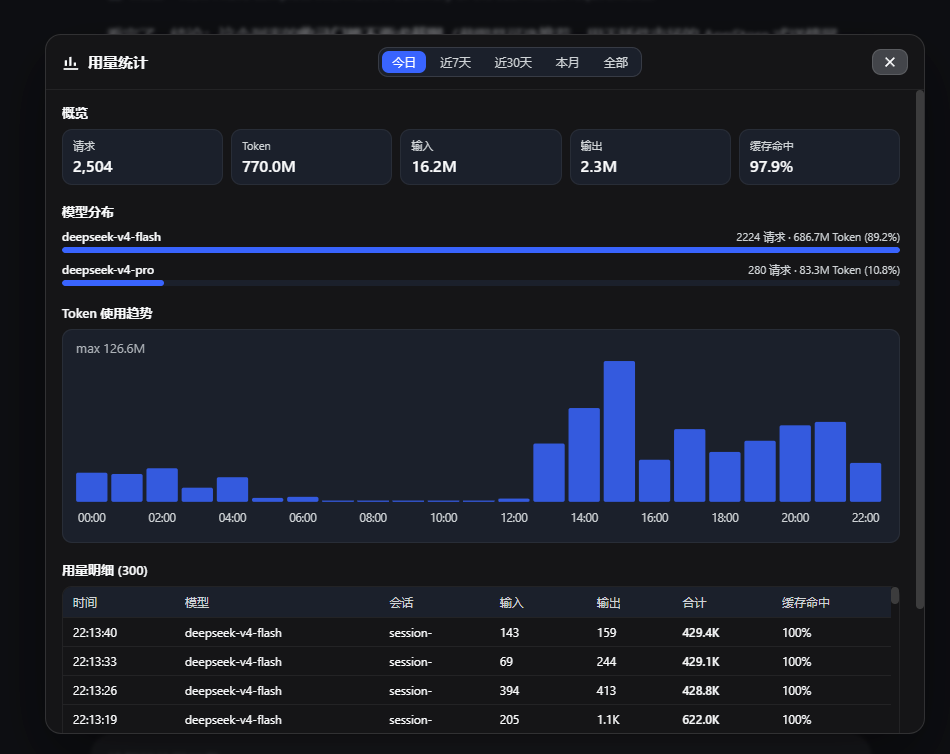 用量统计弹窗 |
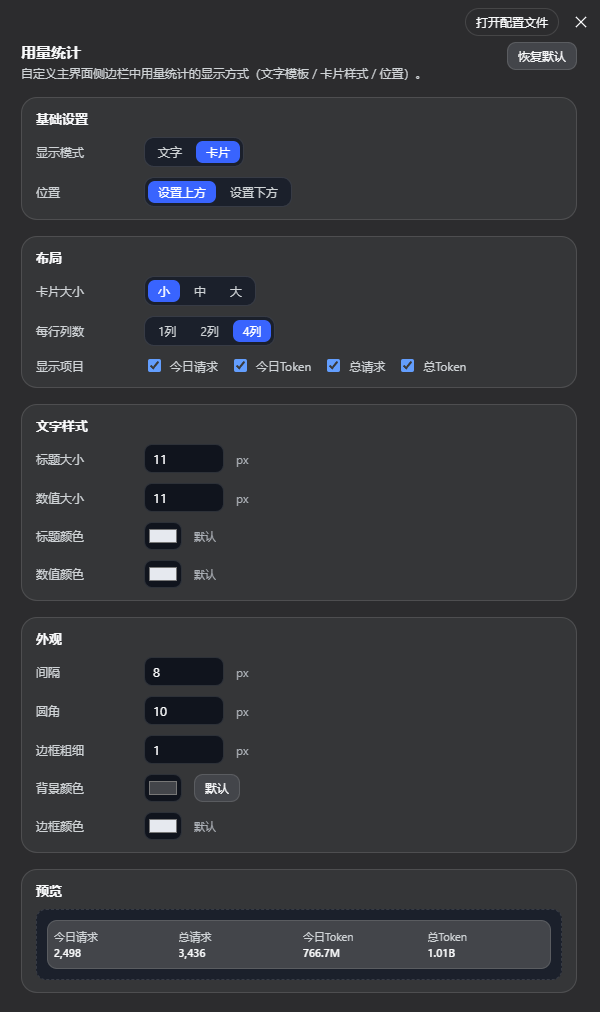 设置页 · 卡片模式配置 |
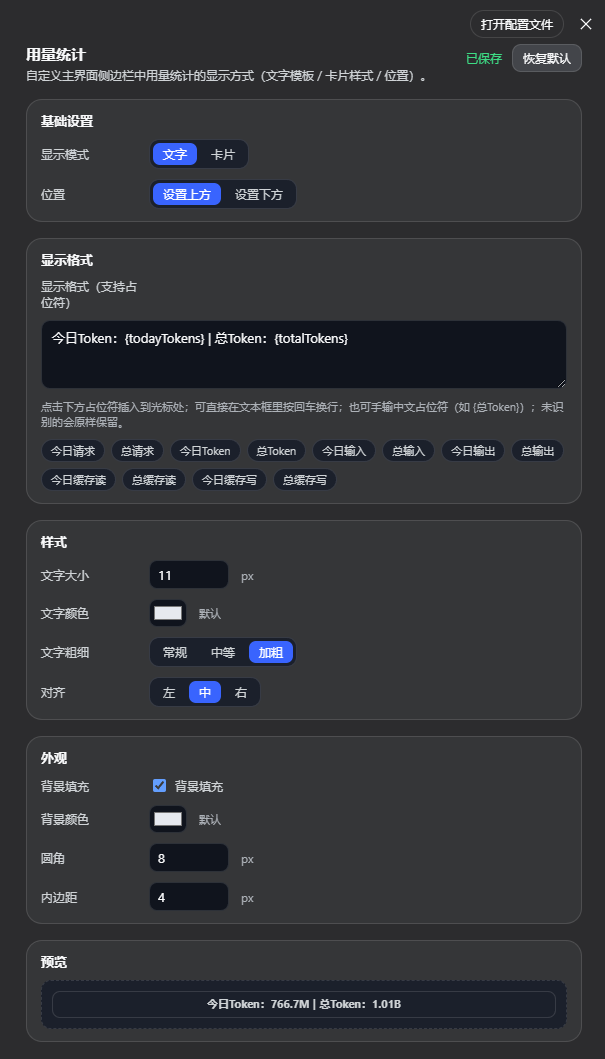 设置页 · 文字模式配置 |
文字模板占位符
| 占位符 | 含义 | 占位符 | 含义 |
|---|---|---|---|
{todayRequests} |
今日请求 | {totalRequests} |
总请求 |
{todayTokens} |
今日 Token | {totalTokens} |
总 Token |
{todayInput} |
今日输入 | {totalInput} |
总输入 |
{todayOutput} |
今日输出 | {totalOutput} |
总输出 |
{todayCacheRead} |
今日缓存读 | {totalCacheRead} |
总缓存读 |
{todayCacheWrite} |
今日缓存写 | {totalCacheWrite} |
总缓存写 |
默认模板:今日请求:{todayRequests} | 总请求:{totalRequests} | 今日Token:{todayTokens} | 总Token:{totalTokens}
安装(web profile)
前置要求
- dsh Web(
dsh web)已初始化运行 - Node.js 22+(依赖内置 Zstandard 支持,已在 Node 24 验证)
方式一:dsh plugin 命令安装(推荐)
dsh plugin --profile web add github:534119219/chicheng-stats
本地源码方式(与 chicheng-cron 等本地插件一致):
dsh plugin --profile web add D:\Harness\chicheng-stats
方式二:手动编辑 profile 的 package.json
打开 ~/.dsh/profiles/web/package.json,在 dependencies 中添加依赖:
{
  "dependencies": {
    "chicheng-stats": "github:534119219/chicheng-stats"
  }
}
并在 dsh.profile.bundles 数组中加入插件名:
{
  "dsh": {
    "profile": {
      "bundles": [
        "@deepseek-ai/dsh-base",
        "@deepseek-ai/dsh-web-app",
        "chicheng-stats"
      ]
    }
  }
}
然后在 profile 目录安装依赖:
cd ~/.dsh/profiles/web
pnpm install
重启并验证
# 重启 dsh web(按你的部署方式,例如)
dsh web
浏览器刷新页面,侧边栏底部(”设置”按钮下方)出现一行用量小字,点击可打开完整统计面板;启动后约 3 秒内自动回填历史数据(回填期间悬停提示”正在回填历史数据…”)。
也可直接验证 API:
curl -X POST http://127.0.0.1:3080/stats/api/summary \
  -H "content-type: application/json" \
  -d "{}"
返回示例:
{
  "ok": true,
  "value": {
    "today": { "requests": 2061, "tokens": 583235886 },
    "total": { "requests": 2999, "tokens": 823786284 },
    "todayKey": "2026-08-16",
    "since": "2026-08-16T08:00:00.000Z",
    "backfill": { "done": true, "scannedSessions": 31, "scannedEvents": 6016 }
  }
}
统计面板数据接口:
curl -X POST http://127.0.0.1:3080/stats/api/usage \
  -H "content-type: application/json" \
  -d '{"range":"7d"}'
range 取值:today(默认)/ 7d / 30d / month / all。返回概览(totals)、模型分布(models)、趋势(trend,今日按小时、其余按天)与用量明细(details,最近 300 条)。
统计口径
-
请求:每次产生 provider 用量样本的 LLM 请求(
assistant/message携带usage,或assistant/chunk的 usage 分片),按(turn, step)去重;同一请求的重复样本按 last-wins 替换,不重复计数; -
Token:
inputTokens + cacheReadTokens + cacheWriteTokens + outputTokens(与 dsh-token-meter 的usageTokens()一致;reasoning 已含在 output 内,不重复计算); -
今日:按事件时间戳的本地日期(
YYYY-MM-DD)分桶。
卸载
- 移除 profile
package.json中的依赖与dsh.profile.bundles条目:
cd ~/.dsh/profiles/web
pnpm install
- 重启
dsh web; - 清空全部统计数据(可选):
rm -rf ~/.dsh/stats
目录结构
chicheng-stats/
├── lib/index.js          # Host 端:事件订阅、回填扫描、持久化、/stats/api
├── lib/client.js         # Client 端:侧边栏用量卡片(window.__ModuleLoader__ 注册)
├── cordis.patch.yml      # profile loader 挂载补丁
├── test-backfill.mjs     # 只读回填干跑脚本(验证解码与统计)
└── package.json
Frequently Asked QuestionsFAQ
Use the verified command dsh plugin --profile default add github:534119219/chicheng-stats in a DSH-enabled shell. The command resolves the public package metadata and keeps the plugin attached to the catalog identity shown on this page.
Compatibility follows the bundle and profile status shown above. If a profile is not detected, keep the plugin disabled there and check the repository documentation before enabling it in production.
The GitHub link and activity metadata are the source of truth for releases and maintenance. Revisit this page after a new release to confirm the catalog has observed the latest version.