534119219/dsh-messaging
DSH 消息平台插件(messaging-core):27 个消息渠道统一接入,移植自 hermes-agent
Listed
2
Notify
Bundle verified
Preview
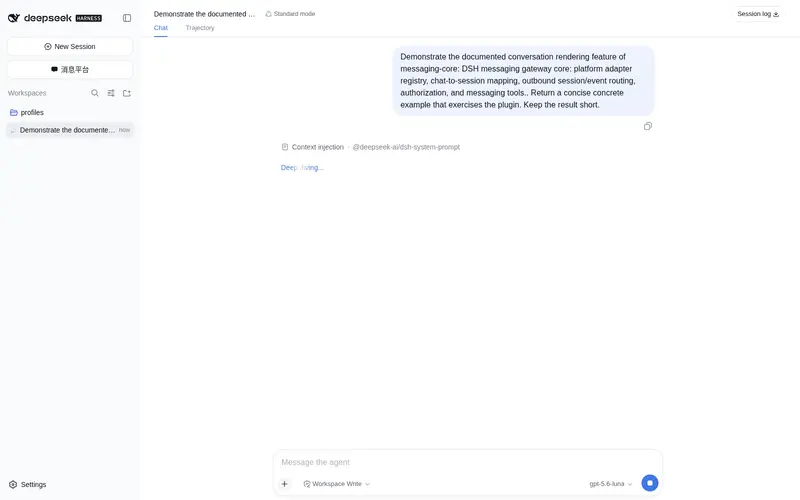
What it does
Unified messaging gateway for DeepSeek Harness: 27 IM platforms (Telegram, QQ, WeChat, Discord, WhatsApp, Feishu and more) in one plugin, with QR scan-to-authorize, per-platform workspaces, slash commands, and a web setup dialog.
Best for
- Teams that want DSH conversations available through one or more of the 27 supported messaging platforms.
- Multi-platform deployments that need separate DSH sessions and workspaces for each chat and platform.
- Bot workflows that benefit from allowlists, slash commands, streaming replies, and a shared web configuration UI.
Not ideal for
- Users who only interact through the DSH Web UI and do not need an external messaging gateway.
- Deployments unwilling to configure and authorize the selected platform bots, accounts, webhooks, or QR-based sessions.
- Workflows that require one shared workspace across every platform rather than per-platform workspaces.
README
DSH Messaging(hermes-agent 消息平台移植)
将 hermes-agent 的消息平台体系移植为 DSH 插件,整合为单一插件 messaging-core:27 个消息渠道的适配器全部内聚在插件内部,一个插件完成注册、会话映射、出站路由、授权、命令与配置界面。
功能特性
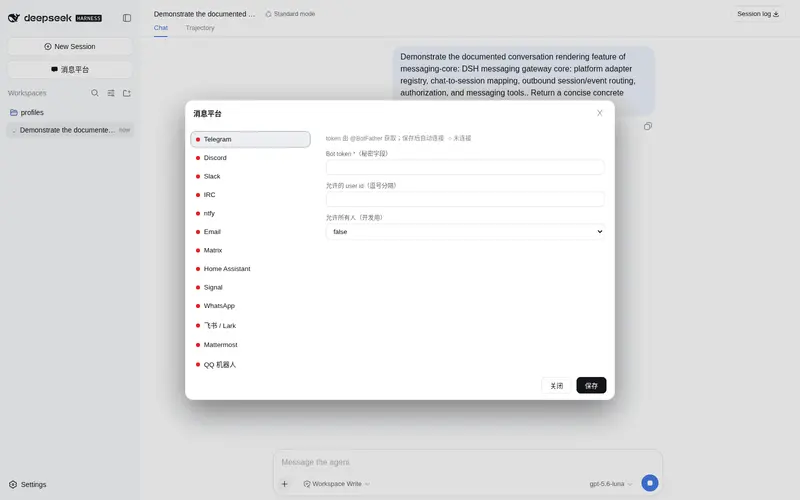
- 27 个消息平台:Telegram、Discord、Slack、IRC、ntfy、Email、Matrix、Home Assistant、Signal、WhatsApp、飞书/Lark、Mattermost、QQ、LINE、SMS、WhatsApp Cloud、企业微信、Teams、钉钉、Google Chat、通用 Webhook、A2A、微信个人号(iLink)、BlueBubbles iMessage、OpenAI 兼容 API Server、腾讯元宝、SimpleX
-
统一会话体系:每个聊天映射到独立的 DSH 会话(
msg-<平台>-<hash>[-vN]),支持/new、/resume(按标题切换历史会话)、/title、/status、/stop、/compress -
每平台独立工作区:
$DSH_HOME/messaging/workspace/<平台>/,注册进 host 工作区注册表,侧栏按平台分组 -
出站流式路由:订阅
session/event,按平台能力渲染(HTML/纯文本/原生 Markdown),支持流式编辑与 typing 指示 -
授权白名单:每平台
allowedUsers/allowAll -
配置界面:侧栏「消息平台」入口(与「新建会话」同款按钮),hermes 式两栏弹窗(左侧平台列表,右侧配置表单),配置走
/messaging/config端点持久化 -
共享 Webhook 监听器:webhook 型平台共用 HTTP listener(默认
127.0.0.1:8765)
截图
 侧栏消息平台入口 |
 消息平台配置弹窗 |
安装(web profile)
在 profile 的 package.json 中添加依赖,并将 messaging-core 加入 dsh.profile.bundles:
{
  "dependencies": {
    "messaging-core": "file:<本仓库路径>/packages/messaging-core"
  },
  "dsh": {
    "profile": {
      "bundles": [
        "...",
        "messaging-core"
      ]
    }
  }
}
然后 pnpm install 并重启 dsh web。源码更新后运行 deploy.ps1 同步到 profile 的 node_modules(file: 依赖是拷贝安装,不是软链),再手动重启 dsh web 生效。
使用
- 侧栏「消息平台」按钮 → 弹窗中选择平台 → 填写配置保存
- 平台连接后,向机器人发消息即可对话;
/status查看会话与模型状态,/title 标题设置会话标题,/resume列出/切换历史会话,/compress手动压缩上下文
结构
packages/messaging-core/
  lib/
    index.js          # 插件入口:messaging 服务 + 27 个平台注册 + 命令系统
    config.js         # 平台目录(弹窗/端点/向导共用的单一事实源)
    agents.js         # agent 生命周期(创建/恢复/单飞/工作区挂载)
    session-map.js    # 聊天↔会话映射(JSONL 持久化 + 历史记录)
    outbound.js       # session/event → 平台适配器 路由
    markdown.js       # 按平台能力渲染(html/plain)
    workspaces.js     # 每平台独立工作区
    tools.js          # send_message / messaging_status 工具
    http.js           # 共享 webhook listener
    client.js         # 侧栏入口 + 配置弹窗(web 客户端 bundle)
    platforms/        # 27 个平台适配器模块(telegram.js、qq.js、discord.js …)
配置
配置存储在 $DSH_HOME/settings.yaml,命名空间 messaging-<平台>(如 messaging-qq、messaging-telegram),与弹窗、CLI 向导(messaging-setup.mjs)、/messaging/config 端点共用同一 schema 目录(config.js)。
平台适配器说明
| 平台 | 接入方式 |
|---|---|
| Telegram | grammY 长轮询,流式编辑/typing/媒体 |
| Discord | Gateway intents,流式编辑/typing |
| 官方 Bot API v2 WS 网关(C2C + 群 @),REST 发送,原生 Markdown(需开通原生 MD 权限,失败自动回退纯文本) | |
| 微信个人号 | iLink Bot API 长轮询,QR 配对向导 weixin-pair.mjs
|
| Baileys 多设备协议,QR 配对 | |
| 飞书/Lark | 官方 SDK + WS 长连接事件订阅 |
| Slack | Socket Mode + chat.update 流式编辑 |
| Matrix | sync 循环 + m.replace 流式编辑 |
| 钉钉 | Stream 模式官方 SDK |
| Teams | Bot Framework webhook + continueConversation |
| 其余 | 见各模块文件头注释 |
开发与验证
-
node messaging-setup.mjs:CLI 配置向导(list / 交互式 / 旧参数兼容) -
node verify-live.mjs:检查运行中的 dsh web 是否为最新构建(/messaging/status、/messaging/config、客户端 bundle) -
deploy.ps1:将packages/messaging-core同步到%USERPROFILE%\.dsh\profiles\web\node_modules\messaging-core
鸣谢
协议与交互语义参考 NousResearch/hermes-agent(MIT License, Copyright (c) 2025 Nous Research),衍生部分的归属声明见 NOTICE。
Frequently Asked QuestionsFAQ
Use the verified command dsh plugin --profile default add github:534119219/dsh-messaging in a DSH-enabled shell. The command resolves the public package metadata and keeps the plugin attached to the catalog identity shown on this page.
Compatibility follows the bundle and profile status shown above. If a profile is not detected, keep the plugin disabled there and check the repository documentation before enabling it in production.
The GitHub link and activity metadata are the source of truth for releases and maintenance. Revisit this page after a new release to confirm the catalog has observed the latest version.