863683348/dsh-feed
Cross-ecosystem aggregation base (聚合的聚合): syncs GitHub dsh-plugin topic + npm into one open JSON index, queried by model tools, CLI (dsh-feed) and a minimal stdio MCP server
Listed
0
Market
Bundle verified
Preview
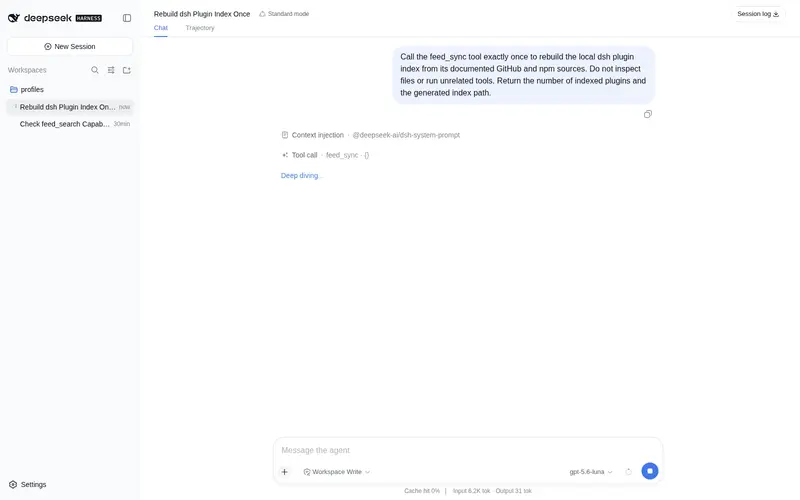
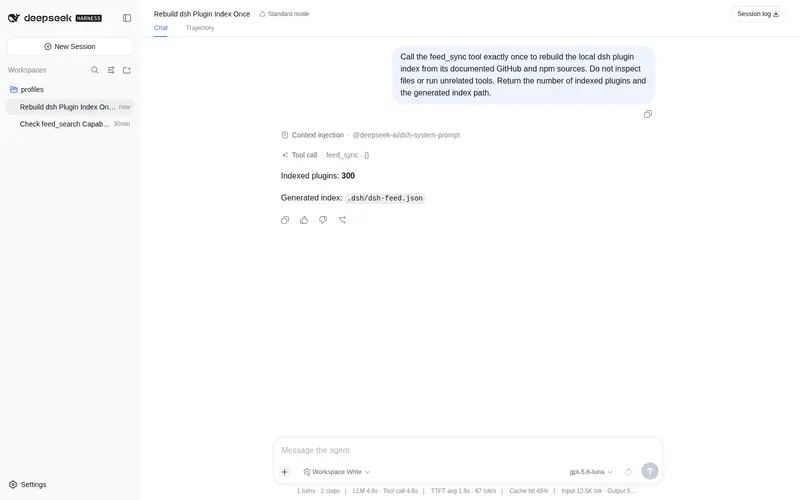
What it does
Cross-ecosystem aggregation data layer: syncs the GitHub dsh-plugin topic and the npm registry into one open JSON index, queried by model tools, a CLI, and a minimal stdio MCP server.
Best for
- Plugin authors and catalog builders who need one normalized index spanning GitHub's dsh-plugin topic and npm.
- Agents or scripts that need to search plugin metadata through model tools, a CLI, or an stdio MCP server.
- Teams that want an open, diffable JSON data source for building their own plugin interfaces.
Not ideal for
- Users looking for a ready-made graphical plugin marketplace; this project intentionally provides no UI.
- Offline workflows that need fresh catalog data, because synchronization requires network access.
- Production workflows that require a mature MCP implementation; the included stdio MCP server is explicitly experimental and minimal.
README
dsh-feed — 跨生态聚合底座(”聚合的聚合”)
不直接做 UI,做开放数据层:把 GitHub dsh-plugin topic 和 npm registry 归一化成一份开放 JSON 索引,交给任何 Agent / CLI / MCP / 未来 UI 消费。你的插件只做”同步 + 查询”——别人基于这份数据再建 UI。
为什么需要它
- 现有市场各自抓数据、各自维护,闭源且重复。
dsh-feed成为数据源:同步一次,全生态可查。 - 一个插件,三种消费面:
-
模型工具:
feed_sync/feed_search/feed_stats -
CLI:
dsh-feed sync|search|stats|mcp - MCP server(实验性):任何 MCP 客户端(Cursor、Claude Desktop…)都能查
-
模型工具:
- 索引是开放 JSON 文件(默认
.dsh/dsh-feed.json),明文、可 diff、可被任何工具读。
安装
dsh plugin --profile <profile> add dsh-feed
# 或只用 CLI(npm 全局):npm i -g dsh-feed
用法
模型侧
| 工具 | 说明 |
|---|---|
feed_sync |
拉取 GitHub topic + npm → 写索引(需网络) |
feed_search |
自然语言查索引(英文词 + 中文 2-gram) |
feed_stats |
索引统计:总数、来源、热门 topic、npm 覆盖 |
CLI
dsh-feed sync                      # 同步(可选 GITHUB_TOKEN 提升限额)
dsh-feed search "移动端 远程"      # 查询
dsh-feed stats
dsh-feed mcp                       # 极简 stdio MCP server(实验性)
MCP 配置示例(任意 MCP 客户端)
{ "mcpServers": { "dsh-feed": { "command": "dsh-feed", "args": ["mcp"] } } }
索引格式(开放数据层)
{
  "updated": "2026-08-16T...",
  "sources": { "github": 200, "npm": 180 },
  "count": 380,
  "plugins": [
    { "name": "owner/repo", "url": "...", "description": "...", "stars": 42, "topics": ["dsh-plugin", "notify"], "npmName": "dsh-xxx" }
  ]
}
设计
-
lib/sync.js— 抓取 + 归一化(GitHub search API + npm search API,可注入 token)。 -
lib/query.js— 纯查询逻辑(分词/评分/统计),零依赖可单测。 -
lib/index-store.js— 索引文件读写(相对路径 + 防逃逸校验)。 -
bin/dsh-feed.js— CLI + 极简 stdio MCP server(JSON-RPC 2.0)。 -
安全:索引只写会话工作区内的
.dsh/;网络请求仅发生在feed_sync(显式触发)。
Roadmap
- 每小时定时同步(
dsh-schedule接入)。 - Web API 只读端点 + 更完整的 MCP 工具(分页/过滤/详情)。
- 与 dsh-need-finder / dsh-recipe 共享同一数据层(去重复抓取)。
测试
node test/feed.test.mjs
License
MIT
Frequently Asked QuestionsFAQ
Use the verified command dsh plugin --profile default add github:863683348/dsh-feed in a DSH-enabled shell. The command resolves the public package metadata and keeps the plugin attached to the catalog identity shown on this page.
Compatibility follows the bundle and profile status shown above. If a profile is not detected, keep the plugin disabled there and check the repository documentation before enabling it in production.
The GitHub link and activity metadata are the source of truth for releases and maintenance. Revisit this page after a new release to confirm the catalog has observed the latest version.