a179-sanae/dsh-auto-collapse
Codex-style workflow auto-collapse: finished turns fold into a single "processed in Xs" row leaving only the final answer; tool calls and think blocks collapse into live-summary chips that follow streaming; expand level by level, fully reversible on uninstall.
Listed
24
Ui
Bundle verified
Preview
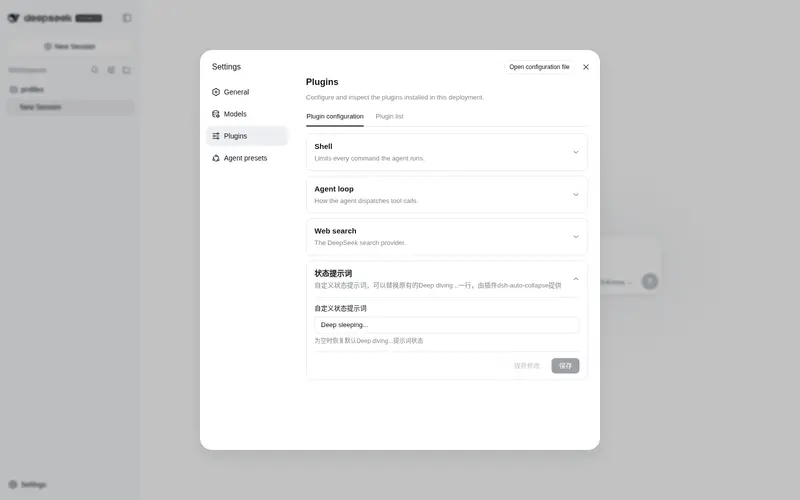
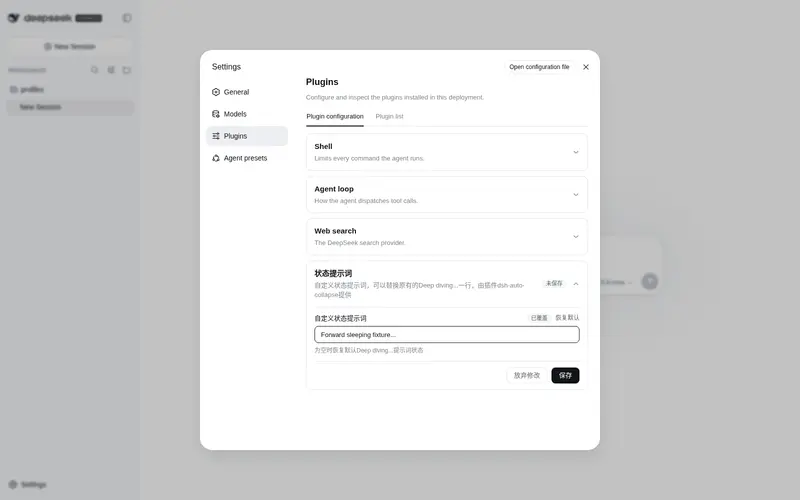
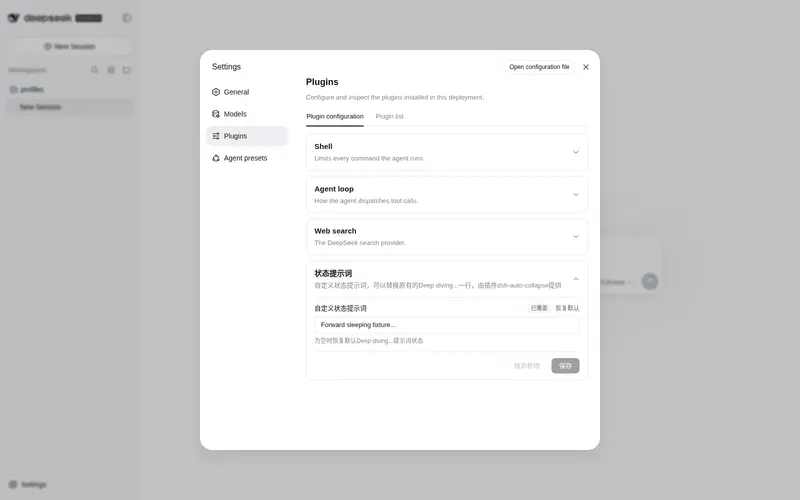
What it does
Codex-style workflow auto-collapse: finished turns fold into a single "processed in Xs" row leaving only the final answer; tool calls and think blocks collapse into live-summary chips that follow streaming; expand level by level, fully reversible on uninstall.
Best for
- DSH Web users who want completed turns reduced to the final answer plus a compact processing summary.
- Long tool-heavy or reasoning-heavy conversations where reversible, multi-level expansion improves scanning.
Not ideal for
- Users who need tool calls and reasoning blocks fully visible by default for auditing or teaching.
- Non-Web DSH interfaces, since the plugin operates on the Web client's DOM.
README
dsh-auto-collapse
DeepSeek Harness Web 客户端插件:把会话里的工具卡片与 Think 推理块自动折叠成一行摘要,让界面只保留模型说的话。
English: README.en.md
这是什么
dsh-auto-collapse 是一个纯前端 DOM 插件,挂在 DeepSeek Harness Web 聊天界面上,把工作流程折叠成一行行摘要——工具调用、推理过程不再占据整屏,呈现接近 VSCode Codex 桌面端的折叠体验,同时将“Deep diving” 修改为 “Deep sleeping”。它不改动消息内容,只控制工作流程的显示状态。
效果预览

特性
-
回合完成自动收起(一级):每个回合完成后,工作过程收成一行
已处理 X秒,只留模型最终正文;点击展开完整工作流程(上下文注入 → 思考 → 工具调用 → 过程正文 → 最终正文)。 -
二级折叠行:展开一级后,工具调用组与思考块各自折叠成一行 chip(
正在运行 {命令}/运行了命令/已思考),点击展开/收起;相邻工具组合并,正文输出是硬边界(不会跨正文合并)。 -
三级思考合并:展开
已思考后,连续思考合并为一个三级思考行(标题Think · 第一句),点击展开合并内容块;原始四级行不出现。 -
原生视觉对齐:图标盒 16px / glyph 14px / 行高 24px / 行距 16px,颜色使用 DSH 原生 token(
--dsw-alias-label-*),思考与命令图标取自 DSH 原生图标(IconThinkOutline14/IconApiOutline14)。 -
流式友好:同一个
assistant-step原地补正文、React 换节点和历史乱序挂载都会重新协调;running 状态带文字平滑呼吸动画,prefers-reduced-motion下停止动画。 -
完整工作类型:除 tool-call 外,顶层
command/manual-compaction、context 和纯图片 final 都按同一回合语义处理。 - 可逆:卸载(HMR stop)时完整还原所有折叠/隐藏/改写。
安装
dsh plugin --profile web add "github:a179-sanae/dsh-auto-collapse#main"
安装后重启 DSH web 服务(或触发插件 HMR),页面 Ctrl+Shift+R 硬刷新即可生效。无需任何配置。
开发
项目结构
src/fold.ts       核心:FoldController(状态机)+ findBlocks(块识别)+ 折叠/展开逻辑
src/client.ts     浏览器端入口(注册插件)
src/index.ts      host half
build.mjs         esbuild 构建(lib/client.js 的注册 id 在 banner 里)
deploy.mjs        安全部署:校验 → 备份 → 替换 → 身份核验重启 → 哈希验证/回滚
cordis.patch.yml  profile 树挂载
test/             fake DOM 契约、竞态、会话切换与 40 组乱序排列回归
检查
npm run check
依次执行 TypeScript 检查、构建和全部回归测试。
快速部署(本机开发)
npm run deploy
脚本先核验插件/DSH 包名和 3080 监听进程身份,再做时间戳备份、替换、重启与服务端哈希验证;失败自动恢复旧 bundle。可用 DSH_AUTO_COLLAPSE_LIB、DSH_DIR、DSH_WEB_PORT、DSH_LOG_DIR 覆盖默认路径。
发布新版本
npm pack --pack-destination <本地插件目录> # 打包(prepack 钩子自动构建)
将 profile 的 package.json 中插件依赖更新为新 tgz 路径后重新安装插件。
关键机制
-
块识别(
findBlocks):顶层节点按 tool-call、command/manual-compaction、context、thinking 和正文分类;user/steering/turn-tail 是不可跨越的硬边界。 -
segment 协调:每轮根据当前 DOM 顺序重建 segment;最后一个含文本或媒体的
assistant-step是 final,其余正文是中间过程。稳定 flow/key 复用展开状态,不依赖一次性 mutation 事件。 -
时长:流式回合按 segment 分别记录 running 起点;历史回合从官方时长或
timeStart/turn-tail 解析。格式X秒/X分Y秒,整分省略秒位。 -
React 共存与可逆性:节点替换后按稳定 key 重新绑定;一级行被移除会按原展开状态重建;所有 inline
display在首次改写前保存并精确恢复。
许可
MIT
Frequently Asked QuestionsFAQ
Use the verified command dsh plugin --profile default add github:a179-sanae/dsh-auto-collapse in a DSH-enabled shell. The command resolves the public package metadata and keeps the plugin attached to the catalog identity shown on this page.
Compatibility follows the bundle and profile status shown above. If a profile is not detected, keep the plugin disabled there and check the repository documentation before enabling it in production.
The GitHub link and activity metadata are the source of truth for releases and maintenance. Revisit this page after a new release to confirm the catalog has observed the latest version.