a179-sanae/dsh-code-check
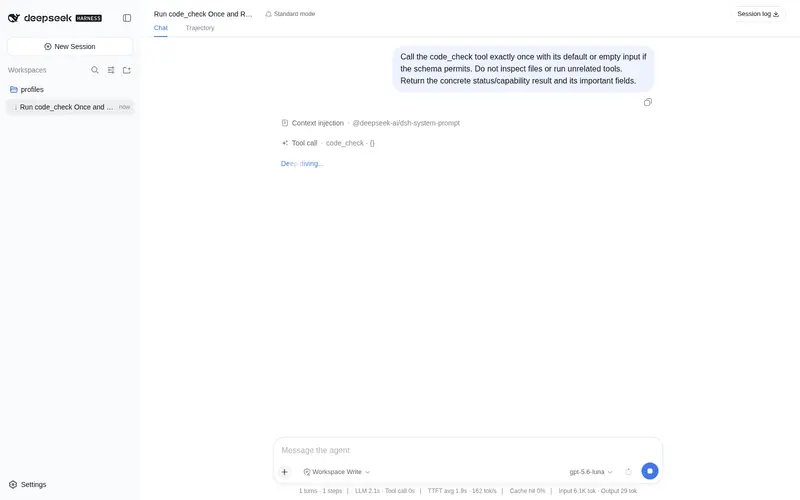
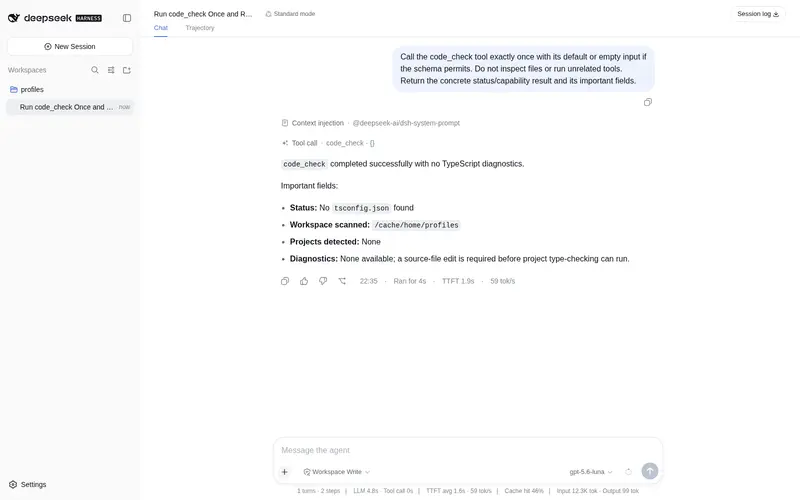
Automatic type-check diagnostics: after the model edits or creates TS files, runs `tsc --noEmit` in the background (debounced per project) and reports errors via the `code_check` tool — grouped by file with line/column, severity and TS error codes, closing the "edit → check → fix" loop.
Listed
2
Dev
Bundle verified
Preview
What it does
Automatic type-check diagnostics: after the model edits or creates TS files, runs `tsc --noEmit` in the background (debounced per project) and reports errors via the `code_check` tool — grouped by file with line/column, severity and TS error codes, closing the "edit → check → fix" loop.
Best for
- TypeScript projects where model edits should trigger debounced, project-scoped `tsc --noEmit` diagnostics.
- Agents that need cached or on-demand errors grouped by file with locations and TypeScript error codes to support an edit-check-fix loop.
Not ideal for
- Projects without a `tsconfig.json` or a locally installed TypeScript package.
- JavaScript-only or non-TypeScript workflows needing ESLint, Pyright, Cargo, or language-server diagnostics, which are not implemented.
README
dsh-code-check
DeepSeek Harness(DSH)的自动类型检查诊断插件。
模型编辑或创建代码文件后,本插件在后台(按项目、防抖)自动运行
tsc --noEmit,并通过 code_check 工具汇报哪里改坏了——按文件分组,带
行列号、严重级别和 TS 错误码。模型看到报告后可以自己修复,形成
“改 → 查 → 修”闭环。Claude Code 有官方 LSP 插件,pi 有 pi-lens,现在 DSH
也有了 dsh-code-check。
特性
- 监听 harness 的
fs/observed变更事件(与内置 skill 文件系统同一条缝),零核心改动。 - 800ms 防抖,连续编辑合并为每个项目一次检查。
- 按被编辑文件向上找最近的
tsconfig.json,只检查对应项目;node_modules内部的文件不会被依赖自带的tsconfig.json劫持。 - 直接以
node typescript/bin/tsc方式启动:不经过 shell / npx /.cmd,Windows 与 POSIX 行为完全一致;命令行固定--pretty false,解析器同时兼容 ANSI 颜色码与--pretty的file:line:col - error TSxxxx格式。 -
code_check工具返回缓存报告,传run: true强制重跑,支持按路径过滤(按路径段精确匹配,bad.ts不会误匹配bad.tsx;自动规范化./前缀与尾部斜杠)。首次调用时会扫描调用方工作区找tsconfig.json,没编辑过也能用。 - 优雅降级:没有
tsconfig.json或本地没装 TypeScript 时给出明确提示,而不是崩溃;tsconfig 配置错误(如include: []、files指向缺失文件)会标注为tsconfig/global error,与运行环境故障区分开。 - 全部配置项可通过
settings.yaml/ profile patch 层调整。
安装
dsh plugin --profile web add
"github:a179-sanae/dsh-code-check#main"
安装后重启 dsh web。工具会自动出现在模型的工具集里,结果以普通工具
卡片渲染在 Web UI 中——不需要任何 UI 改动。
安装注意事项
-
@deepseek-ai/*运行时包(cordis、schemastery、dsh-tools、dsh-llm)是 peer 依赖:由 DSH 宿主提供。不要把它们手动装进 profile——profile 里出现第二份dsh-tools会让宿主的工具调度器解析到 错误实例,所有工具调用都会报Cannot read properties of undefined (reading 'prepare')(已在 rc.6 实测,属宿主 loader 解析问题)。 - 若插件加载报
Cannot find package '@deepseek-ai/...',说明 profile 安装 没解析到宿主包:检查 profile 的pnpm-workspace.yaml,并在pnpm install --force后重新执行dsh plugin --profile web add "github:a179-sanae/dsh-code-check#main"。
用法
让模型正常改代码即可:后台检查会自动调度,随时可以让模型:
- 直接说 “run code_check” 查看当前诊断
- 或模型在编辑后自行调用
code_check
首次使用:项目通过文件编辑事件(fs/observed)习得;还没编辑过时,带
run: true 的 code_check 会先扫描调用方工作区找 tsconfig.json,按需检查。
示例报告:
Type check report — 2 diagnostics (checked at 21:30:04)
  src/app.ts:12:5  error TS2345  Argument of type 'string' is not assignable to parameter of type 'number'
  src/app.ts:40:1  error TS2304  Cannot find name 'foo'
Tip: fix the errors, then call code_check again to verify.
配置
全部可选,默认值如下:
| Key | 默认值 | 含义 |
|---|---|---|
enabled |
true |
后台监听总开关。 |
debounceMs |
800 |
最后一次编辑后的防抖窗口(毫秒)。 |
triggerTools |
['edit', 'write'] |
触发检查的工具 actor 名单。 |
includeExtensions |
['.ts', '.tsx', '.mts', '.cts'] |
触发检查的文件扩展名。 |
maxDiagnostics |
120 |
单份报告最多展示的诊断数。 |
tscTimeoutMs |
60000 |
单次 tsc 超时。 |
extraArgs |
['--incremental'] |
tsc --noEmit -p <tsconfig> 之后的附加参数。 |
cacheCap |
200 |
缓存项目上限(最久未检查的先淘汰)。 |
通过 profile patch 层覆盖,例如:
# $DSH_HOME/profiles/web/cordis.patch.yml
- id: code-check
  config:
    debounceMs: 1500
    maxDiagnostics: 200
覆盖 patch 是平铺的 loader 条目(- id: + config:),不是 - update: 嵌套
写法——后者会被 loader 静默跳过,配置不生效(实测确认)。id-targeted 覆盖会
整体替换 config,想保留的字段必须一并写上。
工作原理
-
apply订阅fs/observed(见src/runtime.ts)。 -
edit/write工具对配置扩展名的文件产生变更后,为最近的含tsconfig.json项目调度一次防抖检查。 -
runTypeCheck用项目本地typescript/bin/tsc启动 Node(见src/diagnostics.ts),把path(line,col): error TSxxxx: message行(自动 剥离 ANSI 颜色,兼容--pretty的path:line:col - error TSxxxx格式)解析 成结构化诊断,并按项目根缓存。 -
code_check工具读缓存(或强制重跑)并格式化报告;结果走标准工具结果 管线,在 Web UI 里显示为普通卡片。
开发
pnpm install
pnpm run typecheck   # src + tests 严格类型检查
pnpm test            # vitest:引擎 + 基于 tests/fixtures/ts-project 的真实 tsc 测试
pnpm run build
pnpm run verify:self-contained
仓库自包含(遵循官方 plugin-template 契约):构建、测试、发布都不需要宿主 源码检出。
路线图
- 接入真实 LSP(tsserver via
vscode-languageserver-protocol),流式增量诊断。 - ESLint / 其他语言路由(pyright、
cargo check、gopls)。 - 自定义 Web UI 诊断卡片(文件级徽标)。
- 检查失败时向下一个模型回合注入紧凑提示。
许可证
MIT
Frequently Asked QuestionsFAQ
Use the verified command dsh plugin --profile default add github:a179-sanae/dsh-code-check in a DSH-enabled shell. The command resolves the public package metadata and keeps the plugin attached to the catalog identity shown on this page.
Compatibility follows the bundle and profile status shown above. If a profile is not detected, keep the plugin disabled there and check the repository documentation before enabling it in production.
The GitHub link and activity metadata are the source of truth for releases and maintenance. Revisit this page after a new release to confirm the catalog has observed the latest version.