AikenFra/dsh-alive
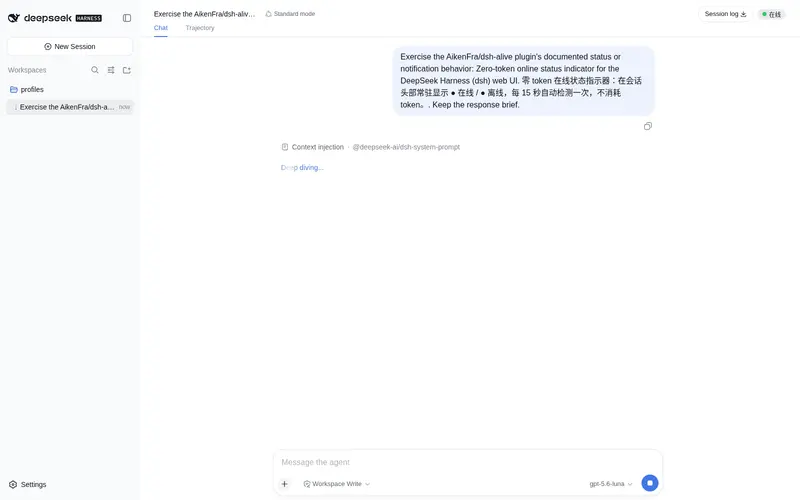
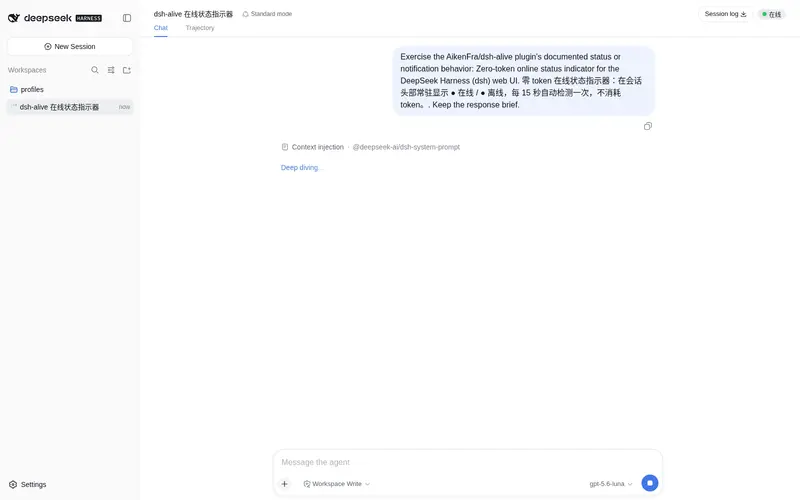
Zero-token online status indicator for the DeepSeek Harness web UI: an always-visible online/offline dot in the conversation header, auto-refreshed every 15 seconds with no LLM calls.
Listed
0
Ui
Bundle verified
Preview
What it does
Zero-token online status indicator for the DeepSeek Harness web UI: an always-visible online/offline dot in the conversation header, auto-refreshed every 15 seconds with no LLM calls.
Best for
- DSH Web users who want an always-visible indication that the local service is responding.
- Users who need lightweight availability feedback without spending model tokens or making LLM calls.
- Workflows where automatic recovery from offline to online should be visible without a manual refresh.
Not ideal for
- Infrastructure monitoring that needs remote probes, historical uptime, alert delivery, or diagnostics beyond a local HTTP heartbeat.
- Non-Web profiles or DSH client versions incompatible with the required header slot and webServer injection.
- Workflows requiring sub-15-second outage detection; polling occurs every 15 seconds.
README
dsh-alive · 零 token 在线状态指示器




A zero-token online status indicator for the DeepSeek Harness (dsh) web UI. 为 DeepSeek Harness (dsh) Web 界面提供零 token 消耗的在线状态指示器。
在会话窗口右上角常驻显示 ● 在线 / ● 离线 状态点,每 15 秒自动检测一次。完全不调用 LLM,零 token 消耗——只是浏览器对本地服务做一次进程内的 HTTP 心跳。
An always-visible ● Online / ● Offline indicator in the conversation header, auto-refreshed every 15 seconds. It costs zero tokens — the browser simply polls a process-local HTTP endpoint.
功能 / Features
- ✅ 会话头部右上角常驻状态点(绿色 = 在线,红色 = 离线,黄色 = 检测中)
- ✅ 每 15 秒自动检测,无需手动刷新
- ✅ 零 token 消耗:纯进程内 ping,不调用任何 LLM
- ✅ 开箱即用,无需任何配置
- ✅ 服务挂了立刻变红点,恢复后自动变回绿点
截图 / Screenshots
| **● 在线(绿色) | ● 离线(红色)** — 会话窗口右上角常驻显示: |
| 在线 / Online | 离线 / Offline |
|---|---|
 |
 |
工作原理 / How it works
浏览器页面 --(每 15s fetch)--> GET /dsh-alive/ping --> dsh 服务进程(直接应答)
                              | 零 LLM 调用,零 token
-
后端:注册一个进程内 HTTP 端点
GET /dsh-alive/ping,立即返回{"ok":true},不经过任何模型。 -
前端:通过 dsh 的 slot 系统注入一个小组件到
conversation.session.header.utilities,用setInterval每 15 秒轮询一次 ping 端点,根据响应更新状态点。
安装 / Install
需要已安装 DeepSeek Harness(
dsh)。适用于webprofile。
# 装进 web profile(npm 发布后)
dsh plugin --profile web add dsh-alive

# 重启服务
dsh web
重启后打开页面,按 Ctrl+F5 强制刷新,右上角即可看到状态点。
本地/手动安装(未发布时)
把本仓库放到 ~/.dsh/profiles/web/dsh-alive,然后:
- 在
~/.dsh/profiles/web/package.json的dependencies加"dsh-alive": "file:./dsh-alive" - 在
dsh.profile.bundles列表追加"dsh-alive" - 重启
dsh web并硬刷新页面
卸载 / Uninstall
dsh plugin --profile web remove dsh-alive
dsh web
兼容性 / Compatibility
- 测试于
dsh 0.1.0-rc.6(webprofile) - 依赖 dsh 的 slot 系统(
conversation.session.header.utilities)与webServer服务注入,要求 dsh web 客户端框架版本匹配
开发 / Development
dsh-alive/
├── package.json        # 插件清单(dsh.bundle / dsh.client)
├── cordis.patch.yml    # bundle 挂载声明
├── dsh/
│   └── index.js        # 后端:/dsh-alive/ping 进程内端点
└── client/
    └── client.js       # 前端:状态点组件 + 15s 轮询
License
Frequently Asked QuestionsFAQ
Use the verified command dsh plugin --profile default add github:AikenFra/dsh-alive in a DSH-enabled shell. The command resolves the public package metadata and keeps the plugin attached to the catalog identity shown on this page.
Compatibility follows the bundle and profile status shown above. If a profile is not detected, keep the plugin disabled there and check the repository documentation before enabling it in production.
The GitHub link and activity metadata are the source of truth for releases and maintenance. Revisit this page after a new release to confirm the catalog has observed the latest version.