AKS1st/dsh-skill-manager
DSH web plugin: a Skill Manager page in the settings panel browsing system / user / workspace / preset skills, with file-tree editing, zip import/export, and delete (system skills read-only).
Listed
1
Dev
Bundle verified
Preview
What it does
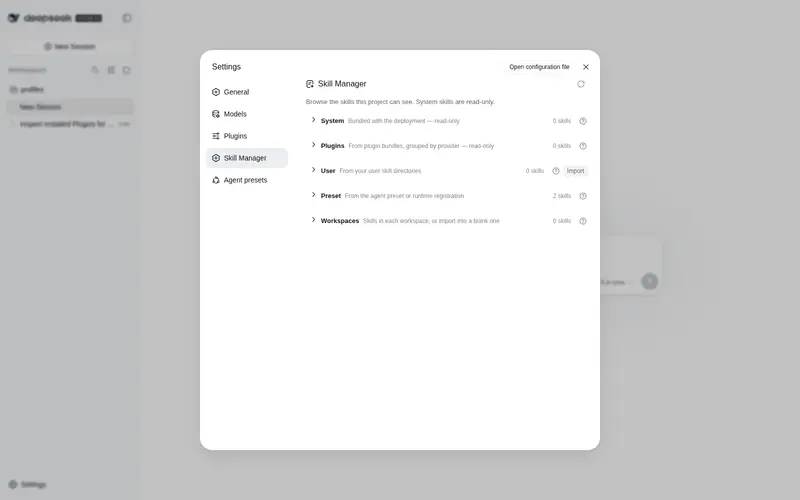
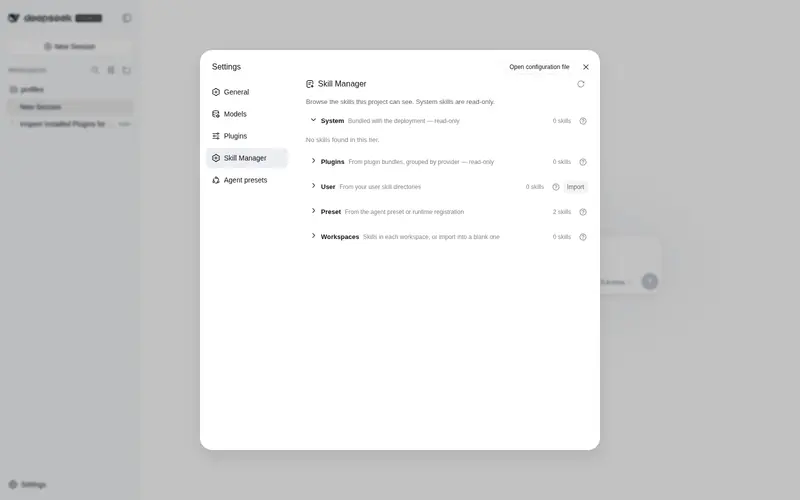
Skill Manager page in the DSH settings panel: browse system / user / workspace / preset skills, expand a skill to its file tree, view and edit files, import skills from a zip, and export or delete them (system skills read-only).
Best for
- DSH administrators who want to browse and manage user and workspace skills through the Web settings panel.
- Users who need file-tree inspection and direct editing without manually navigating skill directories.
- Teams that exchange skills as zip files and need browser-based import or export across workspaces.
Not ideal for
- Editing or deleting bundled system and preset skills; those tiers are read-only.
- Automated or model-driven skill maintenance; file changes are initiated by the user through the browser UI.
- Import workflows using formats other than zip packages.
README
dsh-skill-manager

A DSH web plugin that adds a Skills page to the settings panel (opened from the sidebar-foot Settings trigger). It shows every skill the deployment can see, grouped into system / user / workspaces / preset tiers, and lets you manage them without touching the filesystem by hand:
- Browse — expand a skill to its directory file tree; system (bundled) skills are read-only, user and workspace skills are fully manageable.
- Edit — click a file to open a view/edit window and modify the skill’s content directly.
- Import — upload a zip package to install skills into your user skills directory or any workspace (blank workspaces included, sorted last).
- Export — download any skill as a zip, read-only ones included.
- Delete — remove writable skills with a two-step confirmation.
Screenshots
The Skills page inside the settings panel:

The file editor window (click a file to open it):

Install
dsh plugin --profile web add https://github.com/AKS1st/dsh-skill-manager
dsh web   # restart the web service for the profile change to take effect
Installs straight from the GitHub repository (pnpm git-source install).
How it works
The plugin has two parts that work together:
-
Server side (runs inside the dsh service,
src/index.ts): reads the skills dsh already knows about and serves them to the page, and handles the file operations the page triggers — listing a skill’s files, reading or saving a file, importing a zip, exporting a skill, and deleting a skill. Write and delete are only allowed for user and workspace skills; system skills (the ones dsh ships with) and preset-provided skills are read-only. -
Browser side (the settings page,
src/client/): shows the catalog grouped into system / user / workspaces / preset sections. Workspaces and presets appear as collapsible groups (blank workspaces included, sorted last, as import targets). Clicking a skill expands its file tree; clicking a file opens an editor. The user section and every workspace heading have an Import button (zip upload); every skill row has Export (downloads a zip); writable rows also have Delete (two-step confirm). All styling uses dsh’s theme tokens, so the page follows light/dark mode.
Everything is additive — no changes to dsh itself are needed.
Model Experience
- Token effects: the plugin adds no model-visible tokens. The page is a user-facing browser UI; it only reads the same skill catalog the model already sees, and file edits are user-initiated, not model actions.
- KV-cache: none.
Development
pnpm run check   # tsc --noEmit
pnpm run build   # tsc + tsdown (lib/index.js, lib/client.js, lib/invariant.js)
pnpm run test    # vitest
The @deepseek-ai/* packages are declared as devDependencies; at runtime they
resolve from the dsh installation that loads the plugin. The client-bundle
build scaffold (tsdown.client.ts + build/web/src/platform.ts) is a
check-in snapshot of the harness’s shared preset so the repo builds standalone.
Frequently Asked QuestionsFAQ
Use the verified command dsh plugin --profile default add github:AKS1st/dsh-skill-manager in a DSH-enabled shell. The command resolves the public package metadata and keeps the plugin attached to the catalog identity shown on this page.
Compatibility follows the bundle and profile status shown above. If a profile is not detected, keep the plugin disabled there and check the repository documentation before enabling it in production.
The GitHub link and activity metadata are the source of truth for releases and maintenance. Revisit this page after a new release to confirm the catalog has observed the latest version.