Anionex/dsh-vision-toolkit
[dsh]为纯文本模型设计更强大的视觉工具箱:安装免费使用、粘贴图片直接识别、多张图片问答、截图到前端UI 还原等|DeepSeek Harness-native integration for agent-vision-toolkit: image Q&A, long-screenshot OCR, UI restoration, grounding, pixel diff, Artifacts, and Web UI.
Listed
659
Vision
Bundle verified
Preview
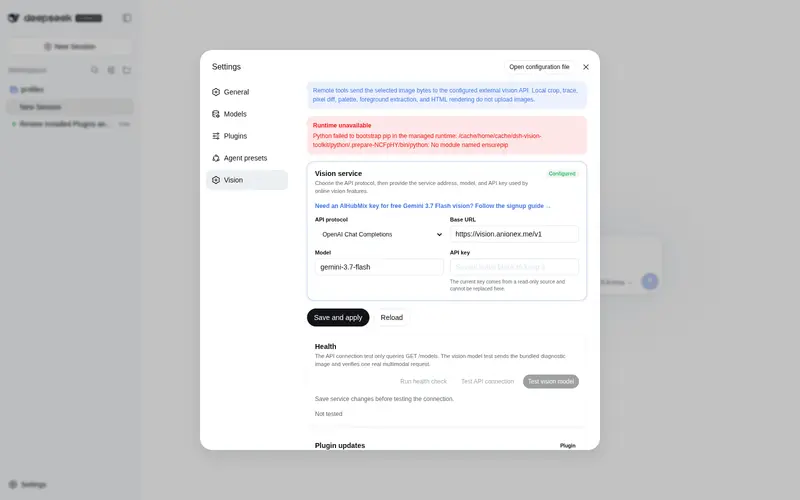
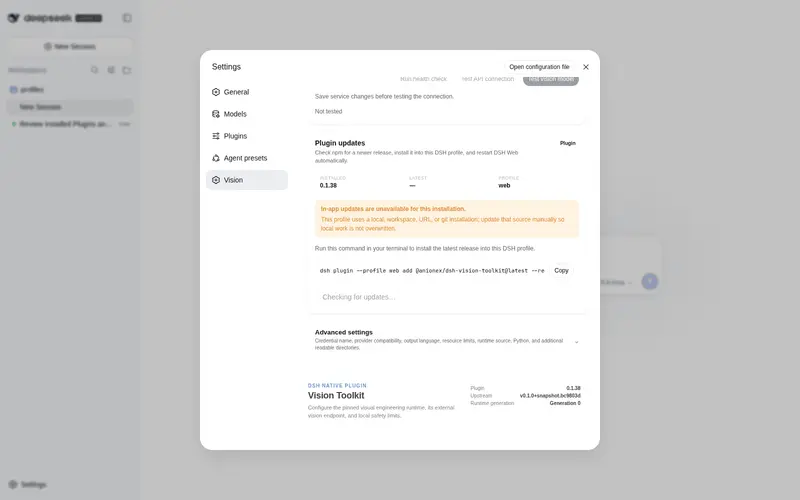
What it does
Vision tasks for text-only models: intent-aware image Q&A, long-screenshot OCR, UI reproduction, grounding, and pixel diff.
Best for
- Text-only DSH models that need task-focused answers about one or multiple images.
- Workflows involving long-screenshot OCR, visual grounding, cropping, tracing, or locating UI elements.
- Frontend reproduction and visual verification workflows that need UI restoration or pixel comparison.
Not ideal for
- Purely textual workflows that do not need image understanding or visual verification.
- Sustained use beyond the documented built-in free quota of 100 images per machine per day, unless another suitable service configuration is available.
- Workflows that specifically require the base text model itself to have native multimodal capabilities rather than using external visual tools.
README

DSH Vision Toolkit






A more powerful vision toolkit—give text-only models in DeepSeek Harness eyes: image Q&A, long-screenshot OCR, UI restoration, and GUI visual tasks in one toolkit and Skill.
| 🚀 Paste an image and ask directly | Install with one command | Built-in free vision | Broad use cases |
| Highlights | Quick start | Toolbox | Configuration and limits | Troubleshooting | Community |
| 🌐 English | 中文 |
🏆 This project is the first comprehensive vision-tool plugin in the DeepSeek Harness ecosystem: it was initiated before internal beta and built during the beta with reference to agent-vision-toolkit.
Original work: The system and division of responsibilities behind these visual tools, together with the
vision-skillsSkill, were personally created and continuously refined by the author through long-term real-world use and repeated iteration.
If this project helps you or gives you some inspiration, feel free to star 🌟 & fork.
Highlights
-
Paste an image and ask directly. In DSH Web, pasting an image switches the text-only model to its
(Vision Toolkit)variant automatically — no manual path copying or model changes. Native thumbnails, session history, and workspace paths stay intact; Web can preview artifacts. - One command to install. The built-in free Gemini 3.7 Flash vision service is ready after installation, with no API key required.
- Built-in free vision quota. The shared service works immediately after installation with a quota of 100 images per machine per day.
- Not just a caption — the content that matters. The model does not produce a generic description; it extracts evidence around the current task, such as “Where is the error?” or “Where is the button?”.
- A battle-tested visual-task methodology. The bundled Skill tells the agent what to look at for different visual tasks, which tool to choose, how to proceed, and how to verify the result.
agent-vision-toolkit gives an agent more than image captions: it can read, locate, crop, trace, rebuild, and verify visual work. DSH Vision Toolkit is its native DeepSeek Harness integration, bringing that workflow into Web and Headless Profiles.
This project has two layers:
- Visual tools and a Skill: the agent learns when to inspect, ground, OCR, crop, trace, or compare pixels.
- Native DSH integration: those capabilities live inside Profiles, sessions, Settings, Artifacts, and the Web UI, with a free Gemini 3.7 Flash vision service ready after installation.
Install and use it immediately. The default setup includes a free Gemini 3.7 Flash vision service and requires no API key.
dsh plugin --profile web add @anionex/dsh-vision-toolkit
Upstream toolkit: Anionex/agent-vision-toolkit · Project website: agent-vision.anionex.me
❤️ Sponsor
Want to sponsor this project? See FUNDING.md or email davidyang042@gmail.com.
Frequently Asked QuestionsFAQ
Use the verified command dsh plugin --profile default add github:Anionex/dsh-vision-toolkit in a DSH-enabled shell. The command resolves the public package metadata and keeps the plugin attached to the catalog identity shown on this page.
Compatibility follows the bundle and profile status shown above. If a profile is not detected, keep the plugin disabled there and check the repository documentation before enabling it in production.
The GitHub link and activity metadata are the source of truth for releases and maintenance. Revisit this page after a new release to confirm the catalog has observed the latest version.