anweat/dsh-browser
Self-contained browser runtime plugin for DeepSeek Harness — bundles Playwright (chromium) and OpenCLI as plugin-local dependencies, exposes a browser service and interactive browser tools.
Listed
5
Browser
Bundle verified
Preview
What it does
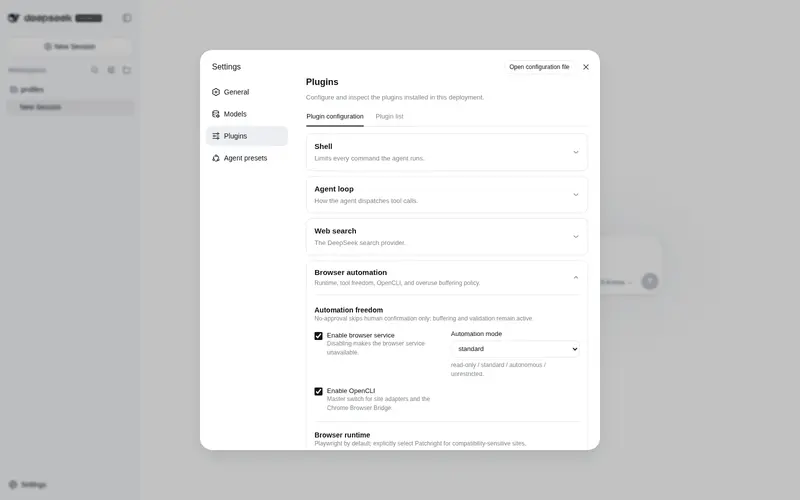
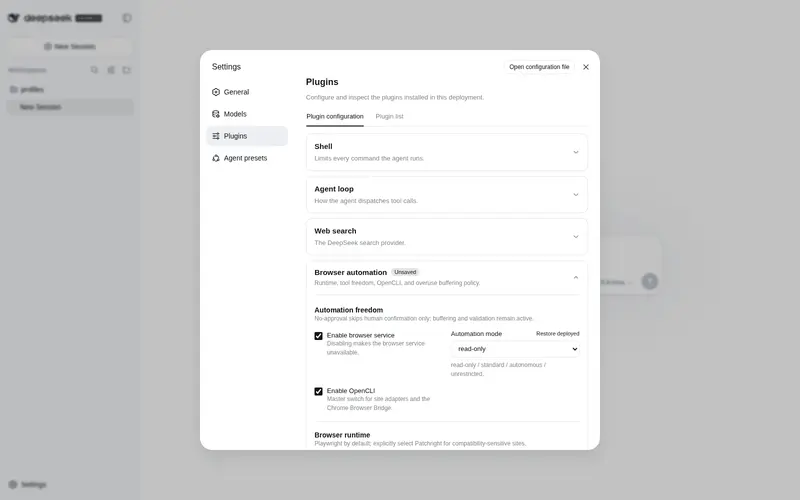
Self-contained browser runtime: Playwright (chromium) + OpenCLI as plugin-local dependencies (global reuse fallback), exposes a `browser` service and 9 interactive browser tools.
Best for
- DSH plugins that need an injectable browser service backed by Playwright and OpenCLI.
- Agents that need persistent-page interaction such as opening, clicking, typing, scrolling, reading, and taking full-page screenshots.
- Deployments that want plugin-local browser drivers with fallback to globally installed packages.
Not ideal for
- Workflows that only need simple HTTP retrieval and gain little from a persistent interactive browser runtime.
- Machines that cannot provide or install the shared Playwright Chromium cache, documented at roughly 400 MB.
- Social-platform OpenCLI workflows without the required browser extension and authenticated browser state.
README
dsh-browser
自包含的浏览器运行时插件 for DeepSeek Harness(DSH)。
把 Playwright(chromium 内核) 与 OpenCLI 作为插件自身的 npm 依赖打包(优先插件本地,缺省回退全局复用),对外提供一个 browser 服务 + 一组交互式浏览器工具。dsh-web-search-pro 通过 inject: ['browser'] 注入该服务,驱动它的 playwright / opencli 后端——不再依赖全局 CLI。
安装
dsh plugin --profile web add @anweat/dsh-browser
# 或本地目录 / tarball:
dsh plugin --profile web add ./dsh-browser
# 重启(web profile 关闭了 HMR):
dsh --profile web
依赖
@deepseek-ai/*已发布到 npm(^0.1.0-rc.6)。 若你的 harness 是本地源码 checkout(如0.1.0-rc.5),版本号可能有出入——用dsh plugin --profile web add ./<path>并在 profile 的pnpm-workspace.yaml里对齐版本后重装即可。
内核与依赖的”打包 vs 复用”
| 层 | 实际是什么 | 打包还是复用 |
|---|---|---|
| chromium 内核 | 共享缓存 %LOCALAPPDATA%\ms-playwright(约 400MB) |
永远复用共享缓存,不塞进插件、不重复下载;缺失时 browser_install 一键补 |
| playwright 驱动(JS 包) |
playwright npm 依赖 |
插件本地 node_modules 优先,缺省回退全局 npm |
| opencli(纯 Node CLI) |
@jackwener/opencli npm 依赖 |
同上,本地优先 / 全局复用 |
服务:browser
dsh-browser 在 apply() 里 ctx.provide('browser', service)。任何插件声明
inject: ['browser'] 即可消费:
export const inject = ['tools', 'browser']
export function apply(ctx: Context) {
  const browser = ctx.get('browser') as BrowserService
  // browser.render / snapshot / searchResults / opencli / open / click / type / scroll / read / screenshot / close
}
服务接口(结构性,无需共享类型包)见 src/browser-service.ts。
工具(9 个)
| 工具 | 作用 |
|---|---|
browser_open |
打开 URL,返回标题/可读文本/全页截图路径(持久页会话) |
browser_click |
按 CSS 选择器点击 |
browser_type |
向 input/textarea 输入 |
browser_scroll |
纵向滚动(触发懒加载) |
browser_read |
读当前页 URL/标题/文本(不截图) |
browser_screenshot |
当前页全页截图 |
browser_close |
关闭当前页(下次 open 全新) |
browser_status |
运行时状态(channel/headless/chromium 是否就绪/opencli 是否启用/当前页) |
browser_install |
安装 playwright chromium(browser_status 报缺失时执行一次) |
配置(cordis.yml / patch config)
- insert:
    - id: browser
      name: '@anweat/dsh-browser'
      config:
        channel: chromium        # 'chromium'(打包内核)| 'msedge'(系统 Edge)
        headless: true
        opencliEnabled: true
        storageStatePath: ''     # Playwright 登录态 JSON(复用已登录会话)
        autoInstall: false       # 缺内核时是否自动 install chromium
        verbose: false
登录态复用
-
channel: chromium+storageStatePath指向一份 storageState JSON,即可用你已登录的身份抓受限页面。 - 生成登录态:
npx playwright codegen --save-storage=storageState.json(或复用dsh-web-search-pro的scripts/save-login.mjs),把产物路径填进storageStatePath。 - opencli 的社交平台后端(小红书/推特/Reddit/IG/FB)仍需浏览器扩展 + 登录态在线,即使 opencli 已打包为依赖也绕不开扩展。
发布 / 构建
pnpm install          # 装依赖(playwright / opencli / @deepseek-ai/*)
pnpm run build        # tsc → lib/
node scripts/install-browser.mjs   # 安装 chromium 内核(发布前验证,可选)
与 dsh-web-search-pro 的关系
dsh-web-search-pro 现在 inject: ['browser'],其 web_snapshot / web_fetch_pro(playwright 后端) /
web_platform_search(中文社区 playwright + 社交平台 opencli) 全部走本插件的 browser 服务。
两者可独立安装,但 web-search-pro 的浏览器类能力依赖 dsh-browser 先行提供 browser 服务(Cordis inject 自动排序,无需手动控制挂载顺序)。
Frequently Asked QuestionsFAQ
Use the verified command dsh plugin --profile default add github:anweat/dsh-browser in a DSH-enabled shell. The command resolves the public package metadata and keeps the plugin attached to the catalog identity shown on this page.
Compatibility follows the bundle and profile status shown above. If a profile is not detected, keep the plugin disabled there and check the repository documentation before enabling it in production.
The GitHub link and activity metadata are the source of truth for releases and maintenance. Revisit this page after a new release to confirm the catalog has observed the latest version.