anweat/dsh-voice-webspeech
Browser Web Speech API voice input: zero server, zero keys, zero model downloads (Edge=Azure, Chrome=Google speech).
Listed
1
Voice
Bundle verified
Preview
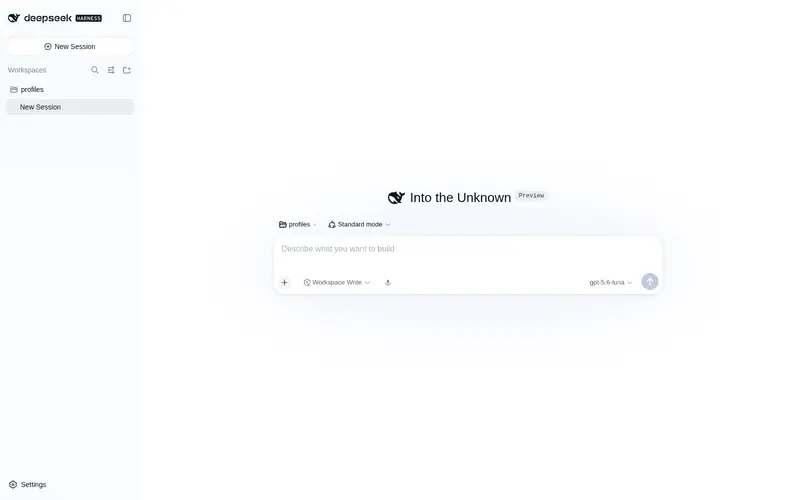
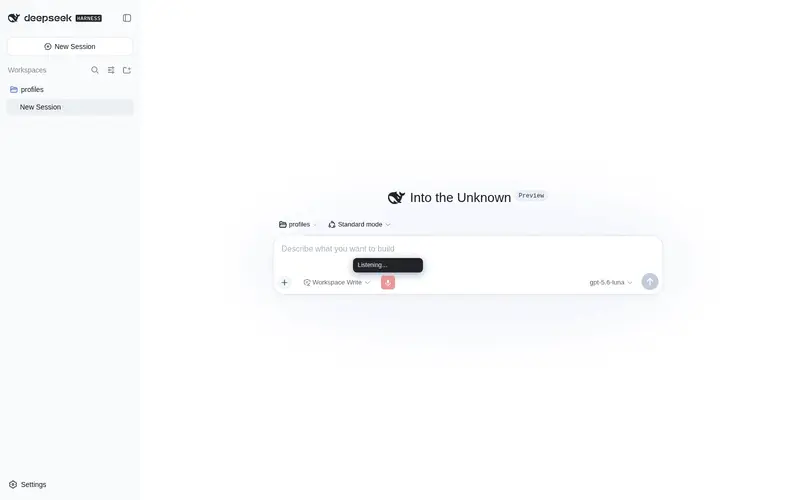
What it does
Browser Web Speech API voice input: zero server, zero keys, zero model downloads (Edge=Azure, Chrome=Google speech).
Best for
- Edge or Chrome users who want push-to-talk dictation directly in the DSH Web composer.
- Users who prefer browser-provided speech recognition without running a server, managing API keys, or downloading local models.
- Multilingual voice-input workflows that need editable transcription, appended text, or optional send-on-release behavior.
Not ideal for
- Firefox or Safari users, because the documented implementation requires Edge or Chrome Web Speech API support.
- Offline or local-only speech workflows; audio is processed by the browser's Azure or Google speech service rather than a local model.
- Hosts outside the documented DSH >=0.1.0-rc.3 <0.2.0 and Node.js ^22.19.0 or >=24 compatibility ranges, or users unable to grant microphone permission.
README
dsh-voice-webspeech



DSH Web GUI 的纯浏览器语音输入插件:零服务端、零 API Key、零模型下载、零 Python。 按住输入框旁的麦克风按钮说话,松手即把语音转成文字——转写完全由浏览器内置语音识别 (Web Speech API)完成:
| 浏览器 | 实际语音服务 |
|---|---|
| Microsoft Edge | 微软 Azure 语音 |
| Google Chrome | Google/Chrome 语音 |
与社区里
dsh-voice-funasr的差异:后者以本地 FunASR 引擎为主(需安装 Python + 下载 ~520MB 模型),浏览器识别只是回退路径。本插件只做”浏览器内置识别”这一件事, 安装即用,适合不想要本地引擎开销的用户。
特性
- 按住说话 / 松手转文字:按住麦克风按钮开始聆听,松手停止;期间连续短句自动累积。
- 实时反馈:聆听时按钮上方悬浮显示”正在聆听… + 实时识别文字”(可关闭)。
-
两种落字方式(设置里切换):
- 默认”转进输入框”:识别结果写入 composer,可编辑后再发送;支持追加到已有文字。
- “松手自动发送”:识别完成直接发送(免提)。
- 多语言:中文普通话/粤语/繁体、英/日/韩/法/德/西/俄等(BCP-47)。
- 隐私:音频直接交给浏览器语音服务,不经过任何 DSH 服务端、不落盘。
兼容性
- DSH:
>=0.1.0-rc.3 <0.2.0(Profile Bundle + 嵌套dsh.client契约) - Node.js:
^22.19.0 || >=24.0.0 - 浏览器:需 Edge 或 Chrome(Web Speech API);Firefox/Safari 不支持
- 麦克风:浏览器需获得麦克风权限(首次使用会在地址栏请求授权)
安装
插件为 out-of-tree client bundle(dsh.client + dsh.bundle.patch)。
仓库已提交构建产物 lib/,git 安装无需再 build。
方式 A:从 GitHub 安装(推荐)
pnpm dsh plugin --profile web add github:anweat/dsh-voice-webspeech
若 pnpm ≥10 提示需要 allowBuilds(因
prepare),把打印的包键写进 profile 的pnpm-workspace.yaml后重跑;本仓库已提交lib/,通常不会触发。建议固定到提交:github:anweat/dsh-voice-webspeech#<sha>。
方式 B:本地 checkout 开发链接
cd D:/codeproject/dsh-voice-webspeech
pnpm dsh plugin --profile web add .
方式 C:打包 tgz 安装
cd D:/codeproject/dsh-voice-webspeech
pnpm run build
pnpm pack    # 产出 dsh-voice-webspeech-0.1.0.tgz
pnpm dsh plugin --profile web add ./dsh-voice-webspeech-0.1.0.tgz
激活:重启 dsh web(pnpm dsh web)。插件的 dsh.bundle.patch 会把它自动挂进
插件树,客户端 bundle 由 dsh.client 声明 + exports["./client"] 自动加载。
不要手工把本插件插进 profile 的 cordis.patch.yml,否则同一 loader id 会重复。
使用
- 输入框工具行左侧出现麦克风按钮:按住说话,松手转文字。
- 默认把文字写进输入框(追加到已有文字后);可在 设置 → 语音输入(Web Speech) 改为 “松手自动发送”。
- 聆听时按钮变红并脉动;识别中的文字实时显示在按钮上方。
设置(设置 → 语音输入(Web Speech))
| 项 | 默认 | 说明 |
|---|---|---|
| 识别语言 | zh-CN | 普通话/粤语/繁体/英/日/韩/法/德/西/俄 |
| 松手自动发送 | 关 | 开启后按住说话、松手直接发送 |
| 追加到已有文字 | 开 | 关闭则每次识别替换输入框内容 |
| 显示实时识别 | 开 | 聆听时实时显示识别中的文字 |
隐私与卸载
- 音频只交给浏览器语音服务(Edge=Azure、Chrome=Google),不经过 DSH 服务端、不落盘、无遥测。
- 卸载:
pnpm dsh plugin --profile web remove dsh-voice-webspeech(或从 profile 依赖里删掉再pnpm install)。
开发
pnpm install
pnpm run dev:link-dsh -- --source D:/codeproject/deepseek-harness   # 可选:从源码链接 @deepseek-ai 类型
pnpm run build
pnpm run typecheck
- host 半:
src/index.ts(空apply,仅让插件出现在宿主插件树) - 客户端:
src/client/(tsdown →lib/client.js,__ModuleLoader__注册) - 识别:
src/client/webspeech.ts(Web Speech API 封装:continuous + interim + abort) -
@deepseek-ai/*是 peer 依赖(optional),构建时外部化,运行时由 DSH 提供。
路线图
- v0.1:按住说话 + 连续听写 + 追加/自动发送 + 多语言 + 实时反馈 ✅
- 后续:本地 ASR 可选后端(SenseVoice/Whisper);TTS 语音朗读回复;快捷键按住
Frequently Asked QuestionsFAQ
Use the verified command dsh plugin --profile default add github:anweat/dsh-voice-webspeech in a DSH-enabled shell. The command resolves the public package metadata and keeps the plugin attached to the catalog identity shown on this page.
Compatibility follows the bundle and profile status shown above. If a profile is not detected, keep the plugin disabled there and check the repository documentation before enabling it in production.
The GitHub link and activity metadata are the source of truth for releases and maintenance. Revisit this page after a new release to confirm the catalog has observed the latest version.