arrow949/dsh-turn-approval
Turn-scoped "Allow for this task" approvals for DeepSeek Harness.
Listed
2
Security
Bundle verified
Preview
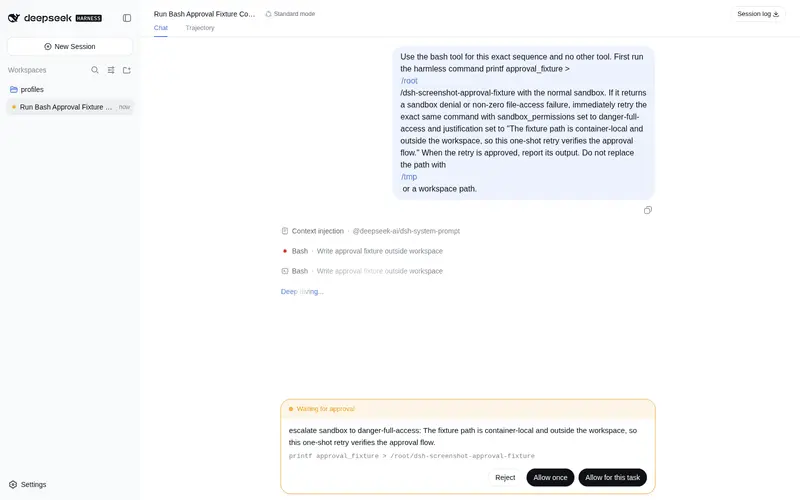
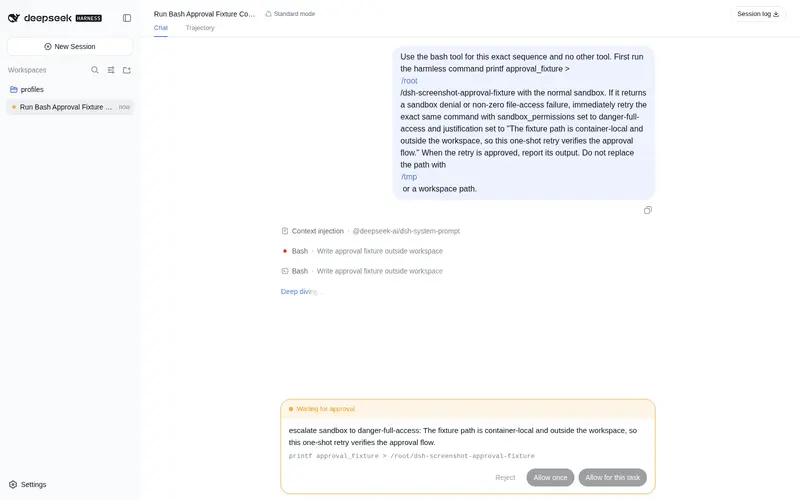
What it does
Turn-scoped “Allow for this task” approvals: automatically allow matching `danger-full-access` escalations only for the current task, then expire.
Best for
- DSH Web users who repeatedly approve matching danger-full-access escalations during one task.
- Security-conscious workflows that want less approval repetition without granting session-wide or persistent full access.
- Multi-session users who need grants isolated by session and turn with approval events retained.
Not ideal for
- Headless profiles, because they have no approval-card UI and the task-grant endpoint is not registered.
- Users who need authorization to persist across turns, process restarts, or released sessions.
- Approval types other than explicitly matching danger-full-access requests, which continue to require individual approval.
README
dsh-turn-approval · 任务级授权

| 中文 | English |
有些高风险操作值得你亲自点头,但同一个任务里,不该让你为同一件事反复点头。
dsh-turn-approval 为 DeepSeek Harness(DSH)Web 审批卡片增加 「允许本次任务」:当 Agent 请求 danger-full-access 时,你可以只授权当前任务余下时间内的同类升级。任务结束后,授权自动消失。

它做什么
默认的 DSH 权限保持 workspace-write + ask,不会被本插件改成全局高权限。
当 Agent 需要工作区外的高权限操作时,审批卡片会显示:
[拒绝] [允许一次] [允许本次任务]
- 拒绝:拒绝当前操作。
- 允许一次:只放行当前操作。
-
允许本次任务:在当前 turn 内,后续同类
danger-full-access请求自动放行;turn/end后立即失效。
安装
从 GitHub 安装
建议固定到一个 commit SHA,确保日后仓库更新不会静默改变本机运行的代码:
dsh plugin --profile web add github:arrow949/dsh-turn-approval#<commit-sha>
插件为已提交构建产物的纯 ESM JavaScript;从 GitHub 安装时不需要 prepare 脚本或 pnpm allowBuilds 权限。
从本地目录安装
dsh plugin --profile web add ./dsh-turn-approval
安装后重启 DSH Web,并在浏览器中硬刷新(Ctrl+Shift+R)。出现第三个按钮即表示插件已加载。
使用
- 正常使用 DSH,平时仍是
workspace-write + ask。 - 当 Agent 请求
danger-full-access时,阅读审批原因与命令。 - 若你愿意在当前任务内继续授予同类高权限,点击「允许本次任务」。
- 当前任务结束后,下一条消息会重新逐项询问。
验证与卸载
查看当前 profile 是否挂载了插件层:
dsh --profile web --dump-config
卸载:
dsh plugin --profile web remove dsh-turn-approval
卸载后,Node half 与 client half 会一并移除,审批卡片自动回到 DSH 官方默认的两个按钮;不会遗留对官方文件的修改。
安全边界
- 仅内存:授权不写入磁盘;DSH 进程重启、插件卸载或 session/agent 被释放后失效(fail-closed)。
-
任务绑定:授权绑定
session + turn,不会把整个 session 切换为 full access。 - 不串权限:一个 session 的授权不影响另一个 session;子代理使用独立 session,不继承授权。
-
类型隔离:只自动放行明确匹配的
danger-full-access升级;workspace-write和其他审批仍逐一询问。 - 用户触发:grant 只能由审批卡片按钮建立,模型没有自行开启任务授权的入口。
- 可审计:自动放行仍保留完整的审批事件记录。
点击「允许本次任务」后,插件会先向宿主建立任务授权。若端点返回非 2xx 或网络请求失败,卡片会明确提示失败并保持可重试;它不会假装授权已建立,也不会静默降级为“允许一次”。
实现与兼容性
本包是官方定义的 DSH bundle:package.json 声明 dsh.bundle.patch,cordis.patch.yml 将插件加入 profile。client half 通过官方 conversation.composer chain 槽位,以更高优先级渲染审批卡片;不修改任何 DSH 官方 bundle 文件,卸载即还原。
当前外观复用官方 ApprovalPanel 的内部 CSS 类名。若未来 DSH 改动该组件结构或 CSS module 类名,本插件可能需要发布兼容更新;这不是修改官方文件。
仅支持 DSH Web:headless profile 没有 UI 入口,任务授权端点不会注册。
给 AI 助手的安装说明
在用户明确要求安装本插件后,执行:
dsh plugin --profile web add github:arrow949/dsh-turn-approval#<commit-sha>
dsh --profile web --dump-config
然后提示用户重启 DSH Web 并硬刷新浏览器。不要修改 DSH 官方 bundle 文件。卸载命令为:
dsh plugin --profile web remove dsh-turn-approval
开发与测试
pnpm install
pnpm test
当前测试覆盖 turn 与 session 隔离、类型隔离、端点防伪造、重启 fail-closed,以及 Cordis 集成链路。
License
MIT
Frequently Asked QuestionsFAQ
Use the verified command dsh plugin --profile default add github:arrow949/dsh-turn-approval in a DSH-enabled shell. The command resolves the public package metadata and keeps the plugin attached to the catalog identity shown on this page.
Compatibility follows the bundle and profile status shown above. If a profile is not detected, keep the plugin disabled there and check the repository documentation before enabling it in production.
The GitHub link and activity metadata are the source of truth for releases and maintenance. Revisit this page after a new release to confirm the catalog has observed the latest version.