asdf17128/dshp
Manage DeepSeek Harness profiles — list, create, clone, diff, and share a whole dsh setup as one portable file.
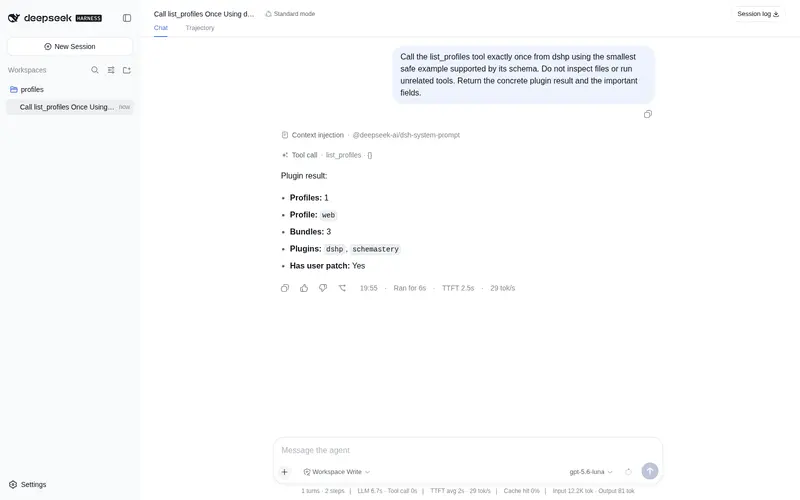
Listed
1
Dev
Bundle verified
Preview
What it does
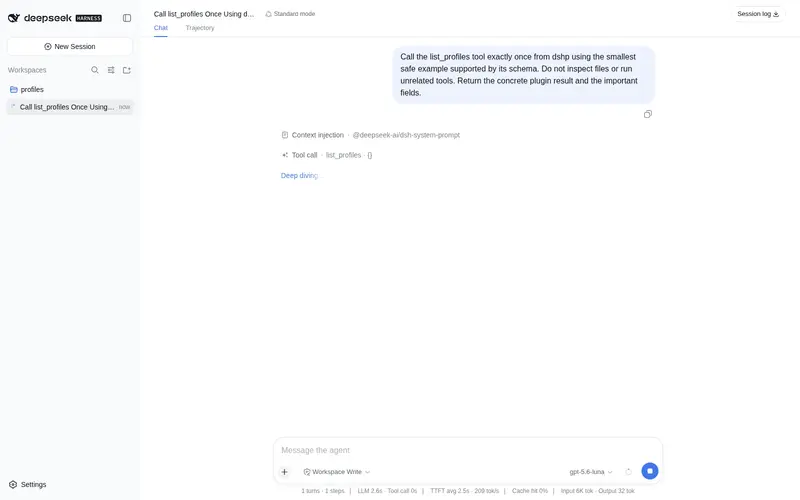
Registers `list_profiles` and `export_profile`, so the agent can show what setups exist and hand back a whole profile — bundle order, plugin versions and patch — as one portable file to share. Read-only.
Best for
- Agents that need to list available local DSH profiles during a conversation.
- Users who want a complete profile exported as one portable file containing bundle order, plugin versions, and the original patch.
- Teams sharing or archiving reproducible DSH setups without evaluating their configuration.
Not ideal for
- Users expecting the installed agent tools to create, clone, import, diff, or delete profiles; they expose only list_profiles and export_profile.
- Workflows that need to modify profiles from the conversation, because the plugin tools are read-only.
- Environments below Node 18 or with a profile layout incompatible with the documented DSH 0.1.0-rc.5 structure.
README
dshp
Share a whole DeepSeek Harness setup as one file.
| English | 中文 |
npx dshp ls
Why
dsh boots profiles and forwards installs to pnpm. It cannot create an empty profile, list the ones you have, copy a working setup before you experiment on it, or hand a setup to someone else — that is all manual work under ~/.dsh/profiles today.
Which matters, because “everything is a plugin” means your setup is a stack of layers, and the useful unit to share is the whole stack, not one plugin at a time.
Share a setup
dshp export web -o my-setup.dshp
# dsh profile — reproduce with: dshp import <this-file>
dshp: 1
name: web
bundles:
  - @deepseek-ai/dsh-base
  - @deepseek-ai/dsh-web-app
  - dsh-cloudflare-browser-run
plugins:
  dsh-cloudflare-browser-run: "^0.1.1"
patch: |
  - id: session-title
    config:
      fallbackMaxWords: 12
Short enough to paste into a forum post. On the other machine:
dshp import my-setup.dshp
That writes the profile, installs the plugins through dsh’s own pnpm, and you boot it with dsh --profile web. Verified end-to-end: a fresh $DSH_HOME reproduced a 132-entry tree identical to the original, patch included.
Experiment safely
dshp clone web web-试验田      # instant, keeps node_modules
dsh plugin --profile web-试验田 add some-experimental-plugin
dshp diff web web-试验田
web -> web-试验田

plugins
  + some-experimental-plugin@^0.2.0
If it goes wrong, dshp rm web-试验田 --yes. Your working profile was never touched.
Commands
dshp ls |
profiles, with bundle/plugin counts and disk size |
dshp show <name> |
bundles in load order, plugins, patch |
dshp new <name> [--web\|--headless] |
create a profile — dsh itself cannot make an empty one |
dshp clone <from> <to> |
copy a working setup, node_modules and all |
dshp export <name> [-o FILE] |
portable file (stdout by default) |
dshp import <file> [--as NAME] [--no-install] |
recreate a profile |
dshp diff <a> <b> |
what differs |
dshp rm <name> --yes |
delete |
What a profile actually is
Under $DSH_HOME/profiles/<name>:
-
package.json—dependenciesare the plugins,dsh.profile.bundlesis the ordered layer stack -
cordis.patch.yml— your own id-targeted overrides -
cordis.yml,pnpm-workspace.yaml— boilerplate, regenerated
So three things reproduce a setup: plugin versions, bundle order, and the patch. That is exactly what the portable file carries.
Bundle order is part of the format: it decides which layer patches which, so a reordering is reported by diff as a real difference.
The patch block is copied byte-for-byte rather than re-serialised, because it may hold !!js expressions (root: !!js dshHomePath('sessions')) that a YAML round-trip would mangle or evaluate. Nothing here ever evaluates your config.
Install and uninstall
As a CLI: npx dshp ls — nothing to install.
As a plugin:
dsh plugin --profile web add github:asdf17128/dshp   # install
dsh plugin --profile web remove dshp                 # uninstall
Removing it drops the list_profiles and export_profile tools. Your profiles
are untouched — the plugin only reads.
Compatibility
Verified against @deepseek-ai/dsh 0.1.0-rc.5. The profile layout it reads
(package.json with dsh.profile.bundles, cordis.patch.yml) is dsh’s own; a
change there is what would break it first.
Requirements
Node 18+. import needs a working dsh (local node_modules/.bin/dsh preferred, otherwise on PATH) because it installs through dsh’s own pnpm; every other command is pure filesystem work.
See also
dsh-doctor — checks a profile for patches that silently stopped applying.
License
MIT
Frequently Asked QuestionsFAQ
Use the verified command dsh plugin --profile default add github:asdf17128/dshp in a DSH-enabled shell. The command resolves the public package metadata and keeps the plugin attached to the catalog identity shown on this page.
Compatibility follows the bundle and profile status shown above. If a profile is not detected, keep the plugin disabled there and check the repository documentation before enabling it in production.
The GitHub link and activity metadata are the source of truth for releases and maintenance. Revisit this page after a new release to confirm the catalog has observed the latest version.