asukasec/dsh-message-preview
Right-side user-message navigator for the DeepSeek Harness Web UI.
Listed
5
Ui
Bundle verified
Preview
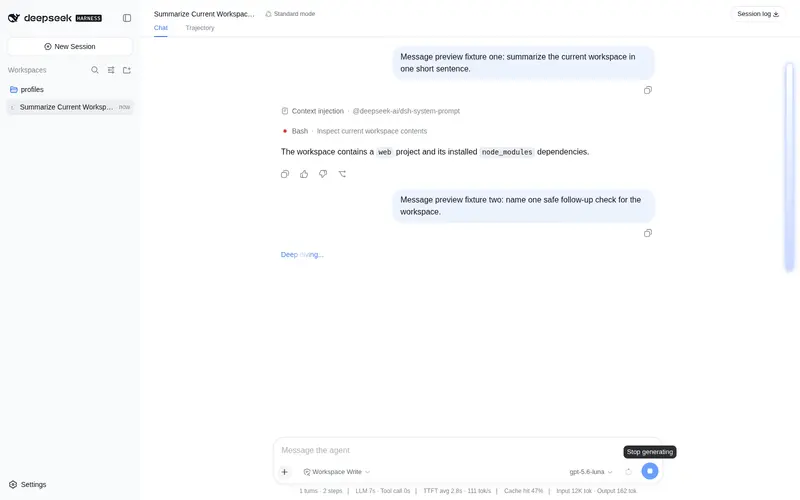
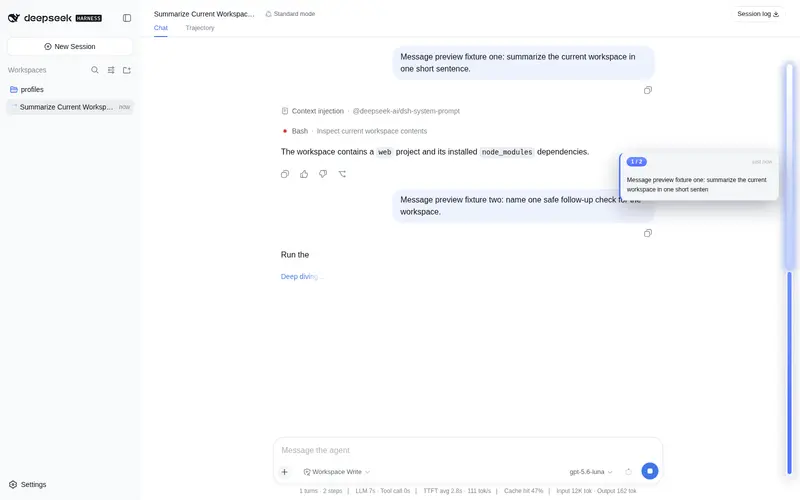
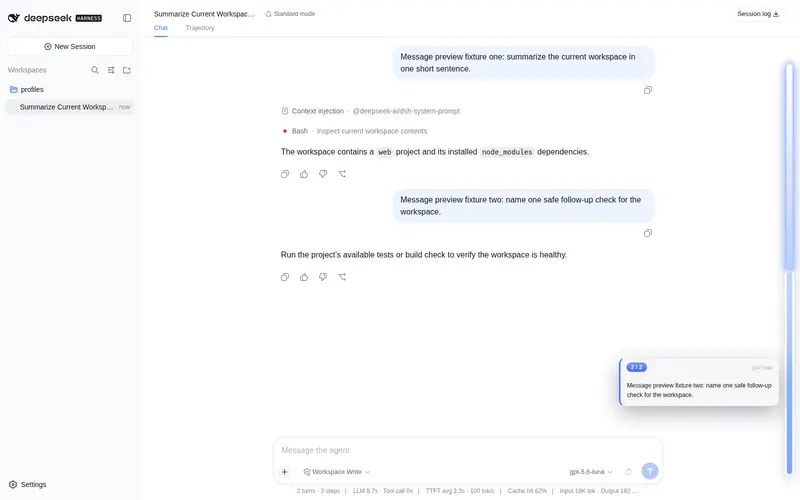
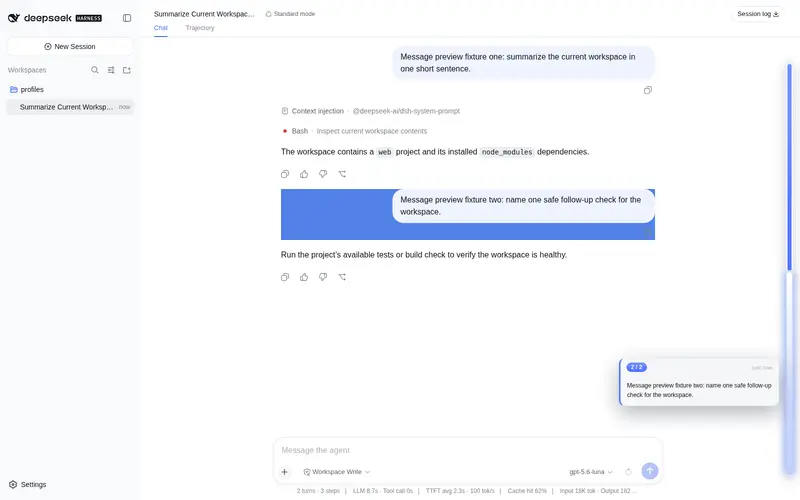
What it does
Right-edge user-message navigator with an adaptive block layout that fits the available height, plus hover previews, keyboard controls, and click-to-jump navigation.
Best for
- DSH Web users navigating long conversations with many user-authored messages.
- Readers who need hover previews, reading-position tracking, keyboard navigation, and click-to-jump access to earlier messages.
- Conversations where an adaptive right-edge index can make message history easier to scan.
Not ideal for
- Conversations with fewer than two user messages, where the navigator automatically hides.
- Headless profiles or non-chat views, because the feature depends on the DSH Web conversation UI.
- Deployments below DSH 0.1.0-rc.6 or Node.js 22.
README
dsh-message-preview


DeepSeek Harness Web UI 的右侧消息导航条。它为当前会话中的每条用户消息生成一个导航块,可悬停预览、显示当前阅读位置,并点击跳转到对应消息。
Right-side user-message navigator for the DeepSeek Harness Web UI, with hover previews, reading-position tracking, and click-to-jump navigation.
功能
- 只索引用户直接发送的消息,排除工具通知、后台任务和注入上下文。
- 当前阅读位置随会话滚动自动高亮。
- 悬停显示消息序号、相对时间和文本预览。
- 点击后自动加载较早的会话历史,平滑滚动并高亮目标消息。
- 导航块会根据消息数量和文本长度自适应排布;少于两条用户消息时自动隐藏。
- 默认仅显示当前位置指示,鼠标靠近会话右侧时展开完整导航条。
- 中英文界面文案随 DSH locale 自动切换。
安装
要求:
- DeepSeek Harness
0.1.0-rc.6或更高版本 - Node.js 22 或更高版本
从 GitHub 安装:
dsh plugin --profile web add "github:asukasec/dsh-message-preview#main"
安装完成后完整重启 Web UI:
dsh web
也可以克隆仓库后从本地目录安装:
git clone https://github.com/asukasec/dsh-message-preview.git
cd dsh-message-preview
dsh plugin --profile web add .
Windows 用户还可以在克隆后的目录中双击 install.cmd。该脚本会定位 DSH_HOME、复制插件,并以幂等方式更新指定 profile 的 cordis.patch.yml:
.\install.ps1 -Profile web -DshHome "D:\path\to\dsh-data"
使用
打开至少包含两条用户消息的会话。会话右侧会显示一枚当前位置指示;将鼠标移到右缘即可展开导航条。
- 悬停导航块:查看消息序号、发送时间和文本预览。
- 点击导航块:跳转到该条用户消息。
- 滚动会话:高亮块会跟随当前阅读位置。
- 键盘导航:按
Tab聚焦当前位置,使用↑/↓、Home/End选取消息,按Enter跳转。
插件没有设置项,安装后即可使用。
工作原理
插件由宿主端和浏览器端两部分组成:
| 部分 | 文件 | 作用 |
|---|---|---|
| 宿主端 | lib/index.js |
注册 dshMessagePreview 会话投影,维护用户消息的序号、时间、短预览和持久 ID。 |
| 浏览器端 | lib/client.js |
挂载到 conversation.input.dock,通过 React Portal 渲染导航条,并负责预览、滚动定位和历史补载。 |
| Bundle | cordis.patch.yml |
让 dsh plugin add 自动把插件加载到 Web profile。 |
数据按以下优先级获取:
- 宿主端
dshMessagePreview投影,提供完整且轻量的消息索引。 - 当前已加载的会话节点,用于首屏回退。
- 投影尚未就绪时,通过
loadOlder()补载更早的历史。
插件不会向第三方服务发送请求,也不会修改会话内容。消息预览只在本地 DSH 进程和浏览器之间传递,宿主端预览最多保留 80 个字符。
卸载
如果使用 dsh plugin 安装:
dsh plugin --profile web remove dsh-message-preview
如果使用 install.cmd / install.ps1 安装,请删除:
$DSH_HOME/profiles/node_modules/dsh-message-preview-
$DSH_HOME/profiles/web/cordis.patch.yml中id: message-preview对应的插入项
然后重启 dsh web。
故障排查
导航条没有出现
- 确认当前会话至少有两条用户消息。
- 确认正在 Chat 会话视图中;其他页签不会挂载聊天 DOM。
- 完整停止并重新启动
dsh web,仅刷新浏览器不足以加载宿主端插件。 - 检查目标 profile 的
cordis.patch.yml是否包含dsh-message-preview。
点击后没有跳转
目标消息可能尚未加载。插件会自动请求较早历史;超长会话可能需要稍等片刻。如果目标已被宿主永久移除或对应 DOM 锚点不可用,则不会执行跳转。
开发与检查
仓库提交的是可直接加载的构建产物,不需要安装开发依赖即可做语法检查:
npm run check
npm pack --dry-run
发布前还应在 DSH Web UI 中验证:导航条展开、鼠标与键盘预览、滚动高亮、较早消息补载和点击跳转。
License
Frequently Asked QuestionsFAQ
Use the verified command dsh plugin --profile default add github:asukasec/dsh-message-preview in a DSH-enabled shell. The command resolves the public package metadata and keeps the plugin attached to the catalog identity shown on this page.
Compatibility follows the bundle and profile status shown above. If a profile is not detected, keep the plugin disabled there and check the repository documentation before enabling it in production.
The GitHub link and activity metadata are the source of truth for releases and maintenance. Revisit this page after a new release to confirm the catalog has observed the latest version.