BeiZi6/dsh-opencodego-usage
DSH Web GUI plugin: OpenCodeGo quota breathing light + liquid-glass panel with rolling/weekly/monthly progress bars (作者 Xu Yuanshan)
Listed
5
Usage
Bundle verified
Preview
What it does
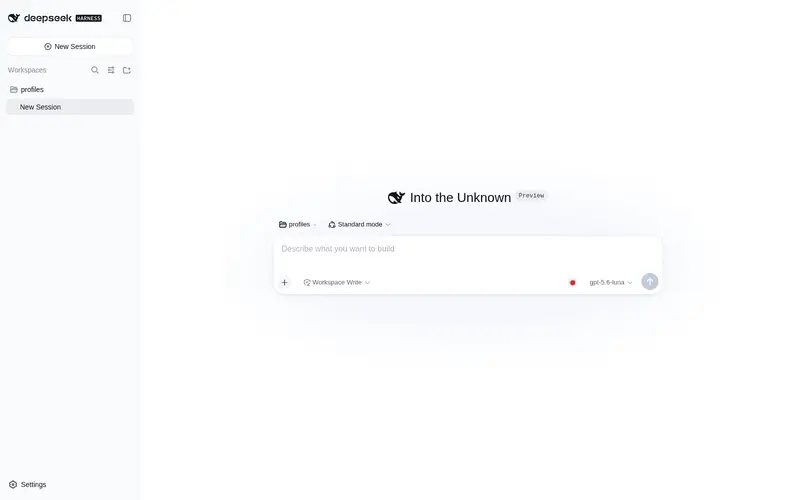
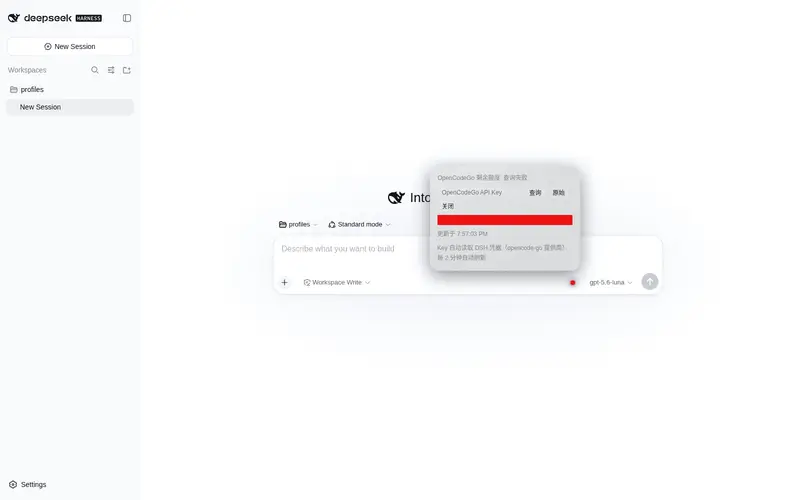
OpenCodeGo quota monitor for the DSH Web GUI: a breathing indicator at the input's bottom-right (green/yellow/red by remaining share), a liquid-glass panel with rolling/weekly/monthly usage windows and reset times, auto-refreshing every 30 s; API key read from DSH credentials.
Best for
- OpenCodeGo users who want at-a-glance remaining quota and reset times inside the DSH Web input area.
- Operators tracking rolling, weekly, and monthly quota windows without maintaining a separate dashboard.
Not ideal for
- Users of providers other than OpenCodeGo; automatic credential resolution is specific to the opencode-go provider.
- Offline or headless workflows; the monitor targets DSH Web and obtains quota data from the official OpenCodeGo HTTPS endpoint.
README
dsh-opencodego-usage
OpenCodeGo quota monitor for the DeepSeek Harness (DSH) Web GUI: a breathing indicator at the bottom-right of the input box shows your remaining quota at a glance; click it to open a liquid-glass panel with per-window progress bars and reset times.
Features
- 🟢🟡🔴 Breathing indicator — color-coded by remaining quota (>50% green, 20–50% yellow, <20% red) with a gentle 3.6 s breathing animation
- 📊 Three-window progress panel —
rolling(≈ last 5 h),weekly(≈ last 7 d) andmonthly(≈ last 30 d) bars with used · remaining amounts and a reset time for each window - 🔑 Zero-config key handling — reads your API key from DSH credentials automatically (only when the provider is
opencode-go); an in-panel override is available - 🪟 Liquid-glass panel — mouse-follow highlight, frosted blur and a window-style diagonal open animation
- ⏱ Auto-refresh — fetches fresh quota every 2 minutes
Installation
Requires DeepSeek Harness with the web profile enabled. Install from the official registry:
dsh plugin --profile web add github:BeiZi6/dsh-opencodego-usage
Restart dsh web for the plugin to take effect.
To remove:
dsh plugin --profile web remove dsh-opencodego-usage
Usage
-
The indicator sits at the bottom-right of the conversation input; its color reflects the lowest remaining share across the three windows:
Remaining share Color > 50% 🟢 green 20–50% 🟡 yellow < 20% 🔴 red - Click it to expand the panel:
-
rolling— quota used in roughly the last 5 hours -
weekly— quota used in roughly the last 7 days -
monthly— quota used in roughly the last 30 days
-
- Each window shows the used percentage, the remaining share and the exact reset time.
- A manual API key override can be entered in the panel for the current session; clearing it falls back to automatic resolution.
- Data refreshes automatically every 2 minutes.
API key resolution
The plugin looks for a key in this order:
- Manual override entered in the panel (kept in a small state file under
$DSH_HOME; the path can be moved with theOCG_STATE_PATHenvironment variable) - DSH credentials — only when the active provider is
opencode-go, the credential referenced byllm-pi-ai.providers.opencode-go.apiKeyEnvis resolved - Process environment
- The state file
The key is only ever sent to the official OpenCodeGo quota endpoint over HTTPS.
How it works
-
Host half (
index.js) — registers a same-origin route/opencodego-usageon the DSH web server. The route queries the official OpenCodeGo quota API (GET https://opencode.ai/zen/go/v1/usage, Bearer auth) and parses the window data:{ "usage": { "rolling": { "status": "ok", "percent": 86, "resetsAt": "…" }, "weekly": { "status": "ok", "percent": 34, "resetsAt": "…" }, "monthly": { "status": "ok", "percent": 17, "resetsAt": "…" } } }Older
used/limitnumeric pair shapes are tolerated as well. -
Client half (
client.js) — a web-shell module registered into theconversation.input.rightslot; it polls the same-origin route every 2 minutes and renders the indicator and the panel.
Known limitations
- The state file only stores a manually overridden key; deleting it never affects credential-based resolution.
- Quota values and reset times are reported by the OpenCodeGo API as-is — no local estimation.
Compatibility
- DeepSeek Harness Web GUI (
dsh web) - Node.js >= 22.19
- Peer dependencies:
@deepseek-ai/cordis(^4),@deepseek-ai/dsh-host-webserver(^0.1.0-rc.6)
License
MIT © Xu Yuanshan
Links
- Repository: https://github.com/BeiZi6/dsh-opencodego-usage
- Issues: https://github.com/BeiZi6/dsh-opencodego-usage/issues
中文简介
为 DSH Web GUI 打造的 OpenCodeGo 剩余额度监控插件:输入框右下角呼吸灯(>50% 绿 / 20–50% 黄 / <20% 红,3.6 秒慢呼吸),点击展开液态玻璃面板——近 5 小时 / 近 7 天 / 近 30 天三窗口进度条与重置时间,每 2 分钟自动刷新;API Key 自动读取 DSH 凭据(仅限 opencode-go 提供商),也可在面板内手动覆盖。
Frequently Asked QuestionsFAQ
Use the verified command dsh plugin --profile default add github:BeiZi6/dsh-opencodego-usage in a DSH-enabled shell. The command resolves the public package metadata and keeps the plugin attached to the catalog identity shown on this page.
Compatibility follows the bundle and profile status shown above. If a profile is not detected, keep the plugin disabled there and check the repository documentation before enabling it in production.
The GitHub link and activity metadata are the source of truth for releases and maintenance. Revisit this page after a new release to confirm the catalog has observed the latest version.