BiBoyang/dsh-im-bridge
DSH 插件:把 DeepSeek Harness 桥接到 IM(v0.1 微信/iLink;钉钉/飞书/Telegram 预留)。turn/approval 推送 + 远程批准/注入,持久去重/收敛分段/合并窗口。
Listed
7
Notify
Bundle verified
Preview
What it does
Two-way WeChat (iLink) bridge: turn-end and approval-request push, in-chat approve/reject and message injection, persistent dedup and convergent long-reply chunking; channel layer extensible to other IMs.
Best for
- Individuals who want to monitor long-running DSH work and respond from WeChat.
- Workflows that need turn-end or approval notifications plus in-chat approve, reject, and message injection.
- WeChat users who benefit from persistent deduplication, merged multi-message input, and reliable long-reply chunking.
Not ideal for
- Teams needing multiple authorized chat users; the documented channel uses a single-user allowlist.
- DingTalk, Feishu, or Telegram deployments today; those channels are reserved by the architecture but not implemented in the described release.
- Workflows that expect chat messages to execute arbitrary shell commands directly; incoming messages are restricted to the session flow.
README
dsh-im-bridge
DSH(DeepSeek Harness)插件:把 DSH 桥接到 IM。v0.1 先落地微信(iLink 通道),架构上通道层(src/ilink.ts 协议客户端)与桥接层(src/index.ts 事件/批准/注入)分离,后续按同样模式接钉钉、飞书、Telegram。
当前(微信通道)能力:在电脑上跑长任务,离开后用微信远程监控、批准、追加指令。
- DSH → 微信:turn 完成 / 出错 / 被阻塞、批准请求(含工具名与原因)实时推送
- 微信 → DSH:回复文本注入绑定会话;回复「批准 / 拒绝」应答 pending approval;
/bind <session>切换绑定会话 - iLink 扫码登录,单用户白名单,消息去重、长回复分段、
../!!/ 超时合并
差异化:为什么又一个微信桥
IM 桥方向已有一批竞品(dsh-chatnode-wechat、dsh2wechat、dsh-wechat-notify 等)。本插件不抢”先做出来”,而是把一个生产级微信 bot(AMClaw,Rust)在微信通道上踩过的坑完整移植到 DSH 插件形态:
- 消息去重是持久的:iLink 的轮询 cursor 不落盘,重启后全靠去重防重复回复。本插件用持久化去重表(跨重启有效)+ 内存 FIFO 双层判重,而不是只在内存里记 msg_id。
-
长回复分段是收敛的:微信单条消息有长度限制,按 1200 字符(Unicode 码点)拆分,分段前缀
(i/n)的长度参与递归收敛,不会出”第 3/2 段”;某段发送失败即停后续段并持久化补发队列,避免乱序。 -
../!!/ 超时合并:手机输入长指令天然分多条发。..后缀=还有后续先别回,!!后缀=说完了立即提交,裸文本进 5 秒合并窗口。缓冲会话每次写入即快照落盘,进程崩溃重启后自动恢复并 flush。 - context_token 缓存:iLink 回复必须携带该用户最近的 context_token,双层缓存(内存 + 落盘)保证重启后仍能回复。
- 协议层容错:iLink 响应字段全部多候选 fallback(qrcode/cursor/msgs/message_id),异构消息宽松解析、单条失败跳过不炸整个轮询;登录确认后支持服务端下发的新 baseurl 运行时切换。
- 安全默认:approval 应答强制校验白名单 user_id + pending approval id 一一对应;微信消息只能进会话流,不能直接执行任意 shell。
安装
dsh plugin --profile web add <本仓库目录>
# headless profile 需单独安装:
dsh plugin --profile headless add <本仓库目录>
使用
- 启动 DSH Web 后查看日志获取微信扫码链接,手机扫码完成登录
- 扫码确认的用户自动成为白名单用户(也可在配置里显式指定
allowedUserId) - 微信里发消息即注入当前绑定会话;
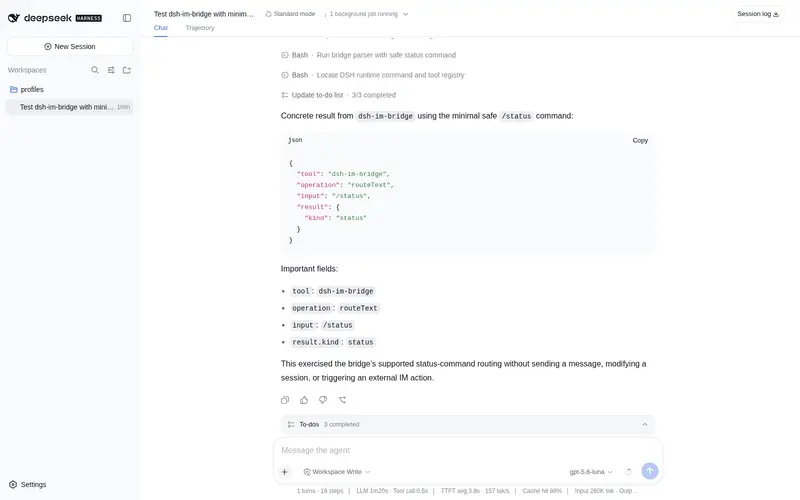
/bind <session-id>切换;/status查看状态 - agent 请求批准时收到推送,回复「批准」或「拒绝」
配置
在 profile 的 cordis.patch.yml 行上加 config 字段:
| 字段 | 默认 | 说明 |
|---|---|---|
allowedUserId |
空 | 白名单微信用户 id;空时首个扫码确认的用户自动绑定 |
mergeTimeoutSecs |
5 | 消息合并窗口 |
chunkMaxChars |
1200 | 分段长度(字符) |
pollTimeoutSecs |
70 | iLink 长轮询超时 |
安全红线
- 微信通道等于绕过本机批准体系:approval 应答必须来自白名单 user_id 且对应真实的 pending approval id
- token 不落库;不打印聊天内容明文以外的任何东西
- 微信来的消息只能进会话流(
source.kind = 'plugin'),不能直接执行任意 shell
开发命令
pnpm install
pnpm build     # tsc,产物在 lib/(提交入库,git 安装不跑构建)
pnpm test      # vitest
改完代码必须 pnpm build 并重启 DSH Web 才生效(ESM 缓存)。
Frequently Asked QuestionsFAQ
Use the verified command dsh plugin --profile default add github:BiBoyang/dsh-im-bridge in a DSH-enabled shell. The command resolves the public package metadata and keeps the plugin attached to the catalog identity shown on this page.
Compatibility follows the bundle and profile status shown above. If a profile is not detected, keep the plugin disabled there and check the repository documentation before enabling it in production.
The GitHub link and activity metadata are the source of truth for releases and maintenance. Revisit this page after a new release to confirm the catalog has observed the latest version.