bigclawd/dsh-security-guard
Security guard for DeepSeek Harness (dsh): static scan for malicious code, prompt injection and token waste, runtime interception, /scan, plugin_scan, web panel and allowlist | DeepSeek Harness 安全守卫插件:恶意代码/提示词注入静态扫描、运行时拦截、/scan、plugin_scan、Web 面板与白名单
Listed
1
Security
Bundle verified
Preview
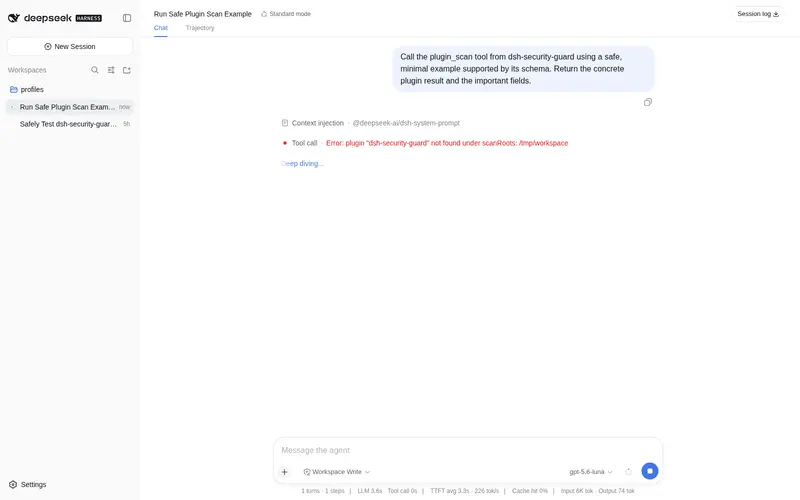
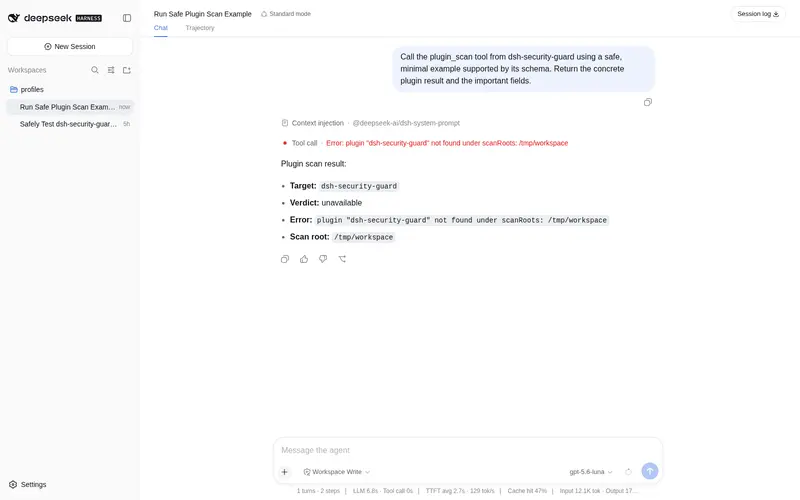
What it does
Static and runtime security guard for dsh: rule-based scans for malicious code, prompt injection and token waste, runtime interception of dangerous tool calls, /scan command, plugin_scan tool, web panel, and allowlist.
Best for
- DSH administrators who want rule-based pre-install inspection of plugin source and manifests.
- Environments that need runtime interception of dangerous tool calls alongside static scanning.
- Teams that want auditable JSON rules, reports, a web panel, and explicit allowlisting.
Not ideal for
- Workflows requiring proof that a plugin is safe; determined attackers may evade rule-based detection through runtime decoding or encryption.
- Environments that cannot tolerate heuristic false positives without maintaining allowlist or severity overrides.
- Protection applied only after installing an untrusted package; a malicious postinstall script may already have run.
README
🛡️ dsh-security-guard
| English | 中文 |
A security guard for the DeepSeek Harness (
dsh). Static scanning and runtime interception that never executes the code it protects you from.






✨ Highlights
| 🔍 Static scan | Rule-based analysis of source files — ts.createSourceFile only, scanned code is never imported or executed |
| 👁️ Runtime watch | Intercepts dangerous tool calls, prompt steps and file operations before they happen |
| 📊 Verdicts | Every finding classified block \| warn \| clean, written to JSON or human-readable reports |
| 🧩 Extensible rules | Plain auditable JSON rules, overridable per id, no opaque signatures |
| 🪝 Install hook | Auto-scans every freshly installed plugin (profile-manifest watcher) |
| 🖥️ Surfaces |
/scan command, plugin_scan tool, live web panel, user-managed allowlist |
🎯 Threat model
| Class | Examples | Default severity |
|---|---|---|
| 🧨 Malicious code |
eval / new Function, child_process, require("node:..."), postinstall hooks, process.env exfiltration, hidden base64/hex payloads, computed access on globals |
block |
| 💉 Context injection | “ignore previous instructions” / 忽略之前的指令 prompt-override phrases, unvetted URL hosts |
block / warn
|
| ⏳ Token waste | oversized files, base64-dominant blobs, repeated words/characters, filler comments | warn |
| 🔐 Sensitive paths |
~/.ssh, .env, credential stores touched by code |
warn |
🔍 Detector families
-
AST pass (
src/static/ast.ts) — parses TS/JS with the TypeScript compiler API (ts.createSourceFile), walks the tree, matches rule patterns (ast-call,ast-member,ast-computed,ast-import). Text is never executed. -
Content pass (
src/static/content.ts) — regex / phrase / url / file rules over text, code strings, image alt attributes and markdown. -
Token pass — size, base64 ratio, repetition and comment-padding heuristics
(
src/static/content.tsheuristics,src/rules/token.jsontuning). -
Runtime watch (
src/runtime/watcher.ts) — pre-step / pre-tool / post-tool gates, shell-pipe and destructive-shell patterns, SSH-write and token-drain telemetry,sessionusage monitoring. -
Whitelist (
src/whitelist.ts) — user-managed allowlist persisted to disk; trust / untrust via CLI or panel.
📦 Rules
Rules are plain JSON bundled under src/rules/ — code.json, injection.json,
token.json, allowlist.json. A rulesDir option overrides or extends them by
id. The full schema lives in src/rules.ts.
{ "id": "code.eval", "kind": "ast-call", "severity": "block", "callee": ["eval"] }
Matcher kinds: ast-call (calls/new), ast-member (dotted access),
ast-computed (computed access on globals — obfuscation signal),
ast-import (imports/requires), regex (scoped to all/string/comment),
phrase, url, file. Beyond the classic malicious patterns, the bundled
rules harden against obfuscation: hex/base64 Buffer.from/toString
encodings, long hex-only string payloads, and computed member access on
globalThis/global/process are all flagged. The full schema lives in
src/rules.ts.
🚀 Usage
Install
dsh plugin --profile default add dsh-security-guard
Host application
import { Context } from '@deepseek-ai/cordis'
import Guard from 'dsh-security-guard'

ctx.plugin(Guard, {
  rulesDir: 'config/guard-rules',          // optional overrides
  scan: { maxFiles: 5000, maxFileSize: 4 * 1024 * 1024, skipSegments: ['node_modules', '.git', 'dist', 'lib'] },
  runtime: { enabled: true, blockOnSeverity: ['block'], maxFindingsPerScan: 200 },
  allowlist: { file: 'data/guard-allowlist.json' },
  web: { enabled: true, path: '/scan' },
  installHook: { enabled: true, intervalMs: 5000 },  // auto-scan newly installed plugins
})
Install hook
The host emits no “package installed” event (dsh plugin add is a separate CLI
process), so the guard watches the profile manifest
($DSH_HOME/profiles/<name>/package.json — the only file the CLI rewrites
after a successful install). Every package added to its dependencies is
statically scanned under node_modules; the report is recorded as a runtime
event (source: install), emitted as a guard/install-scan event, and
appended to guard-install-scans.jsonl in the profile directory. Disable with
installHook: { enabled: false }.
Static scan
/scan ./plugin-dir                 # human-readable report
/scan ./plugin-dir --json          # machine-readable
/scan ./plugin-dir --json --out report.json
Or via the plugin_scan tool with parameters target, severity, json, out.
👁️ Runtime watch
Enabled by default. The guard listens on:
| Event | Action |
|---|---|
agent/pre-step |
Rejects steps matching injection.* or token-drain patterns |
tools/* |
Denies exec/spawn of destructive commands; asks on shell pipelines writing to ~/.ssh or the token cache; blocks write/edit outside workspaceRoots
|
fs/* |
Observes read/edit of sensitive paths (~/.ssh, .env, …) |
session/event |
Tracks assistant/message token usage, warns on suspicious consumption |
🖥️ Web panel
Served by the harness web server at the configured path (default /scan):
live findings, rule overview, allowlist management (trust / untrust), report download.
🧪 Development
pnpm install
pnpm typecheck   # tsc --noEmit
pnpm test        # vitest run (89 tests: static, rules, runtime, whitelist, plugin)
pnpm build       # tsc emit + copy bundled rules into lib/
The test suite runs three fixture families under tests/fixtures/ —
clean/, injected/, malicious/ — plus samples/malicious-demo, a
deliberately malicious sample plugin that the scanner never executes
(scan it with /scan samples/malicious-demo to see it reported).
🔒 Design constraints
- The scanner is purely static: only
ts.createSourceFile/ts.createScannerare used; scanned source is never imported, evaluated or executed. - No unvetted AI-signature or hashing mechanisms; verdicts come from auditable, id-overridable JSON rules.
- Runtime gate decisions use the host’s native
PreToolDecision/PostToolDecision/PreStepDecisioncontracts.
⚠️ Known limits
-
Obfuscation is an arms race. Rule patterns reliably catch naive malware,
copy-paste samples, and — most importantly — install-time lifecycle scripts
in
package.json(unhideable: npm requires the literal key). But a determined attacker can still hide payloads behind runtime decoding or encryption. The scanner is a risk-reduction layer, not a security proof. -
False positives exist. Legitimate code can trip heuristic rules (e.g. a
hex hash constant); verdicts default to
warn, and the allowlist andruleSeverityoverrides handle the rest. -
Scan before install. A malicious
postinstallruns the moment the package is installed — scan the package first (/scan), thendsh plugin add.
📄 License
Frequently Asked QuestionsFAQ
Use the verified command dsh plugin --profile default add github:bigclawd/dsh-security-guard in a DSH-enabled shell. The command resolves the public package metadata and keeps the plugin attached to the catalog identity shown on this page.
Compatibility follows the bundle and profile status shown above. If a profile is not detected, keep the plugin disabled there and check the repository documentation before enabling it in production.
The GitHub link and activity metadata are the source of truth for releases and maintenance. Revisit this page after a new release to confirm the catalog has observed the latest version.