Bing-Bryan/dsh-unread-dot
DSH plugin: macOS Dock badge (dot = running, number = results) + bubble chime, built on the Badging API
Listed
3
Notify
Bundle verified
Preview
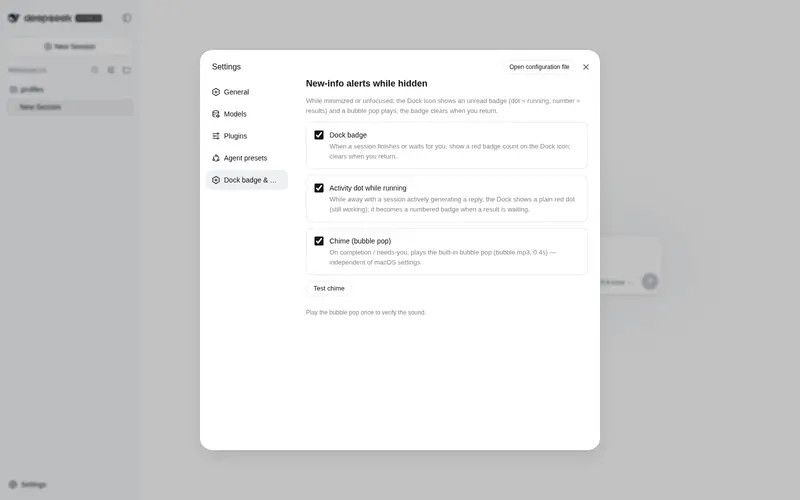
What it does
macOS Dock badge and bubble chime: shows an unread badge on the Dock (dot while running, count when done) and plays a chime while the app is hidden; clears on return, built on the Badging API.
Best for
- macOS users running DSH Web as an installed Chrome PWA who want a persistent Dock status indicator.
- People who want a dot while sessions run and an unread count when results or actions are waiting.
- Users who prefer a short chime and Dock badge without desktop notification banners.
Not ideal for
- Windows, Linux, mobile, or non-macOS Dock workflows; the documented target is macOS.
- DSH opened as an ordinary browser tab; Badging API Dock badges require an installed web app.
- Browsers without the required Badging API support, including unsupported or older browser versions.
README
dsh-unread-dot
DeepSeek Harness(DSH)插件:最小化/切走时,在 macOS Dock 图标上显示未读红点,并在会话完成/需要你处理时播放水泡提示音。回到应用自动清除。




基于 Chrome Badging API(navigator.setAppBadge / navigator.clearAppBadge)实现——不依赖任何 macOS 系统设置,不需要通知权限,没有横幅打扰。
⚠️ 使用前提:请先在 Chrome 中打开 DSH Web,通过浏览器菜单 「更多 → Cast, save and share → 安装应用 / Install…」 把它封装成一个独立的 macOS 应用(PWA)——
setAppBadge只对已安装的 Web App 生效。
效果
| 场景 | Dock 图标 | 声音 |
|---|---|---|
| 会话正在运行(你不在时) | 🔴 红点(无数字)= 还在干活 | 静音 |
| 会话跑完(你不在时) | 🔴 红色数字 +1 = 结果在等你 | 🔊 水泡音 |
| 会话需要你处理 | 🔴 红色数字 +1 | 🔊 水泡音(每段离开期一次) |
| 回到应用 | 自动清除 | — |
为什么用 Badging API
本插件完全构建在 Badging API 之上,用它的三种状态编码「是否/何种新信息」:
navigator.setAppBadge(3)   // 红色数字角标:3 个未读结果
navigator.setAppBadge()    // 无数字红点:有会话正在运行
navigator.clearAppBadge()  // 清除:回到应用,已读
- 无权限、无横幅、无系统设置:角标是系统级常驻标记,网页直接调用即可
- 点 vs 数字:数字 = 未读结果计数,纯点 = 运行中(这是 Badging API 能表达的最清晰差异)
- 兼容性:需将 DSH Web 安装为 PWA(Chrome「安装网页应用」),Chrome 81+ 支持该 API;Chrome 152+ 起角标/通知会正确归属到 Web App 自身
安装
-
安装插件包到你的 DSH profile(以
web为例):dsh plugin --profile web add github:Bing-Bryan/dsh-unread-dot -
在 profile 的
package.json的dsh.profile.bundles中追加:"dsh": { "profile": { "bundles": [ "...", "dsh-unread-dot" ] } } -
重启
dsh web,设置 → Dock 角标与通知 即可配置。
设置项
| 设置 | 默认 | 说明 |
|---|---|---|
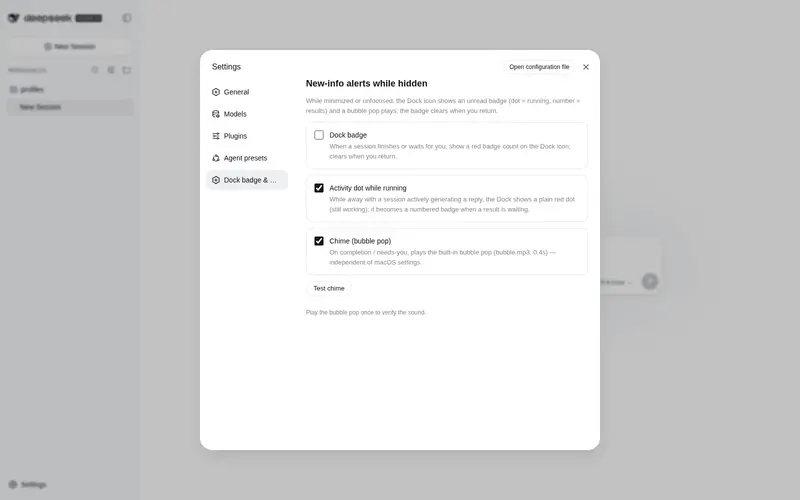
| Dock 角标 | 开 | 总开关:跑完/等你处理时显示数字角标,回到应用清除 |
| 运行中显示活动点 | 开 | 最小化期间有会话在生成回复时,显示无数字红点 |
| 提示音(水泡) | 开 | 完成/需要处理时播放内置水泡声(bubble.mp3,0.4s) |
| 测试提示音 | 按钮 | 立即播放一次水泡音验证声音 |
工作原理
- 插件订阅 DSH 的会话列表(
sessions.list),维护未读/已读状态:回到应用(窗口聚焦)时,当前所有待处理状态标记为已读 - 最小化/切走期间,新发生的完成/等待事件才点亮角标与提示音(旧事件不会累计重复计数)
- 运行中的会话只显示活动点(红点),不进入数字计数
- 提示音用
Audio播放内嵌的 MP3(base64),跨窗口锁保证多个窗口同时打开时只响一次
兼容性
- macOS Chrome(安装为 PWA / 「Install page as app」)
- 角标:
setAppBadge需在已安装的 Web App 上下文中生效 - 无服务器端依赖,纯客户端插件,HMR 热更新零重启
许可
MIT © 2026 Bing-Bryan
内置音效 bubble.mp3 基于 Pixabay 音频:Nature bubble in water 剪辑制作(Pixabay 许可:免费商用、无需署名)。
Frequently Asked QuestionsFAQ
Use the verified command dsh plugin --profile default add github:Bing-Bryan/dsh-unread-dot in a DSH-enabled shell. The command resolves the public package metadata and keeps the plugin attached to the catalog identity shown on this page.
Compatibility follows the bundle and profile status shown above. If a profile is not detected, keep the plugin disabled there and check the repository documentation before enabling it in production.
The GitHub link and activity metadata are the source of truth for releases and maintenance. Revisit this page after a new release to confirm the catalog has observed the latest version.