br1nosense/dsh-project-manager
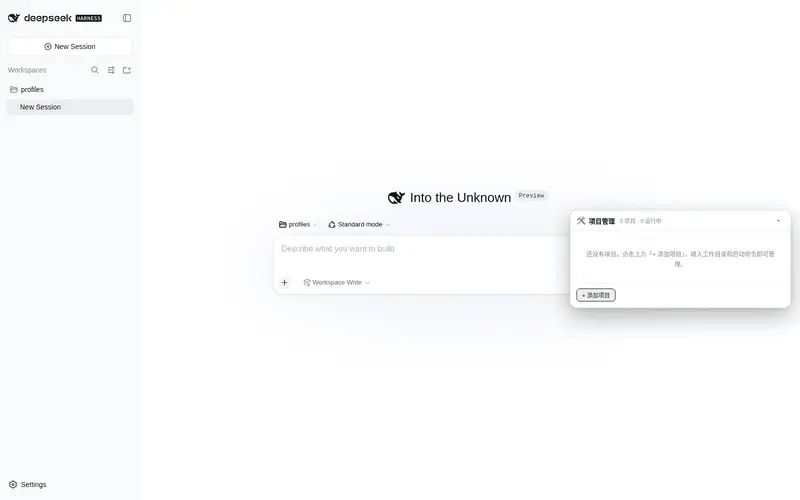
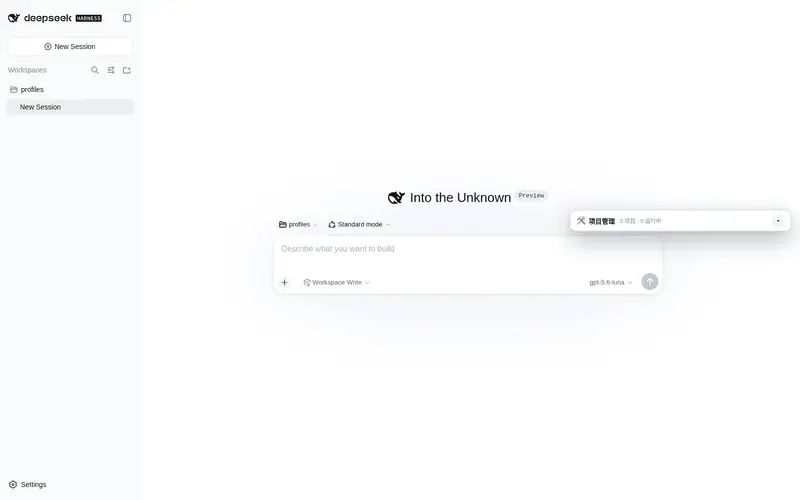
DSH 项目管理插件:在 DSH Web 界面以悬浮窗口形式管理开发项目——添加/删除项目、 一键启动/停止/重启、文件变更热重载自动重启、实时日志查看与持久化。
Listed
0
Dev
Bundle verified
Preview
What it does
Manage development projects from the DSH web UI in a draggable floating window: add/remove, one-click start/stop/restart, hot-reload restart on file changes, and real-time persistent logs.
Best for
- Developers who want to control several local development processes from the DSH Web UI.
- Projects that need one-click lifecycle controls, file-change restarts, and continuously persisted stdout/stderr logs.
- Windows development setups that benefit from stopping an entire process tree with taskkill.
Not ideal for
- Projects already managed adequately by an external supervisor, container orchestrator, or IDE task runner.
- Environments where the required DSH peer dependencies cannot be resolved; the documented local setup may require machine-specific junctions.
- Repositories where broad recursive file watching and automatic process restarts are undesirable.
README
@dsh-user/dsh-project-manager
DSH 项目管理插件:在 DSH Web 界面以悬浮窗口形式管理开发项目——添加/删除项目、 一键启动/停止/重启、文件变更热重载自动重启、实时日志查看与持久化。
功能
-
悬浮窗口:显示在 DSH Web 界面右下角(
shell.overlay),可拖拽移动 (标题栏拖动)、折叠/展开(右上角按钮);位置与折叠状态记忆在 localStorage,窗口尺寸变化时自动钳回可视区域。 - 项目列表:每个项目卡片显示状态徽标(运行中/启动中/停止中/已退出/失败/已停止)、 PID、工作目录、启动命令。
-
启动 / 停止 / 重启:每个项目一行操作按钮。Windows 下停止使用
taskkill /T杀整棵进程树,不会残留子进程。 -
添加项目:名称、工作目录、启动命令(如
npm run dev/python app.py)、 附加参数、自动启动、热重载开关、热重载文件后缀白名单、附加环境变量。 -
热重载:
fs.watch递归监听项目目录,文件变更(按后缀白名单过滤、忽略node_modules/.git/dist等)去抖 500ms 后自动重启进程。 -
日志:每个项目的 stdout/stderr 按行写入内存环形缓冲(上限可配,默认 2000 行)
并持久化到
logs/<id>.log;悬浮窗内可展开日志查看器,增量轮询、自动滚动、清空。
安装
方式一:GitHub 克隆(推荐)
git clone https://github.com/br1nosense/dsh-project-manager.git
cd dsh-project-manager
powershell -ExecutionPolicy Bypass -File .\install.ps1
方式二:本地目录
cd C:\code\dsh\release\dsh-project-manager
powershell -ExecutionPolicy Bypass -File .\install.ps1
安装后重启 dsh web(或由 HMR 自动热更新 client bundle)。验证:
dsh --profile web --dump-config # 应出现 id: project-manager 的行
常见问题:安装插件后 dsh 启动失败(peerDependencies 解析)
症状:安装本插件(bundle)后重启 dsh,web 启动报错 / 起不来。
原因:本插件把 @deepseek-ai/schemastery(以及 @deepseek-ai/cordis、@deepseek-ai/dsh-settings)
声明为 peerDependencies,但插件目录(clone 下来的仓库)下没有 node_modules。Node ESM 会从插件
所在目录逐级向上查找 node_modules,却找不到 DSH 自身嵌套目录里的这几个包(dsh 安装目录通常
不在该查找路径上)。
修复(一次性,本地环境级):在插件工作区根目录(即插件目录的父目录,如把插件 clone 到
C:\code\AI\DSH\dsh-project-manager,则根目录是 C:\code\AI\DSH)的 node_modules\@deepseek-ai\ 下
创建 3 个目录联接(Junction),指向 DSH 自带的同名包:
| 包 | 指向 |
|---|---|
schemastery |
<dsh 安装目录>\node_modules\@deepseek-ai\schemastery(v3.18.1) |
cordis |
<dsh 安装目录>\node_modules\@deepseek-ai\cordis |
dsh-settings |
<dsh 安装目录>\node_modules\@deepseek-ai\dsh-settings |
例如本机 dsh 位于 C:\Users\<你>\AppData\Roaming\nvm\v24.19.0\node_modules\@deepseek-ai\dsh:
$dsh = 'C:\Users\<你>\AppData\Roaming\nvm\v24.19.0\node_modules\@deepseek-ai\dsh\node_modules\@deepseek-ai'
$dst = 'C:\code\AI\DSH\node_modules\@deepseek-ai'
New-Item -ItemType Directory -Force -Path $dst | Out-Null
foreach ($p in 'schemastery','cordis','dsh-settings') {
  New-Item -ItemType Junction -Path (Join-Path $dst $p) -Target (Join-Path $dsh $p)
}
该修复是本机环境级配置,创建在
node_modules下,不应提交到仓库;dsh 升级或换机后路径变化 需重建(建议把上面脚本存成fix-peer-deps.ps1,换环境后重跑)。
REST API(同源,浏览器半边与 agent 均可调用)
| 方法 | 路径 | 说明 |
|---|---|---|
| GET | /project-manager/api/status |
插件状态 |
| GET | /project-manager/api/projects |
项目列表(含实时状态) |
| POST | /project-manager/api/projects |
添加项目 |
| PUT | /project-manager/api/projects/:id |
更新项目 |
| DELETE | /project-manager/api/projects/:id |
删除项目(先停进程) |
| POST | /project-manager/api/projects/:id/start |
启动 |
| POST | /project-manager/api/projects/:id/stop |
停止 |
| POST | /project-manager/api/projects/:id/restart |
重启 |
| GET | /project-manager/api/projects/:id/logs?since=<seq> |
增量日志 |
| POST | /project-manager/api/projects/:id/logs/clear |
清空日志 |
配置
项目列表持久化在 ~/.dsh/settings.yaml 的 project-manager: 段,热重载。
schema 字段见 cordis.patch.yml 注释。
开发
-
lib/index.js— host 半边:进程管理、热重载、日志、webServer REST API、ctx.projectManager服务。 -
lib/client.js— 浏览器半边:shell.overlay悬浮窗口(可拖拽、可折叠)。 - client 端改动由
dsh-client-hmr自动热更新(轮询 bundle 文件 → SSE 推送), 无需重启 dsh web;首次安装(新 bundle 入__DSH_BOOT__)才需重启。
Frequently Asked QuestionsFAQ
Use the verified command dsh plugin --profile default add github:br1nosense/dsh-project-manager in a DSH-enabled shell. The command resolves the public package metadata and keeps the plugin attached to the catalog identity shown on this page.
Compatibility follows the bundle and profile status shown above. If a profile is not detected, keep the plugin disabled there and check the repository documentation before enabling it in production.
The GitHub link and activity metadata are the source of truth for releases and maintenance. Revisit this page after a new release to confirm the catalog has observed the latest version.