BrambleXu/dsh-prompt-profile
Reusable Markdown prompt profiles for DeepSeek Harness with per-turn model selection, argument substitution, and state restoration. DeepSeek Harness 可复用 Markdown Prompt Profile,支持单轮模型选择、参数替换和状态恢复。
Listed
1
Dev
Bundle verified
Preview
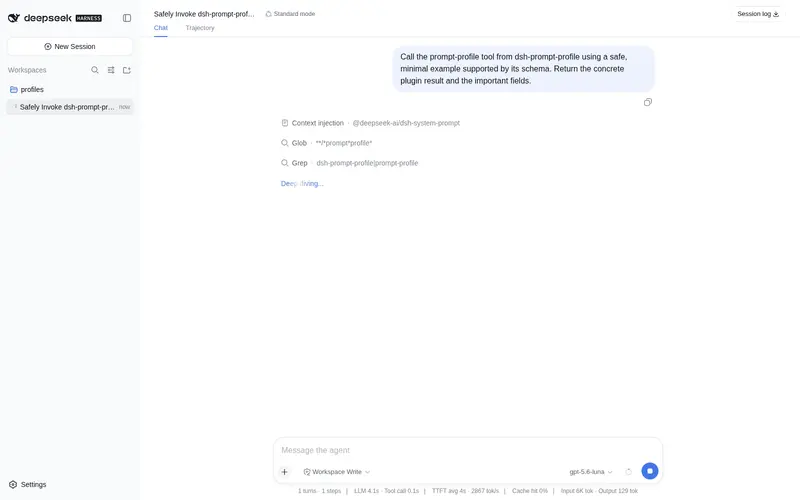
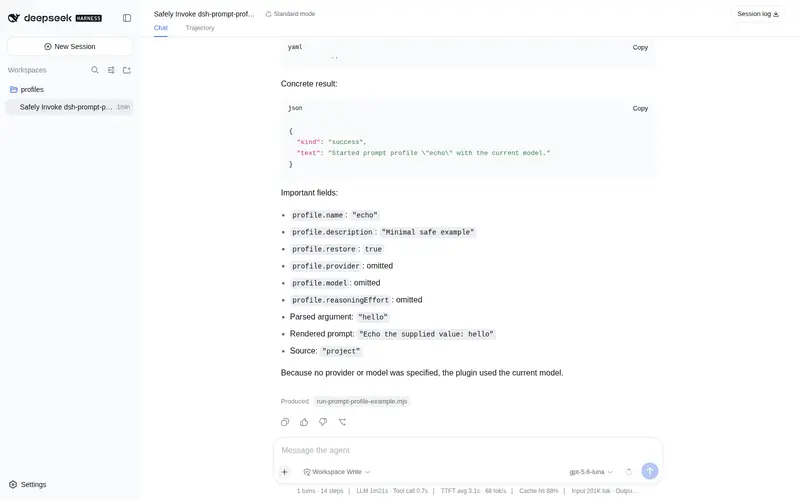
What it does
Reusable Markdown prompt profiles for DeepSeek Harness with per-turn model selection, argument substitution, and state restoration.
Best for
- Teams that repeatedly use standardized review, analysis, or task prompts across sessions.
- Workflows that need one-turn provider, model, and reasoning-effort selection followed by automatic restoration.
- Projects that want repository-specific Markdown profiles to override reusable user-level profiles.
- Commands that benefit from positional or ranged argument substitution into prompt text.
Not ideal for
- Multi-step prompt chains, loops, or best-of-N orchestration.
- Workflows requiring skill injection, subagents, or worktree management.
- One-off prompts where reusable discovery, routing, and restoration add little value.
README
dsh-prompt-profile






English | 中文
Reusable Markdown prompt profiles for DeepSeek Harness. A profile can select a provider, model, and reasoning effort for one turn, render command arguments into its body, and restore the previous selection afterward.
Why this exists 💡
Model choice and review instructions are often repeated across sessions. dsh-prompt-profile turns those combinations into small, reusable Markdown profiles that can be invoked for one turn and then leave the Agent’s previous model selection intact.
Features ✨
- Discover profiles from user and project directories, with project profiles taking precedence.
- Substitute positional arguments into profile bodies with shell-style placeholders.
- Select a provider, model, and reasoning effort for one turn.
- Restore the previous Agent selection automatically or opt out per profile.
- List available profiles and invoke nested profiles by slash-separated names.
Install 📦
dsh plugin --profile demo add ./dsh-prompt-profile
Create a user profile under ~/.dsh/prompt-profiles/ or a project profile under <repo>/.dsh/prompt-profiles/:
---
description: Deep code review
provider: deepseek
model: deepseek-reasoner
reasoningEffort: high
restore: true
---
Review $1 for correctness, regressions, and missing tests. Extra context: ${@:2}
Project profiles override user profiles with the same relative name.
Use 🚀
/prompt-profile list
/prompt-profile review src/index.ts "focus on cancellation"
Nested files use slash-separated names. For example, .dsh/prompt-profiles/review/security.md is review/security.
Supported placeholders:
| Placeholder | Value |
|---|---|
$1, $2, … |
One positional argument |
$@, @$, $ARGUMENTS
|
All arguments |
${@:N} |
Arguments from position N |
${@:N:L} |
L arguments from position N |
Frontmatter 🧾
| Field | Required | Meaning |
|---|---|---|
description |
No | Text shown by /prompt-profile list
|
provider |
With model
|
Harness provider route |
model |
With provider
|
Provider-owned model ID |
reasoningEffort |
With provider and model
|
Adapter-owned reasoning effort ID |
restore |
No | Restore the prior selection after the turn; defaults to true
|
Omit both provider and model to use the current agent selection.
Configure ⚙️
- id: dsh-prompt-profile
  name: dsh-prompt-profile
  config:
    userDirectory: ~/.dsh/prompt-profiles
    projectDirectory: .dsh/prompt-profiles
Develop 🧑💻
pnpm install
pnpm run check
Scope 🎯
Version 0.1 intentionally omits prompt chains, loops, skill injection, subagents, worktrees, and best-of-N orchestration. Those features should be added only when Harness extension points can preserve their lifecycle and durable-session semantics.
License 📄
MIT
Credits 🙏
The core idea comes from pi-prompt-template-model. This first Harness-native release focuses on the smallest useful unit: deterministic discovery, argument substitution, scoped model routing, and restoration.
Frequently Asked QuestionsFAQ
Use the verified command dsh plugin --profile default add github:BrambleXu/dsh-prompt-profile in a DSH-enabled shell. The command resolves the public package metadata and keeps the plugin attached to the catalog identity shown on this page.
Compatibility follows the bundle and profile status shown above. If a profile is not detected, keep the plugin disabled there and check the repository documentation before enabling it in production.
The GitHub link and activity metadata are the source of truth for releases and maintenance. Revisit this page after a new release to confirm the catalog has observed the latest version.