bwndlct/dsh-session-audit
Session execution analytics and audit reports for DeepSeek Harness — see how your agent actually worked
Listed
4
Tools
Bundle verified
Preview
What it does
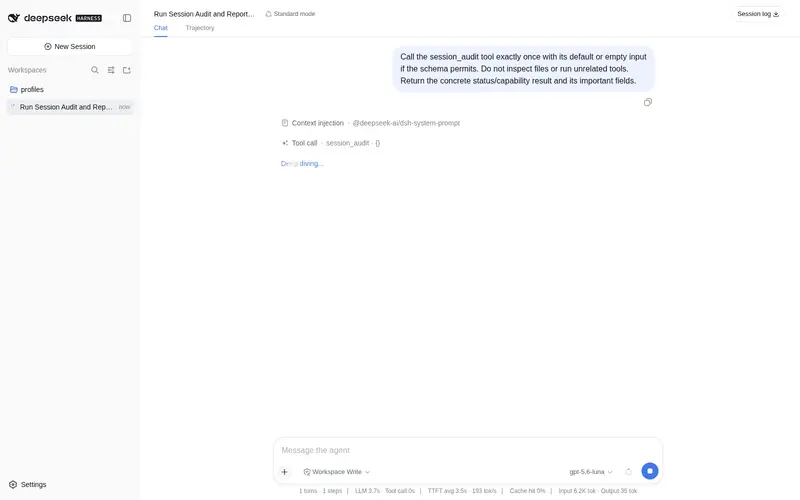
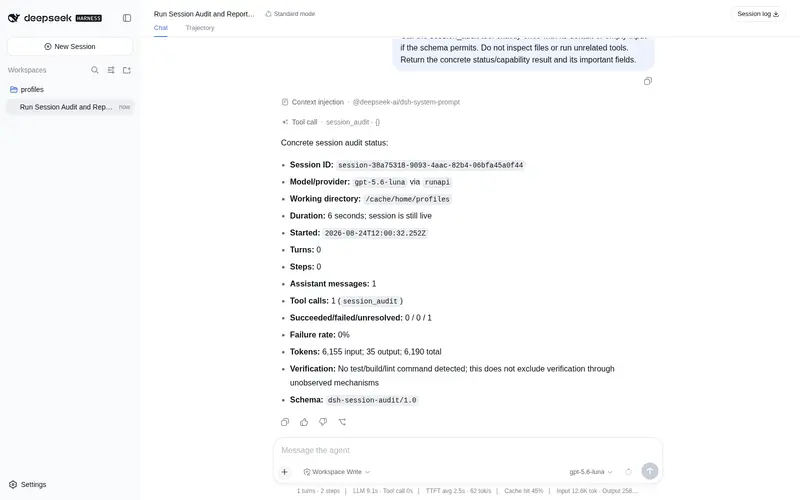
Session execution analytics: steps, tool calls, failures, repeated actions, token usage and verification signals, rendered as text/Markdown/JSON reports.
Best for
- Developers who want a factual post-run view of how one DSH session used steps, tools, tokens, and verification commands.
- Teams investigating repeated calls, consecutive failures, high failure rates, or abnormal turn endings.
- Automation that needs stable text, Markdown, or JSON audit output for a current or persisted session.
- Users who need observed token data without estimates when providers omit usage.
Not ideal for
- Cross-session or whole-project analytics; child-agent sessions must be audited individually.
- Workflows requiring an efficiency score or LLM-based qualitative judgment; the report uses deterministic signals.
- Cases requiring guaranteed detection of custom verification scripts; recognition is pattern-based.
- Time-series or context-growth analysis, which is not currently included.
README
dsh-session-audit
看清你的 DeepSeek Harness Agent 这次到底是怎么干活的。
对一个 DSH Session 做 Steps / Tool Calls / 失败 / 重复动作 / Token /
验证命令(test/build/lint)的执行审计,通过一次 session_audit 工具调用输出一份可读的审计报告。
| 简体中文 | English |
DSH Session Audit
──────────────────────────────────────────────

Session
ID              session-d2309fa2-47d3-484a-8357-236e0acdd9aa
Model           glm-5.3
Provider        zai-coding-cn
Duration        51m 42s
Started         2026-08-14T09:08:08.384Z

Execution
Turns           4
Steps           121
Assistant msgs  120
Turn endings    completed×1, interrupted×1, error×1

Tools
Total calls     150
Succeeded       143
Failed          6
Unresolved      1
Failure rate    4.0%

Top tools
  bash                  83  (1 failed)
  write                 26
  edit                  21  (4 failed)
  read                  12

Tokens
Input           349,428
Output          80,415
Cache read      9,243,520
Total           9,673,363

Execution signals
  ⚠ 3 consecutive failed tool calls detected
  ⚠ `bash` called 83 times
  ℹ session has a turn that never closed

Verification
  ✓ pnpm run typecheck  [typecheck]
  ✓ npm test  [test]  (2 attempts, 2 ok)
(来自本机真实会话的报告)
为什么需要
DSH 的 session 日志已经完整记录了”发生了什么”——它是 append-only 的事实源。 但读完一份上千事件的日志,并不能直接回答你真正关心的问题:
跑了多久?多少个 Turn / Step?哪些工具用得最多?在哪里失败? 有没有重复调用?最后验证过没有?
dsh-session-audit 把单个 session 的持久化事件日志折叠成这些答案。
它是 Step / Tool-call Profiler 和失败分析器,不是 Token 仪表盘
(见现有同类插件)。
功能
- Session 指标 — 时长、Turns、Steps、assistant 消息数、工具调用 总数、按工具分布、成功/失败拆分。
-
Token 用量 — 按 turn:step 折叠 input / output / cache 桶,语义与
官方
session-stats投影一致;provider 没上报时显示 Unavailable, 绝不估算。 - 确定性审计信号 — 连续失败、失败率、高频工具、完全相同的重复 调用(对参数 key 顺序不敏感)、重复读取同一文件。纯规则判定,不用 LLM 打分。
-
验证命令识别 — 识别 shell 工具调用中的 test/build/lint/typecheck
命令(
npm test、pytest、cargo test、tsc、eslint……)并报告 实际观察到的结果。 -
三种格式 — text(默认)、Markdown、JSON(带稳定
schemaVersion)。 - 当前或历史 Session — 默认审计当前内存中的 session,也可按 id 审计任一持久化 session;支持列出最近的 session。
- 健壮 — 空会话、畸形事件、未来新增的事件类型、孤儿 result、 崩溃尾部残帧:全部安全处理,并在报告中以数据质量说明呈现。
安装
要求 dsh(@deepseek-ai/dsh)0.1.0-rc.6+。
# npm(发布后)
dsh plugin --profile web add dsh-session-audit

# GitHub
dsh plugin --profile web add github:bwndlct/dsh-plugins/plugins/dsh-session-audit

# 本地开发(link)
dsh plugin --profile web add link:/path/to/dsh-plugins/plugins/dsh-session-audit
然后编辑 ~/.dsh/profiles/web/package.json,把包加进
dsh.profile.bundles(上面的安装命令不会做这一步):
"dsh": {
  "profile": {
    "bundles": [
      // ...现有条目...
      "dsh-session-audit"
    ]
  }
}
重启 dsh(dsh web),并验证挂载:
dsh --profile web --dump-config | grep -A2 session-audit
使用
在会话里直接让 Agent 调用(自然语言即可),或使用斜杠命令(交互式 profile 中可用):
-
审计当前会话— 审计当前 session。 -
审计 session session-abc123— 按 id 审计某个存储的 session。 -
列出最近的 session— 列出可审计的持久化 session。 -
用 markdown/json 格式审计当前会话— 指定输出格式。
斜杠命令(当 commands 服务挂载时可用,如 web profile):
-
/session-audit [text|markdown|json]— 审计当前会话(空参数默认 text) -
/audit-list— 列出最近的持久化会话
工具参数:
| 参数 | 类型 | 含义 |
|---|---|---|
session_id |
string | 目标 session(默认当前会话) |
format |
text | markdown | json
|
报告格式(默认 text) |
list_sessions |
boolean | 列出最近 session 而不是审计 |
thresholds |
object | 可选的审计规则阈值覆盖(与默认值浅合并) |
报告只留在本地——作为工具结果返回给你和模型阅读,不写盘。
审计信号
全部规则都是确定性的、阈值驱动;所有阈值集中在一个文件
(src/rules/thresholds.ts),默认值保守,正常会话不会被警告淹没。
| 信号 | 级别 | 默认阈值 |
|---|---|---|
| 连续失败的工具调用 | warning | ≥ 3 |
| 工具总体失败率 | warning | ≥ 15% 且 ≥ 3 个有结果的调用 |
| 完全相同的工具调用重复 | warning | ≥ 3 次(参数按排序后的 key 比较,JSON key 顺序不同不会漏判) |
| 同一文件被反复读取 | info / warning | ≥ 4 次(≥ 8 次升 warning);读取工具与参数名可配置(默认 read/read_file → file_path) |
| 高频工具 | info / warning | ≥ 15 次(info),≥ 30 次(warning) |
| Turn 非正常结束 | info | 任何 aborted / error / interrupted
|
| 存在未关闭的 Turn | info | 活跃/被中断会话的标志 |
| 未观察到验证命令 | info | 措辞谨慎——”未观察到”,不是”没有验证” |
| 验证命令失败 | warning | 最后一次观察到的尝试失败 |
| 验证命令连续失败 | warning | ≥ 2 次失败且之后没有成功 |
刻意没有效率评分——报告陈述事实和确定性发现,判断权留给你。
验证命令识别
规则识别 shell 工具调用(bash / pwsh,可配置)里的常见验证命令:
-
test:
npm|pnpm|yarn|bun (run) test*、pytest、cargo test、go test、dotnet test、jest、vitest、mocha、mvn|gradle test、make test -
lint:
(npm|pnpm|yarn|bun) (run) lint*、eslint、biome、prettier、ruff、pylint、flake8、golangci-lint -
typecheck:
(npm|…) typecheck*、tsc、mypy、pyright、cargo check -
build:
(npm|pnpm|yarn|bun) (run) build*、cargo build、go build、dotnet build、make build|all
成败只根据工具结果里实际观察到的内容判定:harness 级错误,或
dsh-tool-bash 对非零退出追加的 [exit code: N] 标记(文档化约定),
都算失败。匹配到命令但没有持久化结果的调用视为”未观察到”,不算
失败。完全没有验证命令时,报告只说”未观察到验证命令”,绝不声称
“Agent 没有验证”——验证可能走了日志看不到的机制。
工作原理
DSH session(live 注册表 或 ~/.dsh/sessions 持久化日志,zstd 帧)
        │  session-reader — 按 session id 直查目录(目录名即 id),
        │                    列出时只解码头帧,审计时完整解码;回退扫描
        ▼
session-adapter — 原始事件 → 规范化 AuditEvent 词汇表
        ▼
analyzer — 一次 O(n) 遍历:计数、工具配对、用量折叠
        ▼
rules — 基于折叠事实的确定性信号
        ▼
SessionAuditReport (schemaVersion 1.0) — text / markdown / json
- Turn/Step 计数与官方
dsh-session-stats语义一致 (steps =step/end数;turns = 有已关闭 step 的不同 turn),审计 数字与 Web UI 统计条一致。 - Token 桶遵循
dsh-llm的TokenUsage:input 不含缓存输入; cache 读/写单列;reasoning(output 的子集)只展示、不重复计入总数。 - 所有 DSH 事件形状知识都收敛在 adapter;analyzer 和 rules 只依赖 规范化词汇表。
隐私
dsh-session-audit 只做本地分析。 只读取本机 DSH home 的 session 日志和内存中的 live session 注册表。不发起任何网络请求、不调 LLM API、不发遥测、不收集任何用户数据。报告只作为工具结果存在于你自己的 会话里。
开发
cd plugins/dsh-session-audit
npm install --no-save            # 安装 typescript + @types/node
npx tsc -p tsconfig.json         # 类型检查 + 构建到 lib/
node --test tests/               # 32 个单元测试
目录结构:
src/
  index.ts               工具注册 + live/磁盘 session 加载
  dsh/
    session-adapter.ts   原始 DSH 事件 → 规范化审计事件
    session-reader.ts    持久化日志发现、zstd 解码、JSONL 解析
  audit/
    analyzer.ts          O(n) 折叠 + 规则编排
    types.ts             SessionAuditReport schema、AuditEvent 词汇表
  rules/                 每条规则一个文件 + 集中阈值
  formatters/            text / markdown / json
  utils/                 stable-json(排序 key 身份)、duration
tests/                   node:test 套件:analyzer、rules、边界、reader
兼容性
- 已针对
@deepseek-ai/dsh0.1.0-rc.6(session format version 0) 验证。 - 同时支持压缩(
session.jsonl.zstd,默认)与明文(session.jsonl) 持久化日志。 -
SESSION_FORMAT_VERSION仍是 pre-release;未来格式升级只需改 adapter——这正是所有形状知识集中一处的原因。
限制
- 验证命令识别基于模式;包在特殊脚本名里的验证器无法识别。
- 子 Agent 的 session 需按 id 单独审计;暂无跨 session 汇总。
- Reasoning token 在 provider 上报时展示,但部分 provider 的逐步值 无法重建。
- 暂无时间序列 / 上下文增长分析(见路线图)。
路线图
- v0.3 — session 对比
- v0.4 — 上下文增长分析
- v0.5 — HTML 报告
- 之后 — Web 仪表盘视图、跨 harness 审计
现有同类插件
Token/费用仪表盘已经存在(dsh-spend、dsh-balance-stats、
dsh-session-cost、dsh-token-monitor),它们与本插件互补:回答的是
“花了多少”。本插件回答”Agent 是怎么干活的”——执行形态、失败位置、
重复行为、验证情况。截至 v0.2.0,dshplugin 生态中没有其他覆盖
单 session 执行审计的插件。
许可
Frequently Asked QuestionsFAQ
Use the verified command dsh plugin --profile default add github:bwndlct/dsh-session-audit in a DSH-enabled shell. The command resolves the public package metadata and keeps the plugin attached to the catalog identity shown on this page.
Compatibility follows the bundle and profile status shown above. If a profile is not detected, keep the plugin disabled there and check the repository documentation before enabling it in production.
The GitHub link and activity metadata are the source of truth for releases and maintenance. Revisit this page after a new release to confirm the catalog has observed the latest version.