cdxiaodong/dsh-guardian
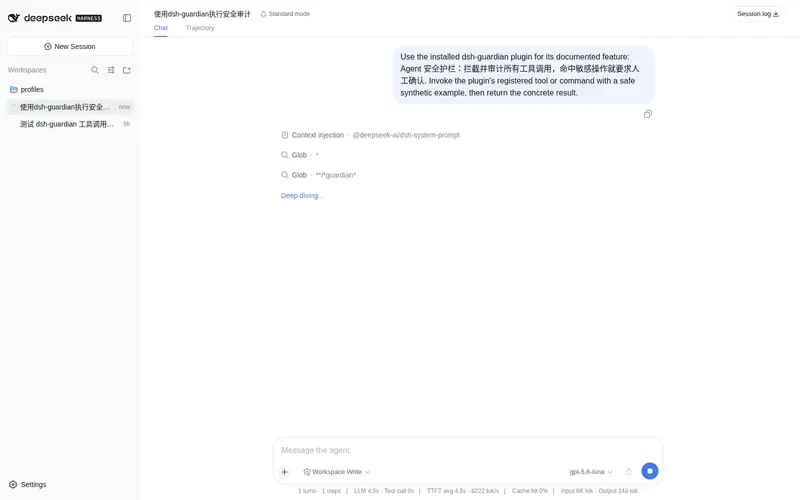
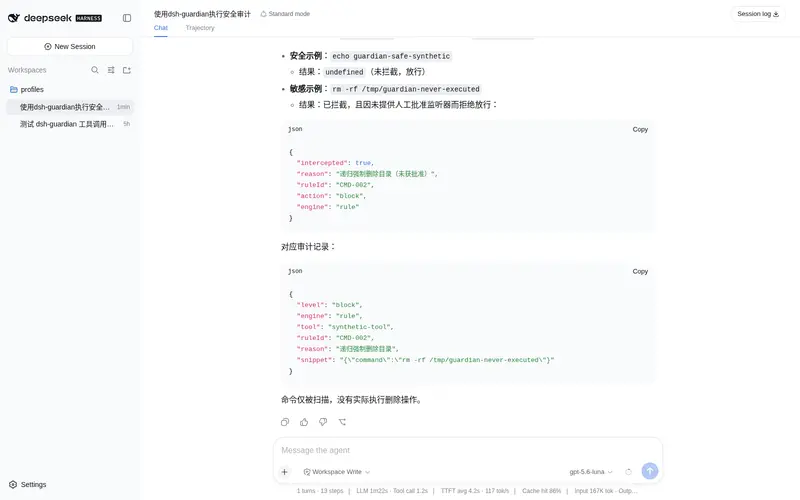
Agent security guardrail: intercepts and audits every tool call, requiring human confirmation on sensitive operations.
Listed
4
Security
Bundle verified
Preview
What it does
Agent security guardrail: intercepts and audits every tool call, requiring human confirmation on sensitive operations.
Best for
- Agent deployments that need pre-execution review and audit of tool calls.
- Workspaces that want configurable detection for destructive commands, credential access, secret leakage, SSRF, prompt injection, and tool poisoning.
- Cordis integrations that can provide human approval handling and restrict file access to allowed roots.
Not ideal for
- Environments expecting a complete security boundary; the documented regex and heuristic controls can be bypassed and do not replace least-privilege sandboxing.
- Blocked-operation workflows without an approval listener, because block-level actions are denied by default when no handler is connected.
- Low-risk workflows where interception, audit logging, and confirmation prompts add more friction than value.
README
dsh-guardian
Agent 安全护栏 · 基于 Cordis 时空可组合元内核的 DeepSeek Harness 插件。 在 Agent 每次工具调用前做安全审查,命中危险即拦截或要求人工确认。

🎯 解决什么问题
LLM Agent(Claude Code / DeepSeek Harness)能自主执行 shell、读写文件、发网络请求。一旦被提示注入、工具投毒或模型误判带偏,可能在你不知情时 rm -rf、读取 .ssh/id_rsa、把密钥外泄到远程。本插件是一道运行时安全网:
Agent 想执行工具 → guardian/check 前置审查 → 命中规则 → 拦截 / 人工批准 → 才放行
🛡️ 五大检测引擎
| 引擎 | 检测内容 | 借鉴来源 |
|---|---|---|
| CMD/INJ 危险命令 | rm -rf、dd、mkfs、fork炸弹、反弹shell、管道执行、提权 | Sigma 规则、PayloadsAllTheThings |
| CRED 凭据保护 | 读 .ssh/.aws/.env/kubeconfig、/etc/shadow | mcp-safeguard CRED 系列 |
| SECRET 密钥泄露 | AWS/GitHub/OpenAI/Anthropic/Slack/Stripe 等 25+ 种密钥正则 + Shannon 熵过滤降误报 | gitleaks、trufflehog |
| SSRF 网络目标 | 云 metadata(169.254.169.254)、内网网段、file://、gopher:// | mcp-safeguard SS 系列 |
| PI/TP 提示注入+工具投毒 | ignore previous instructions、DAN越狱、零宽字符、HTML注释藏指令、瞒用户指令 | Rebuff、LLM Guard、Vigil |
外加:
-
路径沙箱(
guardian/path):realpath 解析 + 白名单根目录 + 编码变体解码 + 空字节截断检测——比纯正则可靠 -
风险评分引擎(
risk.ts):多信号并集概率式加权成 0~1 分,按阈值分级处置(deny/block/warn/allow)
🚦 三级处置
| 级别 | 行为 | 例子 |
|---|---|---|
deny |
直接拒绝 | 反弹shell、mkfs、读 /etc/shadow、明文密钥 |
block |
需人工确认(走 guardian/approve) |
rm -rf ~、读 .ssh、curl 上传文件 |
log |
仅记录审计 | 路径穿越、读取 shell history |
📦 安装
dsh plugin --profile web add github:cdxiaodong/dsh-guardian
🚀 用法
import { Context } from 'cordis'
import * as guardian from 'dsh-guardian'

const ctx = new Context()
ctx.plugin(guardian, {
  allowedRoots: ['/home/user/workspace'],   // 可选:文件访问沙箱白名单
  scanSecrets: true, scanSSRF: true,        // 开关各引擎
})

// ① 接入人工批准(无此监听器时 block 级默认拒绝)
ctx.on('guardian/approve', async ({ tool, rule, snippet }) => {
  const ok = await confirm(`${rule.reason}:${snippet}`)  // 你的 UI 弹窗
  return { approved: ok }
})

// ② 工具调用前审查(同步短路)
const r = ctx.bail('guardian/check', toolName, args)
if (r && r.intercepted) throw new Error(`已拦截:${r.reason}`)

// ③ 文件访问前校验路径
const v = ctx.bail('guardian/path', filePath)
if (v && v.safe === false) throw new Error(`路径被拦截:${v.reason}`)

// ④ 查审计日志
console.log(ctx.guardian.readAudit(20))
🔧 对应论文机制
| Cordis / 时空可组合概念 | 本插件体现 |
|---|---|
| 响应式协效应(provide/inject) |
provide=['guardian'] 对外提供服务;依赖 cordis 事件系统 |
| 可逆效应(Revertible Effects) |
ctx.effect(() => () => stream.end()) 注册撤销函数,卸载自动关文件流、零残留 |
| 拦截机制(Intercept) |
ctx.bail('guardian/check') 全局短路拦截,不改被保护组件代码 |
| 隔离机制 | 多实例可绑定独立配置/白名单 |
🧪 测试
npm ci && npm test # 19/19 通过
🙏 致谢 / 参考
本插件的规则与架构缝合自以下优秀开源方案:
- gitleaks — 密钥正则库 + 熵过滤
- trufflesecurity/trufflehog — 密钥检测器设计
- protectai/llm-guard — scanner pipeline 架构
- protectai/rebuff — 四层纵深检测思想
- deadbits/vigil-llm — 提示注入签名
- SyedAnas01/mcp-safeguard — TP/PI/SSRF/CRED 规则分类法
- SigmaHQ/sigma — 危险命令检测规则
⚠️ 安全认知:所有正则/启发式护栏都可能被绕过(对抗样本实测可绕过多种护栏)。本插件是 risk reducer,关键操作仍需人在环确认 + 最小权限沙箱,不能替代这两者。
📜 License
MIT
Frequently Asked QuestionsFAQ
Use the verified command dsh plugin --profile default add github:cdxiaodong/dsh-guardian in a DSH-enabled shell. The command resolves the public package metadata and keeps the plugin attached to the catalog identity shown on this page.
Compatibility follows the bundle and profile status shown above. If a profile is not detected, keep the plugin disabled there and check the repository documentation before enabling it in production.
The GitHub link and activity metadata are the source of truth for releases and maintenance. Revisit this page after a new release to confirm the catalog has observed the latest version.