cynch18/plugin-switch
DSH web plugin: toggle plugins on/off from the GUI without restarting the server
Listed
3
Market
Bundle verified
Preview
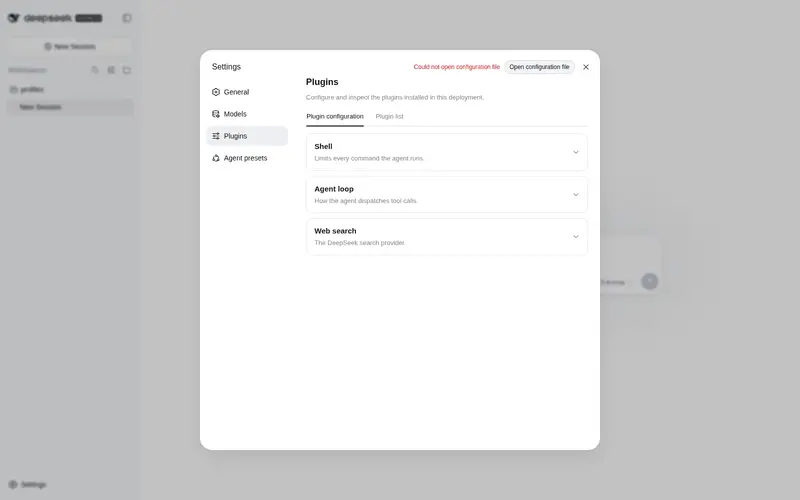
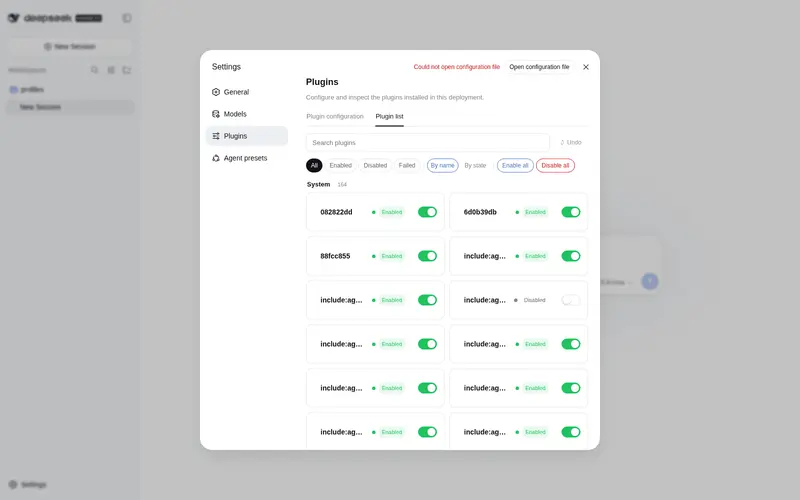
What it does
Toggle switches for the plugin inventory: enable/disable any plugin live from Settings → Plugins → Plugin list without restarting, with groups/filters, bulk toggle, undo, and backup.
Best for
- Personal DSH Web installations that need live enable/disable controls for plugins in Settings.
- Users managing many plugins who benefit from search, grouping, filters, sorting, and bulk toggles.
- Administrators who want one-step undo, automatic configuration backups, dependency warnings, and failure diagnostics.
Not ideal for
- Shared or remotely exposed deployments; its unauthenticated local HTTP route is documented for personal local use only.
- Non-Web profiles or systems below Node.js 22; both are explicit requirements.
- Users unable to edit `cordis.patch.yml` manually if the switch plugin disables itself and its page disappears.
- Installations mixing multiple setup methods, which can create duplicate entries and startup errors.
README
plugin-switch



| English | 中文 |
给 DeepSeek Harness (DSH) 的插件清单页加上滑块开关:点一下即可启用/停用任何插件,立即生效、不用重启服务端,重启后状态保持。
功能
- 实时启停(主动重放通道,绕开平台 watcher 死锁,确定性生效)
- 分组(系统/第三方/本地)、状态筛选、排序、搜索
- 批量启用/停用(单事务:一次备份,撤销一步全回)
- 撤销 + 自动备份(保留最近 20 份)
- 关键条目强确认、被依赖提示 + 停用确认警告、停用来源分层、config 预览、失败诊断
- 多标签页实时同步、CLI 恢复工具、双语界面与动画
快速开始
方式一:dsh plugin add(推荐)
dsh plugin --profile web add github:cynch18/plugin-switch
方式二:直接下载(不用 git)
在 Releases 下载 plugin-switch.zip,解压后运行:
powershell -ExecutionPolicy Bypass -File .\install.ps1
方式三:git clone
git clone https://github.com/cynch18/plugin-switch.git
cd plugin-switch
powershell -ExecutionPolicy Bypass -File .\scripts\install.ps1
然后重启 dsh web,按 Ctrl+Shift+R 刷新 → 设置 → 插件 → 插件清单,每个插件右侧就是滑块开关。
⚠️ 三种方式任选其一:
dsh plugin add、zip、install.ps1 不要重复安装(同一 profile 装两次会产生重复条目,重启报错)。方式二/三的
-KeepOriginal参数保留原只读清单(仅启用 HTTP API);-Dev参数建 junction 指向源码,改代码直接生效。
常见问题(FAQ)
Q:我把”插件开关”自己关了,页面消失了,怎么恢复?
打开 %USERPROFILE%\.dsh\profiles\web\cordis.patch.yml,找到 plugin-switch 条目,把 disabled: true 改回 false(或删掉这一行),保存后约 3 秒自动生效,无需重启。
Q:开关点了没反应?
重启 dsh web 再试;若仍无效,见下方故障排查。
Q:误操作了想回退?
页面上的”↺ 撤销”按钮恢复到上一次开关前的配置(每次开关前自动备份,保留最近 20 份)。
故障排查
| 症状 | 处理 |
|---|---|
| 开关页没出现 | 确认只用了一种安装方式、已重启 dsh、已强制刷新(Ctrl+Shift+R);检查 cordis.patch.yml 里 ui-settings-plugin-inventory 与 plugin-inventory 两行是 disabled: true
|
| 开关后状态没变 | 重启 dsh web 再试 |
| 服务端报错 | 看 dsh 启动窗口日志(loader apply/error 行) |
| 无法打开 GUI | 用 CLI 恢复工具:node scripts/dsh-plugin-fix.mjs list / enable <id> / disable <id> / undo / backups(在仓库目录运行) |
| 配置文件损坏 | 备份在 %USERPROFILE%\.dsh\profiles\web\backups\,把最新一份复制回 cordis.patch.yml 即可 |
卸载 / 恢复原版
- 恢复原只读清单:把
%USERPROFILE%\.dsh\profiles\web\cordis.patch.yml里ui-settings-plugin-inventory、plugin-inventory的disabled: true改回false,同时删除plugin-switch条目。 - 彻底卸载:删除
%USERPROFILE%\.dsh\profiles\web\node_modules\dsh-profile-plugin-switch,并移除cordis.patch.yml中的相关条目。
注意事项
- 需要以
webprofile 运行 DSH(npx @deepseek-ai/dsh web),Node ≥ 22。 - 关闭”插件开关”自身会让开关页消失,恢复需手动把
cordis.patch.yml里plugin-switch的disabled: true改回false(页面上会弹确认)。 -
/plugin-switch是无鉴权的本地 HTTP 路由(与 DSH 自带/plugins/...同级信任),仅限个人本机使用。 - 改包内
index.js需重启 dsh;改client.js刷新页面即可。
开发
npm install
npm test   # 单元测试(applyPatchEdit / 备份轮换 / 来源判定 / baked-disabled scrub)
License
MIT © 2026 CYNCH18
Frequently Asked QuestionsFAQ
Use the verified command dsh plugin --profile default add github:cynch18/plugin-switch in a DSH-enabled shell. The command resolves the public package metadata and keeps the plugin attached to the catalog identity shown on this page.
Compatibility follows the bundle and profile status shown above. If a profile is not detected, keep the plugin disabled there and check the repository documentation before enabling it in production.
The GitHub link and activity metadata are the source of truth for releases and maintenance. Revisit this page after a new release to confirm the catalog has observed the latest version.