DamonKoy/dsh-plugin-toggle
DSH plugin switchboard: Settings tab with descriptions, fuzzy search, and runtime start/stop
Listed
4
Dev
Bundle verified
Preview
What it does
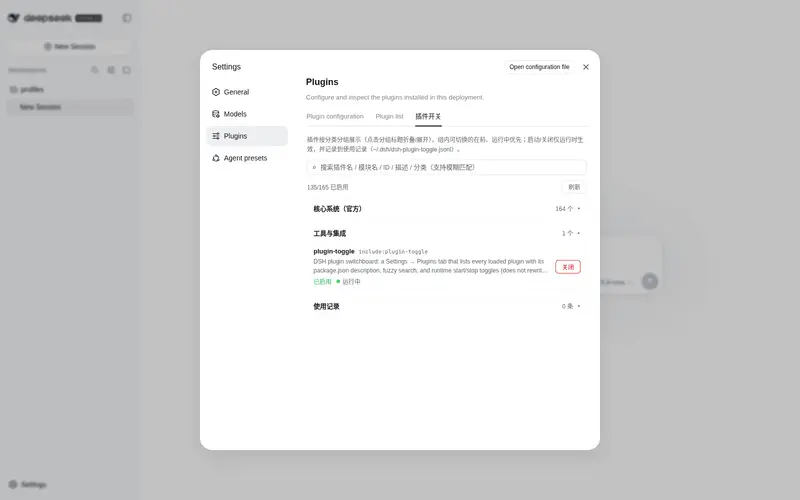
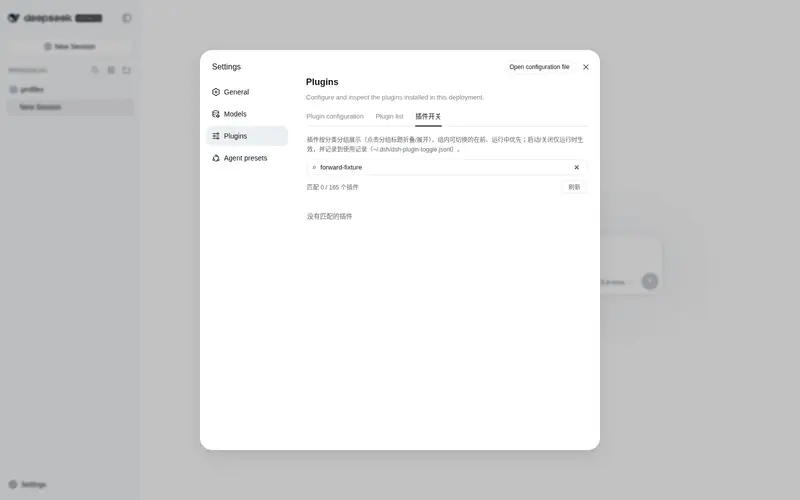
Settings -> Plugins switchboard: every loaded plugin card shows its package description and runtime phase, with fuzzy search and start/stop toggles that never rewrite config files.
Best for
- DSH users managing many loaded plugins who need searchable status, descriptions, and runtime phases in one settings view.
- Operators who want to temporarily start or stop non-core plugins without rewriting configuration files.
- Users who need a local history of recent plugin toggle actions.
Not ideal for
- Users who need enablement changes written permanently into `cordis.yml`; toggles are runtime-only.
- Workflows that require stopping protected core or surface plugins from the UI.
- Users with only a few stable plugins and no need for runtime switching or search.
README
dsh-plugin-toggle
| English | 中文 |
A DeepSeek Harness (DSH) plugin switchboard for the web GUI.
Open Settings → Plugins → Plugin Switch. Every loaded plugin is a card with:
- a short description (from that package’s
package.jsondescription) - enabled / disabled + fiber phase (running / pending / failed / …)
-
Start / Stop (runtime only — does not rewrite
cordis.yml) - fuzzy search (name / module / id / description; subsequence match)
Core / surface plugins (webserver, connection, session, agent, …) are marked Core and cannot be stopped from this UI, so the page cannot take itself down.
Install
dsh plugin --profile web add github:DamonKoy/dsh-plugin-toggle
Restart dsh web, then open Settings → Plugins → Plugin Switch.
Or add the repo as a profile dependency and include the bundle:
{
  "dependencies": {
    "dsh-plugin-toggle": "github:DamonKoy/dsh-plugin-toggle"
  },
  "dsh": {
    "profile": {
      "bundles": ["dsh-plugin-toggle"]
    }
  }
}
Then pnpm install in the profile directory and restart dsh web.
What you get
| Feature | Notes |
|---|---|
| Plugin cards | Title, entry id, description, enabled tag, phase |
| Categories | Grouped sections (core / UI / theme / tools / fun / other), collapsible |
| Sorting | Within a group: togglable plugins first, then by status (running first), then name |
| Fuzzy search | Tokens match as substring or subsequence across fields incl. category |
| Start / Stop |
entry.update({ disabled }) — runtime only, no tree.write()
|
| Core guard | Surface/runtime entries cannot be stopped (id- and module-name-based); others need a two-step confirm |
| Usage history | Every toggle is persisted to ~/.dsh/dsh-plugin-toggle.jsonl (last 1000), shown in a collapsible “使用记录” section |
| Persistence | Installed as a composition plugin — survives dsh web restarts |
HTTP API (same origin)
| Method | Path | Role |
|---|---|---|
GET |
/plugin-toggle/list |
{ entries: [...] } |
GET |
/plugin-toggle/logs |
{ records: [...] } (recent usage history, newest first) |
POST |
/plugin-toggle/set |
{ entryId, enabled } → { ok, entry? \| message? }
|
POST is same-origin only.
Layout
dsh-plugin-toggle/
  lib/index.js          Host: list + set routes over the Cordis Loader
  client/client.js      Client: Settings tab (ModuleLoader factory)
  cordis.patch.yml      Bundle insert (`id: plugin-toggle`)
The client exports.inject is the service name slots (not a package name). Using package names here parks the client fiber forever.
License
MIT
Frequently Asked QuestionsFAQ
Use the verified command dsh plugin --profile default add github:DamonKoy/dsh-plugin-toggle in a DSH-enabled shell. The command resolves the public package metadata and keeps the plugin attached to the catalog identity shown on this page.
Compatibility follows the bundle and profile status shown above. If a profile is not detected, keep the plugin disabled there and check the repository documentation before enabling it in production.
The GitHub link and activity metadata are the source of truth for releases and maintenance. Revisit this page after a new release to confirm the catalog has observed the latest version.