Dariandai/dsh-starter-pack
A curated plugin starter pack: batch-installs and configures 15 vetted community plugins across four groups from a Settings-page UI or the /setup command.
Listed
2
Market
Bundle verified
Preview
What it does
A curated plugin starter pack: batch-installs and configures 15 vetted community plugins across four groups from a Settings-page UI or the /setup command.
Best for
- New DSH users who want a curated starting set instead of evaluating hundreds of community plugins individually.
- Users who want to install selected capability groups from a settings page or `/setup` command.
- Teams comfortable applying the pack's recommended, merge-only configuration for its 15 selected plugins.
Not ideal for
- Users who need precise, package-by-package dependency review and manual configuration before installation.
- Locked-down profiles that cannot permit the pack to invoke `dsh plugin` or edit profile configuration.
- Environments unwilling to accept the pack's automatic `allowBuilds` change, including its wildcard fallback, when a hosted plugin build is blocked.
README
dsh-starter-pack
One-click curated plugin starter pack for DeepSeek Harness (dsh). Install this one plugin, and it installs and configures a batch of the most useful community plugins for you.
中文说明见 README.zh.md。
Why
New DSH users face 400+ community plugins and no idea which to install. dsh-starter-pack is the “essentials bundle”: a vetted, grouped list of the plugins worth having, installed in one click.
Install
Published to npm — installs from the prebuilt npm package, so no pnpm build approval is needed:
dsh plugin --profile web add dsh-starter-pack
Install from GitHub source (optional):
dsh plugin --profile web add github:Dariandai/dsh-starter-pack
Restart dsh web, then open Settings → Starter Pack, or run /setup.
Usage
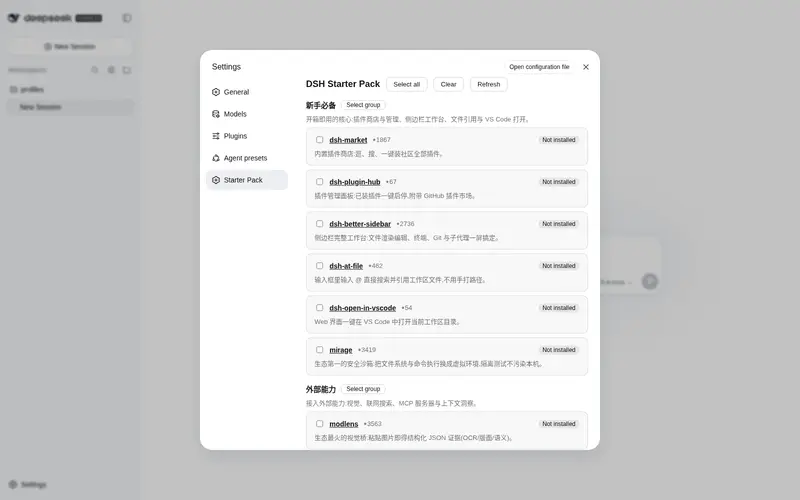
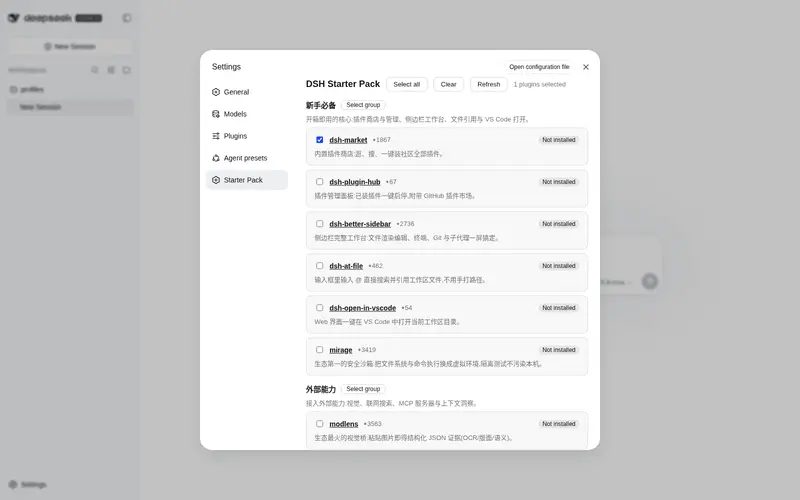
Settings → Starter Pack — pick groups and hit Install selected:

Slash command — no UI needed:
/setup                    # list groups and per-plugin status
/setup essentials         # install one group
/setup external efficiency  # install several groups
/setup all                # install everything
Installed plugins appear with an “Installed” badge and are skipped on re-runs. New plugins take effect after a restart of dsh web.
The curated groups
-
新手必备 (Essentials) — plugin store & manager, sidebar workbench,
@filementions, VS Code open, and a security sandbox (mirage). - 外部能力 (External Capabilities) — vision (modlens), web search (modsearch), an MCP bundle, and a context-insight panel.
- 记忆与技能 (Memory & Skills) — persistent cross-session memory (dsh-mnemon) and a skill manager.
- 效率与外观 (Productivity & Look) — a multi-provider spend wallet, turn notifications, and a skin switcher.
Each entry lists why it’s recommended, with a link to its repo. The list is curated by necessity, practicality and authority — plugins that fail to install reliably (e.g. dsh-toolkit, whose dependency @deepseek-ai/dsh-type-meta is missing from npm, harness discussion #984) are deliberately excluded.
How it works
- The pack ships a curated registry (
src/registry.ts). On install it callsdsh plugin --profile <profile> add <target>for each selected plugin — npm packages when prebuilt,github:owner/repootherwise — skipping anything already present. -
Build scripts: git-hosted plugins often ship a
preparestep that pnpm blocks by default. The pack treats itself as the trust decision: on the first blocked build it setsallowBuilds(including a'*': truecatch-all) in the profile’spnpm-workspace.yamland retries. You can edit that file later to restore pnpm’s defaults. -
Recommended config: plugins that expose a verified host-side config key get a patch written into the profile’s
cordis.patch.yml(merge-only, idempotent). Most curated plugins run on their defaults, which is the recommendation. - Installs run through
child_processre-invoking the runningdshbinary, mirroring howdsh-marketinstalls plugins.
Development
pnpm install
pnpm run check      # typecheck (host + client) + build
npm pack            # produce the publishable tarball
The client bundle is built with tsdown and wraps into the harness __ModuleLoader__ contract (scripts/normalize-client-banner.mjs, guarded by scripts/preflight.mjs).
License
MIT
Frequently Asked QuestionsFAQ
Use the verified command dsh plugin --profile default add github:Dariandai/dsh-starter-pack in a DSH-enabled shell. The command resolves the public package metadata and keeps the plugin attached to the catalog identity shown on this page.
Compatibility follows the bundle and profile status shown above. If a profile is not detected, keep the plugin disabled there and check the repository documentation before enabling it in production.
The GitHub link and activity metadata are the source of truth for releases and maintenance. Revisit this page after a new release to confirm the catalog has observed the latest version.