flyhigao/dsh-sticky-notes
Workspace sticky notes for DSH, saved as multiple Markdown files under the current workspace.
Listed
0
Ui
Bundle verified
Preview
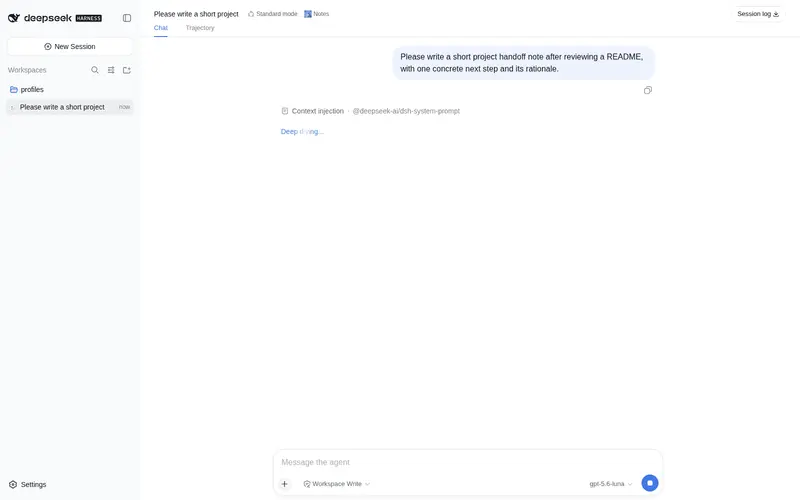
What it does
Workspace sticky notes for DSH, saved as multiple Markdown files under the current workspace.
Best for
- DSH users who want several lightweight notes scoped to each workspace.
- Developers who prefer notes as transparent Markdown files that can be opened in an editor or tracked with Git.
- Users who want to switch among registered local workspaces from one notes panel.
- Workflows involving separate todos, meeting notes, ideas, or temporary snippets per project.
Not ideal for
- Users who do not want note files added under each workspace's `dsh-notes/` directory.
- Workflows needing a database-backed notes service, rich-text editing, or a separate index.
- Sensitive-note workflows where plain Markdown files in the workspace are unsuitable.
README
dsh-sticky-notes

DSH(DeepSeek Harness)工作区便签插件。在当前会话头部提供一个紧凑的便签入口,点击后可以为当前工作区创建、编辑和删除多张便签。
便签以 Markdown 文件形式保存在当前工作区的 dsh-notes/ 目录中,简单、透明、可直接用 Git 管理。
功能
- 当前会话头部快捷入口,不占用侧边栏空间。
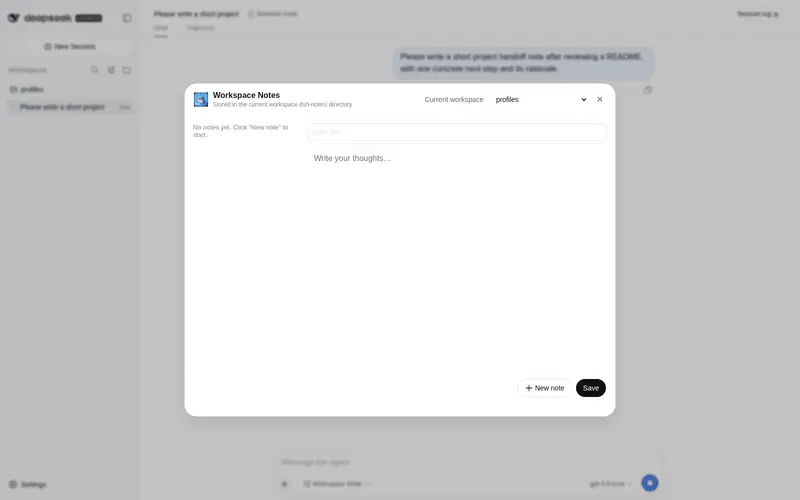
- 多便签管理:列表预览、点开编辑、新建、保存、删除。
- 弹窗内提供工作区下拉框,默认当前会话工作区,也可以切换到本机其他已注册工作区。
- 界面语言跟随 DSH 当前语言设置,支持中文和英文。
- 切换便签、切换工作区或关闭窗口前,会自动保存未提交的编辑内容。
- 数据落在当前工作区:
<workspace>/dsh-notes/*.md。 - 每个便签一个 Markdown 文件,方便直接用编辑器查看和修改。
- 服务端通过
workspaceRegistry解析工作区路径,不信任浏览器传入的任意路径。 - 写操作仅接受同源 POST,避免跨站请求。
兼容性
本插件使用 DSH 官方的加法插槽 conversation.session.header.actions,不会替换整个会话头部,也不会独占该位置。
- 使用唯一 ID
sticky-notes,避免与其他插件冲突。 - 使用
order: 30排序,和其他插件按顺序共存。 - HTTP API 统一使用
/dsh-sticky-notes/*前缀,避免接口冲突。 - 弹窗样式通过独立的
dsh-sticky-notes-modal类名控制,不污染全局样式。 - 通过
ctx.slots.inject(...)注册,不依赖插件加载顺序。
为什么是多张便签
一个工作区会积累很多零散想法:待办、灵感、会议记录、临时代码片段。如果只有一张便签,所有内容会堆在一起,越来越难找。
多张便签更符合「便签」的直觉:
- 每张便签一个主题。
- 列表里可以直接看到标题、预览和更新时间。
- 每个文件独立,方便用 Git 追踪和协作。
安装
从 GitHub 安装
dsh plugin --profile web add github:flyhigao/dsh-sticky-notes
重启 dsh web 后,进入任意会话,在会话头部右侧可以看到便签图标。
本地开发安装
如果你正在本仓库开发:
-
克隆仓库:
git clone git@github.com:flyhigao/dsh-sticky-notes.git -
在 web profile 的
package.json中加入:{ "dependencies": { "dsh-sticky-notes": "file:/path/to/dsh-sticky-notes" }, "dsh": { "profile": { "bundles": [ "@deepseek-ai/dsh-base", "@deepseek-ai/dsh-web-app", "dsh-sticky-notes" ] } } } -
安装并重启:
cd ~/.dsh/profiles/web
pnpm install
# 重启 dsh web
使用
- 打开一个会话。
- 点击会话头部右侧的便签图标。
- 在弹窗顶部选择工作区:默认选中当前会话工作区,也可以切换到本机其他工作区。
- 在弹窗中:
- 左侧:所选工作区的便签列表。
- 右侧:标题输入框 + 正文编辑区。
- 底部:新建、删除、保存。
- 切换便签、切换工作区或关闭窗口时,未点击保存的内容也会先自动保存。
- 保存后,便签会立即写入所选工作区的
dsh-notes/目录。
数据格式
每个便签是一个 Markdown 文件:
<working-directory>/dsh-notes/<note-id>.md
文件内容:
# 便签标题

便签正文…
-
note-id由插件生成,例如note-msw19zz2-7gbiyg。 - 删除便签即删除对应的
.md文件,没有额外索引。 - 手工修改或新增
.md文件后,重新打开便签面板即可看到。
HTTP API
插件自带一组简单的 HTTP 接口,供浏览器端调用:
| 方法 | 路径 | 说明 |
|---|---|---|
| GET | /dsh-sticky-notes/list?workspaceId=<id> |
列出当前工作区所有便签 |
| POST | /dsh-sticky-notes/save |
新建或保存便签 |
| POST | /dsh-sticky-notes/delete |
删除便签 |
保存请求体
{
  "workspaceId": "workspace-id",
  "note": {
    "id": "可选,编辑已有便签时传入",
    "title": "便签标题",
    "content": "便签正文"
  }
}
删除请求体
{
  "workspaceId": "workspace-id",
  "id": "note-id"
}
开发
- 服务端入口:
lib/index.js - 浏览器端入口:
client/client.js - 插件 manifest:
cordis.patch.yml
当前版本为手工维护的轻量实现,不需要额外构建步骤。client/client.js 是 DSH 客户端模块加载器可直接加载的 CJS bundle。
许可证
Frequently Asked QuestionsFAQ
Use the verified command dsh plugin --profile default add github:flyhigao/dsh-sticky-notes in a DSH-enabled shell. The command resolves the public package metadata and keeps the plugin attached to the catalog identity shown on this page.
Compatibility follows the bundle and profile status shown above. If a profile is not detected, keep the plugin disabled there and check the repository documentation before enabling it in production.
The GitHub link and activity metadata are the source of truth for releases and maintenance. Revisit this page after a new release to confirm the catalog has observed the latest version.