FuzzySoul/dsh-chatvoice
ChatVoice — free voice input + AI reply read-aloud for DeepSeek Harness (dsh). 零配置/零成本/免 API key 语音插件
Listed
1
Voice
Bundle verified
Preview
What it does
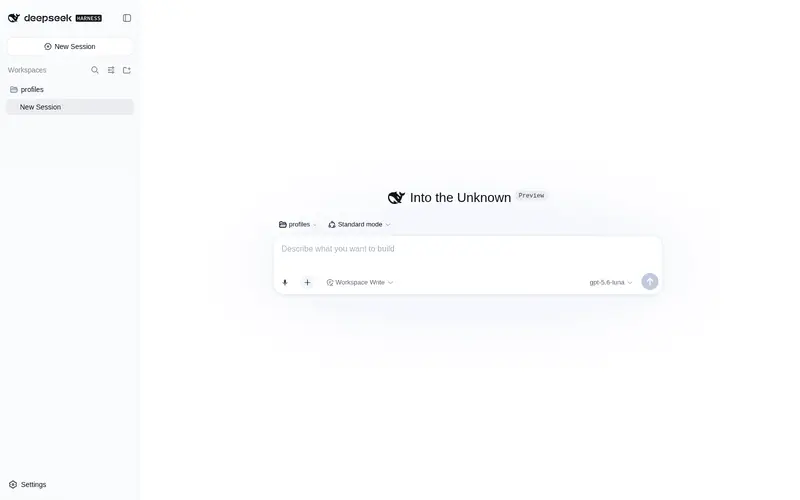
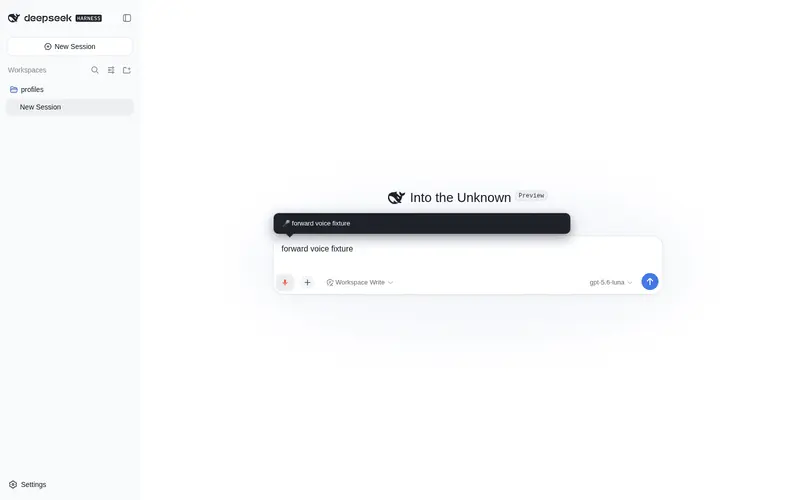
Free voice closed loop for the Web UI: browser SpeechRecognition mic input with live interim results plus read-aloud speaker buttons and auto-read for assistant replies, zero configuration and no API key.
Best for
- Edge or Chrome users who want microphone dictation and browser-based read-aloud in the DSH Web UI.
- Hands-busy, auditory-learning, or accessibility workflows that benefit from live interim recognition and interruptible speech.
- Users who want voice features without configuring an API key or a speech backend.
Not ideal for
- Firefox or Safari users who need speech input; those browsers do not support the required SpeechRecognition feature.
- Users accessing DSH through a plain HTTP LAN address; microphone input requires localhost or HTTPS.
- Workflows requiring consistent recognition accuracy regardless of browser, network, or microphone quality.
README
ChatVoice 🎤🔊 — dsh-chatvoice
| English | 中文 |
给 DeepSeek Harness (dsh) 装上「免费、免 API key、开箱即用」的语音输入 + AI 回复朗读闭环。 全程浏览器原生 Web Speech API —— 零配置、零成本、无任何后端与注册。







ChatVoice = Chat + Voice:一个插件解决「嘴」和「耳朵」——写代码时手不离键盘,用嘴问 AI;懒得看长回复,让 AI 读给你听(听力型学习 / 无障碍 / 摸鱼躺用场景全覆盖)。
功能
| # | 功能 | 说明 |
|---|---|---|
| 1 | 🎤 语音输入 | 输入框旁麦克风按钮:点一下开始说话,识别结果逐句实时进输入框(中间结果实时显示在上方气泡);聆听中随时可打字改错字、删字——语音继续实时追加,删掉的内容停止后也不会回填 |
| 2 | 🔊 回复朗读 | 每条助手回复旁小喇叭,一键朗读该条;点击变「停止」随时打断 |
| 3 | 🔁 自动朗读 | 设置页开启后,新回复完成自动朗读(可随时打断) |
| 4 | ⚙️ 设置页 | dsh 设置 → ChatVoice:识别语言 / 自动朗读 / 音色 / 语速,保存即生效,无需重启 |
| 5 | 🛡 错误提示 | 麦克风权限被拒 / 浏览器不支持 / 非安全上下文 / 识别网络失败,全部有可读 toast,绝不静默失败 |
| 6 | 🇨🇳 中文优先 | zh-CN 识别 + 自动选择 Edge 内置 Xiaoxiao Online (Natural) 免费中文自然音色 |
为什么推荐 Edge
| 能力 | Chrome | Edge | 说明 |
|---|---|---|---|
| 语音识别 | ✅(识别走 Google 服务器) | ✅(识别走 Azure,国内更稳) | 国内网络下 Chrome 可能报 network 错误 |
| 朗读音色 | 部分在线音色 | ✅ Xiaoxiao Online (Natural) 免费中文最自然 | 在线音色需联网 |
| 麦克风(安全上下文) | 仅 localhost/HTTPS | 同左 | dsh web 默认 http://127.0.0.1:3080 ✅;LAN IP 访问麦克风不可用(朗读不受影响) |
安装
dsh plugin --profile web add dsh-chatvoice
# 或手动: pnpm add dsh-chatvoice(dsh.profile.bundles 会自动 reconcile)
重启 dsh web(dsh web),打开 http://127.0.0.1:3080 即可。
⚠️ 必须用 127.0.0.1 访问:语音识别需要安全上下文(HTTPS 或 localhost),LAN IP 直连时麦克风会被浏览器禁用(自动禁用输入功能并提示,朗读仍可用)。
使用
- 语音输入:点输入框工具条上的 🎤 → 浏览器弹麦克风授权(允许)→ 说话(确认句逐句实时进输入框、中间结果实时显示在上方气泡)→ 再点 🎤 停止 → 回车发送;识别中随时可以打字改错字甚至全删——语音只往框尾追加、绝不回写,你删掉的内容停止后也不会复活
- 朗读:点助手回复旁 🔊 → 开始朗读(按钮变红色 ⏹)→ 再点停止
- 自动朗读:设置 → ChatVoice → 勾选「自动朗读新回复」→ 保存,立即生效
设置项
| 设置 | 默认 | 说明 |
|---|---|---|
| 识别语言 | zh-CN | zh-CN / en-US |
| 自动朗读 | 关 | 新回复完成后自动朗读(建议默认关,别太吵) |
| 音色 | 空 = 自动 | 自动选最佳中文音色(Xiaoxiao Online (Natural));可填任意浏览器音色名 |
| 语速 | 1.0 | 0.5(慢)~ 2(快) |
工作原理
- host(dsh/index.js):Config schema + GET/POST /dsh-chatvoice/config 路由,配置持久化到 ~/.dsh/chatvoice.json
- client(client/client.js):MutationObserver 注入麦克风按钮(输入框工具条)与小喇叭(助手回复行);SpeechRecognition 语音输入;speechSynthesis 朗读
- 全部能力来自浏览器,插件没有网络请求、没有子进程、没有 API key
已知限制
- Chrome 的语音识别走 Google 服务器,国内网络可能报 network 错误 → 换 Edge(走 Azure)
- Edge 在线音色需要联网;离线时回退到系统本地音色
- Firefox / Safari 不支持 SpeechRecognition(按钮自动置灰提示,朗读仍可用)
- 语音识别准确性取决于浏览器与系统麦克风,与插件无关
Roadmap(Phase 2)
- 🎙 按住说话(Space 按住识别、松开发送,对标微信语音)
- 🔊 edge-tts 高音质音色(XiaoxiaoNeural,Node 端生成 + 附件路由播放)
- 🗣 语音指令(「保存」「继续」「停止」等口令触发操作)
- 📼 语音备忘:录音转文字存为会话草稿
- 🧩 agent 可调用朗读工具(host 注册 read_aloud,模型可在回答时主动朗读)
English quick start
ChatVoice gives DeepSeek Harness free, keyless voice: speak your prompts (browser SpeechRecognition) and have AI replies read aloud (speechSynthesis). Zero config, zero cost, zero backend — recommend Edge for the most stable Chinese recognition (Azure) and the most natural free Chinese voice (Xiaoxiao Online Natural).
dsh plugin --profile web add dsh-chatvoice
Then open http://127.0.0.1:3080, click the 🎤 in the composer toolbar, allow mic permission, and speak. Click 🔊 on any assistant reply to hear it. Configure language / auto-read / voice / rate under Settings → ChatVoice.
License
MIT © FuzzySoul
Frequently Asked QuestionsFAQ
Use the verified command dsh plugin --profile default add github:FuzzySoul/dsh-chatvoice in a DSH-enabled shell. The command resolves the public package metadata and keeps the plugin attached to the catalog identity shown on this page.
Compatibility follows the bundle and profile status shown above. If a profile is not detected, keep the plugin disabled there and check the repository documentation before enabling it in production.
The GitHub link and activity metadata are the source of truth for releases and maintenance. Revisit this page after a new release to confirm the catalog has observed the latest version.