genius-alray/dsh-mermaid-render
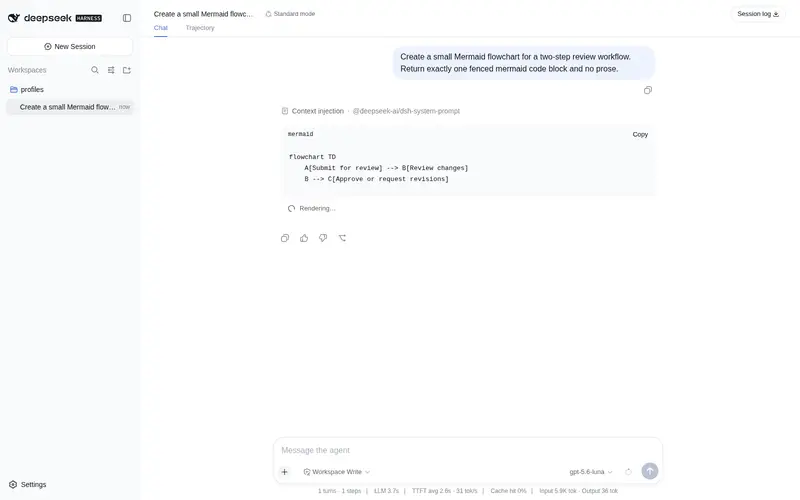
Mermaid diagram renderer for the Web UI conversation: renders mermaid code blocks into interactive cards (zoom, fit-width, fullscreen viewer, preview/code toggle) with official UI primitives, and keeps the original code block with an inline error banner when rendering fails.
Listed
1
Docs
Bundle verified
Preview
What it does
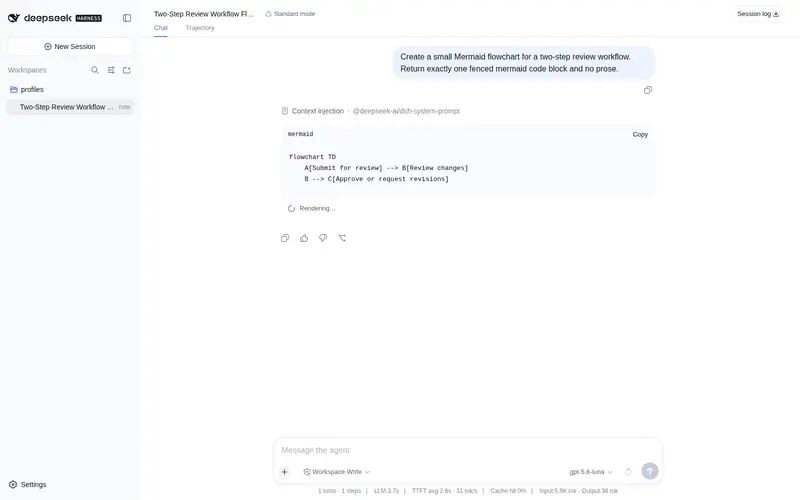
Mermaid diagram renderer for the Web UI conversation: renders mermaid code blocks into interactive cards (zoom, fit-width, fullscreen viewer, preview/code toggle) with official UI primitives, and keeps the original code block with an inline error banner when rendering fails.
Best for
- DSH Web conversations that frequently contain Mermaid flowcharts, sequence diagrams, or other Mermaid blocks.
- Users who need to zoom, fit, inspect fullscreen, or switch between a diagram and its source.
- Teams that want invalid Mermaid to remain visible as source with an inline parser error.
Not ideal for
- Non-web DSH clients or documents viewed outside the conversation UI.
- Conversations that rarely contain Mermaid blocks.
- Environments that cannot load the pinned Mermaid runtime from jsDelivr at first use.
README
dsh-mermaid-render
Interactive Mermaid diagram rendering for agent messages in the DSH Web UI: mermaid code blocks in the conversation are rendered into interactive diagram cards — zoom, fit-width, fullscreen viewer, and a preview/code toggle — built entirely on official UI primitives and DSW design tokens. When rendering fails, the original code block is preserved and an inline error banner is shown right below it.
Features
-
Auto-render mermaid code blocks — fences with
mermaid/mmdinfo strings in conversation messages become diagram cards automatically (both assistant and user messages). - Zoom / fit-width — viewport-only zoom: the card shell keeps its size, only the diagram inside scales and scrolls. Ctrl/⌘+wheel zooms, the fit button resets to width fit.
- Fullscreen viewer — a fixed overlay (product-style mask layer, portal to body): zoom, fit, and close via Esc / mask click / button.
- Preview / code toggle — a segmented selector in the card’s top-right switches between the rendered diagram and the original mermaid source.
- Graceful failure — on a render or loader error the original code block stays visible and a compact inline error banner appears under it; no stray elements are left in the page.
-
Theme-aware — diagrams re-render with the mermaid
dark/defaulttheme when the app theme changes. - Bilingual UI — zh / en labels follow the app locale.
-
Native look — primitives
Pill/Tooltipcomponents, composer-style icon buttons, lucide-style SVG icons,--dsw-*tokens only.
Install
Installed via the official dsh plugin command; it links the package into the profile and automatically appends the dsh.bundle package to dsh.profile.bundles (no manual profile edits).
dsh plugin --profile web add genius-alray/dsh-mermaid-render
Then restart dsh web — the bundle layer is composed at boot.
Git-source installs may hit pnpm’s build-script approval on first run; follow the printed hint to add the key to the profile’s
pnpm-workspace.yamlallowBuildsand re-run. The repo commits prebuiltlib/, so no local build is required.
Usage
Send a message containing a mermaid code block:
```mermaid
flowchart TD
    A[Start] --> B{Has a mermaid block?}
    B -- yes --> C[Load mermaid renderer]
    B -- no --> D[Keep plain code block]
    C --> E[Render interactive diagram]
    E --> F[Toolbar: zoom / fit / fullscreen]
```
The block renders into a card with a bottom-right toolbar (zoom in / zoom out / fit width / fullscreen) and a top-right Preview / Code selector. On a syntax error the card is not rendered: the original code block remains and an inline “Mermaid render failed” banner with the parser message appears below it.
Technical notes
-
Bundle plugin (official form):
package.jsondeclaresdsh.bundle.patch: ./cordis.patch.yml; the patch mounts the package itself. Pure client (dsh.client.platform: web);lib/client.jsis served at/plugins/dsh-mermaid-render/client.js. -
mermaid is not bundled — the ~3.3 MB library is loaded lazily at first use via a runtime dynamic
import()of the pinnedmermaid@10.9.3+esmbuild from jsDelivr, so the plugin bundle stays ~34 kB and the page boot cost is zero. -
Rendering pipeline — a
MutationObserverwatches the conversation scrollport for.md-code-blockelements whose fence infostring is mermaid/mmd; each block is rendered into a private hidden container (mermaid’s error path leaves a huge “Syntax error” SVG in the DOM otherwise — the private container keeps the page clean), then the resulting SVG is mounted into a React root as an interactive card. -
Text fidelity — the SVG is scaled through its own width/height (native vector re-render) rather than CSS transforms, and the card isolates inherited typography (
font: 13px/1.5+ CJK font stack) so Chinese node labels never overflow or clip insideforeignObjectlabels. -
Stable layout — the stage height is fixed at fit-time and
scrollbar-gutter: stablereserves the scrollbar slot, soclientWidthcannot oscillate and the page never jitters. -
UI primitives —
Pill(preview/code toggle),Tooltip, composer-style icon buttons, and hand-drawn lucide-style icons; only--dsw-*tokens, no hard-coded colors.
License
MIT
Frequently Asked QuestionsFAQ
Use the verified command dsh plugin --profile default add github:genius-alray/dsh-mermaid-render in a DSH-enabled shell. The command resolves the public package metadata and keeps the plugin attached to the catalog identity shown on this page.
Compatibility follows the bundle and profile status shown above. If a profile is not detected, keep the plugin disabled there and check the repository documentation before enabling it in production.
The GitHub link and activity metadata are the source of truth for releases and maintenance. Revisit this page after a new release to confirm the catalog has observed the latest version.