genius-alray/dsh-model-picker
DSH Web UI 模型选择器替换插件:对话框式模型选择(模糊搜索 / 供应商折叠分组 / 收藏 / 思考档位下拉),官方 bundle 形态。
Listed
2
Ui
Bundle verified
Preview
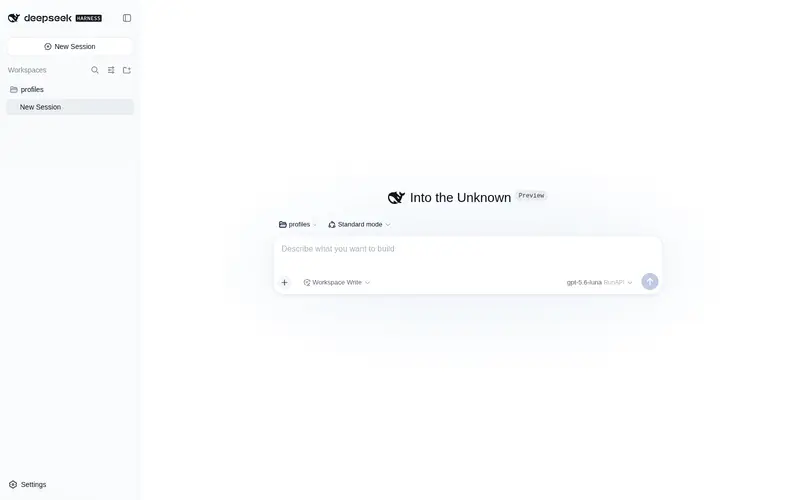
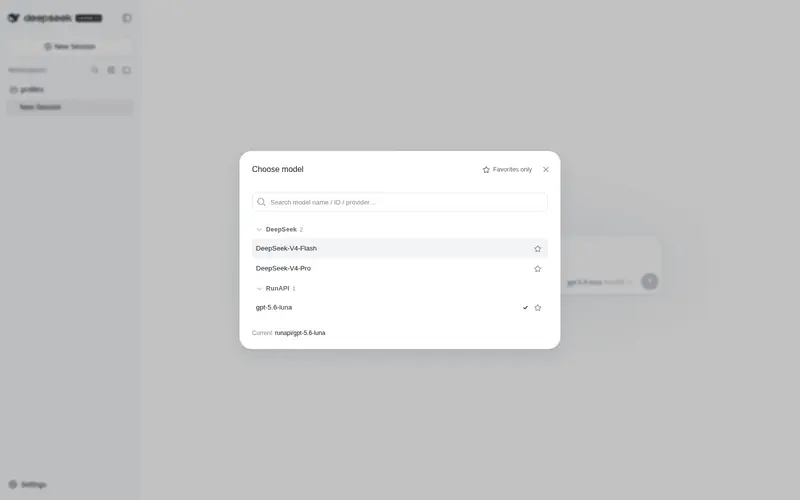
What it does
Dialog-style model picker for the DSH Web UI: fuzzy search, collapsible provider groups, favorites with a favorites-only filter, and a thinking-level dropdown, replacing the built-in model selector with official UI primitives and DSW tokens.
Best for
- DSH Web users with many models or providers who need fast fuzzy search and grouping.
- Users who repeatedly switch among a small set of favorite models.
- Workflows that adjust supported thinking levels independently of model selection.
Not ideal for
- Installations with only a few models, where the built-in selector is already sufficient.
- Users expecting favorites to sync across browsers or with filesystem-based favorite data; they are stored in browser localStorage.
- Model administration in the settings page, which this composer-only replacement does not change.
- Subagent sessions, where model switching remains disabled.
README
dsh-model-picker
DSH Web 模型选择器替换插件:把自带的下拉式模型选择菜单,升级为对话框式模型选择器——支持模糊搜索、按供应商折叠分组、收藏与”只看收藏”过滤,并为当前模型提供独立的思考档位下拉。完整复用 DSH 官方组件库与设计 token,观感与自带 UI 零违和。
为什么替换自带选择器
自带模型选择器是一个小弹窗列表:模型多、供应商多时,只能逐屏滚动查找,没有搜索、没有收藏,每次切换都要重新找。
| 场景 | 自带选择器 | dsh-model-picker |
|---|---|---|
| 模型数量多 | 长列表逐屏滚动,难以定位 | 对话框 + 模糊搜索,输入即过滤(多 token 匹配模型名 / ID / 供应商,命中词高亮) |
| 供应商多 | 单层长列表,分组不可控 | 按供应商分组 + 可折叠,默认只展开常用组 |
| 常用模型 | 每次都要翻找 | 收藏星标(localStorage 持久化),支持”只看收藏”过滤 |
| 描述信息 | 弹窗空间小,信息被截断 | 对话框大空间展示完整描述(供应商名已在分组中体现,行内不再重复) |
| 思考档位 | 混在模型选择流程里 | 触发器上独立档位下拉,随模型选择提交,含”默认档位”语义 |
| 键盘操作 | 基本靠鼠标 | 完整键盘导航(方向键移动、回车选择、Esc 关闭) |
功能特性
- 对话框式选择:居中 Modal,遮罩点击 / Esc / 外点均可关闭,与 DSH 原生对话框一致。
- 模糊搜索:大小写不敏感、多 token 匹配模型名 / ID / 供应商,命中片段高亮;支持清除。
- 供应商分组:可折叠分组头,收起/展开状态即时记忆(会话内)。
-
收藏:每行右侧星标,
localStorage(dsh-model-picker.favorites)持久化;”只看收藏”开关一键过滤。 -
思考档位:触发器旁独立下拉(
默认/ 各档位),按模型展示其可用档位与默认档位。 - 双语文案:完整中 / 英文案,跟随 DSH 的 locale 系统。
- 子代理会话自动禁用:subagent 会话中禁用模型切换,与自带行为一致。
技术要点
-
Bundle 插件(官方形态):
package.json声明dsh.bundle.patch: ./cordis.patch.yml,项目自带 patch 文件挂载自身;加入 profile 的dsh.profile.bundles即生效。 -
客户端插件:纯 client(
dsh.client.platform: web),构建产物lib/client.js由window.__ModuleLoader__收录,dsh-client-modules经dsh.clientmanifest 识别并服务/plugins/dsh-model-picker/client.js。 -
复用官方组件库:
@deepseek-ai/dsh-client-ui-primitives的Modal/Menu/Tooltip/ 图标(定位、外点关闭、Esc、滚动重定位全部交给原语),不手写任何底层交互。 -
数据共享:通过
modelDirectories.directoryFor(sessionId)与自带/model弹出窗共享同一个ModelDirectory实例,选择双向同步。 -
UI 一致性:只使用
--dsw-*设计 token(遮罩bg-mask-1+--dsw-mask-blur、卡片bg-layer-2+border-inverted+shadow-lv3、行高亮--dsw-alias-interactive-bg-hover单光标高亮等),无任何硬编码颜色。
安装
两种方式任选其一,都通过官方 dsh plugin 命令完成:它会在 profile 里执行 pnpm 安装,并自动把声明了 dsh.bundle 的包加入 dsh.profile.bundles(无需手改任何 profile 文件)。
方式一:直接安装(GitHub 源)
dsh plugin --profile web add genius-alray/dsh-model-picker
源格式与 pnpm 一致:
用户名/仓库名、github:用户名/仓库名、git+https://…均可。 Git 源首次安装时若 pnpm 拦截构建脚本(prepare),按提示把 pnpm 打印的 key 加入 profile 的pnpm-workspace.yaml的allowBuilds,然后重跑一次即可。 仓库已提交构建产物lib/,从 Git 源安装无需本地构建,装完重启即用。
方式二:克隆源码后手动安装
git clone https://github.com/genius-alray/dsh-model-picker.git model-picker
cd model-picker
pnpm install && pnpm build                 # 本地构建出 lib/
dsh plugin --profile web add /path/to/model-picker   # 本地文件夹
相对路径按你执行命令的目录解析(
add .、add ../model-picker、file:、link:均支持)。
安装后
# 1. 重启 dsh web(bundle 层在启动时组合)
# 2. 验证 client 模块已被收录
curl -s -o /dev/null -w "%{http_code}" http://127.0.0.1:3080/plugins/dsh-model-picker/client.js   # → 200
打开任意会话,点击输入框上方的模型触发器即可看到新选择器。
卸载
dsh plugin --profile web remove dsh-model-picker
移除依赖的同时自动从 bundle 层摘除,重启 dsh web 后生效。
开发
pnpm install          # 依赖(peer:cordis、react)
pnpm build            # tsdown → lib/{index.js,client.js,...}
pnpm typecheck        # tsc -p tsconfig.json
构建产物验证:lib/client.js 头部应有 window.__ModuleLoader__.load({ id: "dsh-model-picker" ...});primitives 等依赖保持 external(require(...) 形式,运行时经浏览器模块表解析)。
目录结构
model-picker/
├── package.json          # dsh.bundle.patch + dsh.client manifest + exports
├── cordis.patch.yml      # bundle 自挂载 patch(insert 自身)
├── tsdown.config.ts      # 构建配置(external 平台模块、CSS 注入、bundle purity 门禁)
├── tsconfig.json
└── src/
    ├── index.ts          # host 侧(空 apply,纯 client 插件)
    └── client/
        ├── index.tsx     # 选择器 UI:触发器、对话框、搜索、分组、收藏、档位下拉
        └── style.css     # 全部使用 --dsw-* token
已知边界
- 收藏存于浏览器
localStorage,与动态插件版本的 fs 收藏文件不互通(切换实现需重新收藏)。 - 选择器替换的是
conversation.input.model座位(composer 模型触发器);设置页里的模型管理界面不受影响。
Frequently Asked QuestionsFAQ
Use the verified command dsh plugin --profile default add github:genius-alray/dsh-model-picker in a DSH-enabled shell. The command resolves the public package metadata and keeps the plugin attached to the catalog identity shown on this page.
Compatibility follows the bundle and profile status shown above. If a profile is not detected, keep the plugin disabled there and check the repository documentation before enabling it in production.
The GitHub link and activity metadata are the source of truth for releases and maintenance. Revisit this page after a new release to confirm the catalog has observed the latest version.