godchen520/dsh-web-remote
DSH 手机/外网远程访问插件:Cloudflare Quick Tunnel 公网隧道 + token 鉴权 + gzip 压缩 + 局域网 HTTPS 直连 + 手机图标面板 + QQ 机器人取链接
Listed
4
Remote
Bundle verified
Preview
What it does
Access DSH from your phone or anywhere: Cloudflare Quick Tunnel public link + LAN HTTP/HTTPS direct access (auto self-signed cert), token auth, gzip compression, floating phone-icon panel with QR codes, and a NapCat QQ bot channel to fetch the link.
Best for
- DSH users who need phone access over either a Cloudflare Quick Tunnel or the local network.
- Teams that want token-protected remote links, QR-code sharing, and a compact in-app control panel.
- Users who want to retrieve the remote link through the integrated messaging-bot channel.
Not ideal for
- Deployments that require a stable public hostname; Quick Tunnel addresses change after restart.
- Environments that cannot run or obtain cloudflared; its first automatic download requires network access.
- Users requiring browser-trusted LAN HTTPS certificates without warnings; the automatic certificate is self-signed.
README
dsh-web-remote




| English
手机 / 外网远程访问 DeepSeek Harness(DSH)的插件。随时随地通过微信或浏览器控制你的 DSH。
✨ 功能亮点
| 功能 | 说明 |
|---|---|
| 🌐 公网访问 | Cloudflare Quick Tunnel,无需公网 IP、无需注册,cloudflared 缺失时自动下载 |
| 📡 局域网直连 | HTTP + HTTPS 直连(HTTPS 自动生成自签名证书,零配置) |
| 🔒 安全认证 | 每次启动生成随机令牌;HttpOnly Cookie;局域网可免 token |
| ⚡ 性能加速 | 反向代理自动 gzip 压缩,大历史会话加载更快 |
| 📱 侧边栏图标 | 手机快捷按钮常驻左下角,刷新不消失 |
| 🤖 微信机器人 | iLink 协议直连微信,支持 AI 对话、会话控制、模型切换 |
| 💬 QQ 机器人 | NapCat OneBot 11 反向 WebSocket(施工中) |
🚀 快速开始
三步上手:
# 1. 安装插件(在 DSH profile 目录执行)
cd $DSH_HOME/profiles/web
pnpm add github:godchen520/dsh-web-remote

# 2. 注册 bundle(编辑 package.json)
# 在 "dsh.profile.bundles" 数组中添加 "dsh-web-remote"

# 3. 重启 DSH
dsh web
启动后页面左下角出现 📱 图标 → 点击打开远程面板。
📸 截图
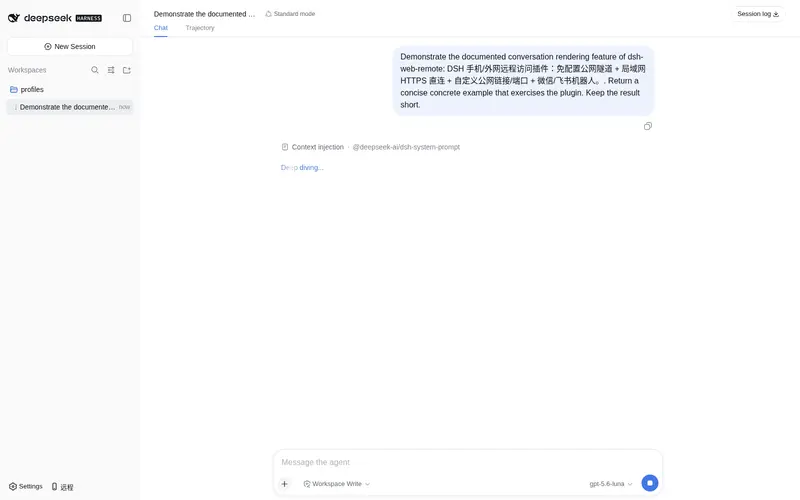
快捷按钮(页面左下角):

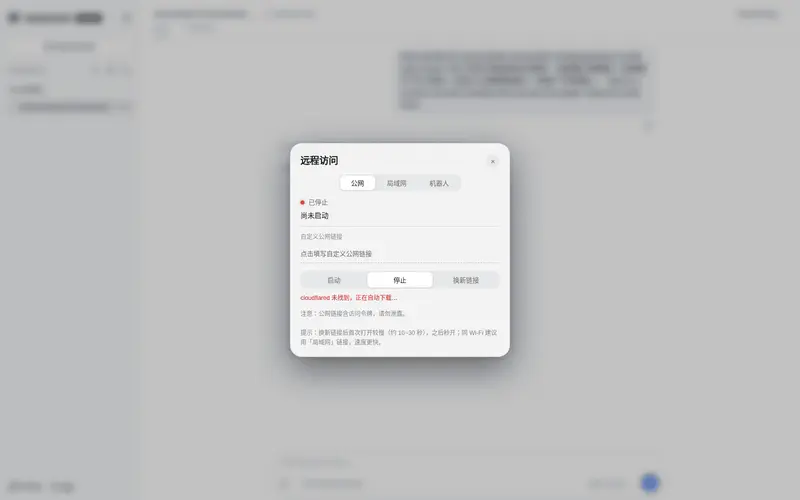
远程面板(公网 / 局域网切换、一键复制链接、二维码、启动 / 停止):

📋 安装方式
方式一:GitHub 直接安装(推荐)
cd $DSH_HOME/profiles/web
pnpm add github:godchen520/dsh-web-remote
在 package.json 的 dsh.profile.bundles 数组中添加 "dsh-web-remote",重启 DSH。
--config.minimumReleaseAge=0可绕过 pnpm 11 新包发布年龄校验(如需要)。
方式二:手动 patch
把本包放入 profile 的 node_modules,然后在 cordis.patch.yml 追加:
- insert:
    - id: web-remote
      name: 'dsh-web-remote'
bundle 方式需重启;cordis.patch.yml 方式会被 HMR 热加载。
⚙️ 配置
全部可选,不配置即开箱即用。在 cordis.patch.yml 里覆盖:
| 参数 | 默认值 | 说明 |
|---|---|---|
targetPort |
3080 |
DSH 自身端口 |
httpPortStart |
3081 |
局域网 HTTP 起始端口(自动跳过占用) |
httpsPortStart |
3082 |
局域网 HTTPS 起始端口 |
qqPortStart |
3001 |
QQ OneBot 桥起始端口 |
cloudflaredPath |
'' |
指定 cloudflared 路径;留空自动探测 / 自动下载 |
pfxPath |
'' |
指定 PFX 证书;留空自动生成自签名 |
pfxPass |
'' |
PFX 密码 |
toolsDir |
'' |
工具与证书缓存目录;留空使用 $DSH_HOME/tools
|
autoStart |
true |
插件加载即自动启动 |
lanOpen |
true |
局域网免 token(私网来源放行) |
📱 使用方法
- 启动后页面左下角出现 📱 图标
- 点击图标 → 面板显示运行状态和链接
- 手机浏览器打开链接即可访问 DSH
公网:https://xxx.trycloudflare.com/?token=...
局域网:https://192.168.x.x:3082(同 Wi-Fi;默认免 token)
🤖 微信机器人
通过微信直接控制 DSH,支持:
远程控制命令:
-
/链接— 获取公网链接(未启动自动开启) -
/停止远程— 关闭远程服务
会话管理:
-
/会话列表— 列出所有会话 -
/选择 N— 选中第 N 个会话 -
/当前会话— 查看选中会话名称 -
/历史内容— 查看会话最近输出
模型切换:
-
/当前模型— 查看当前使用的模型 -
/切换模型— 列出所有模型并切换 -
/选强度 N— 设置思考强度
对话:
- 直接发送内容 → 自动发到选中的会话并回传结果
- 未选择会话时提示先选择
❓ 常见问题
Q: 公网链接打开提示”不安全”? A: 这是 HTTPS 自签名证书的预期行为。手机浏览器选择「继续访问」即可。Edge 需关闭”增强安全性”。
Q: 重启 DSH 后链接变了? A: 公网隧道每次重启会生成新地址,这是正常行为。微信绑定的 token 会自动持久化恢复。
Q: cloudflared 下载失败?
A: 首次启动需要联网下载 cloudflared(约 10MB),之后复用缓存。可手动下载放到 toolsDir 目录。
Q: 微信扫码后断开?
A: 重启 DSH 后微信会自动重连(token 已持久化)。如仍断开,重新发送 /链接 扫码绑定。
📝 更新日志
查看 CHANGELOG.md 了解版本更新历史。
🤝 贡献
欢迎贡献!请查看 CONTRIBUTING.md 了解开发和提交流程。
📄 License
Frequently Asked QuestionsFAQ
Use the verified command dsh plugin --profile default add github:godchen520/dsh-web-remote in a DSH-enabled shell. The command resolves the public package metadata and keeps the plugin attached to the catalog identity shown on this page.
Compatibility follows the bundle and profile status shown above. If a profile is not detected, keep the plugin disabled there and check the repository documentation before enabling it in production.
The GitHub link and activity metadata are the source of truth for releases and maintenance. Revisit this page after a new release to confirm the catalog has observed the latest version.