grunmin/dsh-acp-enhanced
Enhanced ACP (Agent Client Protocol) server for DeepSeek Harness (dsh) — drop-in bridge for the Zed editor: block-level streaming, usage/stat telemetry, model & reasoning-effort switching, permission presets, session resume & archive. Install: dsh plugin add
Listed
1
Notify
Bundle verified
Preview
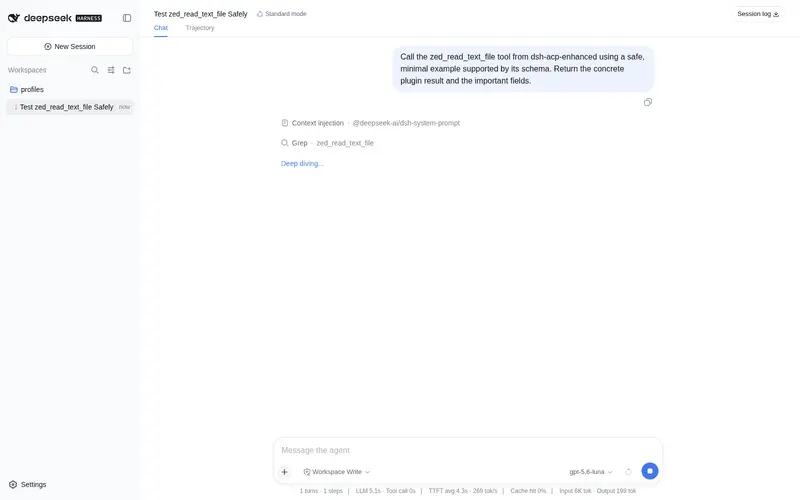
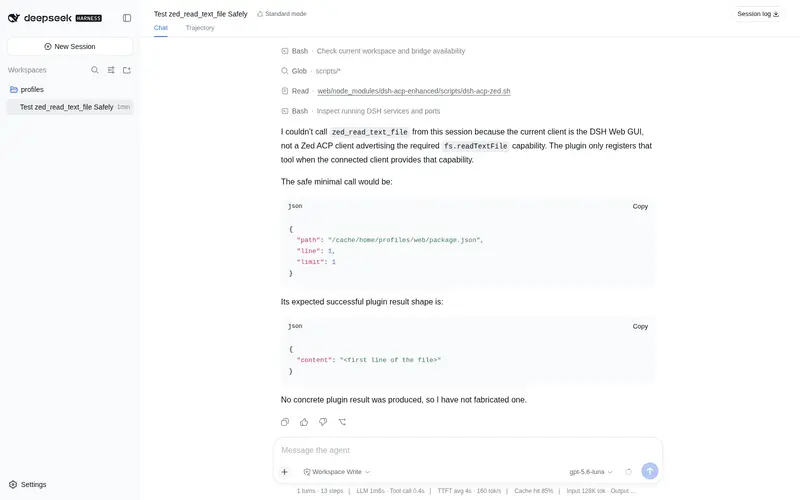
What it does
Enhanced ACP server for DeepSeek Harness: block & reasoning streaming, usage telemetry, model/effort switching, permission presets, session resume/archive, per-session MCP servers, and Zed file/terminal forwarding.
Best for
- Zed users who want DeepSeek Harness exposed as a feature-rich ACP agent.
- Workflows needing streamed reasoning, detailed usage telemetry, and live model or reasoning-effort controls.
- Teams needing permission presets, native approvals, resumable session archives, or per-session MCP servers.
Not ideal for
- Image or audio attachment workflows; only baseline text prompts are supported.
- Sessions requiring multiple prompts in flight concurrently; each session permits one.
- Clients that require additionalDirectories, legacy SSE or acp MCP transports, or session fork/close/resume capabilities.
README
| **中文 | English** |
dsh-acp-enhanced
An enhanced Agent Client Protocol (ACP) server for
DeepSeek Harness (dsh), built for ACP
editors like Zed. It is a drop-in replacement for the official @deepseek-ai/dsh-acp
bridge: the official bridge only streams plain text, this one exposes the Web GUI’s
capabilities — streaming, telemetry, model/permission control, session management, MCP —
over the ACP wire.
Features
Output & telemetry
-
Block + reasoning streaming: text blocks and the model’s thinking arrive live
(
agent_message_chunk/agent_thought_chunk); cancelled/retried attempts never leak torn output -
Full telemetry: context usage ring plus cache hit rate / TPS / input-output-reasoning
tokens / tool timing / turn counts (
usage_update._metacarries the full breakdown)
Model & permissions
-
Model switching: live
provider/modelcatalog dropdown (ACP grouped-select wire shape) -
Reasoning effort:
reasoning_effortdropdown — only when the routed model exposes selectable efforts - Permission presets: read-only / workspace-write / full-access session modes
- Approval: native allow-once / reject-once prompts per tool call
Zed deep integration
-
Tool cards: expand to see each call’s full arguments and result preview
(
rawInput/rawOutput), with per-kind icons -
Zed files & terminal:
zed_read_text_file/zed_write_text_file/zed_terminalput file edits into Zed’s “edited files” area (diff + accept/reject) and commands into a real Zed terminal -
Native form questions:
ask_user_question→elicitation/createform, click an option, no typing - Plan panel: plan mode toggle → “planning” status bar in Zed
Sessions
-
Resume & archive:
session/loadrestores past threads (full replay);session/list/session/deletemanage the thread archive (titled, sorted by last activity); live title updates
Commands
-
Slash commands: typing
/reveals the command list (available_commands_update):/statusshows the route and telemetry,/modellists or switches the model (listings render as monospace code blocks — readable at a glance), everything else (/compact/goal/permission/plan…) runs straight through the harness command registry — all executed without a model turn; unresolved slashes fall through to the model (the/skill-nameskill gesture)
MCP
-
MCP servers:
session/newmcpServersmount any MCP server (stdio + streamable HTTP); tools join asmcp__<server>__<tool>; a failing server never takes the session down
Preview
After picking dsh-acp-enhanced in Zed’s AI Agent panel:


Quick start
This package follows the official dsh plugin conventions (it declares dsh.bundle), so
installation matches any official bundle: one command — auto-initializes the profile,
installs the package, appends the bundle layer; no profile YAML to write.
Install (2 steps)
Step 1 — install (from the npm registry; no source checkout needed):
dsh plugin --profile acp-enhanced add dsh-acp-enhanced
When hacking on the code, use
link:to a local checkout instead (live edits):dsh plugin --profile acp-enhanced add "link:/absolute/path/to/dsh-acp-enhanced"
Step 2 — register in Zed (under agent_servers in ~/.config/zed/settings.json;
Zed spawns agents with a minimal PATH, so use the shipped launcher
scripts/dsh-acp-zed.sh, which locates node/dsh itself)
The launcher ships with the package. Its absolute path depends on how you installed in Step 1:
- npm install (default):
$HOME/.dsh/profiles/acp-enhanced/node_modules/dsh-acp-enhanced/scripts/dsh-acp-zed.sh— replace$HOMEwith your home directory (e.g./Users/you); Zed does not expand~or env vars, so write the full literal path.link:dev install:<your checkout>/scripts/dsh-acp-zed.sh.
Most common: DeepSeek official API (the default route)
{
  // ...your existing settings...
  "agent_servers": {
    "dsh-acp-enhanced": {
      "type": "custom",
      "command": "/bin/bash",
      "args": ["/absolute/path/to/dsh-acp-enhanced/scripts/dsh-acp-zed.sh"],
      "env": {
        "DSH_ACP_PROVIDER": "deepseek-official",  // the official provider id
        "DSH_ACP_MODEL": "deepseek-v4-flash"      // the official model id
      }
    }
  }
}
Both env vars match the shipped patch’s defaults, so they can be omitted entirely — writing them out just makes the route explicit. The API key does not have to live in Zed: store it in
~/.dsh/.credentials.yaml(DEEPSEEK_API_KEY) and the dsh credentials service resolves it; the launcher also falls back to a runningdsh webprocess’s key.
Optional: pin the panel’s default config options (all still changeable in the panel):
"dsh-acp-enhanced": {
  // ...the type/command/args/env above...
  "default_config_options": {
    "model": "deepseek-official/deepseek-v4-flash",
    "plan_mode": false,
    "reasoning_effort": "high"
  },
  "favorite_config_option_values": {
    "model": ["deepseek-official/deepseek-v4-flash", "deepseek-official/deepseek-v4-pro"]
  }
}
Extended: route through an OpenAI-Responses gateway (e.g. a company model gateway)
Same install path; only the env values change to the provider/model the gateway exposes plus the key env var it requires:
"dsh-acp-enhanced": {
  "type": "custom",
  "command": "/bin/bash",
  "args": ["/absolute/path/to/dsh-acp-enhanced/scripts/dsh-acp-zed.sh"],
  "env": {
    "DSH_ACP_PROVIDER": "<gateway-provider-id>",  // provider id exposed by the gateway
    "DSH_ACP_MODEL": "<gateway-model-id>",         // model id exposed by the gateway
    "<KEY_ENV_NAME>": "<key>"                      // the key env var the gateway reads
  }
}
<KEY_ENV_NAME>can also be omitted and the key stored in~/.dsh/.credentials.yamlinstead.
Zed hot-reloads settings. Open the AI Agent panel (Cmd+Shift+A) → pick
dsh-acp-enhanced in the agent selector → send your first message: replies stream in
real time, the status bar shows context usage, the panel exposes Model / Permission preset
/ Plan mode options plus three modes, and the thread archive lists and resumes past
sessions.
Verify locally (no Zed needed):
node scripts/acp-client.mjs                    # official default route, no env; expect ALL CHECKS PASSED
DSH_ACP_PROVIDER=... DSH_ACP_MODEL=... node scripts/acp-client.mjs   # only for a custom route
Optional: route web_search through the same gateway
If the gateway implements the OpenAI Responses web_search server tool, you can route
search through it too (reusing the same credential). Install the sub-package and append
two blocks to the profile’s cordis.patch.yml:
dsh plugin --profile acp-enhanced add dsh-web-search-openrouter
- id: web
  config:
    searchProvider: openai-responses   # the search provider id this sub-package registers on ctx.web (fixed value)

- insert:
    - id: web-search-openrouter
      name: 'dsh-web-search-openrouter'
      config:
        enabled: true
        baseURL: http://<gateway-host>:<port>/v1
        model: <your-model-id>
        apiKeyEnv: <KEY_ENV_NAME>
⚠️
searchProvidermust be exactlyopenai-responses— the search provider iddsh-web-search-openrouterregisters onctx.web. It is not your gateway’s LLM provider id (the one you put inDSH_ACP_PROVIDERabove). Thewebplugin matches it exactly, so a wrong value produces no error at config time and only fails at the first search withWEB_PROVIDER_CONFIGURED_MISSING.
Troubleshooting
| Symptom | Fix |
|---|---|
exec: dsh: not found (status 127) |
Use the shipped dsh-acp-zed.sh launcher (locates node/dsh itself) |
no API key for provider route "xxx" |
Write ~/.dsh/.credentials.yaml, or set env.DEEPSEEK_API_KEY on the agent_servers entry |
| Cannot switch models / context usage missing | A “phantom provider” route was picked; this bridge filters them by default (only config.provider’s models are advertised) — point the profile’s provider at a real route |
| Need detailed diagnostics |
ACP_DEBUG=1 dsh --profile acp-enhanced (stderr lifecycle trace) |
Development
node scripts/acp-client.mjs           # end-to-end smoke (needs an API key)
node scripts/acp-client-tools.mjs     # client-tool tests (mocks Zed fs/terminal/elicitation/plan)
node scripts/acp-mcp-test.mjs         # MCP mount test (no model calls)
node scripts/acp-smoke-keyless.mjs    # keyless boot smoke (CI)
node scripts/acp-resume-test.mjs      # session resume test
Known limitations
Baseline prompts only (no image/audio attachments), no additionalDirectories, text
streams at block granularity, one in-flight prompt per session. MCP supports stdio and
streamable HTTP (legacy SSE / acp transports are not advertised).
session/close / session/fork / session/resume are not implemented (capabilities
undeclared, compliant clients will not call them); session/delete removes the persisted
directory directly because dsh persistence has no official delete API.
Frequently Asked QuestionsFAQ
Use the verified command dsh plugin --profile default add github:grunmin/dsh-acp-enhanced in a DSH-enabled shell. The command resolves the public package metadata and keeps the plugin attached to the catalog identity shown on this page.
Compatibility follows the bundle and profile status shown above. If a profile is not detected, keep the plugin disabled there and check the repository documentation before enabling it in production.
The GitHub link and activity metadata are the source of truth for releases and maintenance. Revisit this page after a new release to confirm the catalog has observed the latest version.