hellosky983/dsh-foundry
Plugin Foundry — a self-extending, everything-is-a-plugin compiler for DeepSeek Harness (DSH). Blueprint registry + scaffold/validate tools.
Listed
2
Dev
Bundle verified
Preview
What it does
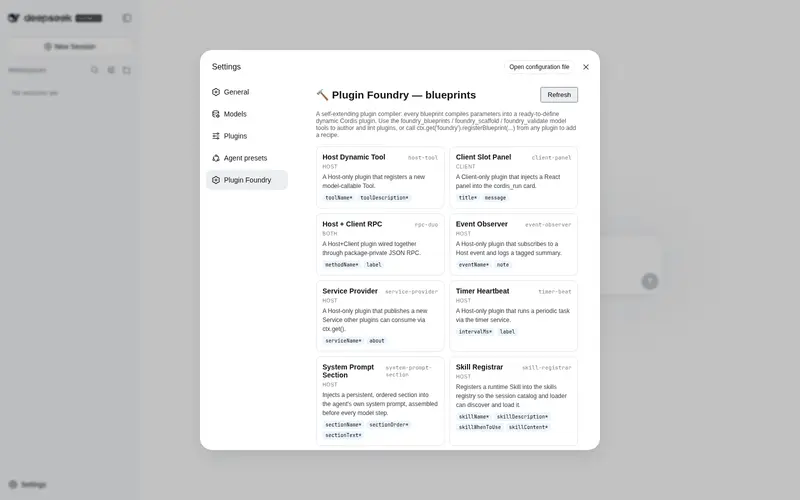
Plugin compiler with a blueprint registry (scaffold → validate → deploy) exposed as a runtime service, three model tools, and a blueprint-gallery settings page.
Best for
- DSH plugin authors who want blueprint-based scaffolding and static validation for runtime plugins.
- Agents that need to turn a known plugin pattern into host or browser code for later deployment.
- Plugin ecosystems that want to register reusable custom blueprints through a runtime service.
Not ideal for
- Workflows expecting the foundry to deploy generated code by itself; the documented flow passes scaffold output to separate runtime-definition tools.
- DSH environments far from rc.6 or without the required `dsh-tools` peer dependency.
- Users who only need to install an existing plugin and do not need scaffolding, validation, or blueprint authoring.
README
dsh-foundry · Plugin Foundry(插件铸造厂)

一个自举式「一切皆插件」编译器:它本身是一个 DSH 插件,用来研发插件,并能被其它插件扩展。
Overview
Plugin Foundry 解决什么问题? 在 DeepSeek Harness(DSH)里编写动态 Cordis 插件需要记住繁琐的运行时契约(harness.defineTool 的 output:{schema,render}、parameters 逐属性 DSL、inject 声明、可逆副作用……)。本插件把这些契约固化成蓝图(blueprint),把「写插件」变成「选配方 + 填参数」,一键编译出可直接 cordis_define 的宿主/浏览器代码,并在定义前做静态校验。
适合谁? DSH 插件作者、需要把能力快速下沉成运行时工具的智能体(本插件与子代理皆可调用)、以及想用「插件扩展插件」的元编程场景。
核心价值:
- 一个
foundry服务(ctx.get('foundry')),任何插件都能registerBlueprint(...)续写配方 → 生态自我生长; - 三个模型工具
foundry_blueprints/foundry_scaffold/foundry_validate; - 九种内置蓝图覆盖 Host/Client/RPC/事件/服务/定时器/系统提示/Skill/文件工具;
- 一张 Settings 里的蓝图画廊页(只读)。
Compatibility
| 项目 | 版本 |
|---|---|
| DeepSeek Harness (DSH) | 0.1.0-rc.6 |
@deepseek-ai/dsh-tools(peerDependency) |
^0.1.0-rc.6 |
| 最后验证日期 | 2026-08-15 |
依赖声明在
package.json的peerDependencies。若你的 DSH 版本与0.1.0-rc.6差异较大,请先以 README 的「Development」冒烟测试验证。
Install / Uninstall
安装(link 方式)
⚠️ 不要用
dsh plugin --profile web add ./dsh-foundry(会把本地目录当 git 源解析而失败)。请手动 link。
- 编辑
$DSH_HOME/profiles/web/package.json,在dependencies增加:"dsh-foundry": "link:/绝对路径/dsh-foundry"并在
dsh.profile.bundles数组加入"dsh-foundry"。 - 在 profile 目录安装:
cd $DSH_HOME/profiles/web && pnpm install - 重启 DSH(或重载 web profile),验证:
dsh --profile web --dump-config # 应看到 "# == dsh-foundry" 层
升级
更新 link 指向的源码目录后,cd $DSH_HOME/profiles/web && pnpm install,重启即可(link 包无需重装版本号)。
禁用 / 彻底移除
# 彻底移除:从 package.json 的 dependencies 与 dsh.profile.bundles 删掉 "dsh-foundry"
cd $DSH_HOME/profiles/web && pnpm install
Quick start
最小可复现示例(安装并重启后,在任意 DSH 会话里):
1. foundry_blueprints
   → 返回 9 个蓝图(id / name / category / description / params)

2. foundry_scaffold { blueprint: "host-tool",
                      params: { toolName: "hello", toolDescription: "say hi" } }
   → 返回可粘贴的 code.host(已内置 output:{schema,render} 契约)

3. 把返回的 code.host 交给 cordis_define + cordis_run
   → 一个名为 hello 的模型工具立即上线,可被你和子代理调用
扩展新配方(任意插件内):
const foundry = ctx.get('foundry')
if (foundry) foundry.registerBlueprint({
  id: 'my-recipe', name: 'My Recipe', category: 'host',
  description: '...', whenToUse: '...',
  params: [{ name: 'x', label: 'X', type: 'string', required: true, default: '' }],
  render: (p) => ({ host: 'return { apply(ctx) { ... } }', client: null, notes: [] }),
})
Configuration
本插件无配置项、无环境变量、无敏感信息。蓝图参数有内置默认值(如 host-tool.toolName 默认 my_tool),调用 foundry_scaffold 时按需覆盖即可。
| 项 | 默认 | 说明 |
|---|---|---|
| 蓝图参数 | 见各蓝图的 params
|
foundry_blueprints 会列出每个参数的 default
|
/foundry/state 路由 |
只读 GET | 仅向本地浏览器暴露蓝图元数据(无敏感数据) |
Permissions & data
-
文件系统:
dsh-foundry本体不读写任何文件。注意:其fs-file-tool蓝图会生成一个宿主文件读写工具——那是你之后自行部署的插件,非本插件行为;该蓝图已在参数说明与源码注释中明确提示(需先fs.resolve(path)、listDir 结果需映射为标量)。 -
网络:仅在 DSH 的本地 web 服务上注册一个
GET /foundry/state路由(回环地址),返回蓝图目录元数据。 - 凭据 / 用户数据:不访问、不读取、不上传任何凭据或用户数据。
- 敏感项:无。
Troubleshooting
| 现象 | 原因与解决 |
|---|---|
curl /foundry/state 返回 HTML 而非 JSON |
路由未注册。确认 bundle 用了 inject:['webServer'] 而非 ctx.get('webServer')(服务激活时序会导致后者在 apply 时为 undefined) |
检查服务时报 no catalogued Service named "foundry"
|
正常现象:ctx.provide('foundry') 是运行时服务,不出现在静态 Service 目录里,ctx.get('foundry') 仍可用 |
| 安装后工具未出现 | 确认已重启、--dump-config 里有 # == dsh-foundry 层、@deepseek-ai/dsh-tools@^0.1.0-rc.6 已装 |
parameters.type must be a value schema object |
正式 bundle 的 defineTool 参数必须是逐属性 DSL({ prop: { type, required? } }),不能用 {type:'object',properties} 包装式 |
日志:插件无独立日志;宿主日志在 DSH 启动/运行输出中。回滚:按「Uninstall」移除,或把 profile 里 dsh-foundry 从 bundles 移除后 pnpm install。
Development
export PATH="/path/to/node/bin:$PATH"
# 语法检查(ESM)
node --check index.js && node --check client.js

# 冒烟测试(mock ctx,验证 3 工具 + foundry 服务 + /foundry/state 路由注册)
mkdir -p /tmp/t/node_modules/@deepseek-ai && ln -s <dsh-tools 路径> /tmp/t/node_modules/@deepseek-ai/dsh-tools
node --input-type=module -e 'import { name, inject, apply } from "dsh-foundry"; ...'
- 蓝图统一在
index.js的BUILTIN_BLUEPRINTS,用makeBlueprint(...)追加即可。 - 客户端画廊页在
client.js,通过window.__ModuleLoader__.load注册到settings.section。 -
贡献:欢迎 PR。请确保新蓝图满足「纯 JS 函数体、可逆副作用、正确的
inject声明」,并附node --check与冒烟测试结果。
License & security
-
许可证:MIT(见
LICENSE)。 - 安全报告:请勿公开披露漏洞。发现安全问题请通过私有渠道(如仓库的 Private vulnerability reporting / 直接联系维护者)报告,我们会尽快响应。
- 本仓库不含密钥、个人信息或私有内容。
Frequently Asked QuestionsFAQ
Use the verified command dsh plugin --profile default add github:hellosky983/dsh-foundry in a DSH-enabled shell. The command resolves the public package metadata and keeps the plugin attached to the catalog identity shown on this page.
Compatibility follows the bundle and profile status shown above. If a profile is not detected, keep the plugin disabled there and check the repository documentation before enabling it in production.
The GitHub link and activity metadata are the source of truth for releases and maintenance. Revisit this page after a new release to confirm the catalog has observed the latest version.