hezhongtang/dsh-update-copilot
Update copilot for DeepSeek Harness: tracks the dsh core, bundles, and every profile plugin (npm + git dual channel); changelog briefs for agent-assisted decisions; confirmed updates only · DSH 更新助手:追踪 dsh 本体、bundle 与全部 profile 插件(npm+git 双通道);变更简报辅助升级决策;仅执行确认过的更新
Listed
0
Dev
Bundle verified
Preview
What it does
Update copilot for DeepSeek Harness: one scan covers the dsh core, official bundles, and every profile plugin; explains what changed and how risky each update is, then updates only what you confirm.
Best for
- DSH maintainers who need one inventory of available updates across core, official bundles, and profile plugins.
- Users who want changelog-backed risk briefs before explicitly approving individual plugin updates.
- Profiles mixing npm, GitHub-pinned, and local `link:` plugin sources.
Not ideal for
- Users expecting automatic DSH core upgrades; core updates are report-only.
- `link:` checkouts without an upstream branch, or repositories where stash restoration conflicts cannot be handled manually.
- Workflows requiring reliable GitHub release details beyond unauthenticated API limits; briefs may degrade to version lists.
- Raw `git+https://` dependencies that need upstream comparison, since they are only reported as-is.
README
dsh-update-copilot




An update copilot for DeepSeek Harness: tracks the dsh core, shipped bundles, and every installed profile plugin — then helps you decide, and only then updates.

| English | 中文 |
Why this exists
DSH moves fast, and so does its plugin ecosystem. Every profile installs plugins through pnpm specs — npm versions, GitHub commit pins, local link: checkouts — and each channel drifts out of date in its own way. Checking them by hand means walking every repo; auto-updating everything blindly means trusting third-party code with your environment.
This plugin takes the middle path: detect everything, summarize what changed, update only what you confirmed. The DSH core is deliberately report-only — upgrading the harness restarts every session, so that decision stays with a human.
Features
| 🔭 Full radar | dsh core + shipped bundles (dsh-base, dsh-web-app) + every profile’s plugin dependencies, in one scan |
| 🔄 Dual channel | npm registry versions (full semver compare, prerelease-aware) and git upstreams (pinned-commit vs HEAD, link: checkouts via read-only ls-remote) |
| 🧭 Update highlights | Per-item: semver distance, risk level (major → high, minor → medium, patch → low), changelog material — npm versions between yours and latest, GitHub compare commits, release notes (with their body rendered inline), or local git log; every artifact links out (npm version pages, commits, releases, compare views) and every row carries a ↗ to its repository — monorepo sub-packages link to their subdirectory, npm plugins without a resolvable GitHub repository fall back to their npm package page |
| 🤖 Agent tools |
update_copilot_scan / update_copilot_brief / update_copilot_update — ask your agent “any updates?” and get an honest, data-backed answer |
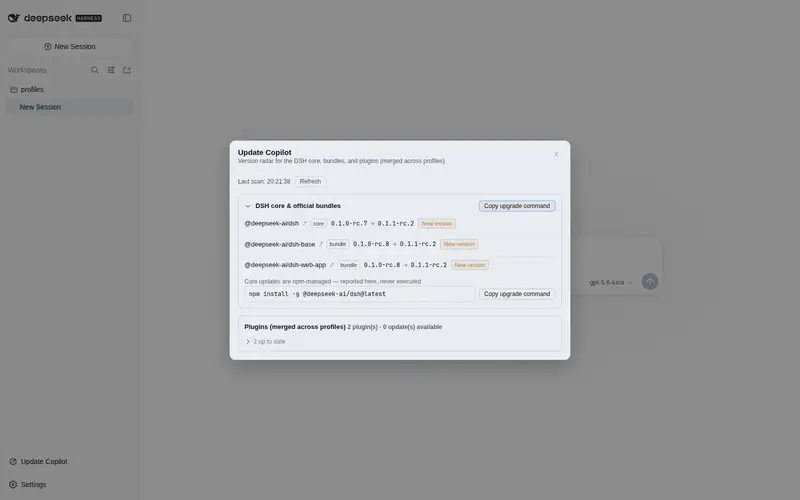
| 🖥 Web surfaces | A sidebar trigger beside Settings (with a lazy badge: the behind-plugin count appears only after the first popup open — no background polling; the badge can be turned off in settings for a quiet sidebar) opens a compact popup — behind rows first, up-to-date rows folded; the full page lives on in Settings → Update Copilot with inline update highlights and two-step confirm updates; updates stream live progress over SSE (resolving / downloading / retrying / stash / pull / restore phases) straight into a per-row progress bar |
| 🛡 Update guardrails | Same-origin POST + explicit confirm, strict target allowlist, single-flight lock, 5-minute timeout; npm/github specs run only through the official dsh plugin CLI, link: checkouts update via git pull in their own directory (auto-stash → pull → restore; conflicts are always handed back for manual handling), file: and official @deepseek-ai/* installs are refused |
| 🌐 Fully bilingual | Every user-facing string — panel, popup, badges, update highlights, recommendations, update errors — follows the UI language (zh/en); the agent tool path keeps stable English identifiers |
Install
# from npm (recommended)
dsh plugin --profile web add dsh-update-copilot

# or straight from the GitHub repo
dsh plugin --profile web add github:hezhongtang/dsh-update-copilot
Restart dsh web, then open Settings → Update Copilot. Works the same in any other profile (--profile <name>).
Usage
Ask your agent
“check for updates”
The agent runs update_copilot_scan, then builds a brief for each outdated item and presents the risk before doing anything. Updates run only after you say yes — the update tool rejects calls without confirm: true.
Or use the popup / panel
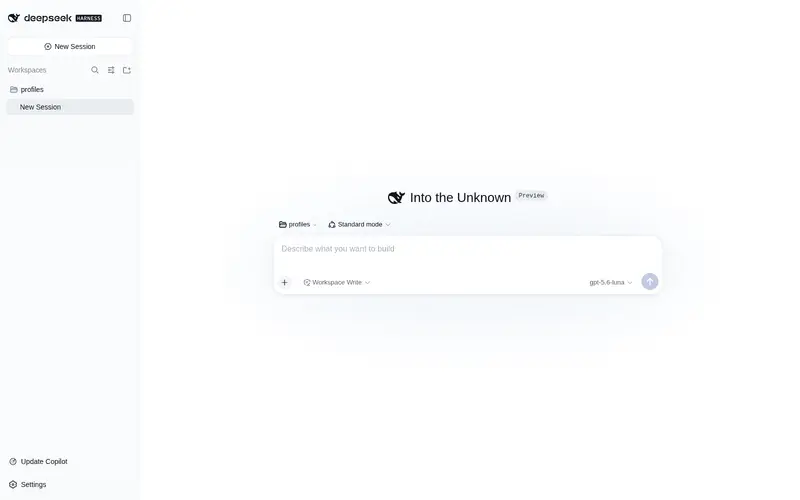
The sidebar button beside Settings opens the compact radar popup (ESC or backdrop click closes; ?duc=1 in the URL opens it once — handy for screenshots and tests). Settings → Update Copilot is the full page: core status (with a copyable upgrade command — never executed), every profile’s plugins with current → latest versions, inline update highlights, and a two-step confirm button per update. After an update, a plugin in the running profile is hot-reloaded in place when its entry and bundle patch are unchanged; the restart banner is only shown for updates outside the phase-1 hot-reload scope (bundle-patch changes, non-current profiles, self-update, etc.).
Agent tool reference
| Tool | Read/Write | Purpose |
|---|---|---|
update_copilot_scan |
read | Full scan across core + all profiles (10-min cache, force to bypass) |
update_copilot_brief |
read | Semver distance, risk, changelog material, recommendation for one item |
update_copilot_update |
write | Execute one confirmed update: npm/github specs through the official dsh plugin CLI (failed/timeout attempts retry automatically — 3 total, 1s/3s backoff); link: checkouts via git pull inside their own directory (auto-stash → pull → restore, conflicts handed back for manual handling), or with source: "remote" switch the dependency to the published npm version (or a github: spec when the package is not on npm) — breaking the local link |
How it works
Each dependency spec is classified into a channel, and each channel has its own comparison:
| Channel | Example spec | Current | Latest |
|---|---|---|---|
| npm | ^0.1.4 |
installed package.json version |
newest version in the full registry doc |
| github | github:owner/repo#sha |
pinned commit in pnpm-lock.yaml
|
upstream HEAD via GitHub API |
| linked | link:../my-plugin |
local git rev-parse HEAD
|
git ls-remote origin HEAD (read-only) |
The npm channel deliberately ignores the latest dist-tag: monorepo sub-packages often leave that tag stale, which false-flags installs that are actually newer than the tag. Versions are compared with full semver precedence (prereleases included), so 0.1.0-rc.6 > 0.1.0-rc.5 and 1.0.0 > 1.0.0-rc.1 both hold.
Updates execute through two vetted paths, never a raw shell string: npm/github specs run dsh plugin --profile <p> add <target> — the same path a human would type — with the target string validated against an allowlist; link: checkouts run git directly in their directory (git stash push for local changes → git pull → git stash pop to restore them). Failed or timed-out pulls are retried automatically: 3 total attempts by default, with 1s/3s backoff; merge conflicts or failed restores are never auto-resolved — the result reports attempts, a stash summary, and the last output.
A link: checkout can also be switched to a remote source: the copilot replaces the dependency spec with the newest published npm version (npm registry first), or with github:owner/repo#<origin HEAD> when the package has no npm release. The local link breaks and future updates follow the normal npm/github channel. Switching is destructive, so it always requires explicit confirmation and is never part of the default pull path.
Security
- The only mutating route is
POST /dsh-update-copilot/update: same-origin enforced,confirm: truerequired. - Official
@deepseek-ai/*packages and the dsh core are never auto-updated; the core’s upgrade command is displayed, not run. - All upstream queries are read-only (
registry.npmjs.org,api.github.com,git ls-remote) with hard timeouts; a failed check degrades that one item instead of failing the scan.
Limitations
- Plugin hot reload is phase-1 scoped: it covers updates whose running profile entry still exists and whose new version keeps the same
dsh.bundle.patchanddsh.clientdeclaration (this includeslink:checkouts — node_modules points at the checkout through a symlink, so the pull takes effect on the same files the reloader reads). Bundle-patch changes, non-current profiles, and copilot self-update still ask for adshrestart. -
link:updates require the checkout to have an upstream branch configured; uncommitted changes are auto-stashed and restored after the pull, and a failed restore (stash pop conflict) needs manualgit stash list/git stash pop. - Switching a
link:to a remote source breaks the local link and there is no automatic switch back (the spec must be edited by hand). The npm-first strategy installs the registry version, which may differ from your local development checkout. - Unauthenticated GitHub API is rate-limited (60 req/h) — briefs degrade gracefully to version lists.
- Raw
git+https://specs are reported as-is without a comparison channel.
Contributing
Issues and PRs welcome at hezhongtang/dsh-update-copilot. The codebase is intentionally small and dependency-free — plain ESM on the host, a hand-authored CJS bundle in the browser, no build step to set up.
License
MIT © 2026 hezhongtang
Frequently Asked QuestionsFAQ
Use the verified command dsh plugin --profile default add github:hezhongtang/dsh-update-copilot in a DSH-enabled shell. The command resolves the public package metadata and keeps the plugin attached to the catalog identity shown on this page.
Compatibility follows the bundle and profile status shown above. If a profile is not detected, keep the plugin disabled there and check the repository documentation before enabling it in production.
The GitHub link and activity metadata are the source of truth for releases and maintenance. Revisit this page after a new release to confirm the catalog has observed the latest version.