huasheng33991/dsh-power-button
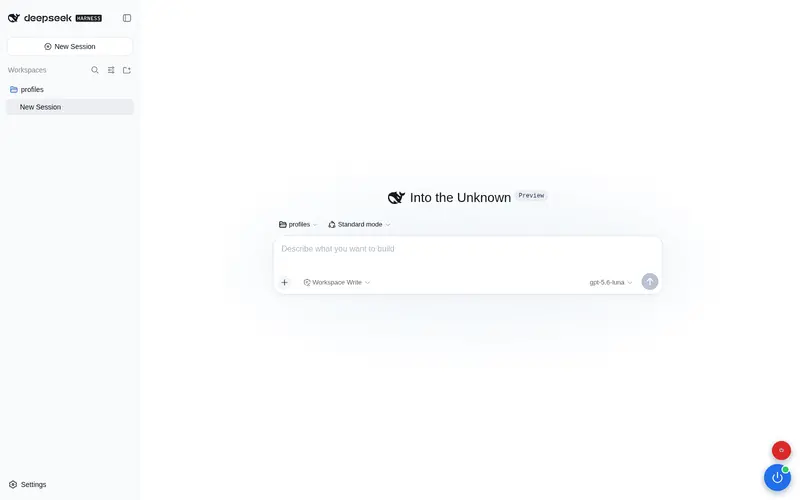
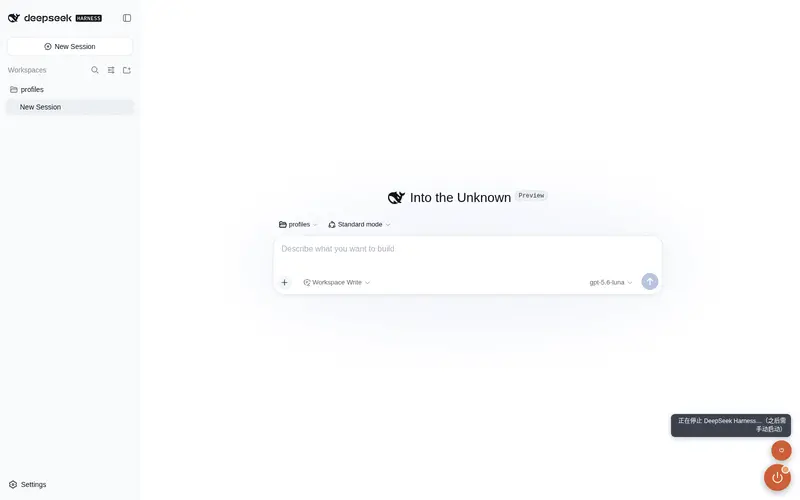
One-click start/stop (restart) button for DeepSeek Harness, pinned to the window bottom-right corner. / DSH 一键启停按钮。
Listed
1
Dev
Bundle verified
Preview
What it does
One-click start/stop button pinned to the window bottom-right corner: restarts DeepSeek Harness in place via a detached helper that relaunches the exact boot invocation (loopback same-origin guarded), with an optional stop-only action.
Best for
- Local DSH Web operators who want a persistent one-click restart control in the interface.
- Development or personal installations where relaunching the exact executable, arguments, environment, and working directory is desirable.
- Operators who also want a nearby explicit stop-only action.
Not ideal for
- Remote administration through a proxy is unsuitable because restart and stop accept only local same-origin requests and reject forwarded requests.
- Deployments managed by an external supervisor gain little from an in-process detached relaunch button.
- Users seeking only health monitoring or status display do not need process restart and stop controls.
README
dsh-power-button
DeepSeek Harness 一键启停按钮 —— 固定在窗口右下角的悬浮电源键。
单击主按钮即可重启 DeepSeek Harness(停旧启新,自动拉起新进程并重连页面);悬停出现的小按钮可仅停止(不自动重启)。
- 状态点:绿 = 运行中 / 红 = 离线 / 琥珀脉冲 = 重启中
- 重启接口仅接受本机同源请求(拒绝代理转发),伪造来源一律 403
- 持久化安装:本体放
~/.dsh/plugins/dsh-power-button/,通过 profilepackage.json的dsh.profile.bundles自动加载,重启后依然存在
路由
| 路由 | 方法 | 说明 |
|---|---|---|
/dsh-power/health |
GET | 健康检查 { ok: true }
|
/dsh-power/restart |
POST | 一键启停:detached helper 等端口释放后按原入口/参数/环境/cwd 重启 |
/dsh-power/stop |
POST | 仅停止,不自动重启 |
安装(profile 层)
# 1. 把本包放入 DSH 用户级插件目录
mkdir -p ~/.dsh/plugins
cp -r dsh-power-button ~/.dsh/plugins/

# 2. 加入 profile 依赖并安装
cd ~/.dsh/profiles/web
pnpm add file:~/.dsh/plugins/dsh-power-button

# 3. 在 package.json 的 dsh.profile.bundles 列表追加 "dsh-power-button"
#    (注意:不要再在 cordis.patch.yml 手动 insert,避免 duplicate loader entry id)

# 4. 重启 dsh web 后刷新页面即可看到右下角按钮
卸载
cd ~/.dsh/profiles/web
pnpm remove dsh-power-button
# 并从 package.json 的 dsh.profile.bundles 移除 "dsh-power-button"
技术说明
重启机制:POST /dsh-power/restart 会派发一个 detached node helper,helper 等待 HTTP 端口释放后,用 process.execPath + execArgv + 原始 argv + cwd + 环境变量 重新拉起完全相同的 dsh 启动命令,随后旧进程收到 SIGTERM 优雅退出。新进程脱离原终端独立运行。
踩坑记录:helper 代码中
})换行后紧跟(async必须加前导分号(;(async),否则 ASI 会把 IIFE 吞进上一条语句,helper 静默不执行导致自启失败。
Frequently Asked QuestionsFAQ
Use the verified command dsh plugin --profile default add github:huasheng33991/dsh-power-button in a DSH-enabled shell. The command resolves the public package metadata and keeps the plugin attached to the catalog identity shown on this page.
Compatibility follows the bundle and profile status shown above. If a profile is not detected, keep the plugin disabled there and check the repository documentation before enabling it in production.
The GitHub link and activity metadata are the source of truth for releases and maintenance. Revisit this page after a new release to confirm the catalog has observed the latest version.