huguangyu666/dsh-plugin-notify
DeepSeek Harness 插件:通知出口——agent 通过桌面通知 / 中文语音播报 / 提示音主动联系用户(长任务完成、出错、呼叫用户回来)。Windows 本机零依赖。
Listed
4
Voice
Bundle verified
Preview
What it does
Notification outbox: agent proactively notifies via toast / Chinese TTS voice / sound effects (explosion, victory, alarm), 60s confirmation window voice-calls you back, volume boost, settings panel.
Best for
- Windows users who leave long-running agents unattended and want completion, failure, or attention alerts.
- Users who want configurable combinations of desktop toast, Chinese offline TTS, and sound effects.
- Workflows that benefit from an immediate completion toast followed by a delayed voice callback when the user does not respond.
- Agents that need an explicit notify_user tool for contextual status messages.
Not ideal for
- Non-Windows environments are unsupported because the plugin requires Windows and PowerShell 5.1 or later.
- Quiet or interruption-sensitive environments may find voice calls, sound effects, or volume boosting unsuitable unless those options are disabled.
- Long spoken content is unsuitable: voice messages are truncated to 300 characters.
- Latency-sensitive tool chains should account for synchronous speech playback, which blocks until completion and has a 120-second timeout.
README
dsh-plugin-notify

已收录于 awesome-dsh-plugin 精选列表(Notifications & Integrations)
DeepSeek Harness 插件:通知出口——让 agent 主动联系你。桌面通知 / 中文语音播报 / 提示音,Windows 本机零依赖。
功能
-
系统提示词注入:自动往所有 agent 的系统提示词注入主动通知规则(长任务完成 / 出错 / 需要你注意时用 notify_user),不用每次教;
DSH_NOTIFY_INJECT_PROMPT=0可禁用 -
自动通知兜底(不依赖模型自觉):
- 会话回合出错 → 自动语音 + 桌面通知
- 回合结束 → 立即桌面通知,进入 60 秒确认窗口:期间你在 dsh 发了消息(=看到了)则取消;没发 → 中文语音呼叫你(无论你在不在电脑前——用电脑没发现任务完成更需要语音打断提醒);
DSH_NOTIFY_ON_TURN_END=0关闭全部
-
agent 工具
notify_user:模型想说啥说啥——把想说的话写进message自由发挥(如搞定了,报告放桌面了);不写则按scene用默认文案 -
命令
/notify:/notify <内容> [--speak|--sound|--toast]手动发通知 -
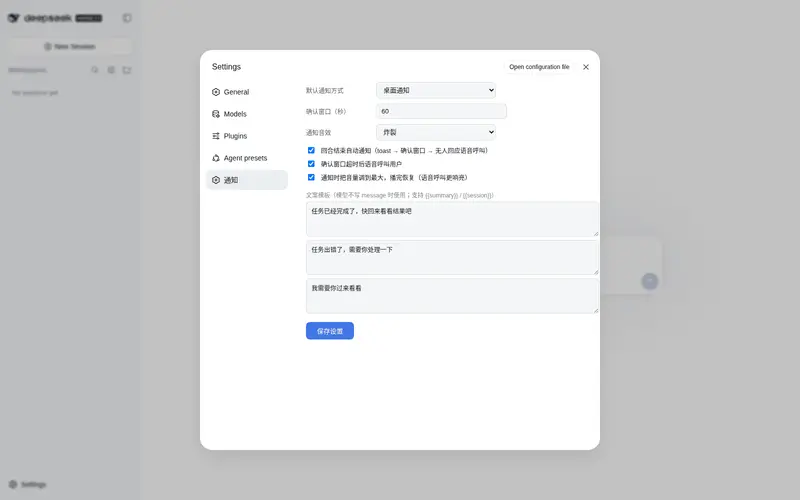
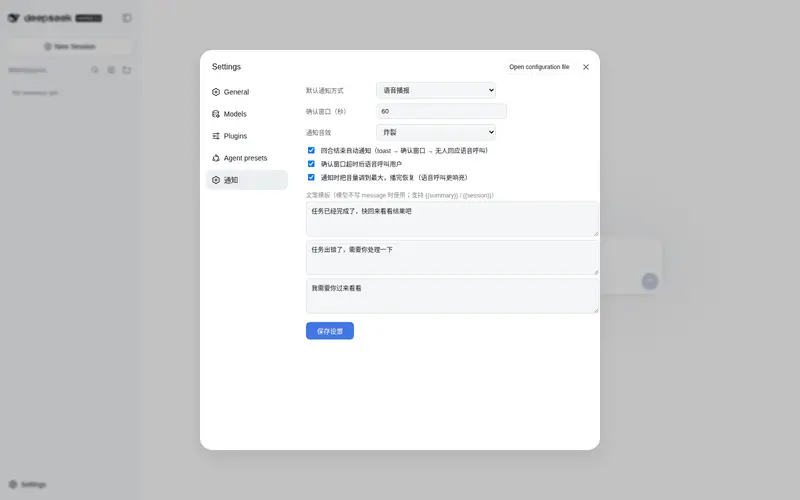
设置入口(dsh 原生设置界面):dsh 左下角设置 → 「通知」分区——所有行为偏好直接嵌在 dsh 设置里(默认通知方式 / 确认窗口秒数 / 自动通知开关 / 语音呼叫开关 / 音量增强 / 文案模板),保存即生效;另有
/notify页面可测试通知 - 音量增强:可选——通知时自动把系统音量调到最大,播报完恢复原音量(适合怕错过呼叫的场景,不是每个人都喜欢所以默认关闭)
- 炸裂音效:4 种合成音效(炸裂 / 胜利 / 警报 / 清脆,Python 标准库实时合成),通知时可配;默认「炸裂」
- 音量增强默认开启:通知时自动把系统音量调到最大,播完恢复原音量
-
三种通道(可组合):
-
toast桌面通知(NotifyIcon 气泡,无额外模块) -
speak中文语音播报(PowerShell SAPI 离线 TTS,优先中文语音) -
sound系统提示音 -
both语音 + 桌面通知
-
安装
方式一:官方命令(推荐)
# 装进 web profile(自动 reconcile dsh.profile.bundles)
dsh plugin --profile web add dsh-plugin-notify
dsh web   # 重启生效
方式二:商店一键安装
装 dsh-store,打开「插件商店」搜索安装。
方式三:手动
npm i dsh-plugin-notify
在 dsh 的 profile patch(~/.dsh/profiles/<profile>/cordis.patch.yml)中挂载:
- insert:
    - id: notify
      name: 'dsh-plugin-notify'
重启 dsh 即生效。要求 Windows + PowerShell 5.1+(系统自带)。
使用
模型主动通知(核心场景):直接跟 agent 说”做完这个任务通知我”“出错时叫我”,它会调用 notify_user 工具。语音播报会念出内容(自动截断 300 字),适合你离开电脑时的场景:
“查一下今天的项目状态,完成后用语音叫我”
手动通知:
/notify 任务完成了
/notify --speak 快回来看看结果
/notify --sound 提醒
测试页:浏览器打开 /notify,选模式点发送;”演示:任务完成叫你”一键体验完整场景。
环境变量
| 变量 | 默认 | 说明 |
|---|---|---|
DSH_NOTIFY_DEFAULT_MODE |
toast |
默认通知方式(toast / speak / sound / both) |
DSH_NOTIFY_INJECT_PROMPT |
1 |
是否向系统提示词注入”主动通知”规则(0 关闭) |
DSH_NOTIFY_ON_TURN_END |
1 |
回合结束是否自动通知(0 关闭全部) |
DSH_NOTIFY_CALL_DELAY_SECONDS |
60 |
toast 发出后等待用户响应的秒数,超时未互动则语音呼叫 |
DSH_NOTIFY_TEMPLATE_DONE 等 |
默认模板 | 文案模板(task_done / task_error / call_back),也可用设置面板或 ~/.dsh/notify/config.json 覆盖 |
文案模板
模型不写 message 时按场景用默认文案(写了 message 则完全自由发挥)。模板支持 {{summary}} / {{session}} 变量,默认不含:
| 场景 | 默认文案 |
|---|---|
task_done |
任务已经完成了,快回来看看结果吧 |
task_error |
任务出错了,需要你处理一下 |
call_back |
我需要你过来看看 |
自定义(设置面板 / 配置文件 ~/.dsh/notify/config.json > 环境变量 > 默认):
# 方式一:配置文件 ~/.dsh/notify/templates.json
# {"task_done": "搞定啦,任务完成了{{summary}}"}
# 方式二:环境变量
# DSH_NOTIFY_TEMPLATE_DONE="搞定啦,任务完成了{{summary}}"
```## 设置面板

浏览器打开 `/notify` 可配置所有行为偏好,保存到 `~/.dsh/notify/config.json` 立即生效:

| 配置 | 说明 |
|---|---|
| 默认通知方式 | 模型/命令不指定时的默认模式 |
| 确认窗口(秒) | toast 发出后等待用户回应的秒数,超时未互动则语音呼叫(默认 60) |
| 回合结束自动通知 | 开关(默认开) |
| 超时语音呼叫 | 开关(默认开) |
| 音量增强 | 通知时把系统音量调到最大,播完恢复(默认开) |
| 通知音效 | 炸裂(默认)/ 胜利 / 警报 / 清脆 / 系统提示音 |
| 文案模板 | 三个场景的通知文案,支持 `{{summary}}` / `{{session}}` 变量 |

## 音效

插件内置音效合成器(`sound.py`,纯 Python 标准库,零依赖),首次使用自动生成到 `~/.dsh/notify/sounds/`:

| 音效 | 构成 |
|---|---|
| 炸裂 | 低频冲击下滑 + 噪声爆裂 + 高频滑音 |
| 胜利 | C-E-G-C 胜利琶音 |
| 警报 | 880Hz 方波断续 |
| 清脆 | E6 → A6 双音 |

## 实现说明

- 后端是单文件 `notify.ps1`(随包分发),通过环境变量 `DSH_NOTIFY_PAYLOAD` 接收 base64 编码的 JSON(避免命令行中文编码问题)
- 语音用系统 SAPI:自动选择 `zh-CN` 语音(如 Microsoft Huihui Desktop),无中文语音时回退默认
- 语音播报同步执行(念完才返回),工具调用串行,超时 120 秒

## 开发

```bash
npm run build   # esbuild 构建 lib/
node test-mock.mjs  # mock 测试 14 项(工具/命令/路由注册、配置读写)
# 单测后端:DSH_NOTIFY_PAYLOAD=$(node -e "console.log(Buffer.from(JSON.stringify({mode:'speak',title:'测试',message:'你好'})).toString('base64'))") powershell -File notify.ps1
许可
MIT
Frequently Asked QuestionsFAQ
Use the verified command dsh plugin --profile default add github:huguangyu666/dsh-plugin-notify in a DSH-enabled shell. The command resolves the public package metadata and keeps the plugin attached to the catalog identity shown on this page.
Compatibility follows the bundle and profile status shown above. If a profile is not detected, keep the plugin disabled there and check the repository documentation before enabling it in production.
The GitHub link and activity metadata are the source of truth for releases and maintenance. Revisit this page after a new release to confirm the catalog has observed the latest version.