Isanti2016/dsh-quicksight
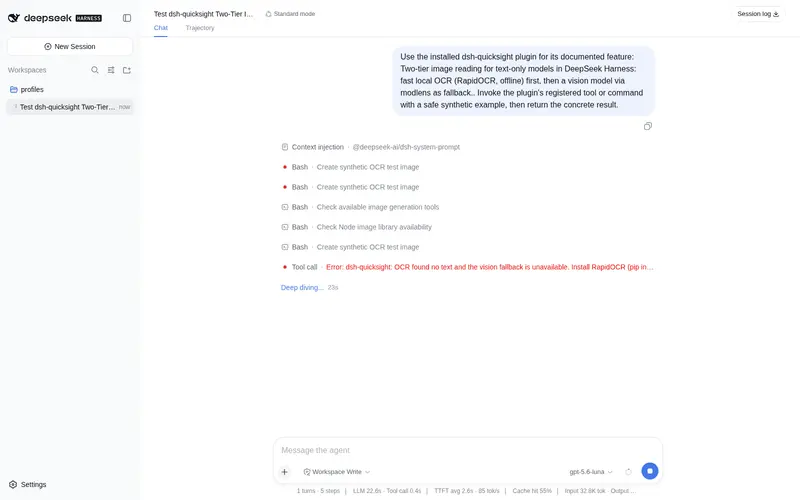
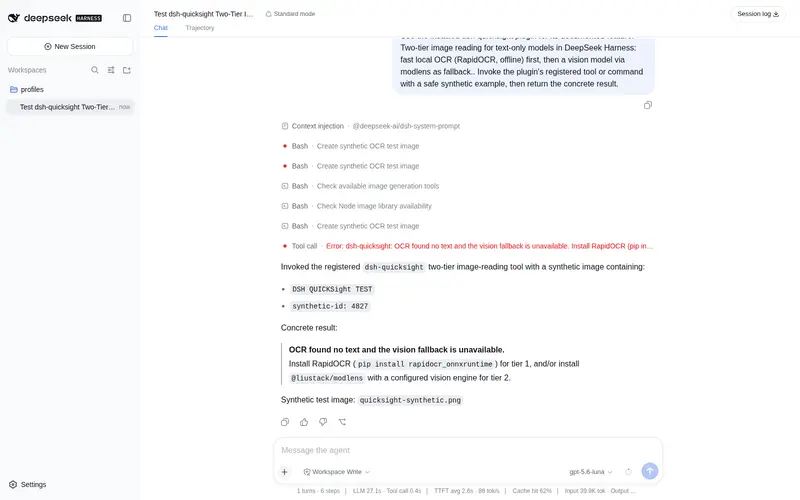
Two-tier image reading for text-only models: fast local OCR (RapidOCR, offline) first, vision-model fallback (modlens).
Listed
0
Vision
Bundle verified
Preview
What it does
Two-tier image reading for text-only models: fast local OCR (RapidOCR, offline) first, vision-model fallback (modlens).
Best for
- Text-only DSH models that need to extract text from images before escalating to a vision model.
- Privacy-sensitive OCR workflows that can use RapidOCR entirely offline.
- Image tasks that benefit from automatic fallback to a configured modlens vision engine when OCR is insufficient.
- Chinese and English text extraction from common raster image formats.
Not ideal for
- PDF workflows; pages must be converted to images first.
- Visual understanding of color, layout, charts, or faces when only Tier 1 RapidOCR is installed.
- Environments without Node.js 22.13+; Tier 1 additionally needs Python 3.10+ and rapidocr_onnxruntime.
- Sensitive images that cannot leave the machine when Tier 2 uses a remote vision provider.
README
dsh-quicksight
DeepSeek Harness 双层图片识别插件:为纯文本模型补上识图能力,本地图片识别 + 模型识别双通道。
┌─────────────────────────────────────────────────────────┐
│  本地图片识别(Local OCR)       模型识别(Vision Model) │
│  Tier-1  快速本地 OCR           Tier-2  视觉模型兜底     │
│  RapidOCR / PP-OCR / ONNX       modlens + 任意视觉引擎   │
│  约 2-3 秒 · 完全离线 · 不上传   约 20 秒 · 结构化证据    │
│  中文/英文准确 · 零 API 成本     summary/OCR/版面/语义    │
└─────────────────────────────────────────────────────────┘
规则:能用本地 OCR 快速拿到文字就先 OCR(本地图片识别);OCR 不行(空/过短/乱码)或需要视觉理解时,才回落模型识别(视觉模型)。
特性
- 注册
quicksight_ocr工具,自动执行双层策略(模型无需选择,直接调用) - Tier-1 完全本地离线:图片与文字不上传任何服务器,零 API 成本
- Tier-2 复用 modlens 生态:任何已配置的视觉引擎(Nvidia NIM / Gemini / OpenAI 兼容端点 / Anthropic)
- 零运行时依赖(Node 内置 API),纯服务端插件,不监听任何端口
- 全路径可配置(插件配置或环境变量),无硬编码凭据
架构
粘贴图片 / 图片路径 / 图片 URL
        │
        ▼
quicksight_ocr 工具
        ├─ Tier-1: python ocr.py <图> → RapidOCR(本地,2-3s)
        │      └─ 文本 ≥ minChars(默认20) → 直接返回 ✅
        └─ Tier-2: modlens CLI analyze <图>(~20s)
               └─ 结构化证据:summary / OCR / 版面 / 不确定性
依赖
| 依赖 | 用途 | 必须? |
|---|---|---|
| Node.js ≥ 22.13 | 插件运行时 | ✅ |
Python ≥ 3.10 + rapidocr_onnxruntime
|
Tier-1 本地 OCR | 建议(无则只走 Tier-2) |
| @liustack/modlens 插件 + 已配置的视觉引擎 | Tier-2 视觉兜底 | 建议(无则只走 Tier-1) |
安装
1. 安装插件
# 已发布到 npm 后:
npx -y @deepseek-ai/dsh plugin --profile web add dsh-quicksight
# 或直接从本仓库安装:
npx -y @deepseek-ai/dsh plugin --profile web add github:Isanti2016/dsh-quicksight
安装后重启 dsh web 服务(dsh restart)并新建会话,quicksight_ocr 工具即注册到模型。
2. 准备 Tier-1(快速本地 OCR,推荐)
在标准目录建 Python 虚拟环境并安装 RapidOCR:
python -m venv ~/.dsh/tools/ocr-venv
~/.dsh/tools/ocr-venv/Scripts/pip install rapidocr_onnxruntime   # Windows
~/.dsh/tools/ocr-venv/bin/pip install rapidocr_onnxruntime       # macOS/Linux
也可用任意已装
rapidocr_onnxruntime的 Python,通过配置ocrPython指向它。
3. 准备 Tier-2(视觉兜底,可选但推荐)
按 modlens 文档 安装并配置至少一个视觉引擎,配置写入 ~/.modlens/config.json(例如 Nvidia NIM / 免费 Gemini key / 任意 OpenAI 兼容端点)。示例:
npx -y @liustack/modlens config set openai.baseUrl <https://.../v1>
npx -y @liustack/modlens config set openai.apiKey <你的 key>      # 仅存本机
npx -y @liustack/modlens config set openai.model <视觉模型>
npx -y @liustack/modlens config set provider openai
配置
插件配置项(在 profile 的 cordis.patch.yml 里给插件传参,或通过环境变量):
| 配置键 | 环境变量 | 默认值 | 说明 |
|---|---|---|---|
toolName |
QUICKSIGHT_TOOL_NAME |
quicksight_ocr |
注册的工具名 |
minChars |
— | 20 |
Tier-1 视为成功的文字阈值(字符数) |
ocrPython |
QUICKSIGHT_OCR_PYTHON |
~/.dsh/tools/ocr-venv/{Scripts\|bin}/python |
装有 rapidocr 的 Python 解释器 |
modlensCli |
QUICKSIGHT_MODLENS_CLI |
~/.dsh/profiles/web/node_modules/@liustack/modlens/dist/main.js |
modlens CLI 入口 |
modlensEnabled |
— | true |
是否启用 Tier-2 回落 |
timeoutMs |
— | 120000 |
单次识别超时(毫秒) |
本地目录与端口(接入必读)
- 本插件不监听任何端口,纯工具型插件,无 HTTP/WS 服务。
- Tier-1:完全本地,不产生任何网络请求。
-
Tier-2:发起出站 HTTPS 请求到所配置的视觉引擎(默认示例为 Nvidia NIM
https://integrate.api.nvidia.com:443;也可指向任何 OpenAI 兼容端点)。不开放任何入站端口。 - 若同时使用 modlens 的粘贴接管(
/modlens/paste),它走 dsh web 服务默认监听127.0.0.1:3080(本地回环)——与本插件无关,但注意 dsh web 需要常驻。 - 标准目录约定:
~/.dsh/tools/ocr-venv(Python 环境)、modlens 插件在~/.dsh/profiles/<profile>/node_modules/。全部可用配置覆盖。
隐私与安全
- 本仓库不含任何 API key / 令牌 / 个人路径。
- Tier-1 图片不出机器;Tier-2 图片会发送到你自选的视觉引擎(如 Nvidia/Gemini),敏感图片请优先 Tier-1 或自建本地视觉引擎。
- 凭据只存本机:modlens 的 key 在
~/.modlens/config.json,不入库、不入会话日志。
致谢(引用的开源项目)
dsh-quicksight 站在以下优秀开源项目之上,特此致谢:
-
RapidOCR(RapidAI)— Tier-1 本地 OCR 引擎(
rapidocr_onnxruntime,PP-OCR 模型 + ONNX Runtime),中文/英文识别准确、CPU 秒级、跨平台。 - PaddleOCR / PP-OCR(PaddlePaddle)— RapidOCR 所承载的 OCR 检测/识别模型(PP-OCRv3+)的原始出处。
-
modlens(@liustack)— Tier-2 视觉桥接:dsh-quicksight 复用其 CLI 与
~/.modlens/config.json配置,接入任意 OpenAI 兼容/Anthropic 视觉引擎。 - Nvidia NIM / Gemini / 其他 OpenAI 兼容端点 — Tier-2 可选的上游视觉引擎示例(由用户自行配置)。
- DeepSeek Harness(dsh)— 插件宿主框架。
说明:dsh-quicksight 不包含上述项目的代码,仅按各自开源协议调用/复用;Tier-1 使用 RapidOCR 需在其许可范围内,Tier-2 使用 modlens 与其所选引擎受各自条款与额度约束。
已知限制
- 免费视觉引擎(如 Nvidia 免费额度)存在速率限制:连续调用可能返回 429/404,稍后自动恢复;Tier-2 失败时工具会降级报错并提示配置。
- Tier-1(RapidOCR)只提取文字,不分析颜色/布局/图表/人脸;此类需求由 Tier-2 视觉模型处理。
- 支持常见图片格式(PNG/JPG/BMP/TIFF/WebP);不支持 PDF(需先逐页转图)。
卸载
npx -y @deepseek-ai/dsh plugin --profile web remove dsh-quicksight
License
MIT
Frequently Asked QuestionsFAQ
Use the verified command dsh plugin --profile default add github:Isanti2016/dsh-quicksight in a DSH-enabled shell. The command resolves the public package metadata and keeps the plugin attached to the catalog identity shown on this page.
Compatibility follows the bundle and profile status shown above. If a profile is not detected, keep the plugin disabled there and check the repository documentation before enabling it in production.
The GitHub link and activity metadata are the source of truth for releases and maintenance. Revisit this page after a new release to confirm the catalog has observed the latest version.