izwarm195/dsh-net-tools
dsh-net-tools: reliable outbound networking for sandboxed DSH agents — net_fetch (proxy CONNECT-tunnel HTTP fetch) and net_proxy_status (proxy diagnostics).
Listed
2
Tools
Bundle verified
Preview
What it does
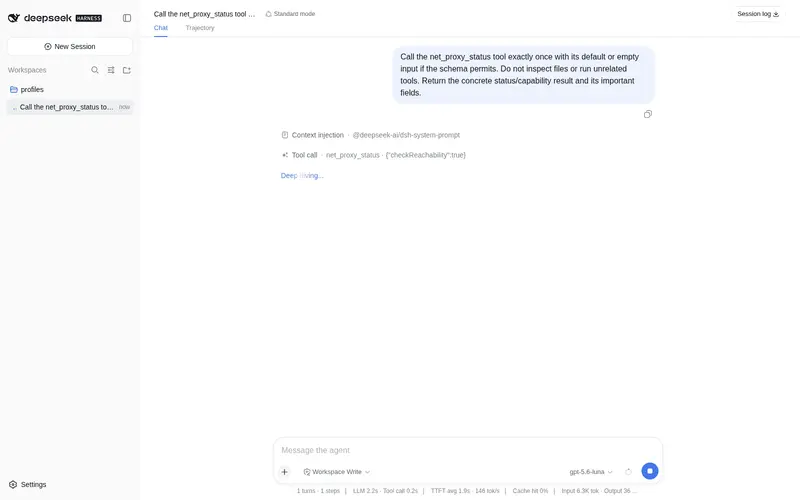
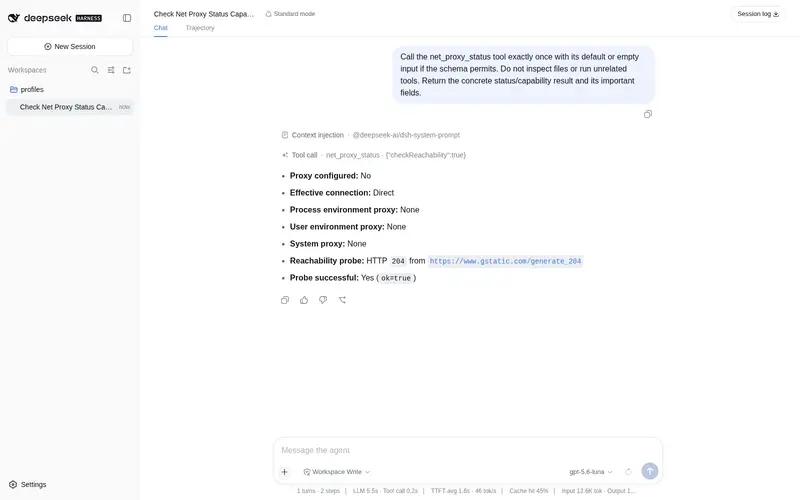
Lets sandboxed agents reach the web through your local proxy: net_fetch fetches pages, net_proxy_status reports proxy status.
Best for
- Sandboxed DSH agents that need outbound HTTP or HTTPS access through a user's local proxy.
- Windows environments where shell TLS is unreliable but Host-side Node.js networking works.
- Users diagnosing which proxy DSH will use and whether it is reachable.
Not ideal for
- Agents that already have reliable unrestricted networking and do not need proxy-aware fetching or diagnostics.
- Private, loopback, or link-local targets under the default policy; these are rejected unless allowPrivate is explicitly enabled.
- Large or slow downloads that exceed the documented response-size, timeout, or redirect limits.
README
dsh-net-tools
让DSH使用你的魔法:把沙箱里的 agent 接上你本地的 HTTP 代理,一条命令就能抓取被墙的网站、文档和 API。
English · 简体中文
🤖 关于本项目
本项目由 AI 完全开发与维护:代码、测试与文档均由 AI(DeepSeek Harness 编码代理)生成,人工仅负责审阅、验收与发布。
要解决的问题
DSH 在文件沙箱(workspace-write)里执行命令时:
- Windows 基于
schannel的 TLS(curl、PowerShell)无法获取凭据,所有 HTTPS 请求都会失败并报SEC_E_NO_CREDENTIALS; - Node.js 自带独立的 TLS 实现不受影响,但沙箱 shell 依然无法稳定联网;
- 本机代理(如
127.0.0.1:7897)只有在每个工具都记得手动传入时才会被使用,极易漏配。
这个插件做了什么
工具运行在 DSH 宿主进程(Node.js)中,位于文件沙箱之外,TLS 正常工作。插件提供:
-
net_fetch—— 通过用户代理的手动 CONNECT 隧道抓取 HTTP(S) 内容(不走 schannel、零依赖)。自动跟随重定向、执行超时/大小上限/SSRF 防护,返回文本(或截断后的响应体)。 -
net_proxy_status—— 报告 DSH 进程会使用哪个代理(用户级环境变量、当前进程环境变量、Windows 系统代理),并检测其可达性。
代理发现顺序:显式 proxy 参数 → HTTPS_PROXY / HTTP_PROXY 环境变量 → Windows 系统代理(注册表 Internet Settings)。
安装
dsh plugin --profile web add <本包>
# 或:dsh plugin --profile desktop add <本包>
安装后重启 DSH,agent 即可使用这两个工具。
使用示例
抓取一个被墙的页面(自动走代理):
net_fetch(url: "https://github.com/")
→ [200] https://github.com/ (via proxy) 1212ms …
排查代理配置:
net_proxy_status(checkReachability: true)
→ effective: http://127.0.0.1:7897
  proxy reachable: true
  probe: [204] https://www.gstatic.com/generate_204 ok=true
实际效果:agent 思考过程中连续调用 net_fetch 抓取网页(截图):

测试
npm test
# 沙箱内无法 spawn 子进程时,用同进程模式:
node --test --test-isolation=none test/fetch.test.js
安全设计
- 仅允许
http:/https:协议; -
SSRF 防护:默认拒绝私网 / 回环 / 链路本地地址(传
allowPrivate: true可放行); - 响应大小上限(默认 1 MiB)、超时上限(默认 30 秒);
- 重定向最多 5 次,且每次重定向都重新执行同样的安全校验。
许可
Frequently Asked QuestionsFAQ
Use the verified command dsh plugin --profile default add github:izwarm195/dsh-net-tools in a DSH-enabled shell. The command resolves the public package metadata and keeps the plugin attached to the catalog identity shown on this page.
Compatibility follows the bundle and profile status shown above. If a profile is not detected, keep the plugin disabled there and check the repository documentation before enabling it in production.
The GitHub link and activity metadata are the source of truth for releases and maintenance. Revisit this page after a new release to confirm the catalog has observed the latest version.