JamesYasR/dsh-email-push-master
Email reminders from your DSH agent when you are away, with stable SMTP (no 535 retry loop), connect and idle timeouts, and a --check self-test.
Listed
0
Notify
Bundle verified
Preview
What it does
Email reminders from your DSH agent when you are away, with stable SMTP (no 535 retry loop), connect and idle timeouts, and a --check self-test.
Best for
- People who leave long-running agent tasks unattended and need email alerts when work finishes, blocks, or needs a decision.
- DSH or other Node-based agent workflows that need a one-way SMTP notification with authentication self-testing and bounded timeouts.
Not ideal for
- Workflows that require replying to or remotely controlling the agent from the notification channel; email is a one-way ping.
- Environments without Node, or users unable to provide and securely store an SMTP authorization code.
README
dsh-email-push-master
| English | 中文 |
Email reminders from your DSH agent when you’re away from the computer.
You start a long-running goal in DSH (or any AI coding agent), then walk away. When the agent finishes, gets blocked, or needs your decision, it sends an email to your phone mailbox — you see it and come back. One-way ping, no remote control.
Origin & what changed
This is a fork of dsh-notify-skill (MIT, open source), hardened for stability:
- removed the
535retry loop (it amplified account risk-control lockout) and fixed asubject/textcrash; - added connect/idle timeouts, a
--checkself-test, structured error classification, and full message headers.
See CHANGELOG.md.
Design: bundle a sender, avoid hand-written fallbacks
The skill ships one zero-dependency implementation — sender.mjs (only Node built-ins tls/net), so the agent sends mail deterministically in every normal DSH session (DSH runs on Node). The sender has connect/idle timeouts, structured error classification (535/550/network), never retries 535 (retries amplify risk-control lockout), and full message headers. The SKILL.md still carries the full contract:
- when to notify (goal done / blocked / before asking you a decision / long-task milestone),
- what to write (specific, in your language, short),
- the config contract (
config.json: sender, SMTP authorization code, recipient; auto-inferred hosts for QQ/163 mail), - how to guide the user through getting an SMTP authorization code when the config is missing,
- failure handling and security rules.
If Node is genuinely unavailable (rare), the agent should stop and tell the user rather than hand-writing SMTP; hand-written SMTP is the main source of intermittent 535 auth failures.
How it works
| Moment | Suggested marker |
|---|---|
| Goal completed | done |
| Goal blocked / stuck | block |
| About to ask the user a decision | question |
| Long task milestone | info |
The agent MUST send via the bundled sender (do not hand-write SMTP):
node sender.mjs "subject" "body"          # reads config.json next to it and sends
node sender.mjs --check                   # verify config + SMTP auth only, no email
Knowledge note (Windows): .NET
SmtpClienthas a known hang on implicit-TLS port 465 — the bundled sender usesnode:tlsinstead, which has no such issue.
Install (DSH)
Plugin install (recommended) — the skill ships as a DSH plugin and registers on ctx.skills:
dsh plugin --profile web add dsh-email-push-master
Or from GitHub: dsh plugin --profile web add github:JamesYasR/dsh-email-push-master. Restart dsh web once after installing, then the skill appears in the session skill catalog.
Manual install (no plugin) — DSH also discovers skills from <dshHome>/skills/<name>/SKILL.md (default ~/.dsh/skills), hot-reloaded by a filesystem watcher:
git clone https://github.com/JamesYasR/dsh-email-push-master.git "$HOME/.dsh/skills/notify"
Or copy the folder manually to ~/.dsh/skills/notify/. New sessions pick it up immediately.
Setup (one-time, ~5 minutes)
The agent will also walk you through this if you just ask it to use the skill.
- Get an SMTP authorization code (not your login password):
- QQ Mail: web QQ Mail → 设置 → 账户 → enable “POP3/SMTP 服务” → generate a 16-char 授权码
- 163 Mail: web 163 Mail → 设置 → POP3/SMTP/IMAP/SMTP → enable → create 授权码
- Copy
config.example.jsontoconfig.jsonand fill it in:{ "email": { "smtpHost": "", "smtpPort": 465, "useSsl": true, "from": "your-address@qq.com", "authCode": "16-char authorization code", "to": "recipient@example.com" } }smtpHostmay be left empty — it is inferred (@qq.com→smtp.qq.com,@163.com→smtp.163.com, port 465 SSL). - Test: ask your agent to send a test notification (it will use the bundled sender).
Other agents (Claude Code, Codex, …)
No compatibility work needed — modern agents are smart. Point them at SKILL.md and the config contract; they should use the bundled sender rather than re-implementing SMTP.
Security
-
config.json(contains your SMTP authorization code) andnotify.logare gitignored — never force-commit them. A leaked authorization code lets anyone send mail as your mailbox. - The skill instructs agents to never print or commit the authorization code.
License
Quickstart
dsh plugin --profile web add github:JamesYasR/dsh-email-push-master
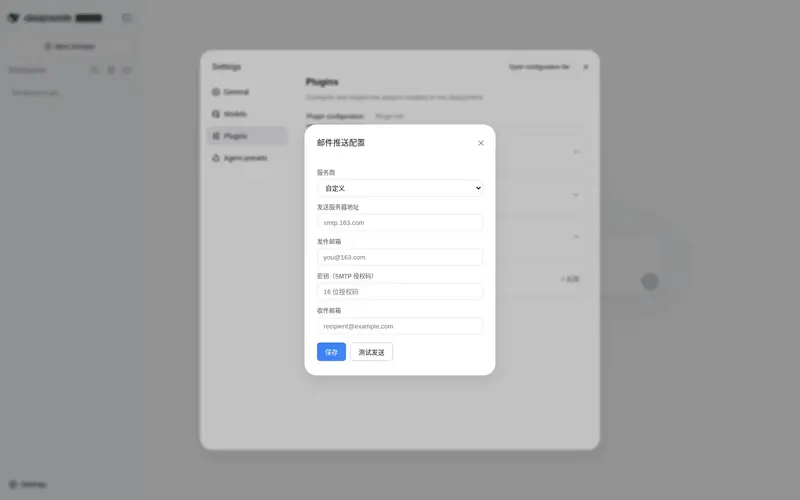
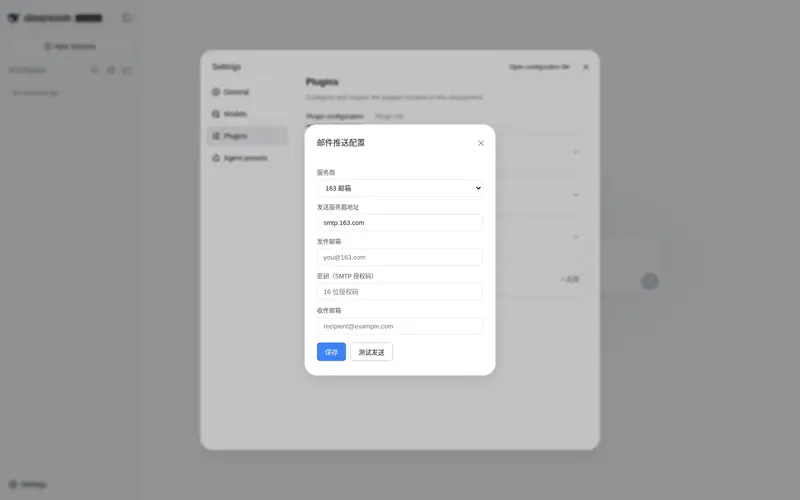
Restart dsh web, then open Settings → Plugins → 邮件推送 to configure provider / server / sender / auth code / recipient. Or run node sender.mjs --check for an auth self-test.
Frequently Asked QuestionsFAQ
Use the verified command dsh plugin --profile default add github:JamesYasR/dsh-email-push-master in a DSH-enabled shell. The command resolves the public package metadata and keeps the plugin attached to the catalog identity shown on this page.
Compatibility follows the bundle and profile status shown above. If a profile is not detected, keep the plugin disabled there and check the repository documentation before enabling it in production.
The GitHub link and activity metadata are the source of truth for releases and maintenance. Revisit this page after a new release to confirm the catalog has observed the latest version.