JesmonX/dsh-web-shell
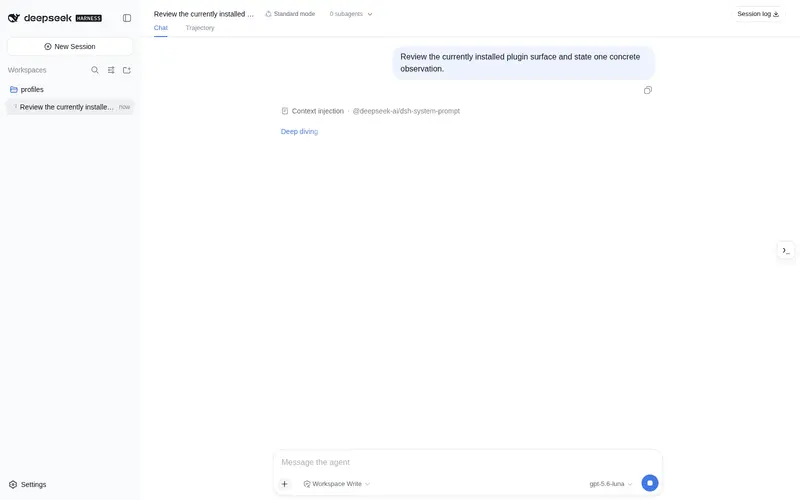
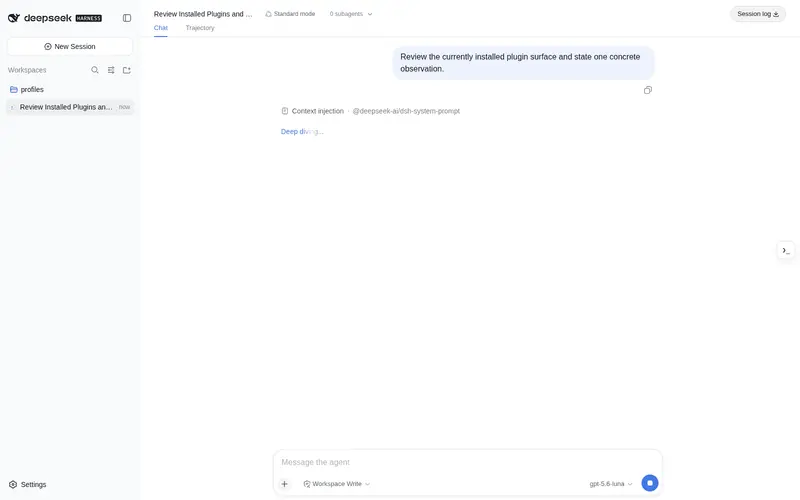
DeepSeek Harness 的右侧停靠 Web Shell 插件,帮助在web对话同时进行用户的 shell 操作。
Listed
1
Dev
Bundle verified
Preview
What it does
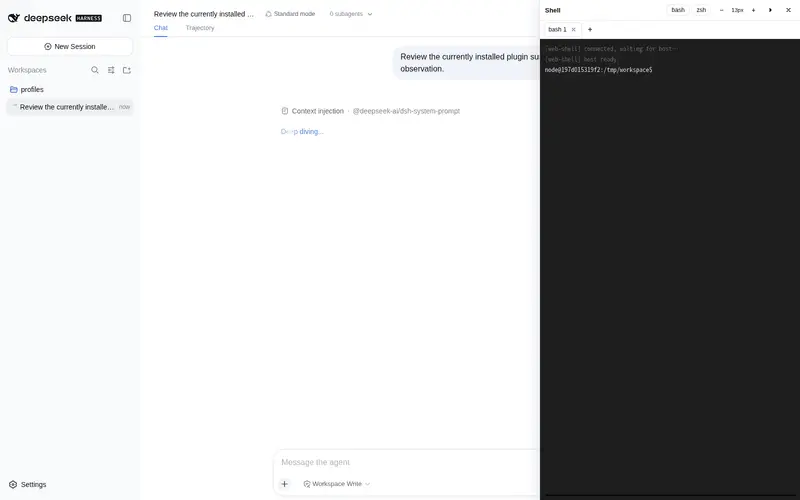
Collapsible right-docked web terminal (xterm.js) bridged to a host PTY over WebSocket: bash/zsh switching, resizable panel, and fold/unfold that keeps the session alive.
Best for
- DSH Web users who want an interactive host shell beside the conversation without switching applications.
- Developers who need a resizable terminal and want a folded panel to preserve the active PTY session.
Not ideal for
- Environments where browser users must not receive shell access with the same operating-system permissions as the DSH process.
- Older DSH UI versions lacking right-dock APIs; the plugin may fall back to an overlay that does not make room beside the conversation.
README
dsh-web-shell



DeepSeek Harness 的右侧停靠 Web Shell 插件。浏览器端使用 xterm.js,通过 /api/shell WebSocket 与宿主侧 PTY 桥接,支持 bash / zsh 切换。
功能
-
右侧停靠:打开后主对话栏自动让位,不再遮挡会话内容(需要较新的
dsh-client-ui-layout)。 - 可调宽度:拖动 shell 左边缘即可调整宽度(360–960px)。
- 按 profile 记忆布局:当前 profile 的 settings domain 会保存 dock 宽度和折叠状态,刷新后恢复。
-
折叠 / 关闭分离:
- 折叠:隐藏面板但保持 WebSocket / PTY 会话存活,再次展开恢复同一个 shell。
- 关闭:断开连接并终止 PTY,再次打开会创建新 shell。
- bash / zsh 切换:切换时关闭旧 PTY 并启动新 shell。
安装
要求 DeepSeek Harness >= 0.1.0-rc.5(npm 上 @deepseek-ai/dsh 的 latest 为 0.1.0-rc.6)。
从 npm(推荐)
dsh plugin --profile web add dsh-web-shell
安装后启动:
dsh web
点击窗口右侧的 ❯_ 按钮打开 shell。
从 GitHub
dsh plugin --profile web add github:JesmonX/dsh-web-shell
仓库已提交构建好的 lib/,git 安装直接可用,不需要构建授权(allowBuilds)。
如果插件管理器不支持 GitHub 简写,可先 clone 再本地安装:
git clone https://github.com/JesmonX/dsh-web-shell.git
dsh plugin --profile web add ./dsh-web-shell
使用
| 操作 | 位置 | 行为 |
|---|---|---|
| 打开 / 展开 | 右侧 ❯_ 按钮 | 打开 shell 或从折叠中恢复 |
| 折叠 | 面板标题栏 › 按钮 | 隐藏面板,保持会话存活 |
| 关闭 | 面板标题栏 × 按钮 | 终止会话 |
| 切换 shell | 标题栏 bash / zsh | 启动新的 PTY |
| 调整宽度 | 面板左边缘拖拽 | 360–960px |
配置
cordis.patch.yml 注入宿主侧默认配置:
- id: web-shell
  name: 'dsh-web-shell'
  inject: [webServer, subprocess, webRuntime]
  config:
    shells: [bash, zsh]
    defaultShell: bash
    rows: 40
    cols: 120
    graceMs: 5000
    fontFamily: '"Maple Mono NF CN", "Sarasa Mono SC", "Cascadia Code", "JetBrains Mono", "Noto Sans Mono CJK SC", "Microsoft YaHei UI", monospace'
可在后续 patch 层覆盖:
-
shells:可选 shell 列表,目前支持bash和zsh。 -
defaultShell:浏览器未选择时使用的默认 shell。 -
cwd:新终端起始目录,默认process.cwd()。 -
rows/cols:初始终端行列数。 -
graceMs:PTY 清理宽限时间。 -
fontFamily:浏览器端 xterm.js 的 CSS 字体栈(使用浏览器所在系统的字体)。默认值优先使用本机已安装的Maple Mono NF CN,并回退到常见等宽中文字体。
布局设置
插件注册 web-shell settings namespace,字段为 dockWidth 和 folded。宽度只在拖拽结束时写入,范围仍由 UI 合同限制在 360–960px;折叠和关闭都会记录为 folded。设置属于 dsh 当前 profile 的 settings domain,不使用浏览器 localStorage,因此同一 profile 的重新加载不会丢失布局偏好。
兼容性说明
- 插件的
shell.overlay槽位由dsh-client-ui-layout声明。建议使用包含该槽位的 DeepSeek Harness 版本(>=0.1.0-rc.5)。 - 完整”主对话栏让位”效果需要
dsh-client-ui-layout提供ctx.layout.setShellWidth/closeShell等右侧停靠 API。 - 如果宿主 UI 版本较旧(有
shell.overlay但没有右侧停靠 API),插件会自动降级为纯 overlay 模式:shell 仍可打开、折叠、关闭和拖拽,但主对话栏不会让位。
从源码构建
本仓库自带完整构建链,无需依赖 deepseek-harness monorepo:
npm install
npm run build
-
npm run build依次执行:tsc -b tsconfig.host.json(宿主侧)→tsc -b tsconfig.client.json(浏览器侧)→tsdown --env.DSH_BUILD_FACE client(打包lib/index.js与lib/client.js)。 - 构建管线复刻自 monorepo 的
packages/client/tsdown.client.ts预设(模块表 externals、CSS Module 内联、xterm.css 内联),产物与 monorepo 构建逐字节兼容(仅 CSS 类名哈希与注释路径不同)。 - 构建工具已锁定精确版本(tsdown 0.22.2 / lightningcss 1.32.0 / typescript 6.0.3),保证产物可复现。
-
lib/已提交进 git 并随 npm 发布:修改src/后请重新npm run build并把lib/一起提交,确保 git / npm 安装到的产物与源码一致。 - 仅类型检查:
npm run typecheck;开发热更新:npm run watch。
安全
Shell 以与 dsh 进程相同的操作系统权限运行。升级路由使用与 /api 网关相同的 loopback / trusted-host / origin 防护;非 loopback 部署必须通过 trustedHosts 显式声明。
插件同时发布 dsh-web-shell/invariant companion。它导出 checkWebShellTrust(),并在 dsh 的 invariant/doctor 诊断组合中对解析后的 webServer / webRuntime 配置执行同一套 /api/shell 围栏预检:Host 必须存在,loopback 必须可用,非 loopback Host 必须在 trustedHosts 中,Origin 必须同源,Sec-Fetch-Site: cross-site 必须拒绝;绑定 0.0.0.0 时还必须配置至少一个合法 trusted host。这样安装者可在启动前发现安全配置缺口,而不是等 WebSocket 升级后才发现。
License
MIT
Frequently Asked QuestionsFAQ
Use the verified command dsh plugin --profile default add github:JesmonX/dsh-web-shell in a DSH-enabled shell. The command resolves the public package metadata and keeps the plugin attached to the catalog identity shown on this page.
Compatibility follows the bundle and profile status shown above. If a profile is not detected, keep the plugin disabled there and check the repository documentation before enabling it in production.
The GitHub link and activity metadata are the source of truth for releases and maintenance. Revisit this page after a new release to confirm the catalog has observed the latest version.