jilian-dsh/dsh-rules-manager
Rules & commands manager for DeepSeek Harness: /rules command + settings panel + custom commands
Listed
2
Dev
Bundle verified
Preview
What it does
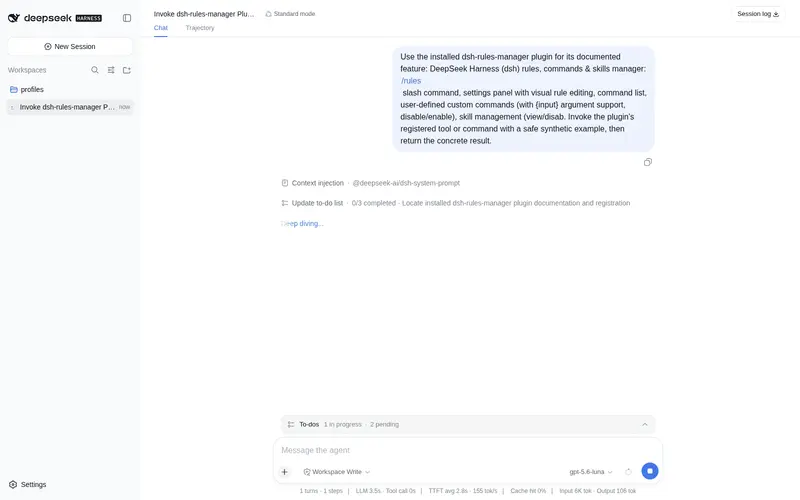
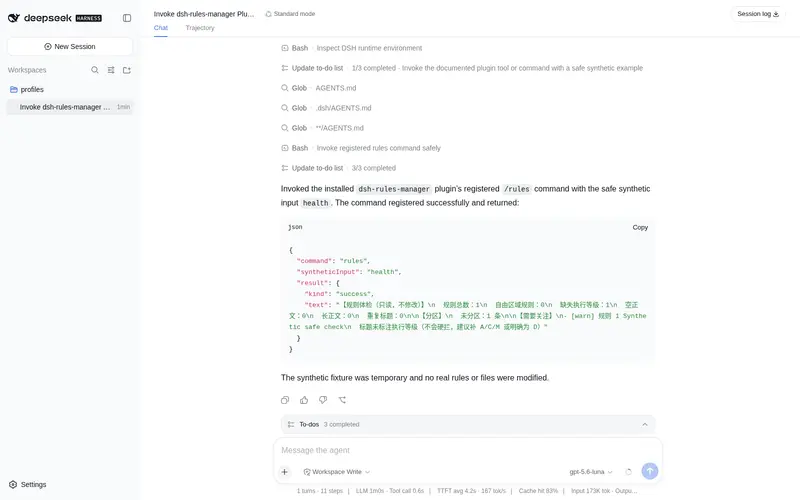
Rules, commands & skills manager for dsh: /rules slash command, settings panel with visual rule editing (add/edit/disable/delete, free-zone support), user-defined custom commands with {input} arguments, skill management, and automatic backup & one-click restore of AGENTS.md.
Best for
- DSH users who want to add, edit, disable, delete, and restore AGENTS.md rules through a UI or `/rules`.
- Teams maintaining reusable custom slash commands, including commands with `{input}` arguments.
- Users who want one place to inspect and manage installed skills and recover AGENTS.md from automatic backups.
Not ideal for
- Workflows that only need rules enforced, not visually managed; enforcement is a separate concern from this manager.
- Environments where restarting DSH after disabling, enabling, or deleting skills is impractical.
- Users who do not maintain AGENTS.md rules, custom commands, or DSH skills.
README
dsh-rules-manager



规则、命令与技能管理插件 for DeepSeek Harness (DSH):用
/rules斜杠命令或设置页「规则、命令与技能」面板,可视化地管理你的用户全局规则(AGENTS.md)、查看全部斜杠命令、创建你自己的自定义命令(支持禁用/启用)、管理技能(查看/禁用/启用/删除进回收站)、备份与一键恢复。
| English | 中文 |
功能一览
| 能力 | 入口 | 说明 |
|---|---|---|
| 规则管理 |
/rules 命令 或 设置→规则、命令与技能 |
列出 / 查看 / 新增 / 修改 / 删除 / 禁用 / 恢复用户全局规则(AGENTS.md),保存即生效,每次修改自动备份 |
| 命令清单 | 设置→规则、命令与技能 →「命令」 | 只读展示所有可用斜杠命令 |
| 自定义命令 | 设置→规则、命令与技能 →「自定义命令」 | 定义你自己的快捷指令:聊天框输入 /名字,把预设内容发送给 AI 执行;支持带参数:预设里写 {input} 会被替换成你输入的内容,没写则参数自动追加到末尾;支持禁用/启用(禁用后斜杠命令停用、内容保留) |
| 技能管理 | 设置→规则、命令与技能 →「技能」 | 查看已安装技能(名称+简介+全文)、禁用(移出技能目录,内容原样保留)、启用(原样搬回)、删除(移入回收站 ~/.dsh/.backups/trash-<时间戳>/,随时可恢复);禁用/删除需重启 DSH 后完全生效 |
| 备份与恢复 | 设置→规则、命令与技能 →「备份与恢复」 | 查看所有自动备份(时间 / 规则条数 / 大小),一键恢复到任意备份时刻 |
仓库结构
dsh-rules-manager/             host 插件(纯 Node,无需构建)
├── index.js                   /rules 斜杠命令
├── service.js                 Remote 服务(支撑设置面板)
├── rules-core.js              共享核心:AGENTS.md 解析 / 备份 / 增删改
├── skills-core.js             共享核心:技能目录搬移(禁用/启用/删除进回收站)
└── README.md                  完整使用文档(中文)/ README.en.md(英文)
dsh-rules-manager-client/      client 插件(浏览器 bundle)
├── client.js                  设置页「规则、命令与技能」面板(手写 __ModuleLoader__ bundle)
└── README.md                  面板说明
docs/                          踩坑与反馈记录(DSH message.id 校验不对称 bug:修复 + 官方反馈存档)
快速开始
方式一:bundle 一键安装(推荐)
dsh-rules-manager 是标准 DSH bundle 包(声明 dsh.bundle,自带 cordis.patch.yml),官方插件命令一行安装:
dsh plugin --profile web add dsh-rules-manager
重启 DSH → 设置页出现「规则、命令与技能」,聊天框可用 /rules。
方式二:源码拷贝
- 把
dsh-rules-manager/拷贝到$DSH_HOME/profiles/web/,把dsh-rules-manager-client/拷贝到$DSH_HOME/profiles/node_modules/; - 在
$DSH_HOME/profiles/web/cordis.patch.yml追加装配(见dsh-rules-manager/README.md); - 重启 DSH → 设置页出现「规则、命令与技能」,聊天框可用
/rules。
安全
- 每次写入 AGENTS.md 前自动备份到
$DSH_HOME/.backups/(时间戳含毫秒不互相覆盖);自动保留最近 5 份——超出部分移入回收站(trash-<时间戳>/,可恢复,不永久删除);打开「备份与恢复」页时也会自动执行一次超额清理; - 一键恢复双保险:恢复前先把当前文件再自动备份一份,恢复错了也能退回;
- 自定义命令与系统命令同名会被拒绝;命令名限小写字母/数字/连字符/下划线;
- 自定义命令支持参数:预设内容里的
{input}占位符会被命令后输入的内容替换(可多处使用);没写{input}时参数自动追加到预设末尾(换行分隔);含{input}的命令不带参数会提示用法(不发送残缺内容),不含{input}的命令不带参数则只发预设内容(兼容旧行为)。 - 技能管理防乱序设计:技能以目录名为唯一标识,无编号无分区——禁用=整目录移走、启用=原样搬回、删除=整目录进回收站,不存在”插回排序”逻辑,天然不会乱序;同名冲突(启用时目标已存在)会被拒绝,绝不覆盖;技能名仅限字母/数字/连字符/下划线(防路径穿越)。
-
命令禁用防乱序设计:禁用/启用只改
commands.json条目上的disabled字段,不搬移、不改列表顺序。
开发
node dsh-rules-manager/test-service.js   # 服务层断言(隔离环境,含技能/命令禁用)
node dsh-rules-manager/test-local.js     # /rules 命令断言(隔离环境)
许可证
社区插件,与 DeepSeek Harness 官方仓库相互独立。发现方式:GitHub 话题 dsh-plugin。
Frequently Asked QuestionsFAQ
Use the verified command dsh plugin --profile default add github:jilian-dsh/dsh-rules-manager in a DSH-enabled shell. The command resolves the public package metadata and keeps the plugin attached to the catalog identity shown on this page.
Compatibility follows the bundle and profile status shown above. If a profile is not detected, keep the plugin disabled there and check the repository documentation before enabling it in production.
The GitHub link and activity metadata are the source of truth for releases and maintenance. Revisit this page after a new release to confirm the catalog has observed the latest version.