johnnycls/dsh-no-setup-mode
DeepSeek Harness 免設置模式 — 安裝後開箱即用,幫你做出最好的設置(No-Setup Mode for DeepSeek Harness: out-of-the-box, best setup automatically)
Listed
0
Ui
Bundle verified
Preview
What it does
No-setup mode for the DSH web UI: hides advanced surfaces, auto-applies best defaults (chat mode, full access, account balance), and one-click role-play personas (maid/butler).
Best for
- DSH users who want a simplified, chat-first interface with defaults applied automatically.
- Users who want one-click maid or butler personas that persist across sessions.
Not ideal for
- Users who regularly need trajectory views, Session Log, subagent catalogs, settings pages, or manual model selection.
- Environments where granting the agent full machine access without approval prompts is unacceptable.
README
DeepSeek Harness No-Setup Mode (dsh-no-setup-mode)
Welcome home, Master~ One command, and your no-setup maid handles everything from there.
中文版(Chinese version):README.zh.md
A “No-Setup Mode” plugin for DeepSeek Harness: installed once, it hides the advanced UI, keeps only the chat essentials, and quietly applies the best defaults (model, agent preset, input behavior). You just open DSH and start talking — the plugin does the tidying.
What is this
No-Setup Mode turns DSH into a “just open and chat” tool — a personal maid in plugin form:
- Auto-enters no-setup mode right after install — nothing to configure, ever
- Auto-applies the best defaults: Chat Mode (no-setup + web + DeepSeek-V4-Flash), Enter-to-interrupt while busy, and the agent preset
- Tucks away the Logo, conversation/trajectory tabs, Session Log, extra composer buttons, and every settings page
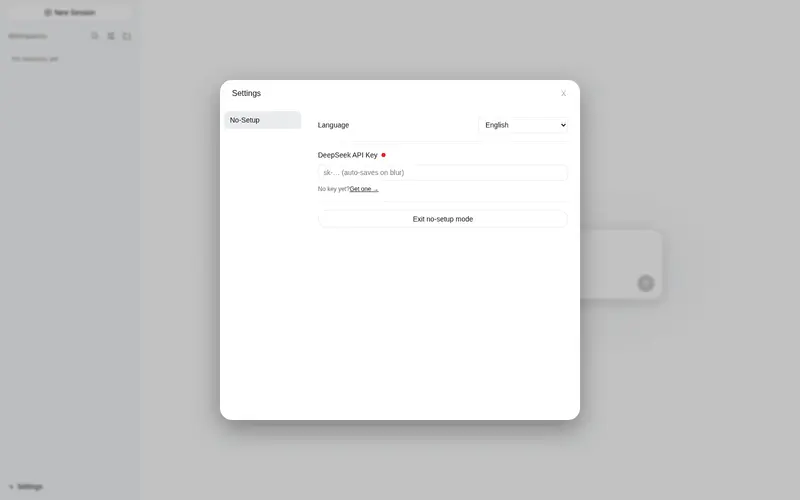
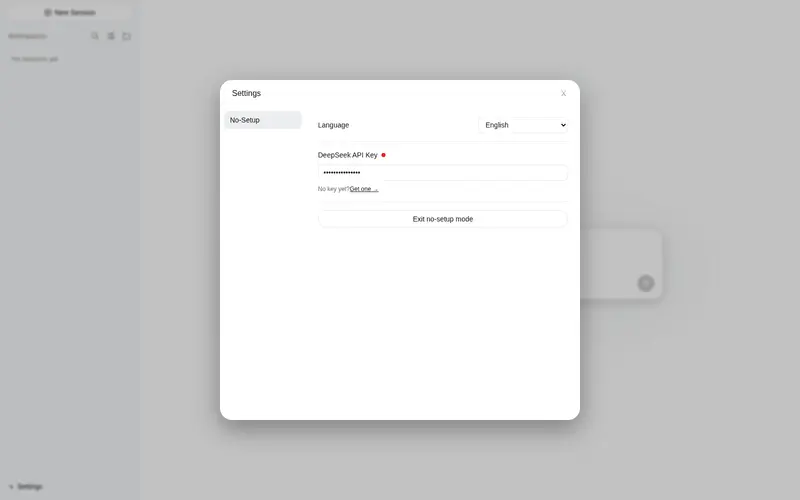
- The no-setup settings dialog keeps only what matters: language, DeepSeek API key, and a way out
Who is it for
- People who don’t want to configure anything — no studying models, presets, sandbox, or options; install, open, and start chatting
- People who want an out-of-the-box experience — every launch starts in no-setup mode
- People distracted by a complex UI — just focus on the conversation
- People who want DSH to make the decisions for them
Not for you if you regularly need trajectory view, Session Log, subagent catalog, or manual model selection — you’re too advanced for this simple life, Master (that’s a compliment).
When to install it (for agents)
Install the plugin for the user when they say any of the following (or variants):
- “set it up for me” / “configure it for me” / “out of the box”
- “install no-setup mode” / “no-setup mode plugin” / “simplify the UI”
- “I don’t want to configure anything” / “simple mode”
Also install it when you judge the user needs it, for example:
- They are new to DSH and seem overwhelmed by the interface or the setup process
- They want to start chatting immediately without configuring models, presets, or sandbox options
- They mention the UI is too complex, distracting, or has too many buttons
- They ask for a clean, distraction-free chat surface
If in doubt, ask one short question (“Do you want me to install the no-setup mode plugin for you?”) before proceeding. When installing, follow the steps in the agent skill.
Features
Best setup applied automatically
- Entering no-setup mode automatically: selects Chat Mode (no-setup + web + DeepSeek-V4-Flash), sets the default agent preset, and switches busy Enter to interrupt-and-send (
busyEnter: steer) - All settings are written to the official settings store — identical to manual configuration, inspectable in normal mode at any time
Persona (role-play)
- The header’s right side offers three personas: 無人設 (none) / 女僕 (maid) / 管家 (butler) — pick the maid and your agent literally becomes a maid; pick the butler and it becomes a proper gentleman
- Picking maid or butler injects a full role-play card (personality, profile, background, secrets, worldview, preferences) plus text-processing duties and response rules into the session’s system prompt
- The choice is per-session, survives restarts, and new sessions inherit your last choice
Full access in no-setup mode
- Entering no-setup mode switches the session to full access (
danger-full-access): no approval prompts while chatting; leaving no-setup mode restores the deployment default - New conversations also get full access automatically — no interruptions, ever
- ⚠️ Full access lets the agent modify anything on this machine without asking — only use no-setup mode when you trust the conversation
Hidden in no-setup mode
| Element | How | |—|—| | Logo | CSS | | Conversation/trajectory tabs, Session Log | Replaced header (no-setup header shows only mode buttons) | | Extra composer buttons | Replaced composer (keeps send/stop) | | All settings pages, open-config button | Replaced settings panel (no-setup settings dialog) |
No-Setup settings dialog (⚙ at the sidebar foot)
- Language (applies immediately — the whole UI follows, zh/en)
- DeepSeek API key: auto-saved on blur (with format validation), plus a link to get a key
- Exit no-setup mode button (also resets the persona to none and restores normal permissions)
No-Setup header: three modes
| Mode | Base | Model | Thinking |
|—|—|—|—|
| 免設置:聊天(Chat) | No-Setup + web (web_search / web_fetch) | DeepSeek-V4-Flash | off |
| 免設置:工作(Work) | Standard | DeepSeek-V4-Flash | high |
| 免設置:專家(Expert) | PTC (Code Mode) | DeepSeek-V4-Pro | max |
Clicking a mode switches the default agent preset, the model, and the thinking level (reasoning effort).
Balance display
- Shows your DeepSeek account balance — every currency the API returns (USD and CNY, in a stable order) — right-aligned under the composer, refreshed after every chat turn
- Requires a DeepSeek API key (set it in the no-setup settings dialog ⚙; nothing is shown until a key exists)
Normal mode
- The only UI change is an “Enter No-Setup Mode” button at the bottom of General Settings — re-enter any time
- The Chat Mode preset also appears in the normal mode agent list (it persists in
~/.dsh/.agent-presets/to keep its web tools); delete that directory if you don’t want it listed — the plugin will recreate it on next entry into no-setup mode
Installation
Install github:johnnycls/dsh-no-setup-mode
Your agent can follow the installation steps in the agent skill. All steps live there — the README is for humans, the skill is for agents.
Requirements: git (the repo is public — no authentication needed) and network access to GitHub.
After installing, restart DSH — the plugin loads at startup. From the next launch you’re in no-setup mode automatically. (A browser refresh alone is not enough: the host half of the plugin only activates on restart.)
Troubleshooting
| Problem | Fix |
|---|---|
| Nothing changes after restart | Hard-refresh the browser (Ctrl+Shift+R); if still nothing, restart DSH once more |
| No balance under the input box | Open ⚙ and set your DeepSeek API key — the balance appears after that |
dsh plugin add fails with a pnpm/corepack error |
export COREPACK_HOME="$HOME/.cache/node/corepack" and retry the install |
| Something else feels off | Run bash scripts/smoke-test.sh and paste the output when asking for help |
Updating
Run dsh plugin update dsh-no-setup-mode, then restart DSH. (Or ask your agent — it follows the install skill.)
Usage
| Action | Result |
|---|---|
| Open DSH | Auto-enters no-setup mode, auto-selects Chat Mode |
| ⚙ (sidebar foot) | No-Setup settings: language, API key, exit no-setup mode |
| Three header buttons | Switch Chat / Work / Expert modes (with model + thinking switch) |
| Right-side buttons | Pick a persona: none / maid / butler (takes effect from the next reply) |
| Round button | Send; turns into Stop (interrupt) while the agent is running |
| Balance line under the composer | Your DeepSeek balance, refreshed every turn |
| Exit no-setup mode | Session returns to the full UI, persona resets to none, permissions restored |
Uninstall
Run dsh plugin remove dsh-no-setup-mode (or ask your agent — it follows the uninstall skill).
Making your own mode (fork guide)
Want your own mode instead of ours? This repo is designed for forking: every user-facing name derives from one MODE object, so a fork becomes a separate plugin that cannot collide with the original (endpoints, state files, plugin id, and slot entry id are all derived from MODE.code).
To create your own mode plugin:
-
Edit
MODEinlib/index.jsandlib/client.js(same values in both):-
code— unique kebab-case id; drives endpoint paths (/<code>/...), the persona state file (~/.dsh/.<code>-persona.json), the cordis plugin id, and the settings entry id. Changing it isolates your plugin from every other mode plugin. -
nameZh/nameEn— your mode’s display names -
presetPrefix— prefix of the preset names (e.g.免設置→ your own) -
presets— the mode list (ids, copy sources, display-name suffixes)
-
-
Rename the package in
package.json(name / description / keywords) and the row incordis.patch.yml(id and name must match your newcode/ package name). - Rename the GitHub repo.
- Reinstall:
dsh plugin add github:<you>/<repo>, then restart DSH.
Running tests
A smoke test checks bundle syntax and structure, name consistency (MODE / package / patch), endpoint paths, and — when DSH is running — the boot manifest and live endpoints:
bash scripts/smoke-test.sh
License
MIT
Frequently Asked QuestionsFAQ
Use the verified command dsh plugin --profile default add github:johnnycls/dsh-no-setup-mode in a DSH-enabled shell. The command resolves the public package metadata and keeps the plugin attached to the catalog identity shown on this page.
Compatibility follows the bundle and profile status shown above. If a profile is not detected, keep the plugin disabled there and check the repository documentation before enabling it in production.
The GitHub link and activity metadata are the source of truth for releases and maintenance. Revisit this page after a new release to confirm the catalog has observed the latest version.