Js2Hou/dsh-mcp-manager
用于 DeepSeek Harness 的 MCP 可视化管理插件:在「设置 → MCP」中查看已安装/启用的 MCP 服务器,支持增删、启用/停用,并实时查看连接状态。
Listed
5
Ui
Bundle verified
Preview
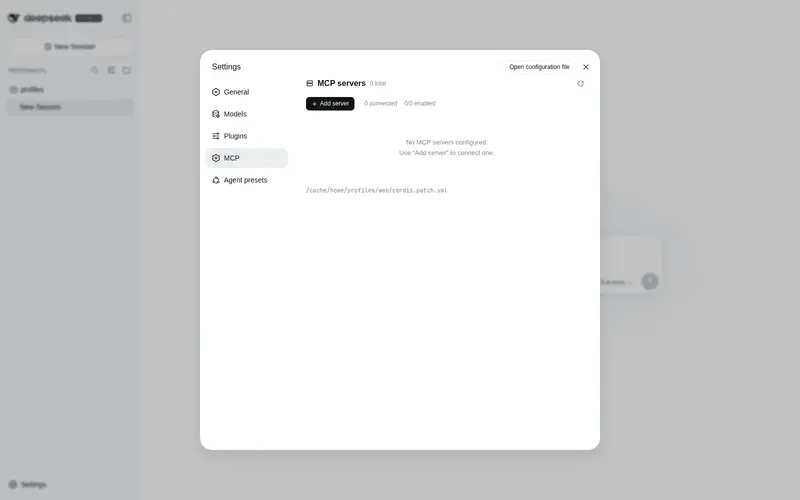
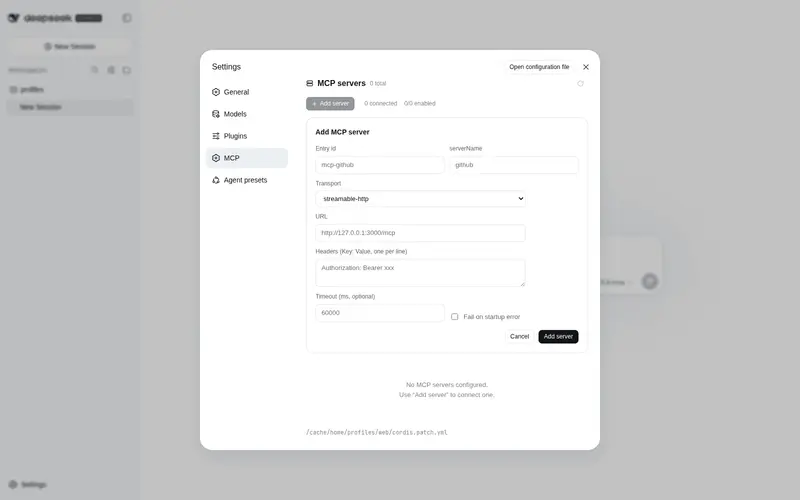
What it does
Visual MCP manager for the DSH web UI: inspect, add, remove, enable/disable MCP servers and view their live connection status from Settings → MCP.
Best for
- DSH WebUI users who want to manage stdio and streamable-HTTP MCP servers from Settings instead of editing YAML manually.
- Operators who need live connection state, registered tool counts, and independent connection tests.
- Teams that frequently add, edit, enable, disable, or remove MCP servers and want changes persisted with hot application.
Not ideal for
- CLI-only DSH workflows that do not use the WebUI Settings surface.
- Environments where the plugin may not write the profile's `cordis.patch.yml`.
- Users who only need to consume an already stable MCP setup and rarely inspect or change server configuration.
README
dsh-mcp-manager
查看列表 新增删除 启用停用 连接状态 连接测试 中英双语
DeepSeek Harness DSH Desktop
一站管理 DeepSeek Harness 里的所有 MCP 服务器,
无需再手改 cordis.patch.yml —— 所有修改即改即生效(HMR 热应用)。







🌏 · English
✨ 功能一览
-
📋 服务器列表:列出所有已安装/启用的 MCP 服务器(
@deepseek-ai/dsh-mcp-client实例)——serverName、传输方式(stdio/streamable-http)、URL / 命令、启用状态、加载阶段、已注册工具数 - ➕ 新增 / ➖ 删除:表单添加 MCP 服务器(stdio 与 streamable-http,支持 env / headers / args / 超时 / failOnStartupError),带格式与重名校验;一键删除
- 🔌 启用 / 停用:随时切换,工具随之热连接 / 热断开
-
📶 连接状态:每台服务器实时状态胶囊(Connected · N tools / Failed / Loading / Disabled)+ 独立 Test 探测(
initialize+tools/list,报告延迟与工具数) - ✏️ 编辑:在被编辑卡片原位展开表单,保存即应用
- 🌏 多语言:界面文案跟随 DSH 语言(zh / en)实时切换
-
💾 持久化:所有修改写入 profile 的
cordis.patch.yml,重启后保留;页面底部显示文件路径
🚀 安装
插件已收录至 dsh-market 与 dsh-plugin-marketplace。
前置:DSH 已装好(dsh web 能正常运行)。
方式一 · AI Agent 安装
告诉 Agent:「请安装 dsh-mcp-manager 插件,插件仓库是 https://github.com/Js2Hou/dsh-mcp-manager」
方式二 · 插件市场安装(推荐)
任选一个插件市场:
-
DSH Desktop(社区桌面版):内置插件市场,选 DSH 1024Store 或 dshfind 源,搜索
js2hou/dsh-mcp-manager安装(同名插件较多,认准作者 Js2Hou); -
dsh-market:搜索
js2hou/dsh-mcp-manager一键安装; -
dsh-plugin-marketplace:搜索
js2hou/dsh-mcp-manager一键安装。
方式三 · dsh 命令安装
dsh plugin --profile web add @js2hou/dsh-mcp-manager
也可 GitHub 源安装(构建产物 lib/ 已入库,无需本地构建):
dsh plugin --profile web add github:Js2Hou/dsh-mcp-manager
Frequently Asked QuestionsFAQ
Use the verified command dsh plugin --profile default add github:Js2Hou/dsh-mcp-manager in a DSH-enabled shell. The command resolves the public package metadata and keeps the plugin attached to the catalog identity shown on this page.
Compatibility follows the bundle and profile status shown above. If a profile is not detected, keep the plugin disabled there and check the repository documentation before enabling it in production.
The GitHub link and activity metadata are the source of truth for releases and maintenance. Revisit this page after a new release to confirm the catalog has observed the latest version.