kaixinbaba/dsh-complete-notify
任务完成时播放提示音并弹出小通知(页面内 toast + 后台时系统通知)。纯浏览器方案,零系统依赖,跨 Windows/macOS/Linux。
Listed
0
Notify
Bundle verified
Preview
What it does
Sound + popup when a task completes: a Web Audio chime, an in-page toast, and a system notification while the page is in the background (browser-only, cross-platform).
Best for
- Users who leave DSH running in a background tab and need completion, blocked, failure, or token-limit alerts.
- Browser-based workflows that benefit from configurable sounds, in-page toasts, and system notifications.
- Users monitoring several top-level conversations and wanting quick links plus brief run statistics.
Not ideal for
- Workflows where the browser tab is closed; notifications cannot arrive after the page closes.
- Users who need notifications for subagent sessions, which are explicitly excluded.
- Environments where notification permission is unavailable or no user interaction occurs to unlock browser audio.
README
dsh-complete-notify


DeepSeek Harness(DSH)任务完成通知插件:任务完成时播放提示音并弹出小通知。
- 纯浏览器方案:音效用 Web Audio 合成、弹窗是页面内 toast、页面在后台时改用系统通知(Web Notification API)——零系统依赖、零音频文件,Windows / macOS / Linux 通用
- 不依赖任何系统通知命令(无 osascript / notify-send / PowerShell),通知权限是浏览器站点级授权,授权一次即可
- 与官方运行指示灯同源的完成检测:会话列表快照的
running/completed状态 - toast 与系统通知附带运行统计(时长 / tokens / 步骤)与一句话小结(💬 recap,≤50 字),点击直达对应会话
安装
# 从 npm 安装(推荐)
dsh plugin --profile web add dsh-complete-notify
# 或锁定 GitHub 版本
dsh plugin --profile web add "github:kaixinbaba/dsh-complete-notify"
# 重启 dsh web 生效(launchd 托管时):
launchctl kickstart -k gui/$(id -u)/com.dsh.dsh-web
本地开发时用源码安装(link: 指向本地目录,改代码后重启即生效,无需每次走 npm):
dsh plugin --profile web add link:/path/to/dsh-complete-notify
使用
- 任务完成后:听到「叮咚」提示音 + 右上角弹出状态着色的小卡片(绿 ✓ 任务完成 / 黄 ⚠ 等待你的反馈 / 红 ✕ 任务中断或失败 / 橙 ⚠ 达到 token 上限),包含一句话小结(💬 recap,≤50 字)、运行统计(时长 ⏱ / tokens ⚡ / 步骤 🔧)与「点击打开会话」提示;点击卡片快速跳转到对应会话,5 秒自动消失
- 页面切到后台/其他标签页时完成任务:收到系统通知(标题与正文按结果状态区分,同样带小结与统计,点击通知会聚焦窗口并打开对应会话)+ 提示音 + 标签页标题闪烁
-
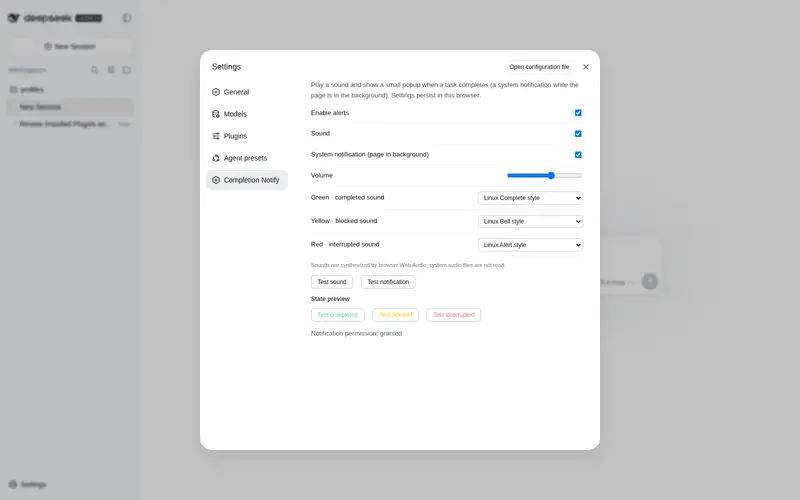
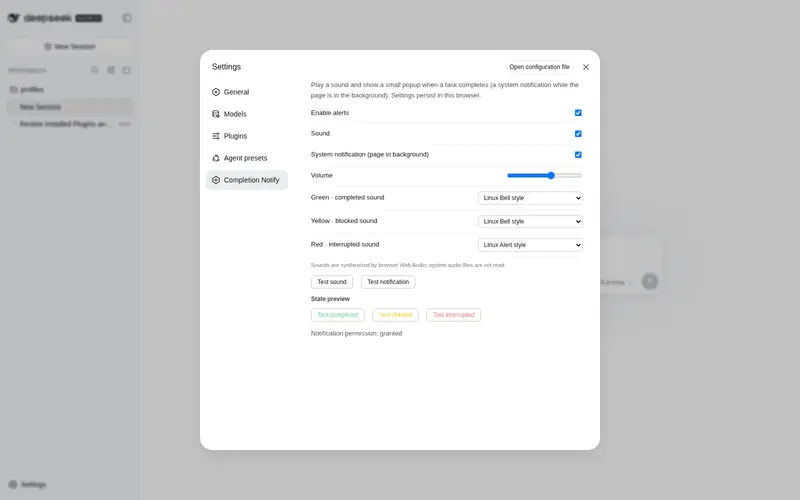
设置 → 任务完成通知:
- 启用提醒 / 提示音 / 系统通知(页面在后台时)开关、音量滑块
- 分别为绿色完成、黄色阻塞、红色中断选择不同音效
- 下拉框按当前浏览器识别的操作系统分组:macOS / Windows / Linux 推荐预设 + 通用预设 + 静音
- 「测试音效」「测试通知」按钮;首次点「测试通知」会请求浏览器通知权限,点允许
- 全部设置保存在浏览器 localStorage(
dsh.completeNotify.v1)
音效选择说明
音效由浏览器 Web Audio API 合成,不读取系统原生声音文件,因此跨操作系统稳定工作。预设名称是对应系统提示音的风格,不是调用 macOS/Windows/Linux 的系统音频文件;每个状态可以独立选择,也可以单独设为静音。
结果状态
结果状态以 Host 端 turn/end 的 reason.kind 为权威来源(客户端兜底推断:turn-error / turn-max-tokens 节点、被打断的 assistant 消息):
| 状态 | 颜色 | 文案 |
|---|---|---|
completed |
🟢 绿 | 任务完成 |
blocked |
🟡 黄 | 等待你的反馈(模型提问 / 等待审批) |
aborted |
🔴 红 | 任务已中断 |
error |
🔴 红 | 任务失败 |
max-tokens |
🟠 橙 | 达到 token 上限 |
弹窗效果预览


关于小结(recap):弹窗先立即显示降级小结(最终回答前 50 字的清洗版),随后由 Host 端异步调用 LLM 生成真正的一句话小结(≤50 字)并自动升级替换。每次运行结束调用一次 LLM(输入为最终回答,输出约 50 字,成本极小)。小结覆盖整轮运行(多轮 goal 任务取最终回答),与运行统计的「最后一轮」口径不同。
行为细节
| 场景 | 行为 |
|---|---|
| 页面可见,任一会话完成 | toast(小结 + 时长/token/steps)+ 对应状态音效 |
| 页面在后台,会话完成 | 系统通知(含小结与统计)+ 对应状态音效 + 标题闪烁 |
| 系统通知权限被拒 | 降级为长时 toast(30 秒,回来也能看到)+ 标题闪烁 |
| 一次完成 | 只提醒一次(按会话去重,重新运行后再完成会再次提醒) |
| 子代理(subagent)会话 | 不提醒 |
| 多会话同时完成 | toast 栈最多 3 条(FIFO) |
运行统计口径为「最后一轮」(turn 号最大的已结束轮次):时长来自
turnTimings,tokens 为 assistant 消息usage的输入+输出之和,steps 为工具调用块数量。单轮任务即为本次运行的完整数据;多轮 goal 运行显示最后一轮。
已知限制
- 标签页必须开着(浏览器限制);标签页关闭后系统通知也收不到。如需关页推送可后续接 Push API(需推送服务器)
- toast 为深色样式,暂未跟随明暗主题切换
- 浏览器自动播放策略:首次用户交互(点击/按键)后音效才可用——DSH 里发第一条消息时即自然解锁
开发
node --test          # 完成检测状态机 + 运行统计单测(通过 stub 执行同一份 client/client.js)
npm run check        # 语法检查
结构:
lib/index.js      # 宿主入口(事件监听、recap LLM 与路由装配)
client/client.js  # 客户端单文件(DSH 模块加载器格式;全部逻辑在此)
cordis.patch.yml  # bundle insert 声明
tests/            # node --test 单测
卸载
dsh plugin --profile web remove dsh-complete-notify
License
MIT
Frequently Asked QuestionsFAQ
Use the verified command dsh plugin --profile default add github:kaixinbaba/dsh-complete-notify in a DSH-enabled shell. The command resolves the public package metadata and keeps the plugin attached to the catalog identity shown on this page.
Compatibility follows the bundle and profile status shown above. If a profile is not detected, keep the plugin disabled there and check the repository documentation before enabling it in production.
The GitHub link and activity metadata are the source of truth for releases and maintenance. Revisit this page after a new release to confirm the catalog has observed the latest version.