kaixinbaba/dsh-vision-recognizer
DeepSeek Harness 识图插件:保持 DeepSeek 对话,15+ 供应商视觉模型把图片转译为文字,可在 设置→插件 配置
Listed
0
Vision
Bundle verified
Preview
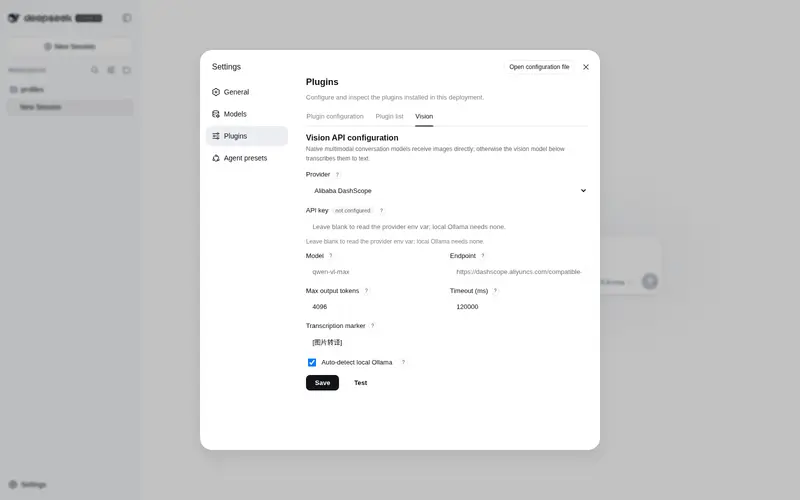
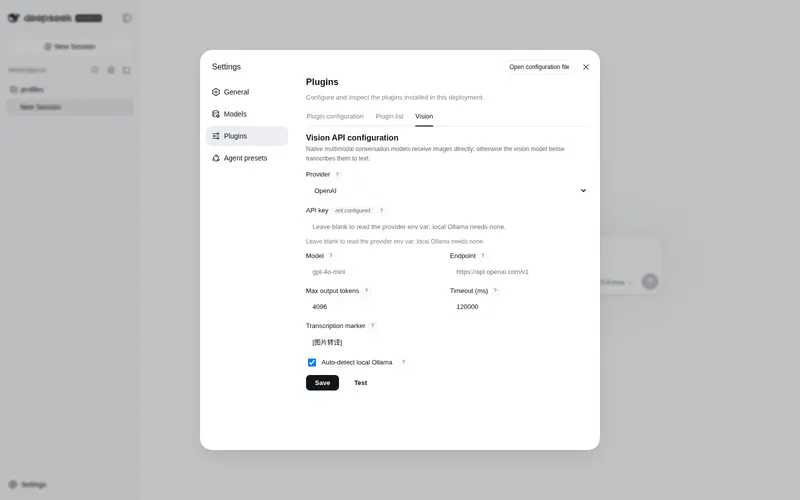
What it does
Vision provider route that transcribes attached images to text through a configurable model (15+ OpenAI-compatible and Anthropic vendors) while DeepSeek keeps answering.
Best for
- DSH users who want DeepSeek to answer while a separate vision model transcribes attached images.
- Teams needing a choice among OpenAI-compatible, Anthropic, cloud, or local Ollama vision providers.
- Image workflows that benefit from ordered fallback models and per-process content-hash caching.
Not ideal for
- Setups with neither configured vision credentials nor a running local Ollama instance.
- Sensitive-image workflows that cannot send image bytes to the configured remote endpoint; these require a trusted local endpoint.
- Workflows requiring native image reasoning by DeepSeek rather than text transcription produced by another model.
README
dsh-vision-recognizer
| English | 简体中文 |
Keep DeepSeek as the conversation brain, attach images anyway, and switch the image-recognition provider any time from Settings → Plugins. A vision plugin for DeepSeek Harness.
It registers a new provider route (default vision-recognizer, shown as DeepSeek + 识图 in the model picker) that wraps the real DeepSeek adapter: it declares image input (so the attachment preflight and the read_image gate admit images) and, in the request stream, transcribes every attached image to text through the vision model you select, then delegates the text-only conversation to DeepSeek. DeepSeek still answers; recognition is an add-on.
attached image ──▶ vision-recognizer route ──▶ vision-model transcription (OCR + layout + detail)
                     │                          │
                     ▼                          ▼
              DeepSeek answers ◀── text-only conversation (image replaced by [图片转译] text)
Features
-
One-click install:
dsh plugin --profile web add dsh-vision-recognizer— no build scripts, nosharpapproval (no native dependencies at all). - Configure from Settings → Plugins → Vision: pick a provider, enter an API key, override model / endpoint / token cap / timeout / marker. Saved changes take effect immediately, no restart.
- 15+ providers, domestic and international: OpenAI, Anthropic Claude, Google Gemini, OpenRouter, Azure OpenAI, Ollama (local), plus Alibaba DashScope, QwenCloud (Intl), Zhipu GLM, Baidu Qianfan, iFlytek Spark, Moonshot Kimi, Tencent Hunyuan, Volcengine Doubao, SiliconFlow. Any OpenAI-compatible endpoint works via the custom provider.
-
Two wire protocols: OpenAI-compatible (
/chat/completions) and native Anthropic Messages — Claude works out of the box. - No hangs: local/anonymous endpoints get a hard 20s timeout cap, HTTP 429 fails fast, failed endpoints cool down for 60s; without a key and without local Ollama it fails fast with actionable guidance.
-
Fallback chain: after the primary model fails, each
fallbackModelsentry is tried in order (each may target a different vendor); only after all fail does the request fail, listing every attempt. - Content-hash cache: the same image is transcribed at most once per process (in-process, capped at 200).
-
Zero-config local path:
autoLocalOllama(default on) probeshttp://localhost:11434and prepends a running Ollama to the chain — images never leave your machine.
Quick start
dsh plugin --profile web add dsh-vision-recognizer
Slow npm registry?
dsh plugin --profile web add dsh-vision-recognizer --registry=https://registry.npmmirror.com
Install from a local checkout (development):
dsh plugin --profile web add file:/path/to/dsh-vision-recognizer
Use the
file:prefix (copies the package intonode_modules). A bareadd .oradd link:…makes pnpm symlink the package, in which case the plugin’sschemasterydependency resolves from the source checkout and is not found — a general pnpm symlink-install gotcha, not a bug in the plugin.
Restart dsh web, then:
- Pick DeepSeek + 识图 in the model selector;
- Open Settings → Plugins → Vision, choose a provider, enter an API key, save;
- Paste an image into any conversation → you should see the
[图片转译]marker followed by a DeepSeek answer.
With no key and no local Ollama, a turn fails fast in a few seconds with guidance — that is the intended anti-hang behavior.
Supported providers
| Provider | baseURL | Default model | Key env var | Protocol |
|---|---|---|---|---|
| OpenAI | https://api.openai.com/v1 |
gpt-4o-mini |
OPENAI_API_KEY |
OpenAI |
| Anthropic Claude | https://api.anthropic.com/v1 |
claude-3-5-sonnet-latest |
ANTHROPIC_API_KEY |
Anthropic |
| Google Gemini | https://generativelanguage.googleapis.com/v1beta/openai |
gemini-2.0-flash |
GEMINI_API_KEY |
OpenAI |
| OpenRouter | https://openrouter.ai/api/v1 |
qwen/qwen-2.5-vl-72b-instruct |
OPENROUTER_API_KEY |
OpenAI |
| Azure OpenAI | user-supplied (…/openai/deployments/<deployment>) |
gpt-4o-mini |
AZURE_OPENAI_API_KEY |
OpenAI |
| Ollama (local) | http://localhost:11434/v1 |
auto-detected | none | OpenAI |
| Alibaba DashScope | https://dashscope.aliyuncs.com/compatible-mode/v1 |
qwen-vl-max |
DASHSCOPE_API_KEY |
OpenAI |
| QwenCloud (Intl) | https://dashscope-intl.aliyuncs.com/compatible-mode/v1 |
qwen-vl-plus |
DASHSCOPE_API_KEY |
OpenAI |
| Zhipu GLM | https://open.bigmodel.cn/api/paas/v4 |
glm-4v-flash |
ZHIPU_API_KEY |
OpenAI |
| Baidu Qianfan | https://qianfan.baidubce.com/v2 |
ernie-4.5-vl-8k |
QIANFAN_API_KEY |
OpenAI |
| iFlytek Spark | https://spark-api-open.xf-yun.com/v1 |
generalv3.5 |
SPARK_API_KEY |
OpenAI |
| Moonshot Kimi | https://api.moonshot.cn/v1 |
moonshot-v1-8k-vision-preview |
MOONSHOT_API_KEY |
OpenAI |
| Tencent Hunyuan | https://api.hunyuan.cloud.tencent.com/v1 |
hunyuan-vision |
HUNYUAN_API_KEY |
OpenAI |
| Volcengine Doubao | https://ark.cn-beijing.volces.com/api/v3 |
doubao-1.5-vision-pro-32k-250115 |
ARK_API_KEY |
OpenAI |
| SiliconFlow | https://api.siliconflow.cn/v1 |
Qwen/Qwen2.5-VL-72B-Instruct |
SILICONFLOW_API_KEY |
OpenAI |
Model ids drift over time; the defaults are starting points — override
Modelin the settings UI. Key resolution order: key entered in the UI → the provider env var →$VISION_API_KEY/$DASHSCOPE_API_KEY.
Configuration storage
Config saved from the UI is written to $DSH_HOME/vision-recognizer.json and merged over the bundle defaults at startup. cordis.patch.yml only carries factory defaults; a user cordis.patch.yml override still works as the composition-time fallback.
⚠️ patch semantics: the bundle’s
- insert:appends this row to the entry list. Writing a second- insert:with the same id in your owncordis.patch.ymlwould register the adapter twice (undefined behavior). To override individual keys, write a single top-level- id: dsh-vision-recognizerentry; better yet, use the Settings UI.
Implementation notes (for plugin authors)
Only stable rc.6 public interfaces are used:
-
ctx.llm.registration(innerProvider).adapter— fetch the wrapped adapter; -
ctx.llm.registerAdapter([providerId], proxyAdapter)— register the new route; - proxying
resolveModeloverridesinputModalitiesto['text', 'image']; - proxying
streamtranscribes image blocks ({ type: 'image', attachment }, bytes read viactx.get('attachments').readImage(ref)), thenyield*forwards the inner adapter’s stream; - the settings UI rides the
settings.plugins.tabslot plus customwebServerroutes, persisting config to its own JSON file (independent of the api-proxy settings allowlist).
Privacy
Transcription sends image bytes (base64, HTTPS) to the vision endpoint you configure — image data leaves your machine unless the endpoint is local (e.g. Ollama). Nothing beyond the harness’s own attachment storage persists any image. For sensitive images, use your own endpoint or a local model, or don’t install this plugin.
License
MIT
Frequently Asked QuestionsFAQ
Use the verified command dsh plugin --profile default add github:kaixinbaba/dsh-vision-recognizer in a DSH-enabled shell. The command resolves the public package metadata and keeps the plugin attached to the catalog identity shown on this page.
Compatibility follows the bundle and profile status shown above. If a profile is not detected, keep the plugin disabled there and check the repository documentation before enabling it in production.
The GitHub link and activity metadata are the source of truth for releases and maintenance. Revisit this page after a new release to confirm the catalog has observed the latest version.